This article is co-authored with generative AI. While I have cross-checked facts against official documentation where possible, errors may remain. Please verify primary sources before making important decisions.
Tool demo videos that I had previously uploaded as silent screen recordings — with no audio and no captions — had accumulated on the channel. They were short clips (9–72 seconds) for which YouTube did not generate auto-captions. Since viewers had no way to follow what was happening, I built a workflow that infers the content from video frames, produces Japanese subtitle files (SRT), and uploads them in bulk via the YouTube Data API. This post is a memo on that workflow.
The manual flow for pasting subtitles one video at a time through the YouTube Studio UI is covered in a separate article: How to Upload VTT Subtitle Files in YouTube Studio. This article focuses on the API + scripts + Claude Code (multimodal) angle for processing many videos at once.
Overall Flow
[1. Audit current audio and caption status of target videos]
        ↓
[2. Download videos with yt-dlp]
        ↓
[3. Extract key frames with ffmpeg → assemble into a contact sheet]
        ↓
[4. Claude Code inspects the contact sheet + corresponding blog post → drafts SRT]
        ↓
[5. Upload SRT via YouTube Data API captions.insert]
Steps 1–2 and 5 are Python scripts, step 3 is ffmpeg, and step 4 is handled by Claude Code (image input).
1. Audit Audio and Caption Status
Caption presence can be retrieved via the YouTube Data API captions.list endpoint. For read access to public videos, an API key alone is enough (I used this path to check over 800 videos at once). When calling via OAuth, the plain youtube scope returns 403, so a youtube.force-ssl scope token is required (the write-side captions.insert / update / delete endpoints require this scope).
Audio presence cannot be determined from yt-dlp format info alone. YouTube sometimes serves silent videos with an audio track attached, so you need to actually fetch the audio and measure the volume with ffmpeg's volumedetect filter.
# Download audio as WAV
subprocess.run(['yt-dlp', '-f', 'worstaudio/bestaudio', '-x', '--audio-format', 'wav',
                '-o', f'{vid}.%(ext)s', f'https://youtu.be/{vid}'], check=True)

# Measure volume
out = subprocess.check_output(
    ['ffmpeg', '-i', f'{vid}.wav', '-af', 'volumedetect',
     '-vn', '-sn', '-dn', '-f', 'null', '/dev/null'],
    stderr=subprocess.STDOUT).decode()
# Parse "mean_volume: -X.X dB" / "max_volume: -X.X dB" from the output
For completely silent videos, both mean_volume and max_volume come back near -91 dB (effectively the floor).
2. Video Download and Contact Sheet Generation
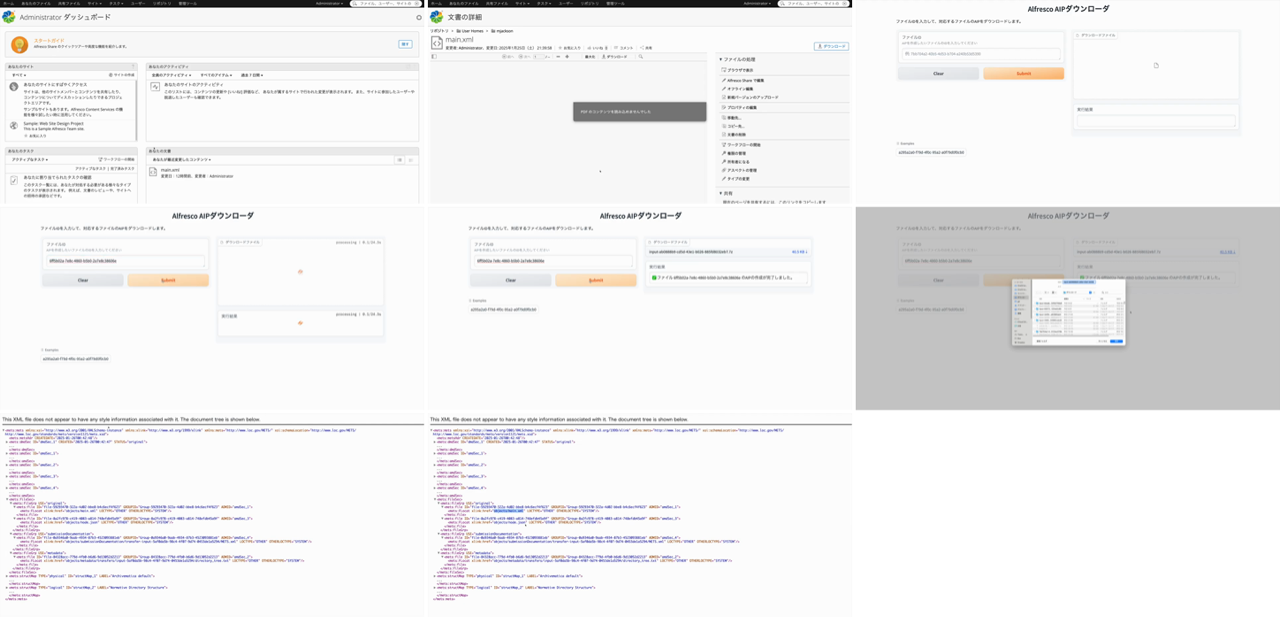
Drafting subtitles requires a visual grasp of what is happening in the video. Rather than scrubbing frame by frame, I assemble key frames into a single "contact sheet" image using ffmpeg's tile filter.
def make_sheet(video_path, sheet_path, dur: float):
    n = max(4, min(12, int(dur) // 4))   # 4–12 frames depending on length
    cols = 3
    rows = (n + cols - 1) // cols
    interval = max(1, int(dur) // n)
    cmd = ['ffmpeg', '-y', '-i', video_path,
           '-vf', f'fps=1/{interval},scale=480:-1,'
                  f'tile={cols}x{rows}:padding=4:color=white',
           '-frames:v', '1', '-q:v', '2', sheet_path]
    subprocess.run(cmd, check=True)
fps=1/N extracts one frame every N seconds, and tile=3x? arranges them in a 3-column grid. Specifying padding and a background color makes frame boundaries easier to see later. Note that ffprobe's duration value is a float, so passing something like tile=3x3.0 may cause ffmpeg to fail with Invalid argument. Cast with int(dur) (or convert with int() before passing into tile=) to stay safe.
An example contact sheet (Alfresco + Archivematica AIP creation demo, 34 seconds, 9 frames) is shown below.
3. Drafting SRT with Claude Code from the Contact Sheet
This is the core step. Claude Code accepts image input directly, so you can have it Read the contact sheet to understand what is happening on screen. Passing along the corresponding blog article with Read provides context that improves caption accuracy.
It tends to be easier to review and edit if you ask for output as a Python dict rather than raw SRT.
SRT_DATA = {
    "7WCO7JoMnWc": [
        (0,    "Alfresco + Archivematica で AIP を作成するパイプラインのデモです。"),
        (8,    "Alfresco の管理画面でファイルを選択し、AIP化のリクエストを送ります。"),
        (16,   "Archivematica が AIP(Archival Information Package)を生成して返します。"),
        (24,   "AIP の中身(METS XML など)も画面で確認できます。"),
        (30,   "詳しい構築手順はブログ記事を参照してください。"),
    ],
    # ... other videos
}
Each entry is a (start_seconds, caption_text) tuple. The end timestamp is the next caption's start time, or the end of the video for the last entry. The code that writes this out as SRT follows.
from pathlib import Path
import subprocess

def fmt(t: float) -> str:
    h = int(t // 3600)
    m = int((t % 3600) // 60)
    s = int(t % 60)
    ms = int((t - int(t)) * 1000)
    return f"{h:02d}:{m:02d}:{s:02d},{ms:03d}"

def ffprobe_duration(p: str) -> float:
    out = subprocess.check_output(['ffprobe', '-v', 'error', '-show_entries',
                                    'format=duration', '-of',
                                    'default=nokey=1:noprint_wrappers=1', p]).decode()
    return float(out.strip())

for vid, items in SRT_DATA.items():
    d = ffprobe_duration(f'{vid}.mp4')
    lines = []
    for i, (start, text) in enumerate(items):
        end = items[i + 1][0] if i + 1 < len(items) else d
        lines.append(f"{i + 1}\n{fmt(start)} --> {fmt(end)}\n{text}\n")
    Path(f'{vid}.srt').write_text('\n'.join(lines), encoding='utf-8')
I kept captions short, with about 10 lines even for longer videos, and used the blog post as the destination for the detailed walkthrough.
4. Upload via captions.insert
The YouTube Data API captions.insert endpoint accepts SRT/VTT subtitle files via multipart upload.
from googleapiclient.http import MediaFileUpload
from google.oauth2.credentials import Credentials
from google.auth.transport.requests import Request
from googleapiclient.discovery import build
import os

SCOPES = ['https://www.googleapis.com/auth/youtube.force-ssl']
TOKEN = os.path.expanduser('~/.youtube_comments_token.json')

creds = Credentials.from_authorized_user_file(TOKEN, SCOPES)
if not creds.valid:
    if creds.expired and creds.refresh_token:
        creds.refresh(Request())
    else:
        raise RuntimeError('Token invalid and cannot be refreshed; re-run the OAuth flow.')
yt = build('youtube', 'v3', credentials=creds)

for srt in Path('.').glob('*.srt'):
    vid = srt.stem
    media = MediaFileUpload(str(srt), mimetype='application/octet-stream', resumable=False)
    body = {
        'snippet': {
            'videoId': vid,
            'language': 'ja',
            'name': '日本語',
            'isDraft': False,
        }
    }
    resp = yt.captions().insert(part='snippet', body=body, media_body=media).execute()
    print(f"{vid}: caption_id={resp['id']}")
isDraft: False registers the caption as published.
Authentication Scope
captions.insert requires an OAuth token with the https://www.googleapis.com/auth/youtube.force-ssl scope. The plain youtube scope used for updating video metadata returns 403.
Even if you already have a youtube scope token, it is safer to obtain a fresh token in a separate file when requesting an additional scope. I used ~/.youtube_comments_token.json as a separate file.
from google_auth_oauthlib.flow import InstalledAppFlow

CLIENT_SECRET = os.path.expanduser('~/.youtube_client_secret.json')
TOKEN = os.path.expanduser('~/.youtube_comments_token.json')

if not os.path.exists(TOKEN):
    flow = InstalledAppFlow.from_client_secrets_file(
        CLIENT_SECRET, ['https://www.googleapis.com/auth/youtube.force-ssl'])
    creds = flow.run_local_server(port=0)
    with open(TOKEN, 'w') as f:
        f.write(creds.to_json())
Pitfalls
The plain youtube scope returns 403 for captions.insert
captions.insert / update / delete require the youtube.force-ssl scope. The read-side captions.list is callable with just an API key, so checking caption presence does not require any additional scope. When writing via OAuth, getting a separate token for force-ssl is the simplest path.
yt-dlp's acodec alone does not tell you whether a video has real audio
A video having a format whose acodec != 'none' in yt-dlp output does not necessarily mean audio is present. Silent videos can be served with an audio track attached, so the audio-presence check should be done after download by running ffmpeg volumedetect on the WAV.
DNS resolution failures during bulk processing
While downloading videos sequentially, Failed to resolve 'www.youtube.com' errors appeared intermittently. The root cause was likely a transient network-side issue, but it is wise to make the script skip existing files so that re-running picks up where it left off.
Related: avoid half-width < > in description
In a separate task, when updating a video description that contained XML tag examples such as <app><lem>...</lem></app>, videos.update returned a 400 with invalidDescription. Half-width < > are not allowed in descriptions, so they must be replaced with full-width 〈〉 or similar. Descriptions and captions are different endpoints, but when string submission to YouTube fails, scope and special characters are the first two things to check.
On Caption Accuracy
Because Claude Code infers content from frames and the article text, it cannot capture every small UI element or subtle screen transition. In this workflow, I kept captions at a coarser granularity ("This video is a demo of X" / "This step performs Y") and directed viewers to the linked blog post in the description for details. As long as a path back to the article is in place, captions only need to function as a high-level guide.
For higher accuracy, you could have Claude Code Read individual representative frames as standalone images, or correlate them with screenshot positions in the corresponding blog article.