Home Articles Books Search About
日本語
How to Upload VTT Subtitle Files in YouTube Studio

How to Upload VTT Subtitle Files in YouTube Studio

Uploading VTT subtitle files in YouTube Studio turned out to be less straightforward than expected. Here is a step-by-step guide. Prerequisites VTT files (with timecodes) ready Access to the video editing screen in YouTube Studio Step 1: Set the Video Language Open “Language” from the left menu. On first visit, the language is not set. Select “Japanese” from the “Set language” dropdown and click “Confirm.” After confirmation, the screen changes to show “Edit subtitles,” “Upload manually” buttons, and a “Translations” section. ...
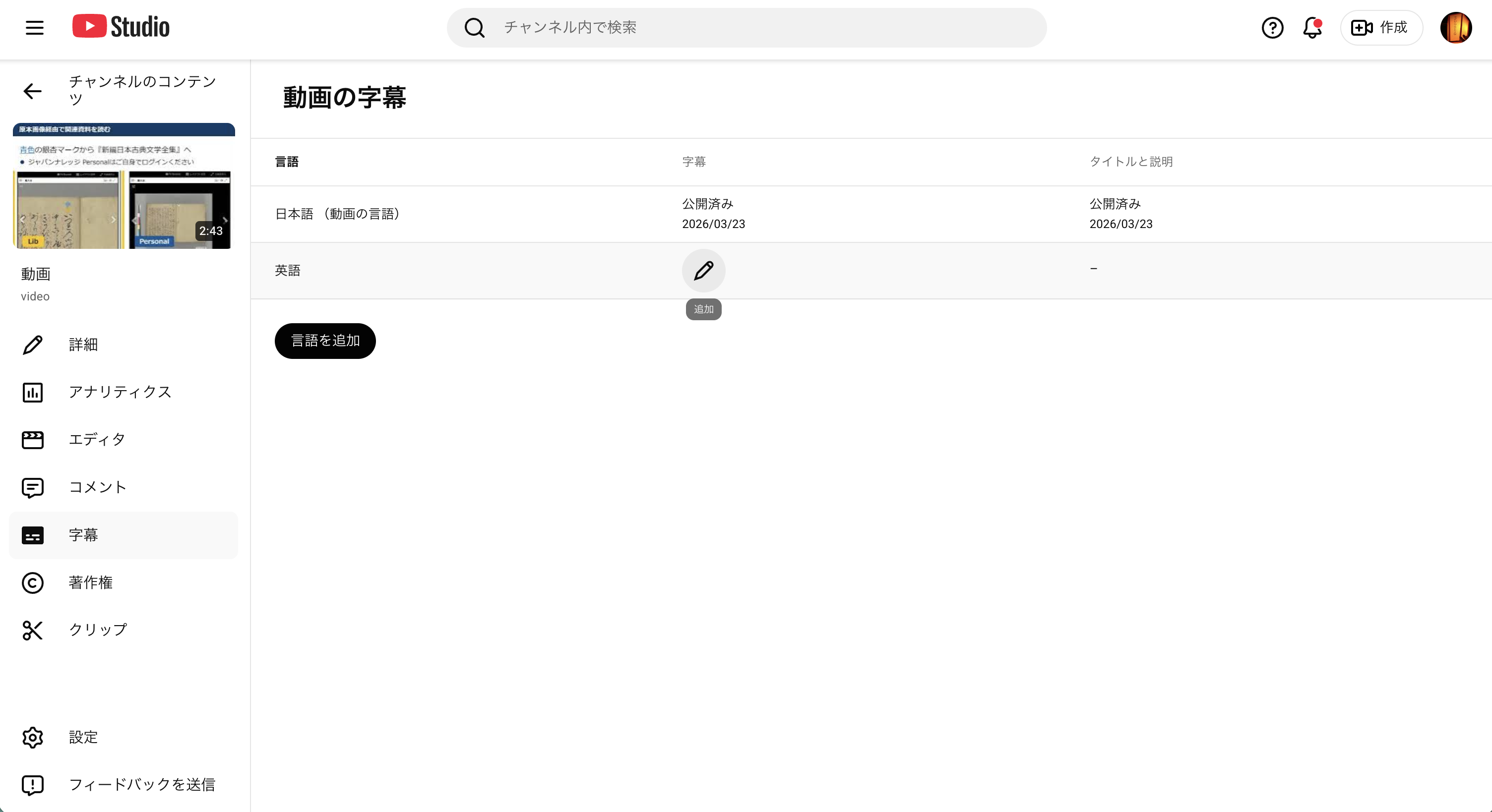
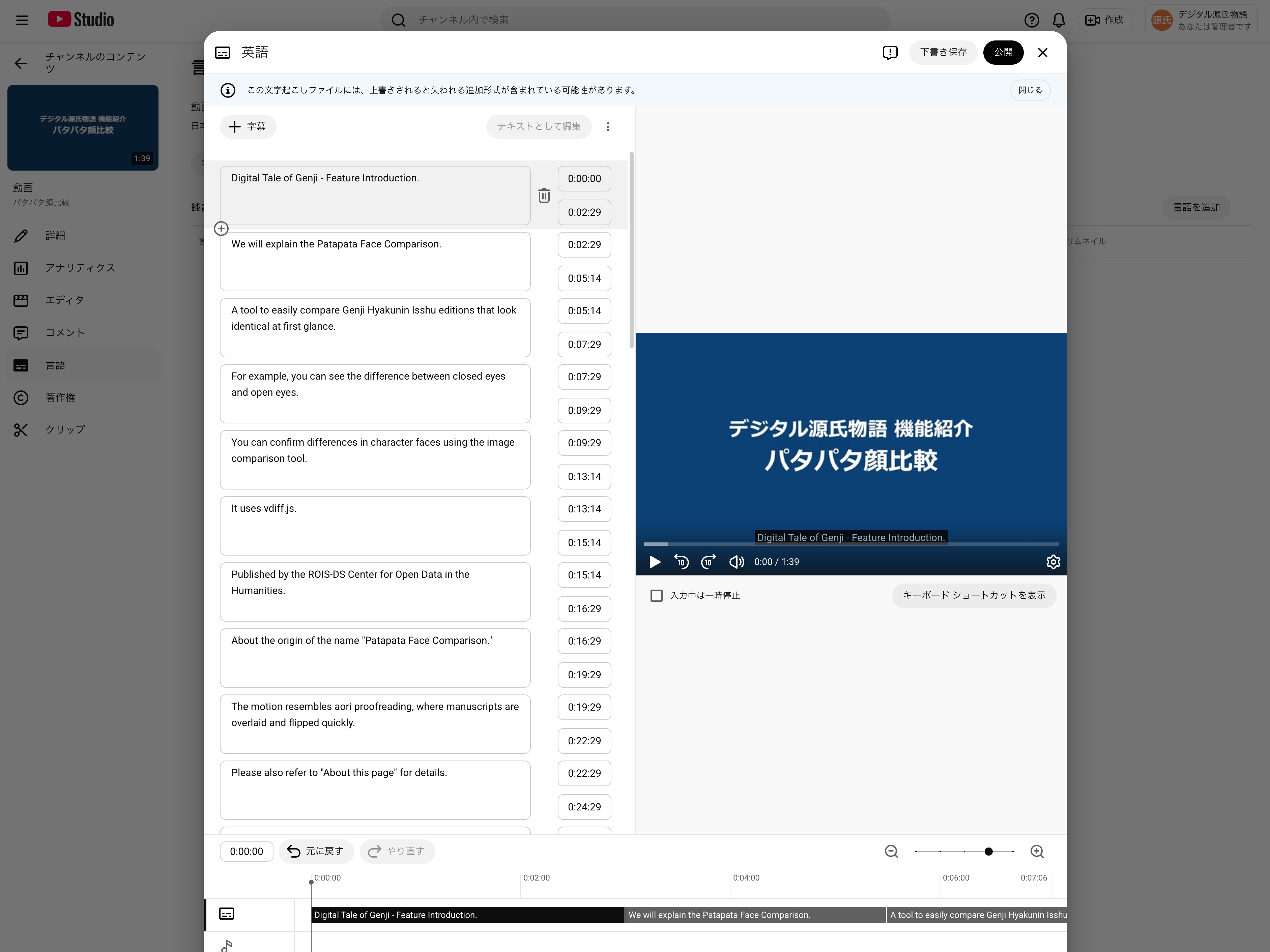
How to Upload English Subtitles (VTT Files) in YouTube Studio

How to Upload English Subtitles (VTT Files) in YouTube Studio

This guide explains how to add English subtitles (en.vtt) to a YouTube video that already has Japanese subtitles uploaded. Related post: Auto-generating multilingual subtitles for videos with Claude Code and publishing via IIIF v3 manifests Prerequisites Logged in to YouTube Studio Japanese subtitles (ja.vtt) already uploaded for the target video English subtitle file (en.vtt) ready Steps 1. Open the subtitle management page Go to YouTube Studio → select the target video → click “Subtitles” in the left menu. ...

Observed Timing: Apple Sales Reports API Data Availability and YouTube API Quota Reset

When automating daily data collection with external APIs, knowing when data becomes available or when quotas reset helps with scheduling. This post documents the observed timings for two APIs: Apple App Store Connect Sales Reports and YouTube Data API v3. Apple App Store Connect Sales Reports API What the official documentation says According to Apple’s official documentation, daily sales reports are available “by 8:00 AM Pacific Time” the following day. ...

How I Used Claude Code's Parallel Agents to Auto-Generate Videos from 882 Blog Posts

How I Used Claude Code's Parallel Agents to Auto-Generate Videos from 882 Blog Posts

Introduction I run a bilingual (Japanese/English) tech blog with 882 articles. To repurpose this content as YouTube videos, I built an automated pipeline combining Claude Code’s parallel agent feature with VOICEVOX text-to-speech. In the process, I hit Claude Code’s weekly usage limit — something that reportedly affects only the top 2% of users. Here’s how the pipeline works and what I learned. Pipeline Overview Blog article (.md) ↓ Claude Code parallel agents (10 concurrent) Dialogue script (sections.json) ↓ VOICEVOX × 3 parallel workers Narrated video (video.mp4) ↓ YouTube API Published on YouTube 1. Script Generation (Claude Code) Each article is read and converted into a two-character dialogue script (sections.json). Using Claude Code’s Agent tool, 10 agents run simultaneously for parallel processing. ...