Overview
I released a Chrome extension for searching Japan Knowledge.
As shown below, it uses the selected text as a query and displays Japan Knowledge search results from the right-click context menu.
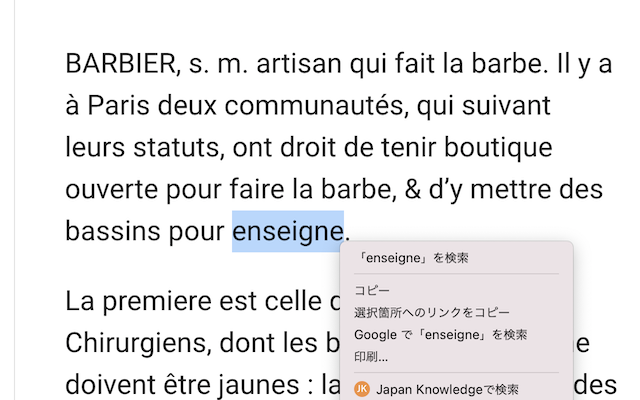
This article explains how to use this extension.
Installation
Access the following page and click the "Add to Chrome" button.
Settings
Enter the following URL in Chrome's address bar to configure search settings. There are two input fields: "URL" and "Other queries."
chrome-extension://cppjkneekbjaeellbfkmgnhonkkjfpdn/options.html
URL
Specify the Japan Knowledge URL to use for searches. Configure this according to your environment and subscription. Clicking the "JK Lib" or "JK Personal" buttons will fill in the respective URLs.
For example, at the University of Tokyo, you can access Japan Knowledge from outside campus using EZproxy at the following URL. In such cases, enter the URL directly.
https://japanknowledge-com.utokyo.idm.oclc.org/lib
Other Queries
In this field, enter query parameters other than the search string (q1). For example, clicking the "Grand Dictionnaire franco-japonais Robert" button will fill in a query parameter that limits the search to that content (cids=42200).
For other search condition specifications, please refer to the URLs of Japan Knowledge search results.
Searching
Select the text you want to search, right-click, and a "Search XXX in Japan Knowledge" menu item will appear. Click it to perform the search.
Summary
I hope this is helpful when using Japan Knowledge.
Source Code
The source code is available at: