This article was co-written with a generative AI. Facts have been cross-checked against official documentation where possible, but errors may remain. Please verify important details with primary sources before acting on them.
Demo
Pages you can actually try:
- IIIF Georeference Viewer — https://nakamura196-projects.vercel.app/ja/iiif-georef
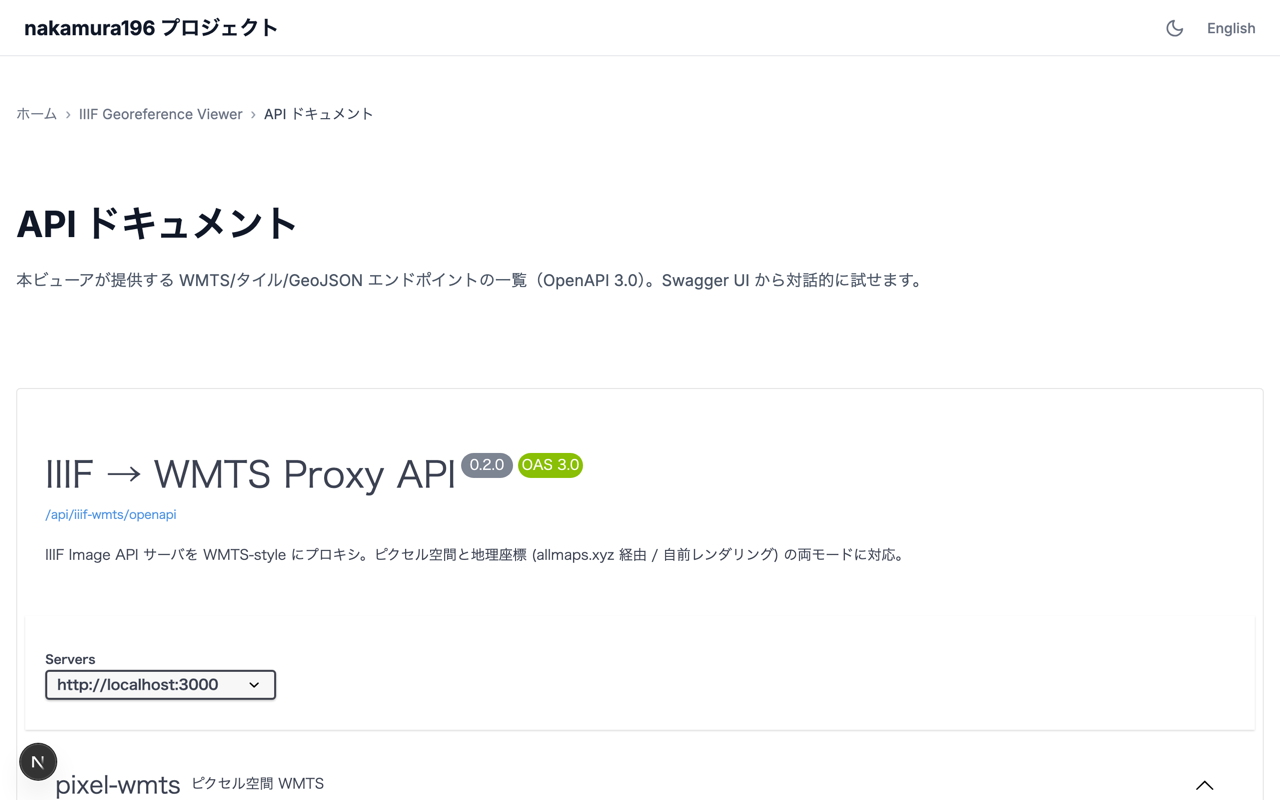
- Swagger UI (API list) — https://nakamura196-projects.vercel.app/ja/iiif-georef/docs
- OpenAPI JSON — https://nakamura196-projects.vercel.app/api/iiif-wmts/openapi
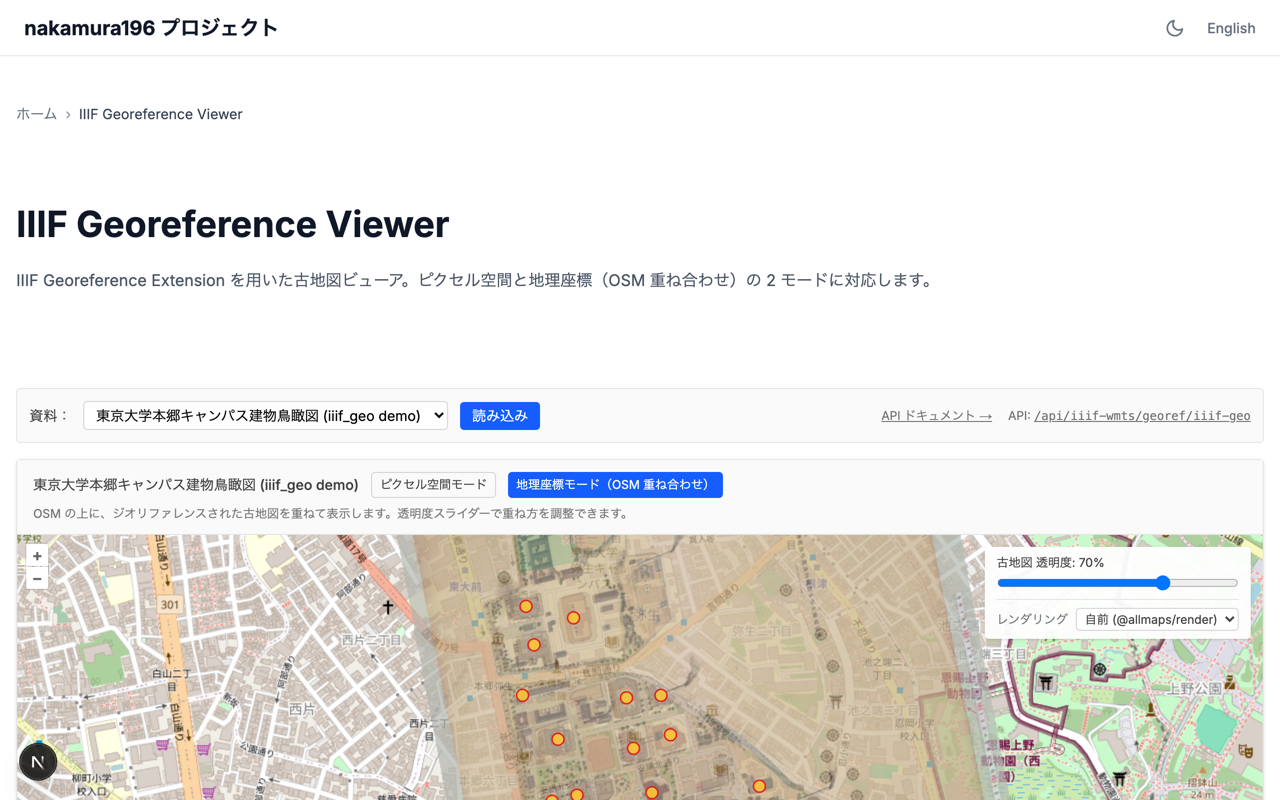
The selector in the top right of the viewer lets you switch the raster source between the built-in @allmaps/render and allmaps.xyz, and adjust the opacity slider.
Overview
This is a small Next.js (App Router, server-side rendering) layer that re-serves IIIF (International Image Interoperability Framework) historic map imagery as OGC WMTS (Open Geospatial Consortium's Web Map Tile Service) compatible tiles, packaged as one project inside the portfolio site nakamura196-projects.
Geo mode (OSM + georeferenced historic map + POI markers):
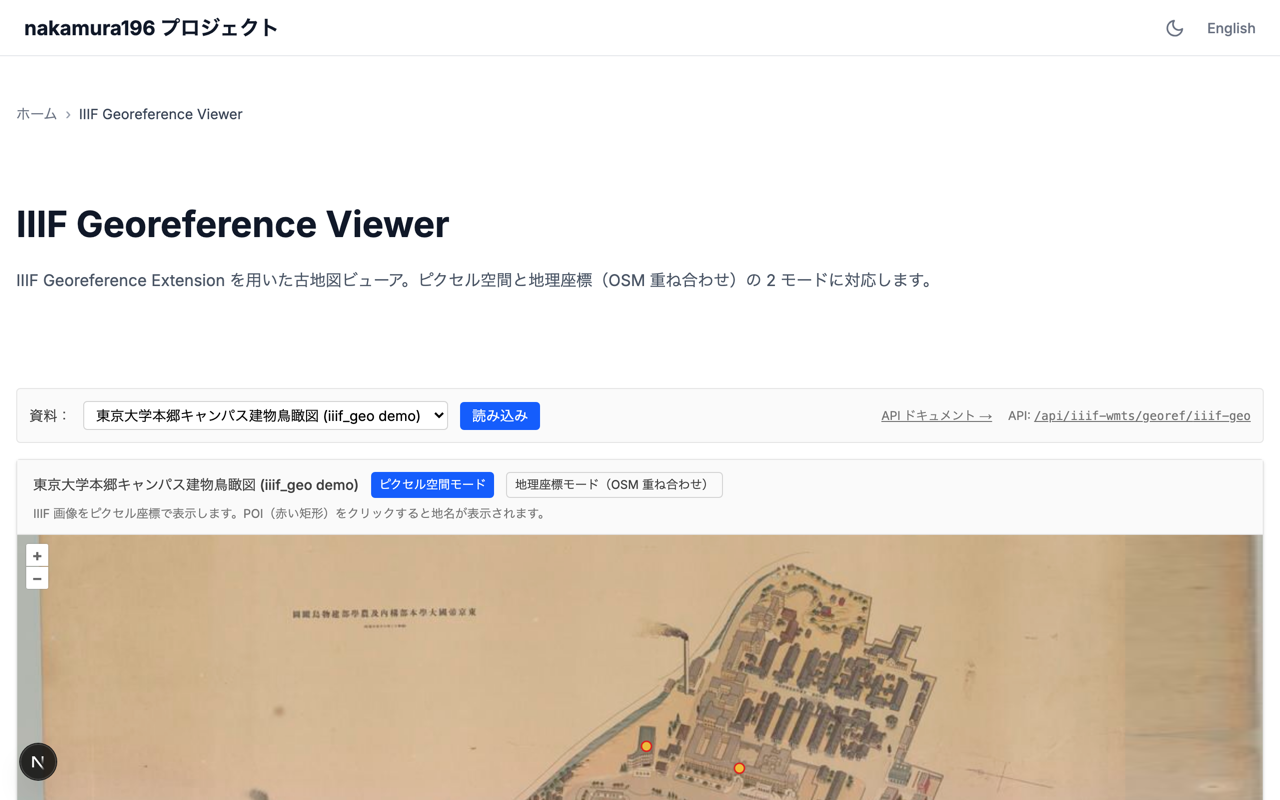
Pixel-space mode (IIIF image in its native pixel coordinates, with POI (point of interest) markers):
Most of the work in this space looks to be already done by the Allmaps team. Annotation editing (Allmaps Editor), tile delivery (allmaps.xyz), rendering (@allmaps/render), the IIIF parser (@allmaps/iiif-parser), the coordinate transformers (@allmaps/project / @allmaps/transform) — these are widely used as the de facto stack for IIIF + georeferencing.
Still, a thin wrapper turned out to be useful for a few reasons:
- Some IIIF servers (for example a Cantaloupe instance behind CloudFront) apply User-Agent filtering, which can prevent allmaps.xyz from fetching the underlying images
- Clients that expect the full OGC WMTS interface (Capabilities / GetFeatureInfo), such as QGIS, are easier to support directly
- POIs from manifest-level annotations (commenting / Linked Places Format) can be served alongside the tiles
- Local development needs to work too — allmaps.xyz only fetches IIIF from publicly reachable URLs, so a
localhostsetup ends up returning empty tiles
The default demo data is nakamura196/iiif_geo's manifest.json — a bird's-eye-view map of the University of Tokyo's Hongo campus with 27 GCPs (ground control points — known image-to-geographic coordinate pairs) and Linked Places Format Point annotations.
API list
Base path is /api/iiif-wmts/. Each endpoint is also documented interactively in the Swagger UI at /[locale]/iiif-georef/docs.
The path parameter naming ({id} vs {slug}) is mostly historical, but there is one practical difference:
- For the pixel-WMTS routes
info/capabilities/ the tile itself (/wmts/{id}/...),{id}accepts either a registered slug (such asiiif-geo) or a URL-encoded raw IIIF image id. Anything that exposes a validinfo.jsonworks, so manifest-less resources are fine. - For everything else (GetFeatureInfo / features / geo-wmts / geo-info / georef), a registered slug is required. These endpoints need a manifest to extract annotations or georeferencing data, so only registry entries are valid.
In the table below, {id} means the first style; {slug} means the second.
| Category | Endpoint | Purpose |
|---|---|---|
| Pixel WMTS | GET /wmts/{id}/info | Metadata JSON for OpenLayers' WMTSTileGrid initialisation |
| Pixel WMTS | GET /wmts/{id}/capabilities | OGC WMTS GetCapabilities XML (for QGIS etc.) |
| Pixel WMTS | GET /wmts/{id}/{z}/{x}/{y} | Pixel-space JPEG tile |
| Pixel WMTS | GET /wmts/{id}/{z}/{x}/{y}/{i}/{j}.geojson | WMTS GetFeatureInfo (tile-local i,j → matching annotation) |
| Geo WMTS | GET /geo-wmts/{slug}/{z}/{x}/{y}.png | Web Mercator PNG tile (via allmaps.xyz; production path) |
| Geo WMTS | GET /geo-wmts-self/{slug}/{z}/{x}/{y}.png | Web Mercator PNG tile (in-process @allmaps/render; works on localhost) |
| Geo WMTS | GET /geo-wmts/{slug}/{z}/{x}/{y}/{i}/{j}.geojson | Geo GetFeatureInfo (i,j → lonlat → image pixel → annotation) |
| Geo meta | GET /geo-info/{id} | center / bounds derived from GCPs (substitute for allmaps.xyz tiles.json) |
| Features | GET /features/pixel/{slug} | All annotations as a pixel-space GeoJSON FeatureCollection |
| Features | GET /features/geo/{slug} | All annotations as a WGS84 (the world geodetic system used for lat/lon) GeoJSON FeatureCollection |
| Georef | GET /georef/{id} | Standalone Annotation document extracted from the manifest's georef annotation |
| IIIF | GET /iiif/{...path} | IIIF reverse proxy (UA injection to traverse CloudFront-like filters) + @id rewriting in info.json |
| Meta | GET /openapi | OpenAPI 3.0 specification covering all of the above |
Swagger UI:
Three layers to keep separate
[A] IIIF Image API
    Serves images in pixel coordinates
    /{id}/{region}/{size}/{rot}/{quality}.{format}

[B] WMTS (Web Map Tile Service)
    Serves a tile pyramid
    /{layer}/{tilematrixset}/{z}/{y}/{x}.{format}

[C] IIIF Georeference Extension
    Bridges A and B by declaring pixel↔projected-geo correspondences in an annotation
    motivation: "georeferencing"
    body.transformation: { type: "polynomial", options: { order: 1 } }
"Connect the pixel space of [A] to the geographic space of [B] via [C]" is Allmaps' starting point, and the same idea structures this implementation.
Reaching for Allmaps first
allmaps.xyz works like this:
https://allmaps.xyz/{z}/{x}/{y}.png?url=<georeference annotation URL>
Point the annotation URL at the georef annotation inside the manifest, and in most cases that's it. Tiles are generated by @allmaps/render running on Cloudflare Workers (IntArrayRenderer) and served from a global CDN. Public documentation suggests warm responses around 200 ms.
Allmaps doesn't hold onto data
allmaps.xyz appears not to store the IIIF imagery or the annotations beyond ordinary caching. Each request fetches the originals from their source URLs, renders the tile, and returns it. The answer to "do I need to upload my image to Allmaps?" is therefore no — that is a deliberate property of the design.
Empty tiles in local development
If you build a viewer that relies on allmaps.xyz, here's a scenario you can hit during development:
[browser] Failed to fetch tiles.json: error code: 1003
[browser] GET /api/.../geo-wmts/iiif-geo/16/58210/25799.png → 200 (129 bytes, transparent PNG)
A 129-byte PNG is a single-bit palette-only fully transparent image. The likely cause is that allmaps.xyz's Cloudflare Workers cannot reach an annotation URL hosted at http://localhost:3000/.... In production this is fine, but losing local verification makes iteration slower.
For that reason, this implementation makes the in-process @allmaps/render Node-runtime path the default, and exposes the allmaps.xyz path as a UI toggle.
// app/api/iiif-wmts/geo-wmts-self/[id]/[z]/[x]/[y]/route.ts
import { Viewport } from '@allmaps/render';
import { IntArrayRenderer } from '@allmaps/render/intarray';
import { parseAnnotation } from '@allmaps/annotation';
import { bboxToRectangle } from '@allmaps/stdlib';

export const runtime = 'nodejs';

export async function GET(req, { params }) {
  // 1. Look up the slug in the registry; extract the georef annotation from the manifest
  const georef = await fetchGeoref(entry);

  // 2. Assemble the annotation and parse it with @allmaps/annotation
  const georeferencedMaps = parseAnnotation(annotation);

  // 3. IntArrayRenderer fetches IIIF tiles (with UA injection) and warps them
  const renderer = new IntArrayRenderer(getImageData, ..., {
    fetchFn: fetchWithUa,
  });
  for (const gm of georeferencedMaps) await renderer.addGeoreferencedMap(gm);

  // 4. Tile coords (z, x, y) → Web Mercator BBOX → Viewport
  const bbox = xyzTileToProjectedGeoBbox(z, xn, yn);
  const viewport = Viewport.fromSizeAndProjectedGeoPolygon(
    [256, 256], [bboxToRectangle(bbox)], { devicePixelRatio: 1 },
  );

  // 5. Render and PNG-encode
  const warped = await renderer.render(viewport);
  const png = encodePng([warped.buffer], 256, 256, 0);
  return new Response(png, { headers: { 'Content-Type': 'image/png' } });
}
Replacing allmaps.xyz's tiles.json too
The GeoViewer needs a center / bounds at startup, which the Allmaps stack normally retrieves via https://allmaps.xyz/tiles.json?url=... — also unreachable from localhost. A small in-process endpoint computes the same thing from the GCPs in the registered georef annotation:
// /api/iiif-wmts/geo-info/[id]/route.ts (Edge Runtime)
const { gcps } = await fetchGeoref(entry);
const lons = gcps.map(g => g.lonlat[0]);
const lats = gcps.map(g => g.lonlat[1]);
return Response.json({
  center: [(min(lons) + max(lons)) / 2, (min(lats) + max(lats)) / 2],
  bounds: [min(lons), min(lats), max(lons), max(lats)],
  gcpCount: gcps.length,
});
That gives OpenLayers a starting view (centre / zoom) without leaving the local development loop.
UA filtering and the reverse proxy
The default iiif_geo data is hosted on the publicly reachable IIIF server at iiif.dl.itc.u-tokyo.ac.jp, which (as far as I could tell from a few probes) does not apply UA filtering. Other servers do — for example a Cantaloupe instance behind CloudFront that responds with 403 to requests missing a User-Agent header.
UA='Cloudflare-Workers'              → 200
UA='Mozilla/5.0'                     → 200
UA='*'                               → 200
UA=''  (no header / certain serverless platforms) → 403
For those cases, a registry entry can set useReverseProxy: true. The georef-annotation route then rewrites target.source.id to point at the in-process /api/iiif-wmts/iiif/{...path} reverse proxy.
// app/api/iiif-wmts/iiif/[...path]/route.ts
export const runtime = 'edge';

const FORWARD_UA = 'Mozilla/5.0 (compatible; iiif-wmts-proxy)';

export async function GET(req: NextRequest) {
  const reqUrl = new URL(req.url);
  const subpath = reqUrl.pathname.replace(/^\/api\/iiif-wmts\/iiif\//, '');
  const upstreamUrl = `${UPSTREAM_BASE}/${subpath}${reqUrl.search}`;

  const upstream = await fetch(upstreamUrl, {
    headers: { 'User-Agent': FORWARD_UA },
    next: { revalidate: 86400 },
  });

  // Rewrite @id in info.json so Allmaps continues routing via this proxy
  if (subpath.endsWith('info.json') && upstream.ok) {
    const json = await upstream.json();
    const proxyBase = `${reqUrl.origin}/api/iiif-wmts/iiif/${subpath.replace(/\/info\.json$/, '')}`;
    json['@id'] = proxyBase;
    json['id'] = proxyBase;
    return Response.json(json);
  }
  return new Response(upstream.body);
}
There are two key details:
- The
@idofinfo.jsonis rewritten to the proxy URL. Allmaps uses that@idas the base for subsequent requests; without the rewrite Allmaps would talk directly to the upstream server. - The georef-annotation route similarly rewrites
target.source.idto the proxy URL, so allmaps.xyz routes its IIIF fetches through this site (and thus through the UA-injected upstream).
Endpoint details
All routes live under /api/iiif-wmts/ as Next.js App Router Route Handlers. The slug catalogue is in src/lib/iiif-wmts/registry.ts.
Pixel-space mode (non-geo)
Useful even for non-georeferenced imagery — it exposes the native pixel coordinate system of any IIIF resource through WMTS-style URLs.
WMTS Capabilities XML
GET /api/iiif-wmts/wmts/{id}/capabilities
The first thing QGIS-style WMTS clients ask for. The document contains:
- Layer id and title
- TileMatrixSet (per-zoom
ScaleDenominator,TileWidth,TileHeight,MatrixWidth,MatrixHeight) - Supported format (
image/jpeg) - Supported
InfoFormat(application/geo+json,text/html) - A ResourceURL template for tile retrieval
- A ResourceURL template for GetFeatureInfo
In QGIS: Data source manager → WMS/WMTS → New → point the URL at this Capabilities document.
WMTS tile
GET /api/iiif-wmts/wmts/{id}/{z}/{x}/{y}
The JPEG tile itself. Path order is the WMTS convention: {TileMatrix}/{TileCol}/{TileRow}. Internally the route converts the request into an IIIF Image API region/size request and fetches it from the upstream with the injected User-Agent. z=0 is the smallest (one tile covers the whole image); z=max is the native resolution (one pixel = one image pixel).
WMTS GetFeatureInfo
GET /api/iiif-wmts/wmts/{id}/{z}/{x}/{y}/{i}/{j}.geojson
The standard WMTS "what is at tile-local pixel (i, j)?" endpoint. Example response:
{
  "type": "FeatureCollection",
  "features": [{
    "type": "Feature",
    "id": "https://example.org/places/gcp-1",
    "properties": {
      "text": "GCP 1",
      "properties": { "resourceCoords": [6690, 7517], "title": "GCP 1" }
    },
    "geometry": { "type": "Point", "coordinates": [6690, 7517] }
  }],
  "queryPixel": [6700, 7500]
}
text is the place name (the LPF — Linked Places Format — properties.title); coordinates are image-pixel coordinates. Annotations carrying xywh are returned as polygons; those with only resourceCoords are returned as points (the Linked Places Format style used by iiif_geo).
Metadata
GET /api/iiif-wmts/wmts/{id}/info
A proxy-shaped metadata JSON intended for client initialisation. The fields map directly onto the OpenLayers WMTSTileGrid constructor.
{
  "id": "iiif-geo",
  "width": 18415,
  "height": 12911,
  "tileSize": 512,
  "maxZ": 7,
  "resolutions": [128, 64, 32, 16, 8, 4, 2, 1],
  "matrices": [
    { "identifier": "0", "matrixWidth": 1, "matrixHeight": 1, "scale": 128 }
  ]
}
All annotations as GeoJSON
GET /api/iiif-wmts/features/pixel/{slug}
Returns every annotation as one GeoJSON FeatureCollection. WMTS GetFeatureInfo is "one request per click"; this endpoint is "one request up front". Plumb the response into an OpenLayers VectorLayer and the standard hit-testing covers hover/click popups.
Coordinates stay in image-pixel space, so this layer goes on top of a pixel-space custom projection.
Geo mode (requires georeferencing)
Serves a georeferenced historic map as Web Mercator (EPSG:3857) WMTS tiles. The result can be draped over modern basemaps such as OpenStreetMap.
Geo tile (in-process render, default)
GET /api/iiif-wmts/geo-wmts-self/{id}/{z}/{x}/{y}.png
Calls @allmaps/render directly under the Node runtime. The advantage is that it works on localhost. Measured on this deployment, cold-start runs land around 10 seconds; warm requests are 200–500 ms.
Geo tile (via allmaps.xyz)
GET /api/iiif-wmts/geo-wmts/{id}/{z}/{x}/{y}.png
Delegates rendering to Allmaps. The route forwards ?url=<our annotation URL> to allmaps.xyz, caches the PNG, and returns it. This is the faster option in production but is unreachable from localhost.
Geo GetFeatureInfo
GET /api/iiif-wmts/geo-wmts/{id}/{z}/{x}/{y}/{i}/{j}.geojson
The geo variant of WMTS GetFeatureInfo. Internally it reverses tile + (i, j) → Web Mercator → WGS84 → image pixel and returns the matching annotation. The GeoJSON is in WGS84, so QGIS renders it correctly.
All annotations as GeoJSON (WGS84 projected)
GET /api/iiif-wmts/features/geo/{slug}
The same set of annotations projected forward into WGS84. Load it into OpenLayers with dataProjection: 'EPSG:4326' / featureProjection: 'EPSG:3857' and the overlay aligns with the raster historic map. As with the pixel route, Point-only annotations come out as Points and xywh-bearing ones as Polygons.
Georef Annotation (rewritten)
GET /api/iiif-wmts/georef/{id}
Extracts the georef annotation from the manifest and emits a standalone Annotation document with target.source.id tidied up. For useReverseProxy: true entries the source is rewritten to the IIIF reverse-proxy URL. This is the document allmaps.xyz consumes as ?url=....
Geo info (center / bounds)
GET /api/iiif-wmts/geo-info/{id}
A substitute for allmaps.xyz's tiles.json. Returns center and bounds computed from the GCP min/max, so OpenLayers can decide the initial view without leaving the local environment.
Helper endpoint
IIIF reverse proxy
GET /api/iiif-wmts/iiif/{...path}
The core of the UA-injection workaround. Forwards requests to the upstream IIIF server with a User-Agent header attached, returning the response as-is. For info.json it additionally rewrites @id. From Allmaps' perspective it looks like an ordinary IIIF server — effectively a thin wrapper.
WMTS GetFeatureInfo vs a one-shot GeoJSON
WMTS' GetFeatureInfo is designed around per-click server round-trips, but for browser viewers, "fetch every feature up front and do hit-testing client-side" is often easier to live with.
| GetFeatureInfo | GeoJSON one-shot | |
|---|---|---|
| Server work | Per click | Once |
| Required transform | inverse (geo → pixel) | forward (pixel → geo) only |
| Network round trips | Per click | Once at startup |
| Client side | Custom implementation | Standard VectorLayer |
The pragmatic answer is to keep both: GetFeatureInfo for clients like QGIS, and the one-shot GeoJSON for browsers.
Performance comparison of the two render paths
Approximate values from the X-Render-Time header.
| Endpoint | Runtime | Cold start | Warm |
|---|---|---|---|
allmaps.xyz proxy (geo-wmts) | Cloudflare Workers | ~25 ms | 80–200 ms |
In-process render (geo-wmts-self) | Node runtime | ~10 s | 200–900 ms |
The cold-start gap is wide because the Node runtime path does several things in series:
- Fetch the IIIF region (~1 s)
- JPEG decode + polygon warp + PNG encode (~400 ms)
- The function cold start itself (~3 s)
- Multiple region fetches if needed, sequentially
Cloudflare Workers, by contrast, stays warm, and the IIIF imagery is already cached at Cloudflare's edge.
In production, allmaps.xyz is the faster option; the in-process path is what makes local development and full self-containment feasible. That seems like a reasonable split for now.
Where self-hosting earns its keep
The value of self-hosting isn't really speed; it's the rest of the matrix.
| Axis | allmaps.xyz | self-hosted |
|---|---|---|
| Speed | ◎ | △ |
| Data sovereignty | external | in-house |
| Auth / UA-filtered IIIF | out of scope | OK (UA injection) |
| WMTS Capabilities (QGIS) | out of scope | OK |
| WMTS GetFeatureInfo | out of scope | OK |
| POI / annotation integration | out of scope | OK |
| Pixel-space WMTS (non-geo) | out of scope | OK |
| Local development | out of scope | OK |
| SLA | community-run | set by your org |
| Engineering effort | 0 | moderate |
If all you need is to serve a publicly georeferenced historic map as tiles as fast as possible, allmaps.xyz alone is plenty. If you also need WMTS conformance, support for protected IIIF, in-house data flow, POI integration, or local verification, putting a thin wrapper on top of allmaps.xyz (plus optional self-rendering) looks like the realistic shape.
A subtle bug: annotations drift relative to the raster map
Notes on a non-obvious coordinate-transform bug I ran into during development.
Fitting in lon/lat space
The first fitAffine projected GCP WGS84 coordinates into Web Mercator and then fit. Compared against @allmaps/transform's GcpTransformer, the numbers disagreed, so I switched to fitting in plain lon/lat. That matched GcpTransformer (lonlat). I thought I was done — but I wasn't.
render uses ProjectedGcpTransformer (Mercator-space fit)
Revisiting the "annotations drift in the corners" complaint, I noticed that @allmaps/render's WarpedMap imports from a different package:
import { ProjectedGcpTransformer } from "@allmaps/project";
It uses @allmaps/project's ProjectedGcpTransformer, not @allmaps/transform's GcpTransformer. The default options of ProjectedGcpTransformer are:
{
  internalProjection: webMercatorProjection,  // ← project GCPs into Mercator before fitting
  projection: webMercatorProjection,
}
In other words it projects the GCPs into Web Mercator before performing the polynomial fit. That keeps the fit consistent with the tile output side (also Mercator).
My annotation side was returning GcpTransformer (lonlat fit) values; render was using ProjectedGcpTransformer (Mercator fit). They agree near the centroid of the GCPs but diverge towards the corners — about 0.0016° / ~150 m for this dataset. That was the bulk of the "corners drift" effect.
The fix was to switch the fitAffine wrapper to use ProjectedGcpTransformer directly.
import { ProjectedGcpTransformer, webMercatorToLonLat, lonLatToWebMercator } from "@allmaps/project";

const transformer = new ProjectedGcpTransformer(
  gcps.map(g => ({ resource: g.pixel, geo: g.lonlat })),
  "polynomial",
);
Take-aways:
@allmaps/transform.GcpTransformerand@allmaps/project.ProjectedGcpTransformerare similar but not the same; ifrenderuses the latter, the annotation pipeline needs to use the latter as well- The README and docs aren't always enough to tell which one a library uses; sometimes it's faster to follow the source from the caller
- Even when two implementations agree near the centroid, they can diverge at the edges, so always test across the full extent
forward and inverse are not mathematical inverses of each other
After unifying on ProjectedGcpTransformer there was still residual drift in the corners. Tracking it down took a while.
ProjectedGcpTransformer exposes two relevant methods:
transformToGeo(pixel) → mercator(least-squares fit of the forward direction)transformToResource(mercator) → pixel(least-squares fit of the inverse direction)
These two are fitted independently and are not mathematical inverses of one another. Because the GCPs carry noise, the optimal fit in one direction differs from the optimal fit in the other. Round-tripping a point through both can drift noticeably — in this dataset, 300+ pixels at the corners.
The critical piece: render is the one that uses transformToResource. Reading the @allmaps/render source, the flow is roughly:
// renderers/IntArrayRenderer.ts (equivalent)
for each canvasPixel in viewport:
  projectedGeoPoint = canvas → mercator
  resourcePoint = warpedMap.projectedTransformer.transformToResource(projectedGeoPoint)
  // ↑ uses the inverse fit
  sample image at resourcePoint
So:
render(the raster historic map) follows thetransformToResourcefit- annotation overlays were using
transformToGeoto forward-project pixels
Two different least-squares solutions. They agree near the GCP centroid but diverge at the edges. That was the last source of misalignment.
The fix is to treat transformToResource as canonical and use its mathematical inverse for forward projection of annotations. Because the model is order 1 (affine), three sample points are enough to recover the coefficients and invert analytically:
// 1. Sample three points (mercator) through transformToResource to get pixel,
//    then extract the affine coefficients.
//    pixel = M * mercator + t  (M is 2×2, t is 2D)
const m0 = [cx, cy], m1 = [cx + D, cy], m2 = [cx, cy + D];
const p0 = transformer.transformToResource(m0);
const p1 = transformer.transformToResource(m1);
const p2 = transformer.transformToResource(m2);
const a = (p1[0] - p0[0]) / D, b = (p2[0] - p0[0]) / D;
const c = (p1[1] - p0[1]) / D, d = (p2[1] - p0[1]) / D;
const tx = p0[0] - (a * m0[0] + b * m0[1]);
const ty = p0[1] - (c * m0[0] + d * m0[1]);

// 2. Inverse: mercator = M^(-1) * (pixel - t)
const det = a * d - b * c;
const ia = d / det, ib = -b / det, ic = -c / det, id = a / det;
const itx = -(ia * tx + ib * ty), ity = -(ic * tx + id * ty);

// 3. annotation forward (pixel → mercator)
function forward(px, py) {
  return [ia * px + ib * py + itx, ic * px + id * py + ity];
}
With this, transformToResource(forward(P)) = P holds exactly (round-trip diff = 0). The render side and the annotation side then use exactly the same transform, and the corners line up.
xywh AABB → SVG path
While I was in there, I also revisited the annotation selectors. Some manifests carry two selectors for the same annotation:
| Selector | Content |
|---|---|
FragmentSelector | xywh=21223,10870,96,123 (axis-aligned bounding box) |
SvgSelector | M 21223,10877 L 21270,10994 L 21319,10984 L 21269,10870 Z (tilted quadrilateral) |
The xywh is the AABB of a piece of text that is rotated on the historic map, and is therefore a bit larger than the text itself. The SVG path follows the text and hugs the actual letterforms more closely.
When the AABB is what gets drawn, the overlay rectangle looks slightly too large compared with the text, which amplifies any apparent "drift" visually. Preferring SvgSelector brings the overlay polygon closer to the actual text region.
iiif_geo's Point-only annotations
iiif_geo's manifest.json embeds Linked Places Format annotations (properties.title + resourceCoords) inside the features array of the georef annotation. Those don't have an xywh, so they can't become polygons. To handle both shapes:
- if
properties.xywhexists → Polygon - if only
properties.resourceCoordsexists → Point
both are produced as CommentingAnnotation records, and /api/iiif-wmts/features/{pixel,geo}/{slug} outputs Point or Polygon accordingly. The OpenLayers VectorLayer uses image: Circle({...}) to draw markers for the Point variant.
Summary of the alignment fixes
| Symptom | Cause | Fix |
|---|---|---|
| Overall drift at the level of the fit residual | render fits in Mercator space, annotations fit in lon/lat space | Unify on ProjectedGcpTransformer |
| 300+ px drift in the corners | transformToGeo and transformToResource are independent least-squares fits | Use the mathematical inverse of transformToResource for annotation forward |
| Rectangle slightly larger than the underlying text | The xywh AABB was being drawn | Prefer SvgSelector |
iiif_geo Points not visible | The pipeline assumed xywh | Treat resourceCoords as Point |
Any remaining offset against OSM is a separate issue: it's the fit residual of the order-1 polynomial itself, intrinsic to the historic map.
A minor gotcha: React 19 + OpenLayers + Turbopack
Under App Router + React 19 + Turbopack, creating an OpenLayers Map inside useEffect can produce this error on mode switches (geo → pixel and back):
NotFoundError: Failed to execute 'removeChild' on 'Node':
The node to be removed is not a child of this node.
From the symptoms it appears that passing a React-rendered DOM node to OpenLayers' Overlay (new Overlay({ element: popupRef.current })) is the trigger. OpenLayers re-parents the element into its own DOM tree, and on unmount React then tries to remove it from where it last knew the node lived, which fails.
The fix is to keep the DOM that OpenLayers touches outside of React's render tree. Both the map target div and the popup div are created imperatively, with explicit cleanup:
useEffect(() => {
  if (!ref.current) return;
  const container = ref.current;

  const olTarget = document.createElement('div');
  olTarget.style.position = 'absolute';
  olTarget.style.inset = '0';
  container.appendChild(olTarget);

  const popupEl = document.createElement('div');
  popupEl.style.cssText = '...';
  container.appendChild(popupEl);

  let map: Map | null = null;
  // fetch info / build layers ...
  map = new Map({
    target: olTarget,
    overlays: [new Overlay({ element: popupEl })],
  });
  // Popup updates go through popupEl.textContent / style.display directly — not React state

  return () => {
    try { map?.setTarget(undefined); } catch {}
    for (const el of [popupEl, olTarget]) {
      try { el.parentNode?.removeChild(el); } catch {}
    }
  };
}, []);

return <div ref={ref} className="absolute inset-0" />;
With that, React's virtual DOM and OpenLayers' DOM mutations stay orthogonal and the removeChild error doesn't reappear on mode switches.
Summary
@allmaps/render/@allmaps/projectis effectively the de facto stack for IIIF + georeferencing + tile delivery, so trying it first is the obvious starting point.- For IIIF servers behind authentication or UA filtering, a small UA-injecting proxy is enough to make allmaps.xyz workable.
- If you need WMTS conformance (Capabilities / GetFeatureInfo) or POI / annotation integration, a thin wrapper on top of Allmaps is sufficient — there's no need to reimplement Allmaps.
- To keep local development working, calling
@allmaps/renderdirectly under the Node runtime (geo-wmts-self) and computing center / bounds from GCPs (geo-info) is a workable substitute for the allmaps.xyz path. It's slower than allmaps.xyz in production, but you keep data sovereignty, SLA, and verifiability in-house. - For polynomial order 1 fits, annotations and the raster map can be kept aligned out to the corners by using the mathematical inverse of
ProjectedGcpTransformer.transformToResourcefor the annotation forward direction. - The most reliable cleanup pattern for App Router + React 19 + OpenLayers is to keep the OL-managed DOM outside of React's render tree entirely.
Outputs and references:
- Repository: nakamura196/nakamura196-projects (the
/[locale]/iiif-georefroute, the/api/iiif-wmts/*API, and Swagger UI at/[locale]/iiif-georef/docs) - Deployment: https://nakamura196-projects.vercel.app/ja/iiif-georef
- Sample data: nakamura196/iiif_geo
The core capabilities here (annotation parsing, coordinate transforms, tile rendering) are all @allmaps/* packages. This article is essentially a note on how to wire Allmaps into a particular hosting environment.