I developed mirador-physical-ruler, a plugin for Mirador version 4 that displays a physical dimensions ruler overlay on the viewer.
- GitHub: https://github.com/nakamura196/mirador-physical-ruler
- Demo: https://nakamura196.github.io/mirador-physical-ruler/
Background
When viewing historical material images published in digital archives, it is often difficult to intuitively grasp the physical size of the original. The IIIF specification defines a Physical Dimensions service that allows embedding physical scale information in a manifest's canvas.
While dbmdz/mirador-plugins physicalRuler exists for Mirador 2 and mirador-ruler-plugin for Mirador 3, no equivalent was available for Mirador 4.
Overview
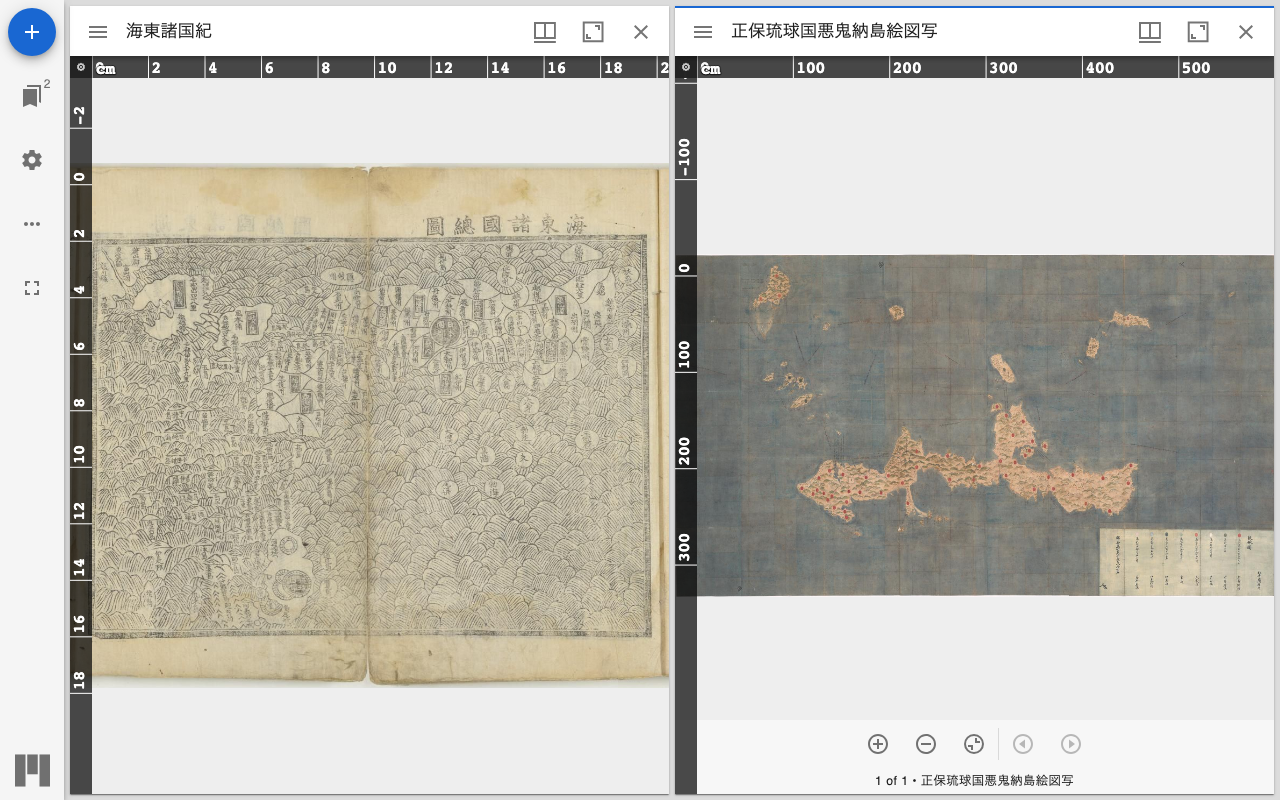
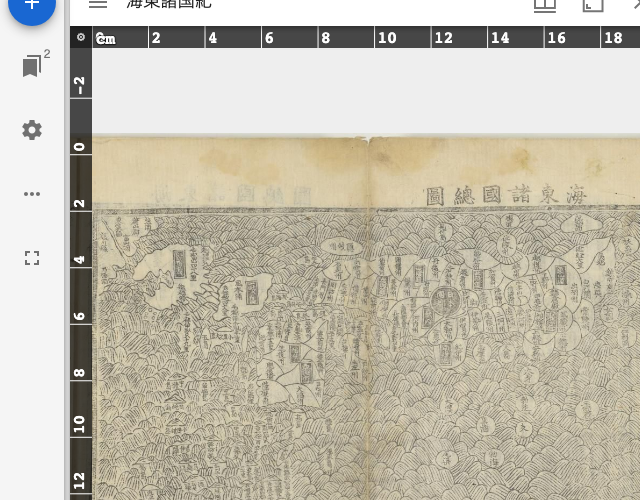
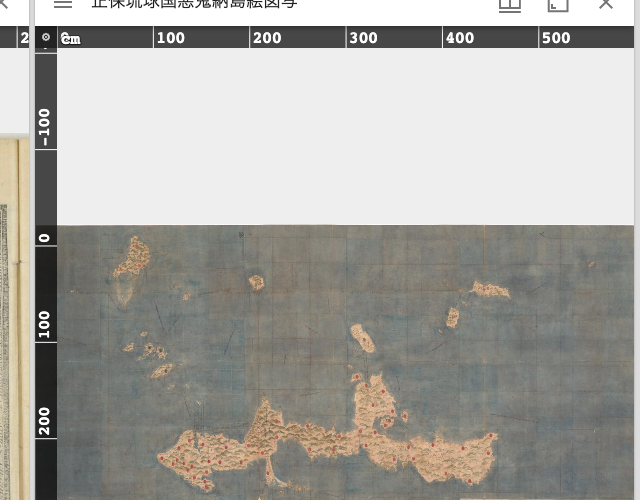
Left: Kaitō Shokokuki (21.2 × 32.6 cm), Right: Shōhō Ryūkyūkoku Akunijima Ezu Utsushi (621.6 × 353.7 cm). Each ruler adapts to the physical dimensions of the material.
Ruler display
When a canvas has a physdim service configured, scale rulers are rendered as SVG overlays along the top and left edges. For Kaitō Shokokuki (21.2 cm wide), tick marks from 0 to 20 cm are shown.
For large-format materials like the Ryukyu map (621.6 cm wide), tick intervals automatically adjust, displaying marks at 100 cm intervals.
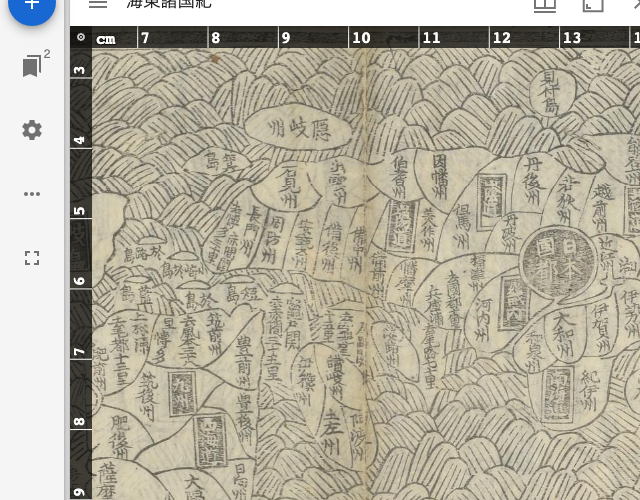
Automatic adjustment on zoom
Zooming in produces finer tick intervals, allowing detailed dimension measurement.
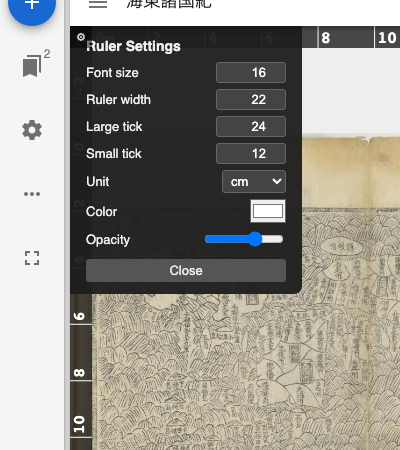
Settings panel
The gear button in the top-left corner opens a settings panel for:
- Font size
- Ruler width
- Tick sizes (large / small)
- Display units (mm / cm / in)
- Color
- Background opacity
Loading external manifests
The demo page supports a ?manifest= query parameter to load any IIIF manifest URL:
https://nakamura196.github.io/mirador-physical-ruler/?manifest=https://example.com/manifest.json
Usage
npm install mirador-physical-ruler
import Mirador from 'mirador';
import { createPlugin } from 'mirador-physical-ruler';

const plugin = createPlugin({
  color: '#ffffff',
  thickness: 34,
});

Mirador.viewer(
  {
    id: 'mirador',
    windows: [{ manifestId: 'https://example.com/manifest.json' }],
  },
  plugin
);
Adding physdim service to a manifest
Add the following to the canvas service property:
{
  "service": [
    {
      "@context": "http://iiif.io/api/annex/services/physdim/1/context.json",
      "profile": "http://iiif.io/api/annex/services/physdim",
      "physicalScale": 0.04739,
      "physicalUnits": "mm"
    }
  ]
}
physicalScale represents the physical size per pixel in mm. Calculate it by dividing the physical width (mm) by the canvas width (px). If the scan resolution is known: 25.4 / dpi.
Sample materials
The demo uses two items from the Historiographical Institute, The University of Tokyo:
- Kaitō Shokokuki (32.6 × 21.2 cm, 10 pages) — Digital Archive of 15th-Century Maps of Japan and Ryukyu
- Shōhō Ryūkyūkoku Akunijima Ezu Utsushi (353.7 × 621.6 cm) — Digital Archive of Shōhō Ryūkyūkoku Ezu
Technical implementation
The Mirador 4 plugin API uses a wrap mode to wrap the OpenSeadragonViewer component. The OSD viewer instance is obtained via OSDReferences.get(windowId), and getBoundsNoRotate() provides the viewport bounds for scale calculation.
In OSD's viewport coordinate system, canvas pixel coordinates are used directly, so the conversion to screen pixels is:
pixelsPerUnit (screen px/mm) = containerWidth / (bounds.width × physicalScale)
Zoom, pan, and animation events are batched via requestAnimationFrame, and tick intervals are automatically selected from the 1, 2, 5, 10, 20, 50... series using a niceInterval function.