
This article was written with the assistance of generative AI. Factual claims have been checked against official documentation where possible, but errors may remain. Please verify with primary sources before making important decisions.
Audience: researchers, librarians, and digital archive staff who want to leave annotations on IIIF images. No programming knowledge is required except for the section on embedding Mirador.
Mirador Annotation Editor (MAE) is a plugin that adds annotation creation and editing to version 4 of the Mirador IIIF image viewer. It is developed by Tétras Libre SARL in France, with the cooperation of Leipzig University and the École nationale des ponts et chaussées.
Mirador is a viewer for looking at IIIF images, but by default it has no feature for creating annotations. Once you embed MAE, you can draw shapes on any region of an image, attach text, tags, and metadata, and save and export the result as W3C / IIIF standard annotations.
This article walks through using MAE for the first time, up to creating one annotation and exporting it, using the official demo as the subject.
1. Characteristics of MAE
Several tools deal with IIIF annotation. For example, IMMARKUS is a local-first standalone annotation app, and Annotorious is a JavaScript library for annotation. Among these, MAE's position is as follows.
- Embeds directly into Mirador 4 You can add annotation creation to an existing Mirador-based viewer as a plugin. A site already built for viewing can be extended into one that also creates annotations.
- A variety of annotation targets It supports spatial targets via rectangle, circle, line, and freehand shapes. Temporal targets for video are handled by the sibling project MAEV (described below).
- Saving in standard formats
Annotations are saved in IIIF / W3C Web Annotation format, and by swapping the
adapteryou can choose the storage destination (local, your own backend, Mirador Multi User, and so on).
The license is the Apache License 2.0.
2. Background Knowledge (the Minimum)
IIIF manifest
IIIF (International Image Interoperability Framework) is a standard for image delivery adopted by libraries and museums worldwide. What you pass to MAE is the URL of a JSON called a Presentation Manifest, which bundles a set of images and their metadata.
Web Annotation
This is a W3C Recommendation that models the structure of "associating some content with a certain region of a certain resource." The annotations MAE exports also follow this form, with a target ("where") and a body ("what").
3. Open the Demo
MAE provides an official demo environment.
- Landing page: https://tetras-iiif.github.io/mirador-annotation-editor/
- Stable demo: https://tetras-iiif.github.io/mirador-annotation-editor/stable/
From the landing page you can go to three demos: stable (demo branch), latest (main branch), and testing (testing branch). This article uses the stable demo (stable/).
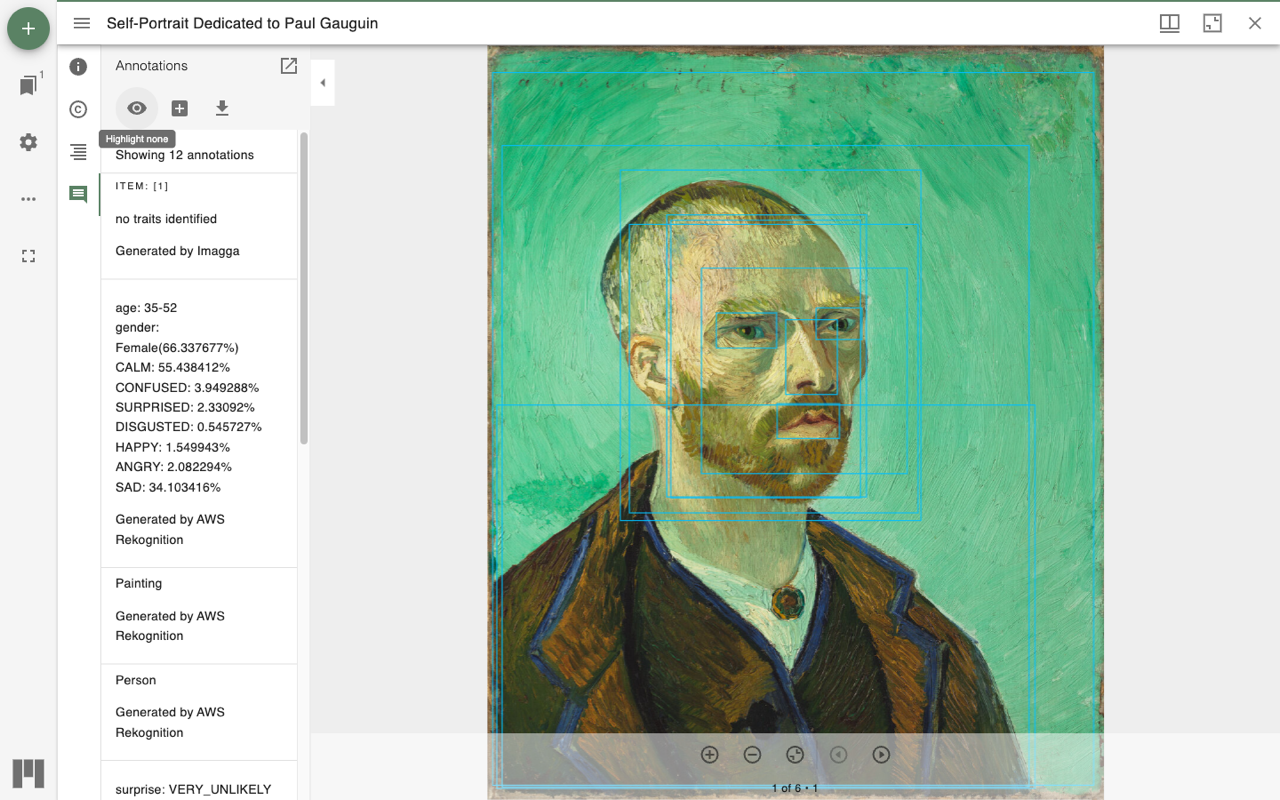
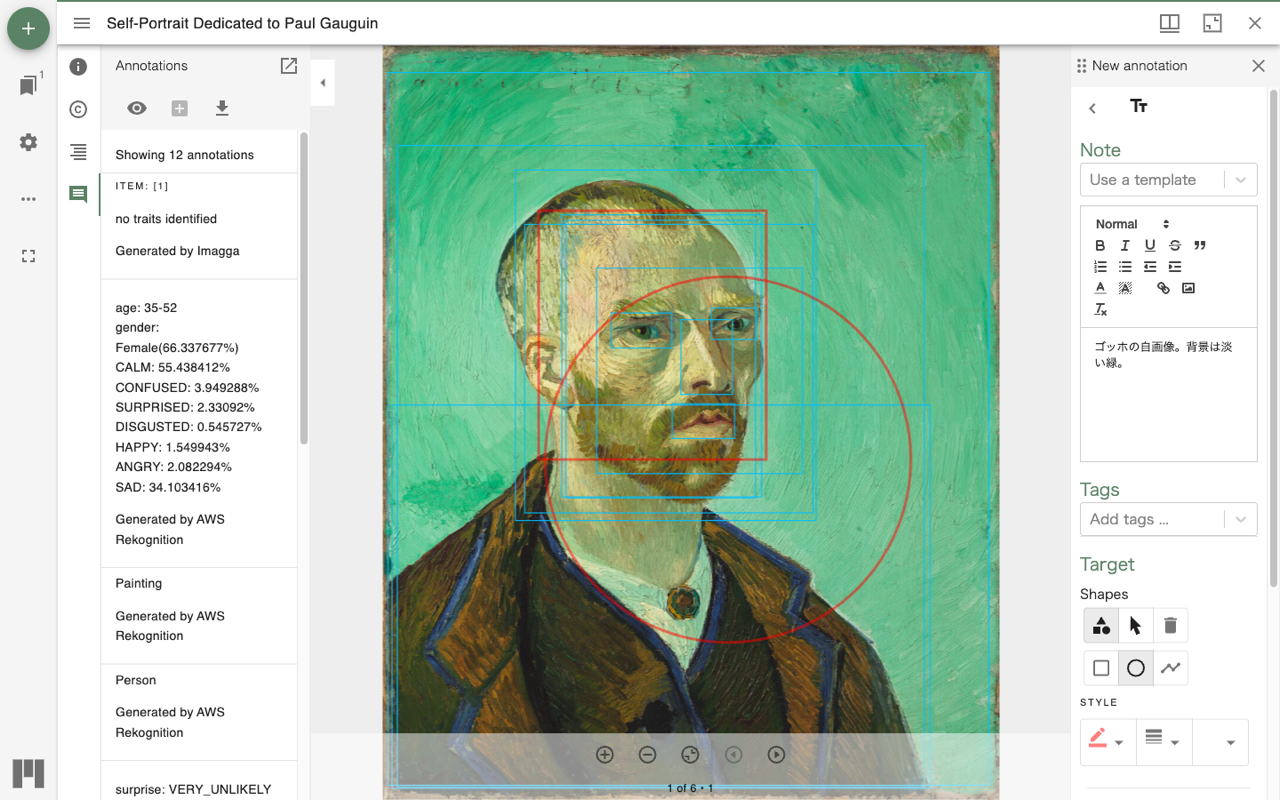
When you open the demo, the Mirador window shows the IIIF manifest of Van Gogh's "Self-Portrait Dedicated to Paul Gauguin," with the annotation panel open in the left sidebar.

4. View the Existing Annotations
This demo image already has 12 annotations attached (sample annotations auto-generated by AWS Rekognition). The toolbar at the top of the annotation panel lets you control how annotations are shown.
- Highlight all: highlights the target region of every annotation on the image.
- Create annotation: starts creating a new annotation.
- Export local annotations for visible items: exports the visible annotations.
Press Highlight all and you can see at a glance which annotation points to which part of the image.
5. Create an Annotation: Choose a Template
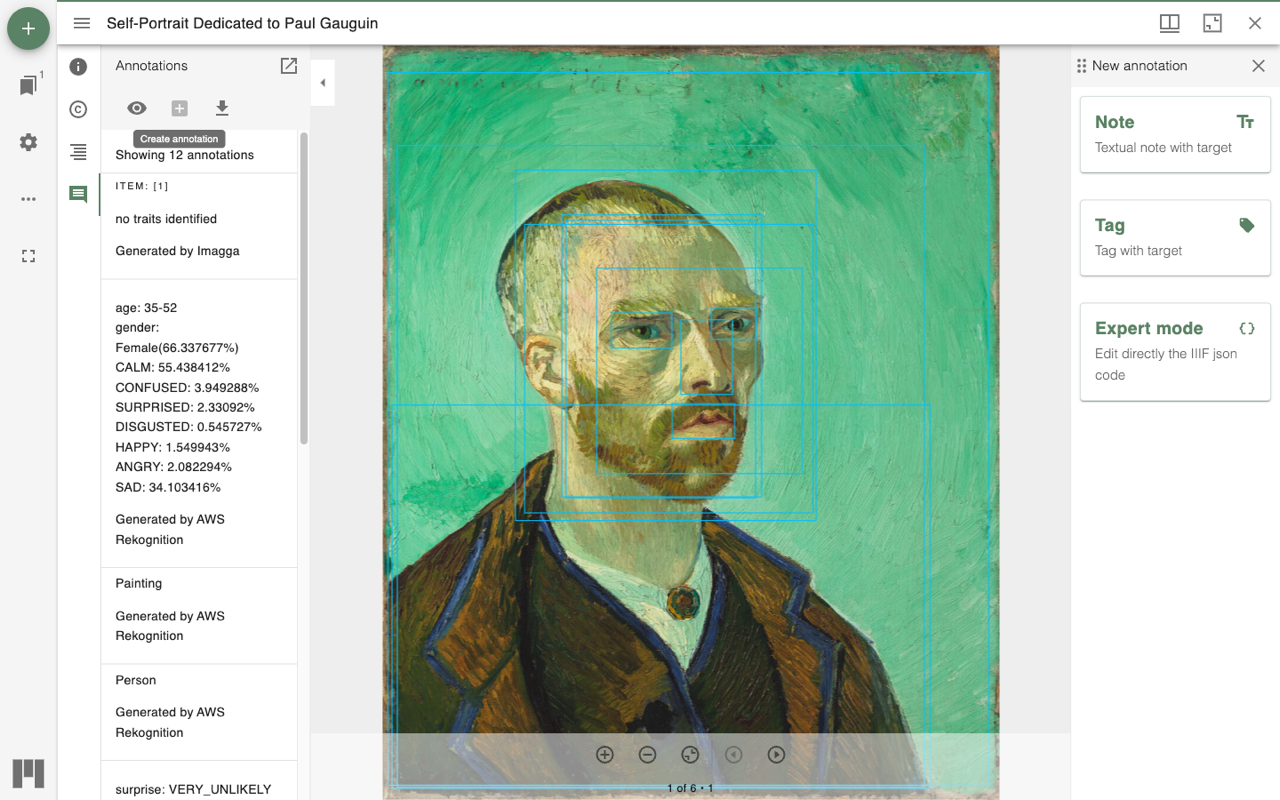
Press the Create annotation button at the top of the annotation panel, and a "New annotation" panel opens on the right. MAE uses a template-based creation flow, so you first choose one of three templates.
| Template | Use |
|---|---|
| Note | A text annotation with a target. The standard form, covering shapes, body text, and tags |
| Tag | A tag annotation with a target. For quickly attaching only a classification tag |
| Expert mode | For advanced users, editing the generated IIIF Annotation JSON directly |
Here we choose the standard Note.
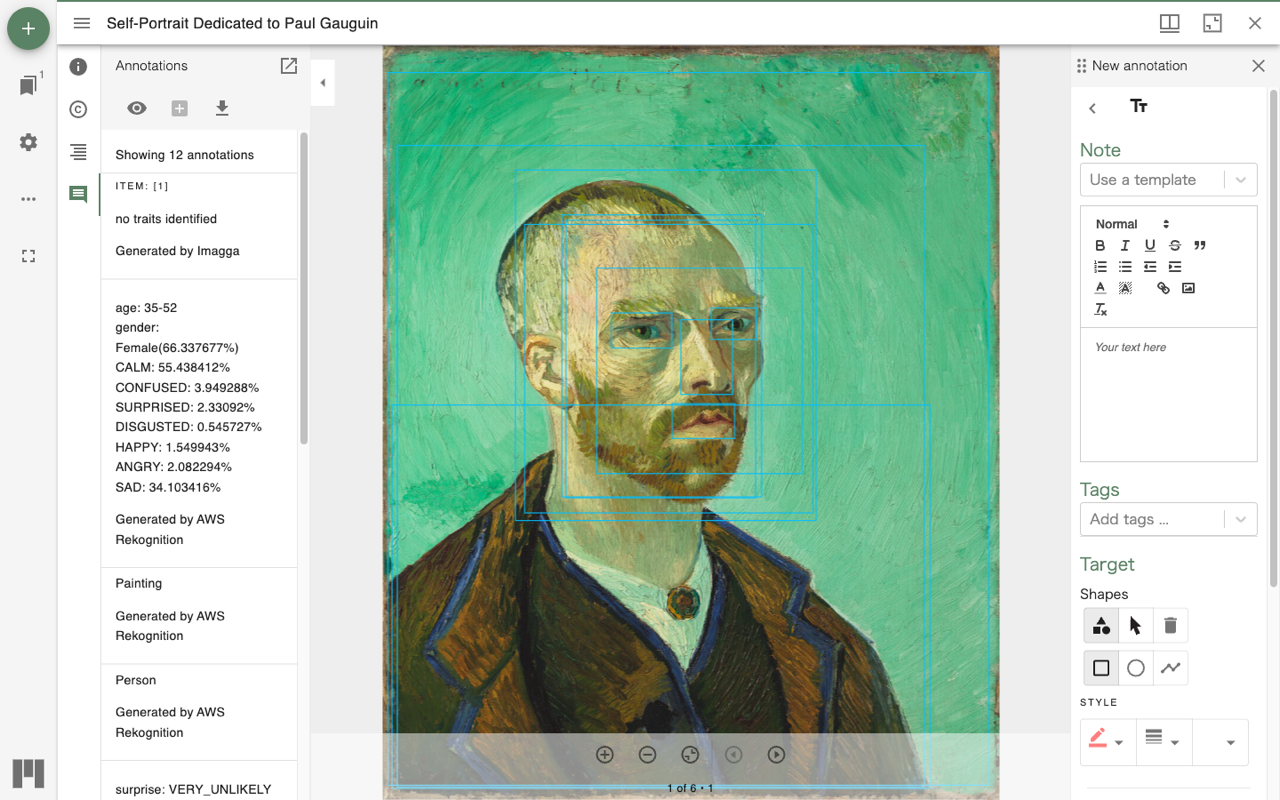
From the top, the form is arranged as the rich text editor, Tags, and Target (shapes).
6. Draw a Shape Target
From Shapes under Target, you specify with a shape which region the annotation applies to. The tools provided are rectangle, circle, and line.
Choose the rectangle tool and drag over the image, and that region becomes the annotation's target (its spatial target). You can also combine several shapes.
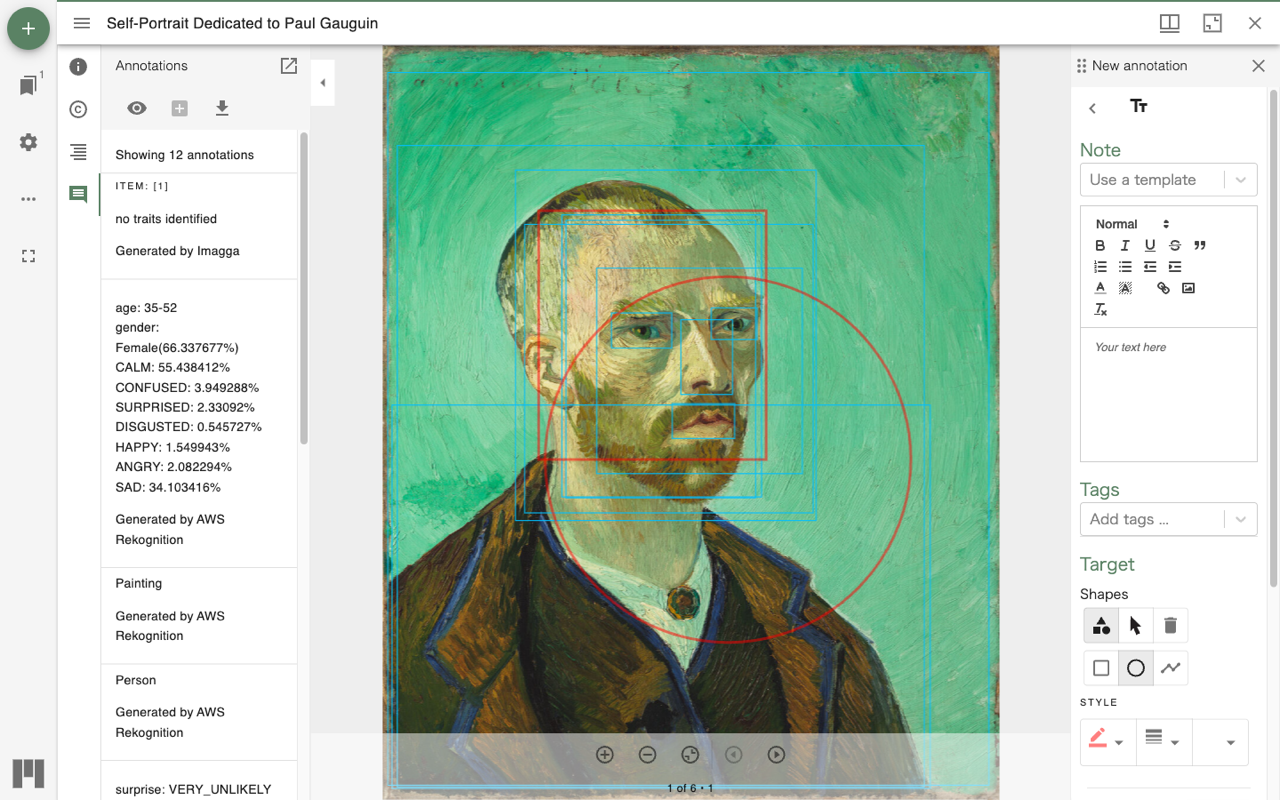
The appearance of a shape can be changed from STYLE. You can set the border color, line weight, and fill color, adjusting them for visibility against the image.
7. Body Text and Tags
Rich text body
The annotation body is entered in a Quill-based rich text editor. Bold, italic, underline, strikethrough, blockquote, ordered and bulleted lists, indentation, links, and image insertion are available.
Tags
Enter keywords in the Tags field and they are attached to the annotation as tags. If you pass tagsSuggestions in the plugin configuration, autocomplete for tag input is enabled.
In addition to body text and tags, you can also attach metadata based on Dublin Core.
8. Save and Export
Press Save at the bottom of the form, and the annotation you created is added to the list in the annotation panel on the left.
To export, press Export local annotations for visible items in the annotation panel's toolbar. The visible annotations are exported in IIIF / W3C Web Annotation format, becoming research data that can be reproduced in other IIIF-compatible viewers such as Mirador or the Universal Viewer.
Where annotations are actually stored is determined by the adapter passed to the plugin. The demo saves to the browser's local storage, but you can switch to your own backend, or to Mirador Multi User for simultaneous multi-user editing.
9. Embed It in Your Own Site
MAE is published on npm and can be embedded as a plugin into an existing Mirador 4-based viewer.
npm install mirador-annotation-editor
import mirador from 'mirador';
import { miradorAnnotationEditorPlugins } from 'mirador-annotation-editor';

mirador.viewer(
  {
    id: 'mirador',
    annotation: {
      // adapter: swap the implementation to change where annotations are stored
      adapter: (canvasId) => new LocalStorageAdapter(`mae-${canvasId}`),
      // allow changing shape styling
      allowTargetShapesStyling: true,
      // tag autocomplete suggestions
      tagsSuggestions: ['portrait', 'landscape', 'still life'],
    },
    windows: [{ manifestId: 'https://example.com/manifest.json' }],
  },
  [...miradorAnnotationEditorPlugins]
);
The main configuration options are as follows.
| Option | Role |
|---|---|
adapter | Where annotations are persisted (local / your own backend / MMU) |
allowTargetShapesStyling | Whether to allow changing shape color, line weight, etc. |
commentTemplates | Predefined boilerplate templates |
readonly | Disable annotation creation and editing, making it view-only |
tagsSuggestions | Autocomplete suggestions for tag input |
quillConfig | Customization of the rich text editor |
The actual API varies by MAE version. When integrating, check the repository README and the demo configuration.
10. When You Want to Annotate Video: MAEV
MAE deals with images. If you want to annotate video, use the sibling project Mirador Annotation Editor Video (MAEV). MAEV extends MAE and, in addition to spatial targets on a video frame, can handle temporal targets that specify a start and end time.
MAEV is covered in a separate article: "Annotating IIIF Video — A Mirador Annotation Editor Video Hands-on."
Explainer Video
The flow of operations in this article is also introduced in an explainer video, presented as a dialogue between Zundamon and Shikoku Metan (in Japanese).
Summary
By embedding Mirador Annotation Editor, Mirador — which could only show IIIF images — becomes a viewer that can create annotations. Choose a template with Create annotation, specify a region with a shape, write body text and tags, and save: with this sequence of operations, the annotation becomes data in a standard format reproducible in other IIIF viewers. The main advantage of MAE is being able to retrofit annotation creation onto a Mirador site already built for viewing.
Reference Links
- Mirador Annotation Editor repository: https://github.com/tetras-iiif/mirador-annotation-editor
- Demo: https://tetras-iiif.github.io/mirador-annotation-editor/
- Mirador Annotation Editor Video (video edition): https://github.com/tetras-iiif/mirador-annotation-editor-video
- Mirador: https://projectmirador.org/
- W3C Web Annotation Data Model: https://www.w3.org/TR/annotation-model/
- IIIF Presentation API 3.0: https://iiif.io/api/presentation/3.0/


Comments
…