Overview
Custom Ontology is a module that allows you to add custom vocabularies when standard ontologies from LOV, schema.org, or W3C are not available. It is useful for researchers who manage internal properties or create new data. This article explains how to use this module. A Japanese translation of the module's README.md file is also included at the end.
For registering standard existing vocabularies (ontologies), please refer to the following article.
Usage
After installing the module, you can access the editing screen from the following menu.

Configuration
Here, we set the prefix to "ex" and the namespace URI to "https://diyhistory.org/nakamura196/ns/ex/".
The namespace URI can be set freely, but when given in the recommended format (Omeka url + /ns/{prefix}/) as in this example, a web page becomes available at the following URL. This feature is described later.
Omeka url + /ns/{prefix}?format=html
Entering Vocabulary Information
Enter the necessary information for creating a vocabulary as shown in the screen below.

You can also add classes and properties at this point, but you can create the vocabulary with just the information entered so far. Pressing the submit button in the upper right corner of the screen will create the vocabulary.
The created vocabulary can be confirmed from the "Vocabularies" list page.
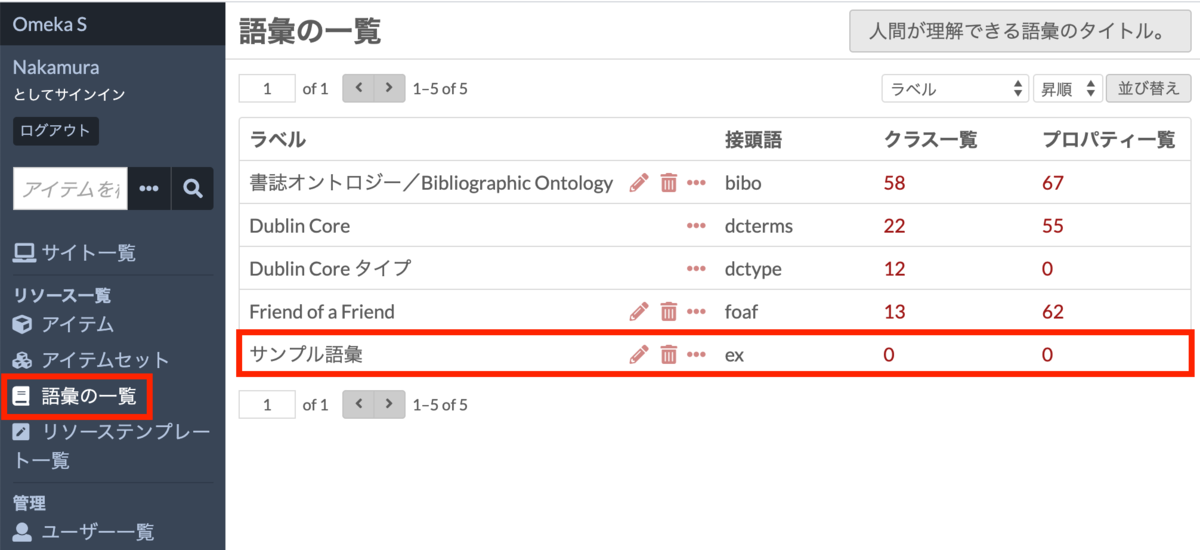
For instructions on how to operate this page, please refer to the following article about Omeka S core vocabulary operations.
When adding classes or properties (described later) after creating the vocabulary, you can skip the information entered here.
Entering Classes
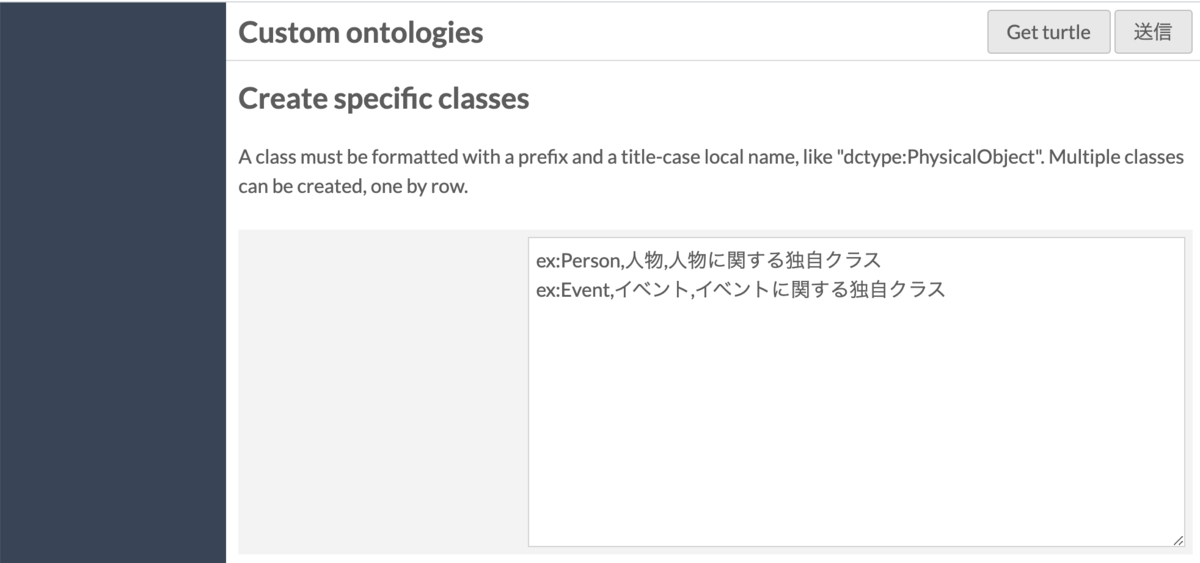
Here we create a custom Person class "ex:Person" and an Event class "ex:Event". Enter values in the "Create specific classes" form as shown below. Each class is described on a separate line in the format "prefix:ClassName,Label,Comment". Note that the class name must begin with an uppercase letter (e.g., ex:person will trigger an alert).
Entering Properties
Here we create a custom property "ex:name". The creation method is the same as for classes. The difference is that the property name following "prefix:" must begin with a lowercase letter (e.g., ex:Name will trigger an alert).

API
As mentioned above, the created vocabulary can be confirmed from Omeka S core features such as the vocabulary list, and can be used from various features just like other vocabularies.
In addition, when you create a vocabulary in the recommended format (Omeka url + /ns/{prefix}/) provided by this module, you can publish vocabulary information as a site page. In this example, vocabulary information can be accessed from the following URL.
https://diyhistory.org/nakamura196/ns/ex?format=html
You can also download a Turtle file by accessing the namespace URI without query strings, as shown below.
https://diyhistory.org/nakamura196/ns/ex
By sharing this Turtle file with other people or systems, you can share the information of your custom vocabulary. This design satisfies one of the principles of Linked Data:
When someone looks up a URI, provide useful information, using the standards (RDF, SPARQL)
https://www.w3.org/DesignIssues/LinkedData.html
Summary
This article explained how to use Custom Ontology. Created vocabularies can be updated or deleted using Omeka S's standard features. For details, please refer to the following article.
It is always recommended to first check whether existing vocabularies (ontologies) can be used before using this module. That said, this module and article may be helpful for researchers who manage internal properties or create new data.
Japanese Translation of README.md
Custom Ontology (Omeka S Module)
Custom Ontology is a module that allows you to create custom classes and properties to describe resources when standard ontologies from LOV, schema.org, or W3C are not available. It is useful for researchers who manage internal properties or create new data. Properties and classes can be used via Omeka S's standard API, just like other ontologies.
This module replaces an existing feature from Omeka Classic. It allowed editing and creating Item Types, which correspond to resource classes and resource templates, as well as creating new elements corresponding to properties. In Omeka S, this feature was not ported in order to share data and follow Semantic Web standards.
To facilitate sharing data and semantically linking them, it is always recommended to first search for and use existing ontologies. If properties are known only to you and described nowhere, it is difficult to match them or establish relationships with other properties. This module avoids to create a specific rdf vocabularies, turtle or n3 files too, so anybody can use Omeka S like wished, with any documents or resources.
Installation
(Omitted as it is largely the same as other modules)
Usage
Simply click the Custom Ontology menu and follow the instructions to create ontologies, resource classes, and properties.
After filling in the form, import directly using the Submit button.
You can add new classes and properties to a previously imported ontology, but you cannot update existing ones from the form. However, you can later upgrade the vocabulary using a Turtle file from the core administration page (admin/vocabulary), just like other vocabularies.
When custom ontologies are named as suggested (Omeka url + /ns/prefix), they will be publicly listed at https://example.org/ns and available as turtle, (a common simplified Notation3 format), at their namespace uri, and as a web page at https://example.org/ns/{prefix}?format=html.