Home Articles Books Search About
日本語
How to Correctly Load Local JSON Files in Nuxt 4 SSG

How to Correctly Load Local JSON Files in Nuxt 4 SSG

Introduction When performing Static Site Generation (SSG) with Nuxt 4, there are cases where you want to load data from local JSON files to generate static pages. However, unlike Next.js’s getStaticProps, it is not straightforward, and there are several pitfalls to watch out for. This article introduces the correct approach discovered through trial and error. The Problem: Why Simple fs Reading Does Not Work The First Approach We Tried (Failed) // This does not work const fetchLocalData = async (filePath: string) => { if (import.meta.server) { const fs = await import('fs'); const path = await import('path'); const fullPath = path.resolve(process.cwd(), 'public/data', filePath); const data = fs.readFileSync(fullPath, 'utf-8'); return JSON.parse(data); } // Client-side const response = await fetch(`/data/${filePath}`); return await response.json(); }; This approach has the following problems: ...

Next.js 15 Compatible Multilingual and Dark Mode SSG Template
Next.js 15 Compatible Multilingual and Dark Mode SSG Template

This article was reviewed by a human for implementation and written by AI. Overview This template is a starting point for web application development that supports static site generation (SSG) with Next.js 15, with built-in multilingual support and dark mode. It combines TypeScript, Tailwind CSS, next-intl, and next-themes. https://nextjs-i18n-themes-ssg-template.vercel.app/ja/ Key Features 1. Static Site Generation (SSG) Full static export with output: 'export' Fast page loading and SEO optimization Reduced hosting costs 2. Internationalization (i18n) Full multilingual support with next-intl Japanese and English support (easy to add more languages) URL-based language switching (/ja/about, /en/about) Type-safe translation keys 3. Dark Mode System-linked dark mode with next-themes Automatic detection of user preferences Smooth theme switching animation Persistent settings via LocalStorage 4. Improved Developer Experience Type safety with TypeScript Efficient styling with Tailwind CSS Code quality management with ESLint Unified component structure Tech Stack { "dependencies": { "next": "^15.4.4", "react": "^19.1.0", "next-intl": "^4.3.4", "next-themes": "^0.4.6", "tailwindcss": "^4.1.11", "@tailwindcss/typography": "^0.5.16" } } Project Structure src/ ├── app/ │ ├── [locale]/ │ │ ├── layout.tsx # Root layout │ │ ├── page.tsx # Home page │ │ ├── about/ # About page │ │ └── example/ # Sample page │ ├── icon.svg # Favicon │ └── sitemap.ts # Sitemap generation ├── components/ │ ├── layout/ # Layout components │ │ ├── Header.tsx │ │ ├── Footer.tsx │ │ ├── PageLayout.tsx │ │ ├── ToggleTheme.tsx │ │ └── ToggleLanguage.tsx │ └── page/ # Page-specific components ├── i18n/ │ └── routing.ts # i18n configuration └── messages/ # Translation files ├── en.json └── ja.json Notable Implementations 1. Static Export Support for sitemap.ts export const dynamic = 'force-static'; export const revalidate = false; export default function sitemap(): MetadataRoute.Sitemap { // Implementation } 2. Unified Page Layout <PageLayout breadcrumbItems={breadcrumbItems} title={t('title')} description={t('description')} > <YourContent /> </PageLayout> 3. Configuration via Environment Variables # .env.example NEXT_PUBLIC_SITE_URL=http://localhost:3000 NEXT_PUBLIC_BASE_PATH= Usage Installation git clone [repository-url] cd nextjs-i18n-themes-ssg-template npm install Development npm run dev Build npm run build Customization Points Adding languages: src/i18n/routing.ts and messages/ directory Adding pages: Create new directories under src/app/[locale]/ Theme customization: tailwind.config.js and global CSS Metadata: generateMetadata function in each page Best Practices Component naming: Use PascalCase Translation keys: Organize with nested structure Type safety: Maximize use of TypeScript types Performance: Cache strategy utilizing static generation Summary This template aims to enable quick construction of static sites optimized for SEO, with built-in internationalization and dark mode features. The goal is to improve developer productivity while providing an excellent experience for end users. ...

How to Implement sitemap.ts When Using output: 'export' in Next.js 15

How to Implement sitemap.ts When Using output: 'export' in Next.js 15

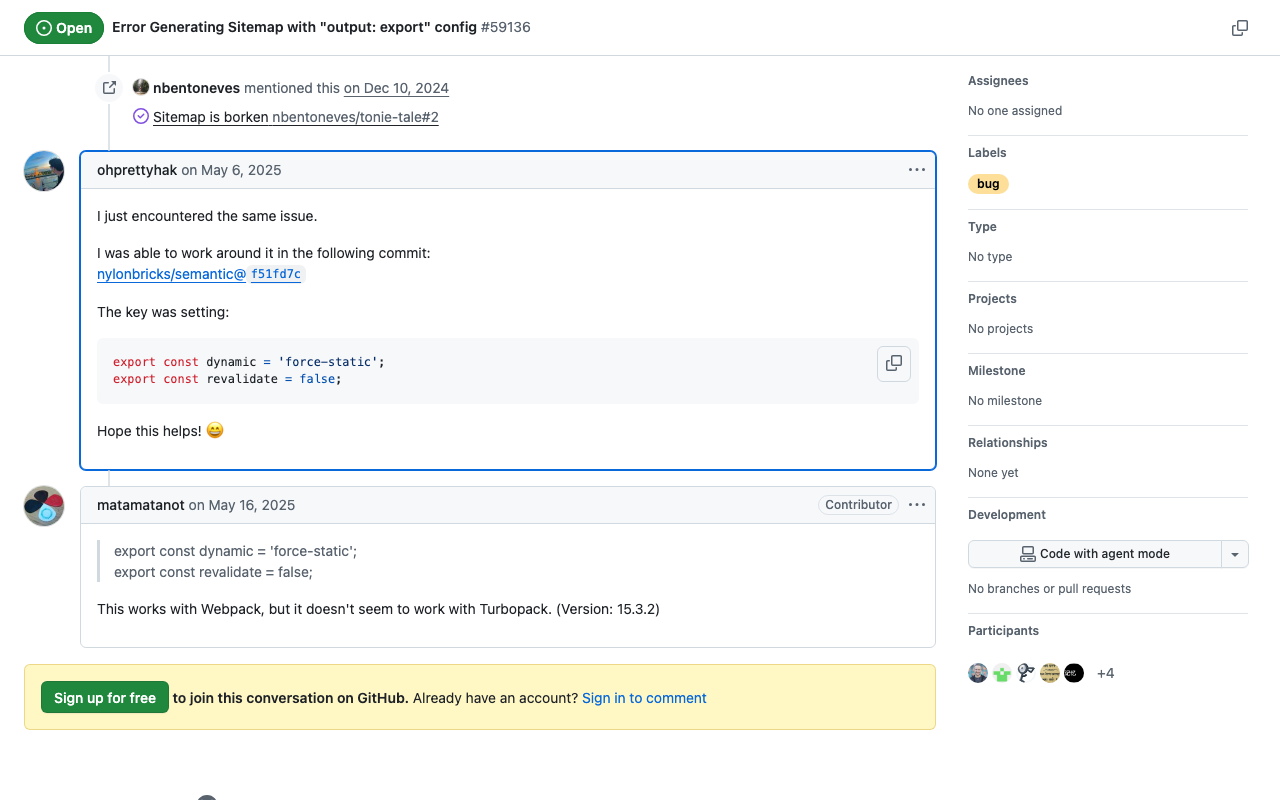
This article was written by AI after a human verified the implementation. Background When using static site generation (output: 'export') in Next.js 15, you may encounter an error with the sitemap.ts implementation: Error: export const dynamic = "force-static"/export const revalidate not configured on route "/sitemap.xml" with "output: export". Solution This problem can be solved by adding the following two exports to sitemap.ts: // src/app/sitemap.ts import { MetadataRoute } from 'next'; export const dynamic = 'force-static'; export const revalidate = false; export default function sitemap(): MetadataRoute.Sitemap { // sitemap generation logic } Implementation Example import { MetadataRoute } from 'next'; import { routing } from '@/i18n/routing'; export const dynamic = 'force-static'; export const revalidate = false; export default function sitemap(): MetadataRoute.Sitemap { const baseUrl = process.env.NEXT_PUBLIC_SITE_URL || 'http://localhost:3000'; const staticPages = [ '', // Home page '/about', '/example', ]; const sitemapEntries: MetadataRoute.Sitemap = routing.locales.flatMap((locale) => staticPages.map((page) => ({ url: `${baseUrl}/${locale}${page}`, lastModified: new Date(), changeFrequency: page === '' ? 'daily' : 'weekly' as const, priority: page === '' ? 1 : 0.8, })) ); return sitemapEntries; } Verification With this implementation, /out/sitemap.xml is correctly generated when running npm run build. ...