vttファイルからTEI/XMLを作成する
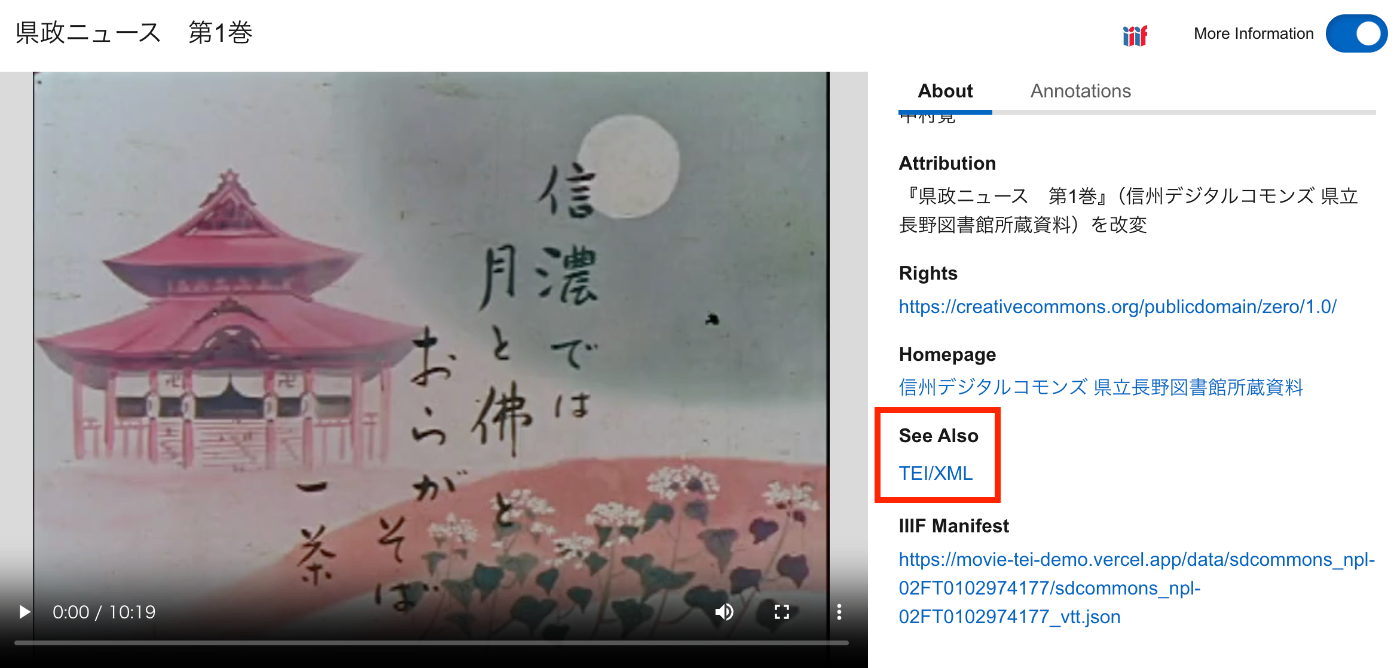
概要 vttファイルからTEI/XMLファイルを作成する方法の備忘録です。 さらに、IIIFマニフェストから、vttファイルおよびTEI/XMLファイルにアクセスできるようにしてみます。結果、以下のように、TEI/XMLファイルがSeeAlsoに関連づけられ、また「Annotations」タブから、vttファイルの内容にアクセスできます。 https://clover-iiif-demo.vercel.app/?manifest=https://movie-tei-demo.vercel.app/data/sdcommons_npl-02FT0102974177/sdcommons_npl-02FT0102974177_vtt.json 参考 以下の「The Ethiopian Language Archive」における取り組みを参考にしました。特に、TEI/XMLの構造化方法が特に参考になりました。 https://dev.jael.info/documentation/ 例 以下で作成したvttファイルを対象とします。 具体的には、以下の『県政ニュース 第1巻』(県立長野図書館)を使用します。 https://www.ro-da.jp/shinshu-dcommons/library/02FT0102974177 TEI/XMLの作成 作成したTEI/XMLファイルの例は以下です。 https://movie-tei-demo.vercel.app/data/sdcommons_npl-02FT0102974177/sdcommons_npl-02FT0102974177.xml 具体的には以下です。 <?xml-model href="http://www.tei-c.org/release/xml/tei/custom/schema/relaxng/tei_all.rng" type="application/xml" schematypens="http://relaxng.org/ns/structure/1.0"?> <?xml-model href="http://www.tei-c.org/release/xml/tei/custom/schema/relaxng/tei_all.rng" type="application/xml" schematypens="http://purl.oclc.org/dsdl/schematron"?> <teiCorpus xmlns="http://www.tei-c.org/ns/1.0"> <teiHeader> <fileDesc> <titleStmt> <title>県政ニュース 第1巻</title> </titleStmt> <publicationStmt> <distributor>中村覚</distributor> <availability> <licence target="http://creativecommons.org/licenses/by/4.0/">http://creativecommons.org/licenses/by/4.0/</licence> </availability> </publicationStmt> <notesStmt> <note>昭和30年に長野県が制作した記録映像。次の8タイトルを収録する。「地方選挙終る」、「地方選挙後初の県議会開かる」、「三十年度を賄う県のお台所」、「すすむ土木建設」、「明るく正しく健やかに」、「幕をとじた善光寺の御開帳」、「勇ましい水防訓練」、「お国じまん民謡大会」</note> </notesStmt> <sourceDesc> <biblStruct> <monogr> <title>県政ニュース 第1巻</title> <availability> <licence target="https://creativecommons.org/publicdomain/zero/1.0/">cc0</licence> </availability> <imprint> <publisher>信州デジタルコモンズ 県立長野図書館所蔵資料</publisher> </imprint> </monogr> <ref target="https://www.ro-da.jp/shinshu-dcommons/library/02FT0102974177">信州デジタルコモンズ 県立長野図書館所蔵資料</ref> </biblStruct> </sourceDesc> </fileDesc> </teiHeader> <TEI> <teiHeader> <fileDesc> <titleStmt> <title>県政ニュース 第1巻</title> </titleStmt> <publicationStmt> <p /> </publicationStmt> <notesStmt> <note /> </notesStmt> <sourceDesc> <p /> </sourceDesc> </fileDesc> <revisionDesc> <change when="2025-02-18"> 作成 </change> </revisionDesc> </teiHeader> <text> <body> <timeline unit="ms"> <when absolute="00:00:00.000" xml:id="t1" /> <when absolute="00:00:25.500" xml:id="t2" /> <when absolute="00:00:38.500" xml:id="t3" /> <when absolute="00:00:50.500" xml:id="t4" /> <when absolute="00:00:55.500" xml:id="t5" /> <when absolute="00:01:03.500" xml:id="t6" /> <when absolute="00:01:08.500" xml:id="t7" /> <when absolute="00:01:18.500" xml:id="t8" /> <when absolute="00:01:23.500" xml:id="t9" /> <when absolute="00:01:33.500" xml:id="t10" /> ... </timeline> <annotationBlock xml:id="ab1"> <u start="#t1" end="#t2">♪♪♪</u> </annotationBlock> <annotationBlock xml:id="ab2"> <u start="#t2" end="#t3">今年は選挙の当たり年。2月の総選挙に引き続いて、4月の県市町村と八木早の選挙で、長野県116万有権者の関心は非常な高まりようです。</u> </annotationBlock> <annotationBlock xml:id="ab3"> <u start="#t3" end="#t4">男女青年や婦人層はもちろんのこと、この老人も今年88を迎えたとはいえ、その慎重な投票ぶりが老いの表に一徹さを伺わせています。</u> </annotationBlock> <annotationBlock xml:id="ab4"> <u start="#t4" end="#t5">♪〜</u> </annotationBlock> <annotationBlock xml:id="ab5"> <u start="#t5" end="#t6">かくて県下における投票率、全国の上位を占める立派な成績を収めました。</u> </annotationBlock> <annotationBlock xml:id="ab6"> <u start="#t6" end="#t7">♪ ♪</u> </annotationBlock> <annotationBlock xml:id="ab7"> <u start="#t7" end="#t8">その日午後8時 きっかり、県下一斉に即日開票が行われました。</u> </annotationBlock> <annotationBlock xml:id="ab8"> <u start="#t8" end="#t9">その結果、長野県知事には、前知事の林寅氏が当選。</u> </annotationBlock> <annotationBlock xml:id="ab9"> <u start="#t9" end="#t10">またこれと同時に、県議会議員61名の当選も決定しました。</u> </annotationBlock> ... </body> </text> </TEI> </teiCorpus> IIIFマニフェストファイルの作成 上述したTEI/XMLファイルをseeAlsoに持つIIIFマニフェストファイルを作成しました。 ...
