ホーム 記事一覧 ブック DH週間トピックス 検索 このサイトについて
English
校異源氏物語テキストDBのTEI/XMLからPDFを作成する

校異源氏物語テキストDBのTEI/XMLからPDFを作成する

概要 校異源氏物語テキストDBは、『校異源氏物語』のテキストデータを公開するデータベースです。 https://kouigenjimonogatari.github.io/ 今回、本DBに以下のようなPDFファイルを追加しました。 https://kouigenjimonogatari.github.io/output/01/main.pdf 本記事は、上記のようなPDFファイルを、XSLTとTeXを使って作成します。 リポジトリのクローン 以下のように、リポジトリをクローンします。 git clone --depth 1 https://github.com/kouigenjimonogatari/kouigenjimonogatari.github.io そして以下のコマンドにより、xslt3をインストールします。 npm i xslt3 https://www.npmjs.com/package/xslt3 XSLファイルの作成 今回は、まずTEI/XMLファイルをTeXファイルに変換します。 以下のようなXSLファイルを作成しました。 https://github.com/kouigenjimonogatari/kouigenjimonogatari.github.io/blob/master/xsl/tex.xsl <?xml version="1.0" encoding="UTF-8"?> <xsl:stylesheet version="1.0" xmlns:xsl="http://www.w3.org/1999/XSL/Transform" xmlns:tei="http://www.tei-c.org/ns/1.0"> <xsl:output method="text" encoding="UTF-8"/> <xsl:template match="/"> \documentclass[a4paper,11pt,landscape]{ltjtarticle} \usepackage{xcolor} \usepackage{luatexja-fontspec} % fontspec を LuaTeX-ja と共に利用 \usepackage[top=2cm,bottom=2cm,left=2cm,right=2cm,textwidth=25cm]{geometry} % スタイル定義 \newcommand{\person}[1]{\textbf{\color{blue}#1}} \newcommand{\place}[1]{\textit{\color{green}#1}} % 日本語フォント設定 \setmainjfont{Noto Serif CJK JP} % 日本語フォントを指定 \title{<xsl:value-of select="//tei:title"/>} \date{} \begin{document} \maketitle % 本文 <xsl:for-each select="//tei:seg"> <xsl:apply-templates/> \par\medskip </xsl:for-each> \end{document} </xsl:template> <!-- 人名の処理 --> <xsl:template match="tei:persName"> \person{<xsl:value-of select="."/>}</xsl:template> <!-- 地名の処理 --> <xsl:template match="tei:placeName"> \place{<xsl:value-of select="."/>}</xsl:template> </xsl:stylesheet> 先にインストールしたxslt3を使って、以下のようにTEI/XMLファイルをTeXファイルに変換できます。 ...
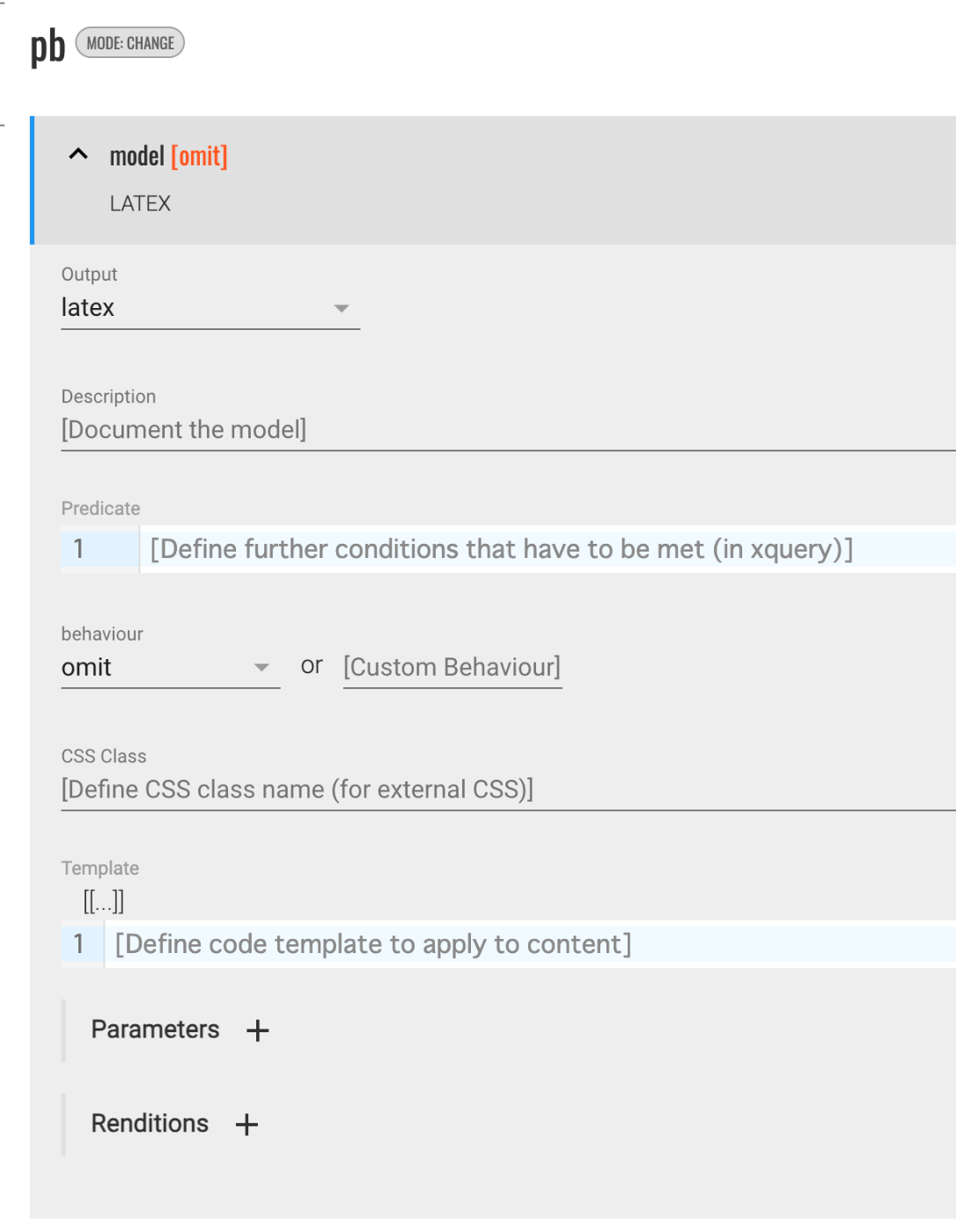
TEI PublisherのODDの設定例①

TEI PublisherのODDの設定例①

概要 TEI PublisherのODDに関する設定方法の備忘録です。 変換先で非表示にする 以下が参考になりました。 https://teipublisher.com/exist/apps/tei-publisher/documentation/odd-customization-other-behaviours behaviour でomit を選択します。 これにより、変換先(上記の例では、latex )でpb要素が非表示になりました。 lbで改行させる latexへの変換に限ったものかもしれませんが、behaviour でparagraph を選択することで、lbタグがあった箇所に、空白行が挿入されるようになりました。

Ace.jsでTeXをハイライトする

Ace.jsでTeXをハイライトする

概要 Ace.jsでTeXをハイライトする機会がありましたので、備忘録です。 以下の記事を参考にしました。 https://banatech.net/blog/view/11 参考になりましたら幸いです。 画面例 デモサイト https://nakamura196.github.io/ace_latex/ リポジトリ https://github.com/nakamura196/ace_latex ソースコード <html lang="en"> <head> <title>ACE in Action</title> </head> <body> <div id="editor" style="width: 100%; height: 400px; border: 1px solid gray;"></div> <script src="https://cdnjs.cloudflare.com/ajax/libs/ace/1.23.2/ace.js" integrity="sha512-oVyp48/610D5Jo577cvp2vX+Fc0kYaI6s2tZRqBRzjZh7+y/vOEHTzUefbXk/B8P0B76bOK3tL1zeF/QcXlyiA==" crossorigin="anonymous" referrerpolicy="no-referrer" ></script> <script> const text = `\\usepackage{hiragino,ryumin,cid} \\usepackage[dvips]{graphics} \\usepackage{multicol} \\begin{document} テキスト \\右注{(サンプル)}テキスト \\end{document}`; const editor = ace.edit("editor"); // editor.setTheme("ace/theme/monokai"); editor.setFontSize(14); editor.getSession().setMode("ace/mode/latex"); editor.getSession().setUseWrapMode(true); editor.getSession().setTabSize(4); editor.$blockScrolling = Infinity; editor.setOptions({ enableBasicAutocompletion: true, enableSnippets: true, }); editor.setValue(text, 1); </script> </body> </html>

TEI Critical Apparatus Toolboxを用いてTEI XMLをLaTeXに変換してみる

TEI Critical Apparatus Toolboxを用いてTEI XMLをLaTeXに変換してみる

概要 TEI Critical Apparatus Toolboxは、a tool for people preparing a natively digital TEI critical editionです。日本語訳の一例は以下です。 ネイティブ デジタル TEI クリティカル エディションを準備する人々のためのツール http://teicat.huma-num.fr/index.php 校異情報を可視化する機能を提供する他、複数の便利な機能を提供しています。 その中で、「TEI から LaTeX および PDF への変換」機能があることを教えていただいたので試してみます。 Print an edition 以下にアクセスします。 http://teicat.huma-num.fr/print.php this dummy edition fileという文字列のリンクをクリックして、以下のサンプルデータをダウンロードします。 http://teicat.huma-num.fr/print-feature-test-file.xml 上記のファイルを本ツールにアップロードします。変換に関する様々なオプションが用意されていますが、デフォルト設定のまま、画面下部の「送信」ボタンをクリックします。 すると、zipファイルがダウンロードされます。myEditionというフォルダが展開され、.log、.pdf、.texの3つのファイルが格納されていることが確認できます。 PDFの例は以下です。 TEXの例は以下です。 注意 2023年4月時点において、上記の機能は日本語を含むxmlファイルではうまく出力できませんでした。この点の改善についても今後検討してみたいと思います。 まとめ TEI/XMLファイルの変換ツール、フローを検討する上で、参考になりましたら幸いです。