ホーム 記事一覧 ブック DH週間トピックス 検索 このサイトについて
English
@samvera/rampビューアのFiles/Markersタブの使用方法

@samvera/rampビューアのFiles/Markersタブの使用方法

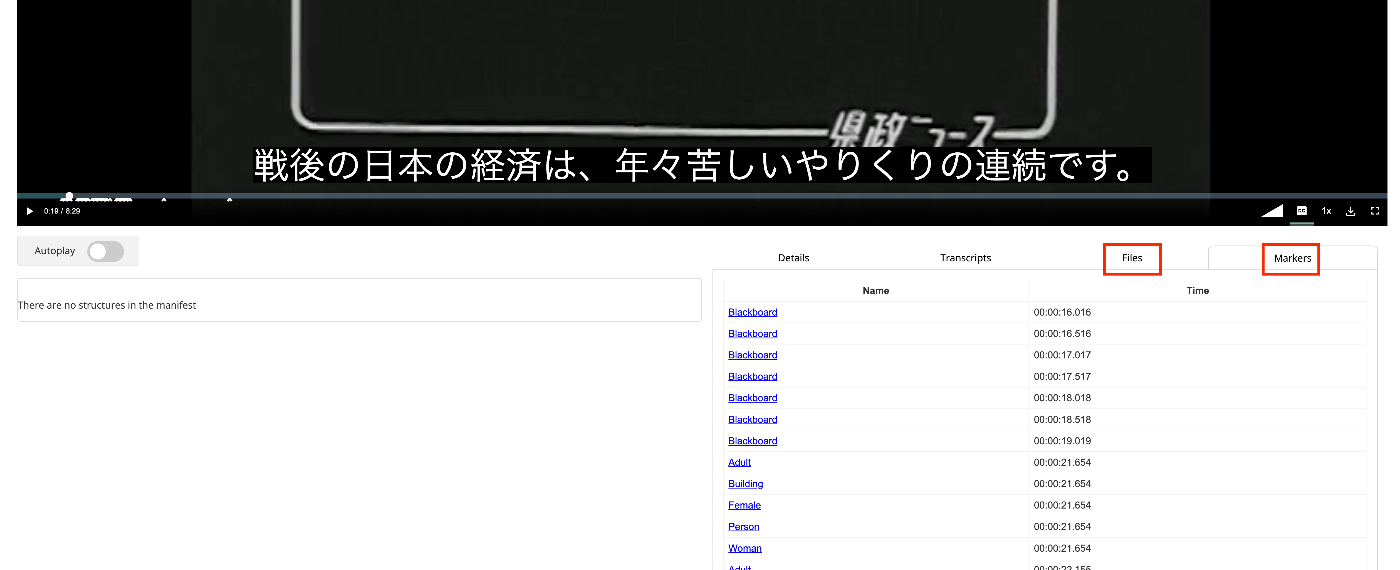
概要 IIIF Audio/Visualに対応したビューアの一つである@samvera/rampビューアのFiles/Markersタブの使用方法について調べたので備忘録です。 マニュアル Filesについては、以下に記載がありました。 https://samvera-labs.github.io/ramp/#supplementalfiles また、Markersについては、以下に記載があります。 https://samvera-labs.github.io/ramp/#markersdisplay 使用するデータ 『県政ニュース 第1巻』(県立長野図書館)を使用します。 https://www.ro-da.jp/shinshu-dcommons/library/02FT0102974177 Filesタブ renderingプロパティを読むと記載されています。renderingプロパティについては、以下のCookbookにも掲載されています。 https://iiif.io/api/cookbook/recipe/0046-rendering/ 以下のようなスクリプトにより、マニフェストファイルにrenderingプロパティを追加します。 def add_rendering(self, manifest_path): manifest = self.load_manifest(manifest_path) japan_search_id = manifest.homepage[1].id.split("/")[-1] japan_search_api_url = f"https://jpsearch.go.jp/api/item/{japan_search_id}" rendering = ResourceItem( label={ "ja": ["アイテム参照API"], }, id=japan_search_api_url, type="Dataset", format="application/json" ) manifest.rendering = rendering output_path = f"{self.input_dir}/manifest_rendering.json" with open(output_path, "w") as f: f.write(manifest.json(indent=2)) return output_path 以下のようなマニフェストファイルが作成されます。 { "@context": "http://iiif.io/api/presentation/3/context.json", "id": "https://d1u7hq8ziluwl9.cloudfront.net/sdcommons_npl-02FT0102974177/manifest.json", "type": "Manifest", "label": { "ja": [ "県政ニュース 第1巻" ] }, "requiredStatement": { "label": { "ja": [ "Attribution" ] }, "value": { "ja": [ "『県政ニュース 第1巻』(県立長野図書館)を改変" ] } }, "rendering": [ { "id": "https://jpsearch.go.jp/api/item/sdcommons_npl-02FT0102974177", "type": "Dataset", "label": { "ja": [ "アイテム参照API" ] }, "format": "application/json" } ], ... } ビューアでの表示例は以下です。 ...
iiif-prezi3を使って、動画に目次を付与する

iiif-prezi3を使って、動画に目次を付与する

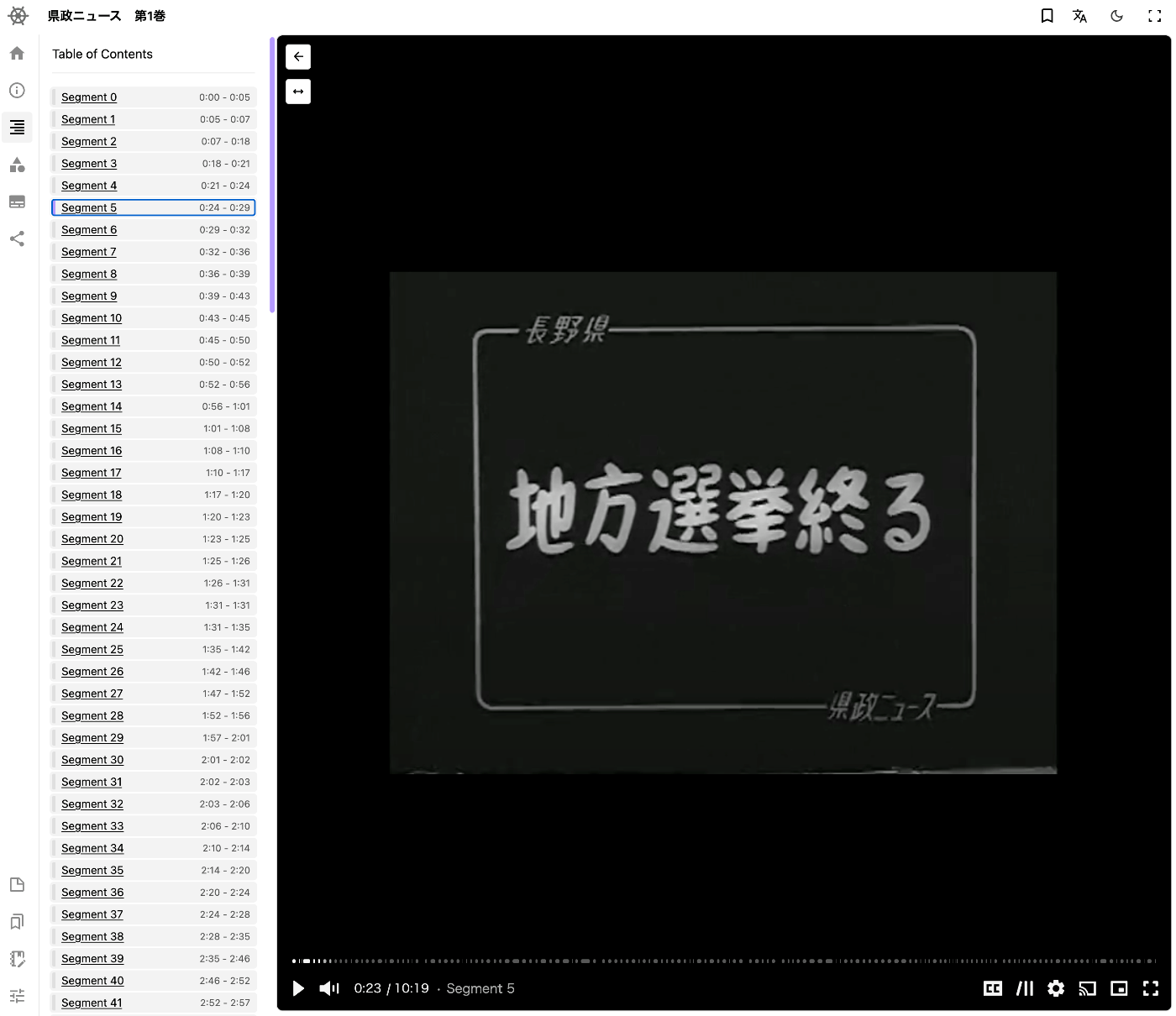
概要 iiif-prezi3を使って、動画に目次を付与する方法に関する備忘録です。 セグメントの検出 Amazon Rekognitionのビデオセグメントの検出を用います。 https://docs.aws.amazon.com/ja_jp/rekognition/latest/dg/segments.html 以下などでサンプルコードが公開されています。 https://docs.aws.amazon.com/ja_jp/rekognition/latest/dg/segment-example.html 使用するデータ 『県政ニュース 第1巻』(県立長野図書館)を使用します。 https://www.ro-da.jp/shinshu-dcommons/library/02FT0102974177 マニフェストファイルへの反映 以下の記事などを参考に、マニフェストファイルが作成済みであるとします。 以下のようなスクリプトにより、マニフェストファイルにvttファイルを追加します。 from iiif_prezi3 import Manifest, AnnotationPage, Annotation, ResourceItem, config, HomepageItem, KeyValueString #| export class IiifClient: def load_manifest(self, manifest_path): with open(manifest_path, "r") as f: manifest_json = json.load(f) manifest = Manifest(**manifest_json) return manifest def add_segment(self, manifest_path): manifest = self.load_manifest(manifest_path) path = f"{self.input_dir}/output_segment.json" with open(path, "r") as f: data = json.load(f) range_id = f"{self.prefix}/range" range_toc = manifest.make_range( id=f"{range_id}/r", label="Table of Contents" ) canvas_id = manifest.items[0].id for s in data["Segments"]: s_type = s["Type"] if s_type != "SHOT": continue index = s["Shot Index"] start = s["Start Timestamp (milliseconds)"] / 1000 end = s["End Timestamp (milliseconds)"] / 1000 range_seg = range_toc.make_range( id=f"{range_id}/r{index}", label=f"Segment {index}", ) range_seg.items.append({ "id": f"{canvas_id}#t={start},{end}", "type": "Canvas" }) output_path = f"{self.input_dir}/manifest_segment.json" with open(output_path, "w") as f: f.write(manifest.json(indent=2)) return output_path 以下のようなマニフェストファイルが作成されます。 ...

iiif-prezi3を使って、動画に字幕を設定する

iiif-prezi3を使って、動画に字幕を設定する

概要 iiif-prezi3を使って、動画に字幕を設定する方法に関する備忘録です。 字幕の作成 OpenAIのAPIを使用して字幕ファイルを作成しました。動画のファイルを音声ファイルに変換しています。 from openai import OpenAI from pydub import AudioSegment from dotenv import load_dotenv class VideoClient: def __init__(self): load_dotenv(verbose=True) api_key = os.getenv("OPENAI_API_KEY") self.client = OpenAI(api_key=api_key) def get_transcriptions(self, input_movie_path): audio = AudioSegment.from_file(input_movie_path) # 一時ファイルにオーディオを書き込む with tempfile.NamedTemporaryFile(suffix=".mp3") as temp_audio_file: audio.export(temp_audio_file.name, format="mp3") # MP3形式でエクスポート temp_audio_file.seek(0) # ファイルポインタを先頭に戻す # Whisper APIでトランスクリプトを取得 with open(temp_audio_file.name, "rb") as audio_file: # Whisper APIでトランスクリプトを取得 transcript = self.client.audio.transcriptions.create( model="whisper-1", file=audio_file, response_format="vtt" ) return transcript 使用するデータ 『県政ニュース 第1巻』(県立長野図書館)を使用します。 https://www.ro-da.jp/shinshu-dcommons/library/02FT0102974177 マニフェストファイルへの反映 以下の記事などを参考に、マニフェストファイルが作成済みであるとします。 以下のようなスクリプトにより、マニフェストファイルにvttファイルを追加します。 from iiif_prezi3 import Manifest, AnnotationPage, Annotation, ResourceItem, config, HomepageItem, KeyValueString #| export class IiifClient: def load_manifest(self, manifest_path): with open(manifest_path, "r") as f: manifest_json = json.load(f) manifest = Manifest(**manifest_json) return manifest def add_vtt(self, manifest_simple_path): manifest = self.load_manifest(manifest_simple_path) vtt_url = f"{self.prefix}/video.vtt" canvas = manifest.items[0] vtt_anno_page = AnnotationPage(id=f"{canvas.id}/page2") canvas.annotations = [ vtt_anno_page, ] vtt_body = ResourceItem(id=vtt_url, type="Text", format="text/vtt") vtt_anno = Annotation( id=f"{vtt_anno_page.id}/a1", motivation="supplementing", body=vtt_body, target=canvas.id, label = "WebVTT Transcript (machine-generated)" ) vtt_anno_page.add_item(vtt_anno) with open(f"{self.input_dir}/manifest_vtt.json", "w") as f: f.write(manifest.json(indent=2)) 以下のようなマニフェストファイルが作成されます。 ...

iiif-prezi3を使って、動画にアノテーションを付与する

iiif-prezi3を使って、動画にアノテーションを付与する

概要 iiif-prezi3を使って、動画にアノテーションを付与する方法に関する備忘録です。 アノテーションの付与 Amazon Rekognitionのlabel detectionを用います。 https://docs.aws.amazon.com/rekognition/latest/dg/labels.html?pg=ln&sec=ft 以下などでサンプルコードが公開されています。 https://docs.aws.amazon.com/ja_jp/rekognition/latest/dg/labels-detecting-labels-video.html 特に、GetLabelDetectionにおける集計をSEGMENTSにすることで、StartTimestampMillisとEndTimestampMillisを得ることができます。 ただし、以下の点に注意が必要です。 SEGMENTS による集計の場合、境界ボックス付きの検出されたインスタンスに関する情報は返されません。 使用するデータ 『県政ニュース 第1巻』(県立長野図書館)を使用します。 https://www.ro-da.jp/shinshu-dcommons/library/02FT0102974177 マニフェストファイルへの反映 以下の記事などを参考に、マニフェストファイルが作成済みであるとします。 以下のようなスクリプトにより、マニフェストファイルにvttファイルを追加します。 from iiif_prezi3 import Manifest, AnnotationPage, Annotation, ResourceItem, config, HomepageItem, KeyValueString #| export class IiifClient: def load_manifest(self, manifest_path): with open(manifest_path, "r") as f: manifest_json = json.load(f) manifest = Manifest(**manifest_json) return manifest def add_label_segment(self, manifest_path): manifest = self.load_manifest(manifest_path) label_path = f"{self.input_dir}/output_label_seg.json" with open(label_path, "r") as f: label_seg = json.load(f) canvas = manifest.items[0] labels = label_seg["Labels"] anno_page_id = f"{canvas.id}/page1" anno_page = AnnotationPage(id=anno_page_id) canvas.annotations.append(anno_page) for i in range(len(labels)): label = labels[i] start = label["StartTimestamp"] / 1000 end = label["EndTimestamp"] / 1000 name = label["Label"]["Name"] anno_id = f"{anno_page_id}/a{i}" anno = Annotation( id=anno_id, motivation="tagging", target=canvas.id + "#t=" + str(start) + "," + str(end), body={ "type": "TextualBody", "value": name, "format": "text/plain", } ) anno_page.add_item( anno ) output_path = f"{self.input_dir}/manifest_label_seg.json" with open(output_path, "w") as f: f.write(manifest.json(indent=2)) return output_path 以下のようなマニフェストファイルが作成されます。 ...