Mirador2のPhysical Document Rulerを試す
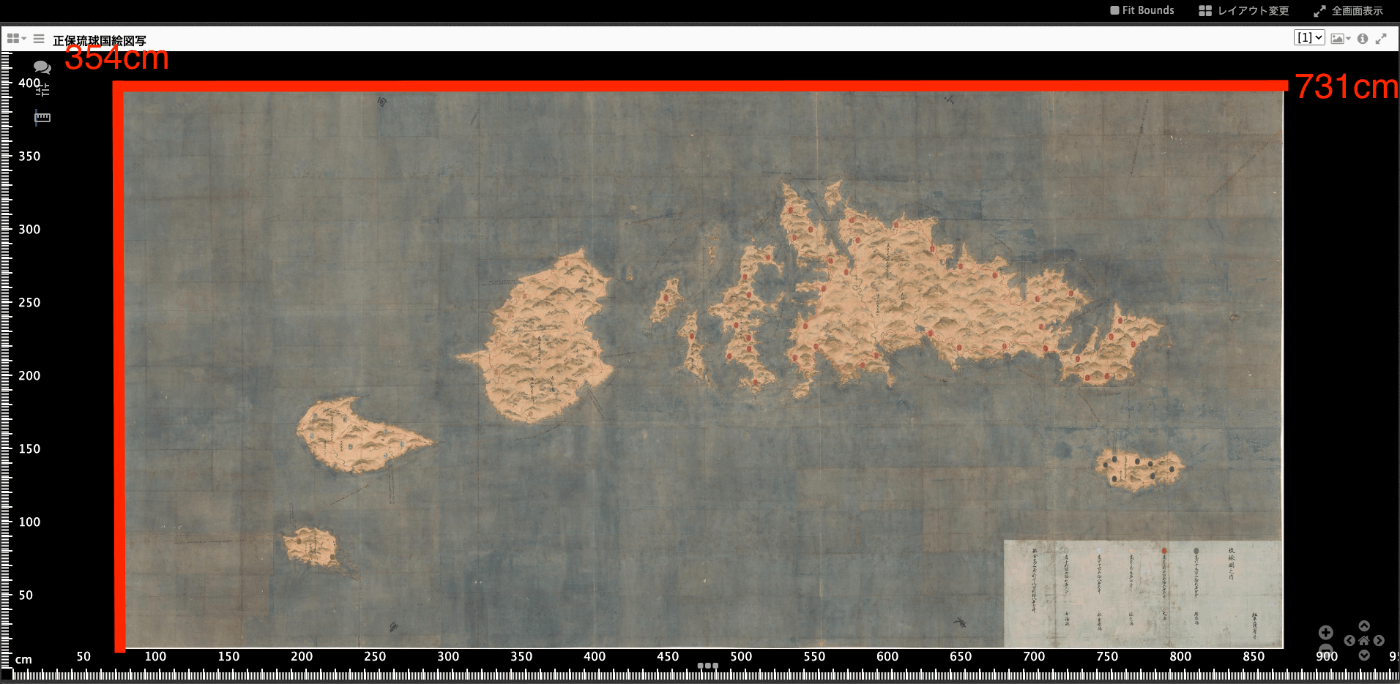
概要 IIIFのLinking to External ServicesにPhysical Dimensionsがあります。 https://iiif.io/api/annex/services/#physical-dimensions 以下のように説明されています。 For digitized objects, it is often useful to know the physical dimensions of the object. When available, they allow a client to present a ruler, or other rendition of physical scale, to the user. (機械翻訳)デジタル化された物体の場合、その物体の物理的な寸法を知ることはしばしば有用である。利用可能な場合、クライアントが定規やその他の物理的な縮尺をユーザーに提示することができます。 Mirador ver.2とver.3では、それぞれ以下のプラグインが存在します。 ver.2 https://github.com/dbmdz/mirador-plugins#physical-document-ruler ver.3 https://github.com/ubleipzig/mirador-ruler-plugin 残念ながらver.3のプラグインをうまく導入することができませんでした。そこで、Mirador2を対象に、Physical Document Rulerを使用する方法を説明します。 結果、例えば東京大学史料編纂所所蔵の大型絵図である正保琉球国絵図写(請求記号:S島津 76-2-4、法量:354.1×731.0cm)を対象にした場合、以下のように定規を表示させることができます。 ソースコードの準備 以下のリポジトリからソースコードを取得できます。 https://github.com/nakamura196/mirador2 Mirador2のプラグインを格納する以下のフォルダmirador/pluginsに対して、以下で公開されているPhysicalRulerのソースコードをコピーしています。 https://github.com/dbmdz/mirador-plugins/tree/main/PhysicalRuler そして、index.htmlで以下のように参照しています。 ... <body> <div id="viewer"></div> <script src="mirador/mirador.min.js"></script></script> <script src="mirador/plugins/PhysicalRuler/physicalRuler.js"></script> <script type="text/javascript"> ... </script> </body> データ マニフェストファイルの各Canvasに対して、serviceを追記します。physicalScaleは実寸(cm)をピクセル数で割った値を用いています。 ...