ホーム 記事一覧 ブック DH週間トピックス 検索 このサイトについて
English
gdriveを用いたOmeka Sの簡易バックアップ

gdriveを用いたOmeka Sの簡易バックアップ

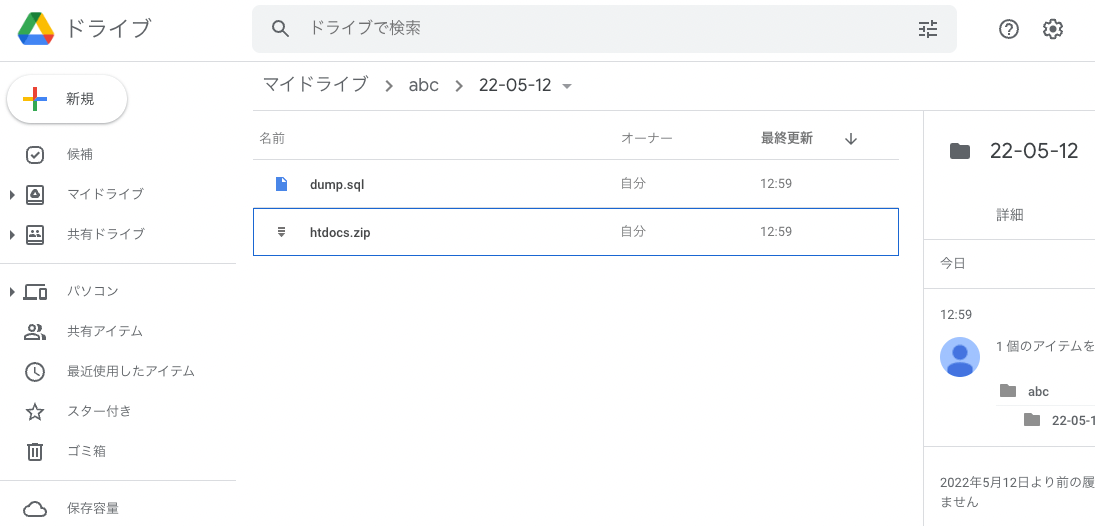
概要 gdriveを用いたOmeka Sの簡易バックアップの方法についてのメモです。 ここでは例として、Amazon Lightsailで起動したLAMP環境にインストールしたOmeka Sを対象とします。インストール方法は以下をご確認ください。 gdriveのインストール 今回は、Google Driveにファイルをバックアップします。そのため、gdriveを使用します。以下の記事を参考に、gdriveをインストールしてください。 backup用のスクリプトを用意する $HOMEディレクトリにおいて、例えばbackup.shというファイルを作成します。ファイルの内容の一例は以下です。 # 設定値 ## Omeka Sのインストールディレクトリ OMEKA_DIRNAME=htdocs OUTPUT_DIRNAME=`date +%y-%m-%d` ## MySQLのユーザ名。 USERNAME=root ## MySQLのパスワード。以下のコマンドで確認できます。 ## cat /home/bitnami/bitnami_application_password PASSWORD=<パスワード> ## Omeka Sのデータベース名。例:omekas DATABASE_NAME=<データベース名> FOLDER_ID=<GoogleドライブのフォルダID> # 出力フォルダの作成(日付に基づくフォルダ名を作成) mkdir -p "$OUTPUT_DIRNAME" # sqlのバックアップ mysqldump -u $USERNAME -p$PASSWORD $DATABASE_NAME > $OUTPUT_DIRNAME/dump.sql # omeka関連フォルダの圧縮 zip -q $OUTPUT_DIRNAME/$OMEKA_DIRNAME -r $OMEKA_DIRNAME # Google Driveへのアップロード ./go/bin/gdrive upload --recursive --parent $FOLDER_ID $OUTPUT_DIRNAME # 出力フォルダの削除 rm -rf $OUTPUT_DIRNAME 上記のファイルを作成後、以下のコマンドを実行します。 ...

Using gdrive in a LAMP environment started with Amazon Lightsail

Using gdrive in a LAMP environment started with Amazon Lightsail

Overview Memorandum for using gdrive in a LAMP environment started with Amazon Lightsail, allowing backup of files to Google Drive, etc. Procedure First, access Amazon Lightsail and press the following “Connect using SSH” button on the target instance. You can access the server as follows. Linux ip-172-26-5-202 4.19.0-19-cloud-amd64 #1 SMP Debian 4.19.232-1 (2022-03-07) x86_64 The programs included with the Debian GNU/Linux system are free software; The programs included with the Debian GNU/Linux system are free software; the exact distribution terms for each program are described in the The programs included with the Debian GNU/Linux system are free software; the exact distribution terms for each program are described in the /usr/share/doc/*/copyright. The programs included with the Debian GNU/Linux system are free software; the exact distribution terms for each program are described in the individual files in /usr/share/doc/*/copyright. Debian GNU/Linux comes with ABSOLUTELY NO WARRANTY, to the extent permitted by applicable law. ___ _ _ _ _ _ | _ _ |_) |_ _ _ _ _ _ _ _ _ _ _ __ (_) | _ _ \ \ \}/ _| ' \}/ _` | ' \} |___/_|\__|_|_|\__,_|_|_|_|_|_| *** Welcome to the LAMP packaged by Bitnami 7.4.28-14 *** *** Documentation: https://docs.bitnami.com/aws/infrastructure/lamp/ *** *** https://docs.bitnami.com/aws/ *** *** Bitnami Forums: https://community.bitnami.com/ *** Last login: Thu May 12 03:25:13 2022 from 72.21.217.186 bitnami@ip-172-26-5-202:~$ Install golang Install golang as follows. ...

Amazon Lightsailで起動したLAMP環境でgdriveを使用する

Amazon Lightsailで起動したLAMP環境でgdriveを使用する

概要 Amazon Lightsailで起動したLAMP環境でgdriveを使用するための備忘録です。Google Driveへのファイルのバックアップなどが可能になります。 手順 まず、Amazon Lightsailにアクセスして、対象となるインスタンスにおいて、以下の「Connect using SSH」ボタンを押します。 以下のように、サーバにアクセスできます。 Linux ip-172-26-5-202 4.19.0-19-cloud-amd64 #1 SMP Debian 4.19.232-1 (2022-03-07) x86_64 The programs included with the Debian GNU/Linux system are free software; the exact distribution terms for each program are described in the individual files in /usr/share/doc/*/copyright. Debian GNU/Linux comes with ABSOLUTELY NO WARRANTY, to the extent permitted by applicable law. ___ _ _ _ | _ |_) |_ _ _ __ _ _ __ (_) | _ \ | _| ' \/ _` | ' \| | |___/_|\__|_|_|\__,_|_|_|_|_| *** Welcome to the LAMP packaged by Bitnami 7.4.28-14 *** *** Documentation: https://docs.bitnami.com/aws/infrastructure/lamp/ *** *** https://docs.bitnami.com/aws/ *** *** Bitnami Forums: https://community.bitnami.com/ *** Last login: Thu May 12 03:25:13 2022 from 72.21.217.186 bitnami@ip-172-26-5-202:~$ golangのインストール 以下のように、golangをインストールします。 ...