ホーム 記事一覧 ブック DH週間トピックス 検索 このサイトについて
English
Omeka Sの特定のvocabularyのプロパティ一覧を取得する

Omeka Sの特定のvocabularyのプロパティ一覧を取得する

概要 Omeka Sの特定のvocabularyのプロパティ一覧を取得する方法です。 方法 以下を対象にします。 https://uta.u-tokyo.ac.jp/uta/api/properties?vocabulary_id=5 次のプログラムにより、プロパティ一覧をMS Excelに書き込みます。 import pandas as pd import requests url = "https://uta.u-tokyo.ac.jp/uta/api/properties?vocabulary_id=5" page = 1 data_list = [] while 1: response = requests.get(url + "&page=" + str(page)) data = response.json() if len(data) == 0: break data_list.extend(data) page += 1 remove_keys = ["@context", "@id", "@type", "o:vocabulary", "o:id", "o:local_name"] for data in data_list: for key in remove_keys: if key in data: del data[key] # DataFrameに変換 df = pd.DataFrame(data_list) df.to_excel("archiveshub.xlsx", index=False) 結果 以下のようなMS Excelが得られます。 o:label o:comment o:term Maintenance Agency A repository responsible for the maintenance of the archival finding aid. archiveshub:maintenanceAgency Is Maintenance Agency Of An archival finding aid for which the repository is responsible for the maintenance. archiveshub:isMaintenanceAgencyOf Encoded As An EAD document that is an encoding of the archival finding aid. archiveshub:encodedAs Encoding Of An archival finding aid of which the EAD document is an encoding. archiveshub:encodingOf Administers A resource which the agent manages. archiveshub:administers Is Administered By An agent that manages the resource. archiveshub:isAdministeredBy Provides Access To A resource to which the agent provides access. archiveshub:providesAccessTo Access Provided By An agent that provides access to the resource. archiveshub:accessProvidedBy Is Publisher Of A resource which the agent makes available. archiveshub:isPublisherOf Level An indicator of the part of an archival collection constituted by an archival resource. archiveshub:level Is Represented By A resource which represents the archival resource, such as an image of a text page, a transcription of text, an audio or video clip, or an aggregation of such resources. archiveshub:isRepresentedBy Origination An agent responsible for the creation or accumulation of the archival resource. archiveshub:origination Is Origination Of An archival resource for which the agent is responsible for the creation or accumulation. archiveshub:isOriginationOf Has Biographical History A narrative or chronology that places archival materials in context by providing information about their creator(s). archiveshub:hasBiographicalHistory Is Biographical History For An archival resource that the narrative or chronology places in context by providing information about their creator(s). archiveshub:isBiographicalHistoryFor Associated With A concept adjudged by a cataloguer to have an association with an archival resource which they consider useful for the purposes of discovering that resource. archiveshub:associatedWith Members Members archiveshub:members Country Code The ISO 3166-1 code for the country of the repository. archiveshub:countryCode Maintenance Agency Code The ISO 15511 code for the repository. archiveshub:maintenanceAgencyCode Body A literal representation of the content of the document. archiveshub:body Date created or accumulated The date, represented as a string, of a time interval during which the archival resource was created or accumulated. archiveshub:dateCreatedAccumulatedString Date created or accumulated The date, represented as a typed literal, of a time interval during which the archival resource was created or accumulated. archiveshub:dateCreatedAccumulated Date created or accumulated (start) The start date, represented as a typed literal, of a time interval during which the archival resource was created or accumulated. archiveshub:dateCreatedAccumulatedStart Date created or accumulated (end) The end date, represented as a typed literal, of a time interval during which the archival resource was created or accumulated. archiveshub:dateCreatedAccumulatedEnd Date of Birth The date of birth of the person. archiveshub:dateBirth Date of Death The date of death of the person. archiveshub:dateDeath Extent The size of the archival resource. archiveshub:extent Custodial History Custodial History archiveshub:custodialHistory Acquisitions Acquisitions archiveshub:acquisitions Scope and Content Scope and Content archiveshub:scopecontent Appraisal Appraisal archiveshub:appraisal Accruals Accruals archiveshub:accruals Access Restrictions Access Restrictions archiveshub:accessRestrictions Use Restrictions Use Restrictions archiveshub:useRestrictions Physical and Technical Requirements Physical and Technical Requirements archiveshub:physicalTechnicalRequirements Other Finding Aids Other Finding Aids archiveshub:otherFindingAids Location of Originals Location of Originals archiveshub:locationOfOriginals Alternate Forms Available Alternate Forms Available archiveshub:alternateFormsAvailable Related Material Related Material archiveshub:relatedMaterial Bibliography Bibliography archiveshub:bibliography Note Note archiveshub:note Processing Processing archiveshub:processing Name Name archiveshub:name Dates Dates archiveshub:dates Location Location archiveshub:location Other Other archiveshub:other Surname The surname of a person who is the focus of the concept archiveshub:surname Forename The forename of a person who is the focus of the concept archiveshub:forename Title The title of a person who is the focus of the concept archiveshub:title Epithet Epithet archiveshub:epithet Archival Box A number of archival boxes archiveshub:archbox Metre A number of metres archiveshub:metre Cubic Metre A number of cubic metres archiveshub:cubicmetre Folder A number of folders archiveshub:folder Envelope A number of envelopes archiveshub:envelope Volume A number of volumes archiveshub:volume File A number of files archiveshub:file Item A number of items archiveshub:item Page A number of pages archiveshub:page Paper A number of papers archiveshub:paper まとめ Omeka Sの利用にあたり、参考になりましたら幸いです。 ...
GakuNin RDM APIをつかってみる

GakuNin RDM APIをつかってみる

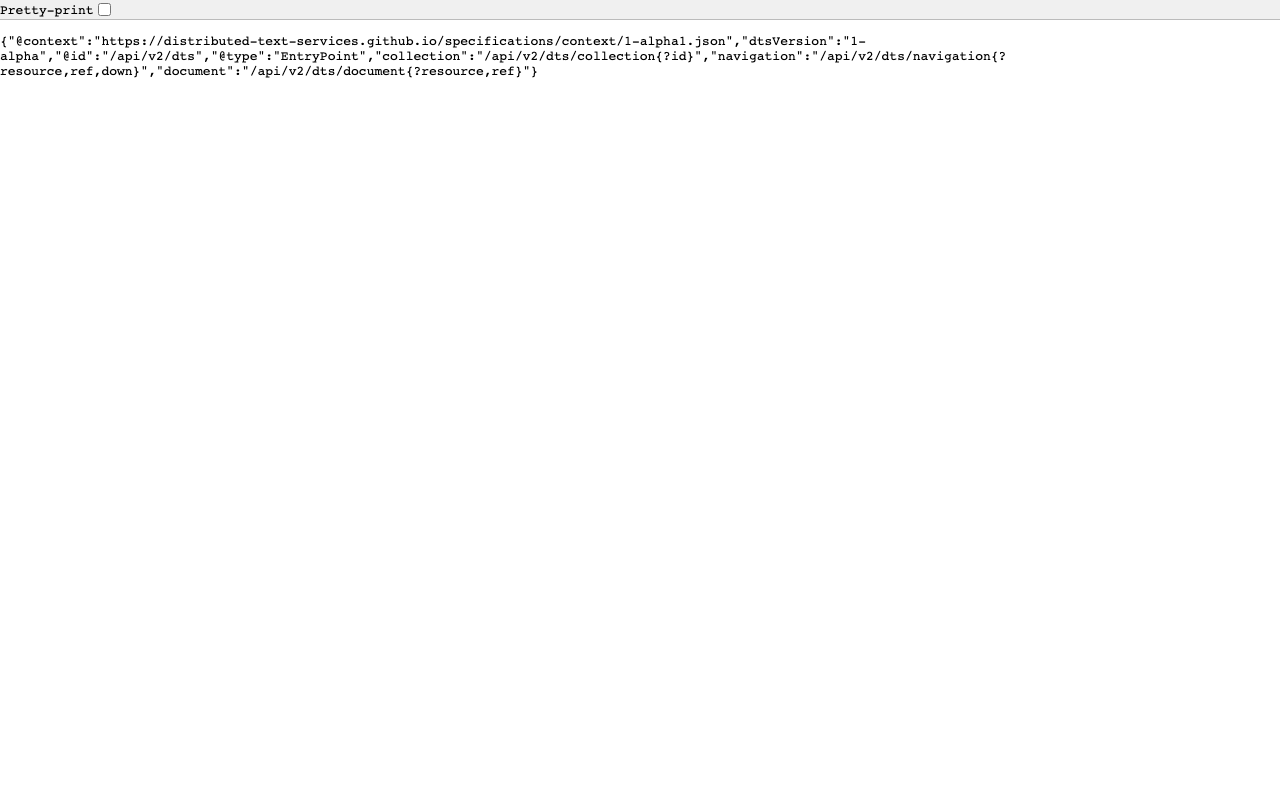
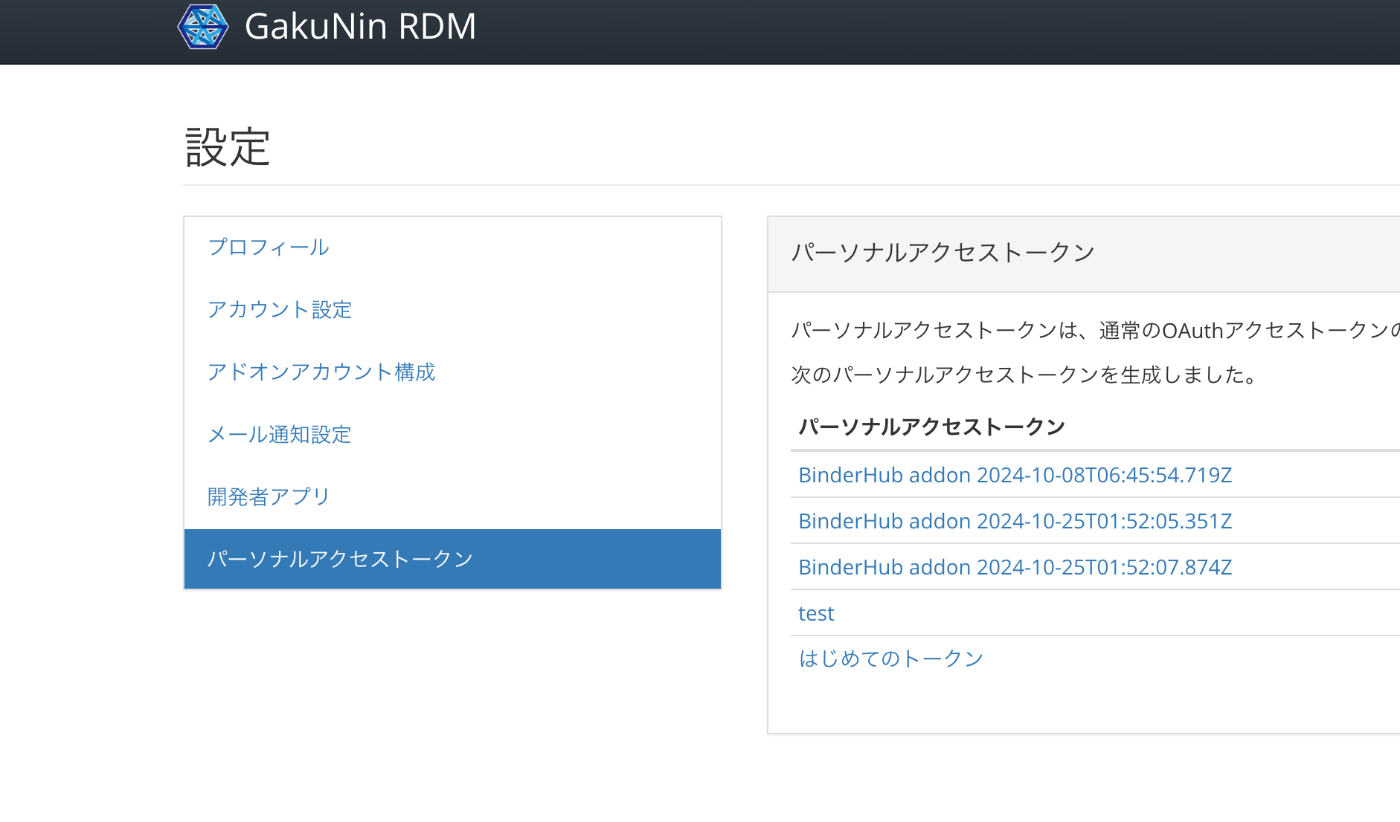
概要 GakuNin RDMでは、以下でAPIが公開されています。このAPIの使用例について備忘録です。 https://api.rdm.nii.ac.jp/v2/ 参考 GakuNin RDMはOSF(Open Science Framework)をベースに構築されており、APIに関するドキュメントは以下で確認することができます。OpenAPIに準拠しています。 https://developer.osf.io/ PATの取得 PAT(パーソナルアクセストークン)を取得します。 ログイン後、以下のURLから作成することができます。 https://rdm.nii.ac.jp/settings/tokens/ 利用 以下のようなスクリプトにより、プログラムからもアクセスすることができます。 access_token=xxx import requests import os from dotenv import load_dotenv load_dotenv(verbose=True) load_dotenv("./env") access_token = os.environ.get("access_token") # アップロードURLにクエリパラメータを追加 url = f'https://api.rdm.nii.ac.jp/v2/nodes/' # ファイルを開き、PUTリクエストでアップロード # with open(file_path, 'rb') as file: response = requests.get( url, headers={ 'Authorization': f'Bearer {access_token}' } ) response.json() 参考までに、Authorizationヘッダーが未指定の場合、以下の結果が返却されました。 {'data': [], 'links': {'first': None, 'last': None, 'prev': None, 'next': None, 'meta': {'total': 0, 'per_page': 10}}, 'meta': {'version': '2.0'}} ブラウザで確認 APIの出力結果はブラウザでも確認することができます。 https://api.rdm.nii.ac.jp/v2/ 以下のように、Django REST frameworkで作成されていることがわかります。 また、おそらく「Django REST framework JSON:API」を使用し、JSON:APIが採用されていることがわかります。 まとめ GakuNin RDMおよびOSF(Open Science Framework)のAPIについて、参考になりましたら幸いです。 ...

校異源氏物語テキストDBで公開するTEI/XMLファイルに対するDTS APIのGitHubリポジトリ

校異源氏物語テキストDBで公開するTEI/XMLファイルに対するDTS APIのGitHubリポジトリ

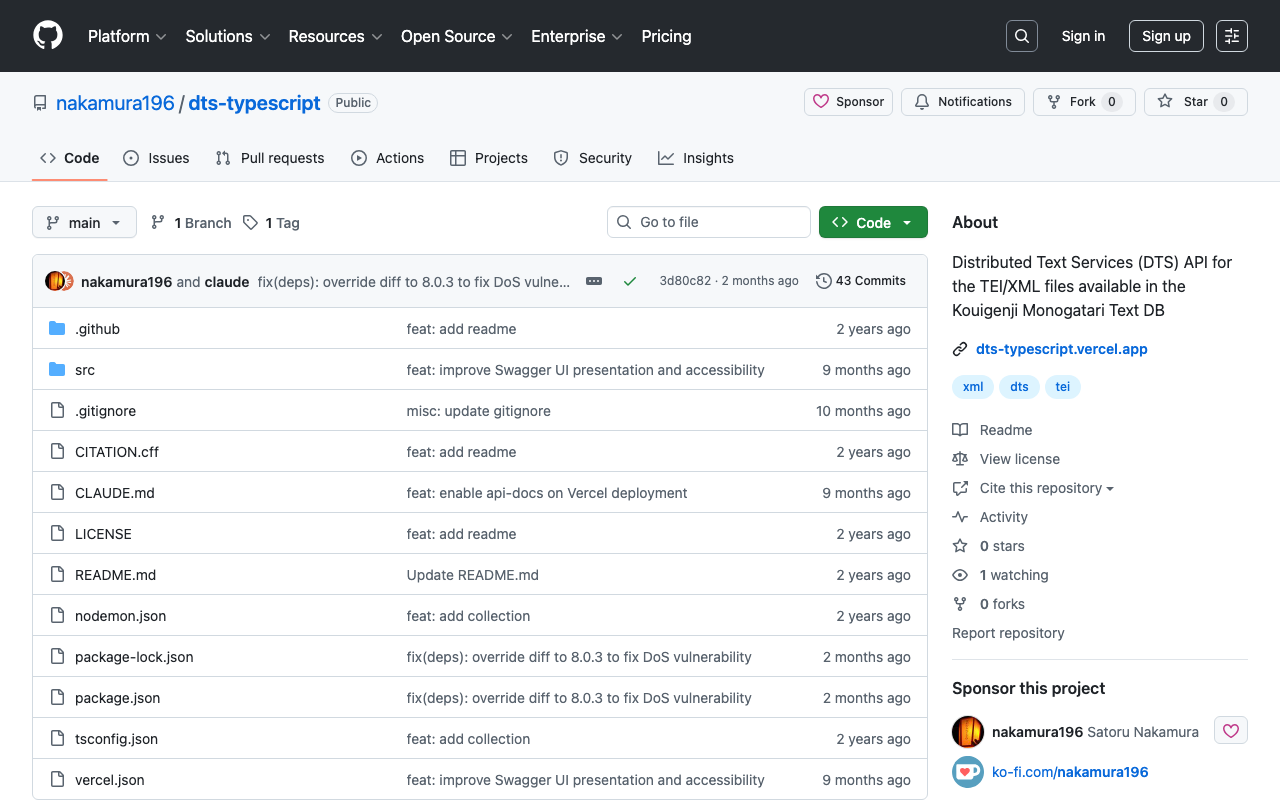
概要 以下の記事で紹介したAPIのGitHubリポジトリを公開しました。 リポジトリは以下です。 https://github.com/nakamura196/dts-typescript 不完全な点があるかと思いますが、参考になりましたら幸いです。 メモ vercelのrewrite 以下のように設定することで、/へのアクセスを/api/dtsにリダイレクトさせることができました。 { "version": 2, "builds": [ { "src": "src/index.ts", "use": "@vercel/node" } ], "rewrites": [ { "source": "/api/dts(.*)", "destination": "/src/index.ts" } ], "redirects": [ { "source": "/", "destination": "/api/dts", "permanent": true } ] } collectionのID コレクションのIDとして以下を使用しています。 const COLLECTION_ID = "urn:kouigenjimonogatari"; 当初urn:プレフィックスをつけていませんでしたが、以下のMyCapytainライブラリから使用した際、urn:がない場合、/が挿入され、うまくいかないことがありました。 https://github.com/Capitains/MyCapytain まとめ 不完全な実装が多いですが、参考になりましたら幸いです。

校異源氏物語テキストDBで公開するTEI/XMLファイルに対するDTS APIを作成する

校異源氏物語テキストDBで公開するTEI/XMLファイルに対するDTS APIを作成する

概要 校異源氏物語テキストDBで公開するTEI/XMLファイルに対するDTS(Distributed Text Services) APIを作成したので、備忘録です。 背景 校異源氏物語テキストDBは以下です。 https://kouigenjimonogatari.github.io/ TEI/XMLファイルを公開しています。 開発したDTS 開発したDTSは以下です。 https://dts-typescript.vercel.app/api/dts Express.jsをVercelに設置しています。 DTSは以下を参考にしてください。 https://zenn.dev/nakamura196/articles/4233fe80b3e76d MyCapytainライブラリ 以下の記事で、DTSをPythonから利用するライブラリを紹介しました。 https://zenn.dev/nakamura196/articles/1f52f460025274 本ライブラリを使用して、開発したDTSを利用してみます。 Create the resolver With the following line we create the resolver : from MyCapytain.resolvers.dts.api_v1 import HttpDtsResolver resolver = HttpDtsResolver("https://dts-typescript.vercel.app/api/dts") Require metadata : let’s visit the catalog The following code is gonna find each text that is readable by Alpheios # We get the root collection root = resolver.getMetadata() # Then we retrieve dynamically all the readableDescendants : it browse automatically the API until # it does not have seen any missing texts: be careful with this one on huge repositories readable_collections = root.readableDescendants print("We found %s collections that can be parsed" % len(readable_collections)) We found 54 collections that can be parsed Printing the full tree # Note that we could also see and make a tree of the catalog. # If you are not familiar with recursivity, the next lines might be a bit complicated def show_tree(collection, char_number=1): for subcollection_id, subcollection in collection.children.items(): print(char_number*"--" + " " + subcollection.id) show_tree(subcollection, char_number+1) print(root.id) show_tree(root) default -- urn:kouigenjimonogatari ---- urn:kouigenjimonogatari.1 ---- urn:kouigenjimonogatari.2 ---- urn:kouigenjimonogatari.3 ---- urn:kouigenjimonogatari.4 ---- urn:kouigenjimonogatari.5 ---- urn:kouigenjimonogatari.6 ---- urn:kouigenjimonogatari.7 ---- urn:kouigenjimonogatari.8 ---- urn:kouigenjimonogatari.9 ---- urn:kouigenjimonogatari.10 ---- urn:kouigenjimonogatari.11 ---- urn:kouigenjimonogatari.12 ---- urn:kouigenjimonogatari.13 ---- urn:kouigenjimonogatari.14 ---- urn:kouigenjimonogatari.15 ---- urn:kouigenjimonogatari.16 ---- urn:kouigenjimonogatari.17 ---- urn:kouigenjimonogatari.18 ---- urn:kouigenjimonogatari.19 ---- urn:kouigenjimonogatari.20 ---- urn:kouigenjimonogatari.21 ---- urn:kouigenjimonogatari.22 ---- urn:kouigenjimonogatari.23 ---- urn:kouigenjimonogatari.24 ---- urn:kouigenjimonogatari.25 ---- urn:kouigenjimonogatari.26 ---- urn:kouigenjimonogatari.27 ---- urn:kouigenjimonogatari.28 ---- urn:kouigenjimonogatari.29 ---- urn:kouigenjimonogatari.30 ---- urn:kouigenjimonogatari.31 ---- urn:kouigenjimonogatari.32 ---- urn:kouigenjimonogatari.33 ---- urn:kouigenjimonogatari.34 ---- urn:kouigenjimonogatari.35 ---- urn:kouigenjimonogatari.36 ---- urn:kouigenjimonogatari.37 ---- urn:kouigenjimonogatari.38 ---- urn:kouigenjimonogatari.39 ---- urn:kouigenjimonogatari.40 ---- urn:kouigenjimonogatari.41 ---- urn:kouigenjimonogatari.42 ---- urn:kouigenjimonogatari.43 ---- urn:kouigenjimonogatari.44 ---- urn:kouigenjimonogatari.45 ---- urn:kouigenjimonogatari.46 ---- urn:kouigenjimonogatari.47 ---- urn:kouigenjimonogatari.48 ---- urn:kouigenjimonogatari.49 ---- urn:kouigenjimonogatari.50 ---- urn:kouigenjimonogatari.51 ---- urn:kouigenjimonogatari.52 ---- urn:kouigenjimonogatari.53 ---- urn:kouigenjimonogatari.54 Printing details about a specific one # Let's get a random one ! from random import randint # The index needs to be between 0 and the number of collections rand_index = randint(0, len(readable_collections)) collection = readable_collections[rand_index] # Now let's print information ? label = collection.get_label() text_id = collection.id print("Treaing `"+label+"` with id " + text_id) Treaing `総角` with id urn:kouigenjimonogatari.47 What about more detailed informations ? Like the citation scheme ? def recursive_printing_citation_scheme(citation, char_number=1): for subcitation in citation.children: print(char_number*"--" + " " + subcitation.name) recursive_printing_citation_scheme(subcitation, char_number+1) print("Maximum citation depth : ", collection.citation.depth) print("Citation System") recursive_printing_citation_scheme(collection.citation) Maximum citation depth : 1 Citation System -- line Let’s get some references ! reffs = resolver.getReffs(collection.id) print(reffs) # Nice ! DtsReferenceSet (DtsReference https://w3id.org/kouigenjimonogatari/api/items/1587-01.json> [line]>, DtsReference https://w3id.org/kouigenjimonogatari/api/items/1587-02.json> [line]>, DtsReference https://w3id.org/kouigenjimonogatari/api/items/1587-03.json> [line]>, DtsReference https://w3id.org/kouigenjimonogatari/api/items/1587-04.json> [line]>, DtsReference ... Let’s get some random passage ! # Let's get a random one ! from random import randint # The index needs to be between 0 and the number of collections rand_index = randint(0, len(reffs)-1) reff = reffs[rand_index] passage = resolver.getTextualNode(collection.id, reff) print(passage.id, passage.reference) # Let's see the XML here # For that, we need to get the mimetype right : from MyCapytain.common.constants import Mimetypes print(passage.export(Mimetypes.XML.TEI)) urn:kouigenjimonogatari.47 DtsReference https://w3id.org/kouigenjimonogatari/api/items/1640-06.json> [line]> TEI xmlns="http://www.tei-c.org/ns/1.0">dts:fragment xmlns:dts="https://w3id.org/dts/api#"> ... 考察 上記の通り、MyCapytainライブラリの基本操作に対応したDTSを構築することができました。 ...

WordPress REST APIで非公開の投稿も含めて検索する

WordPress REST APIで非公開の投稿も含めて検索する

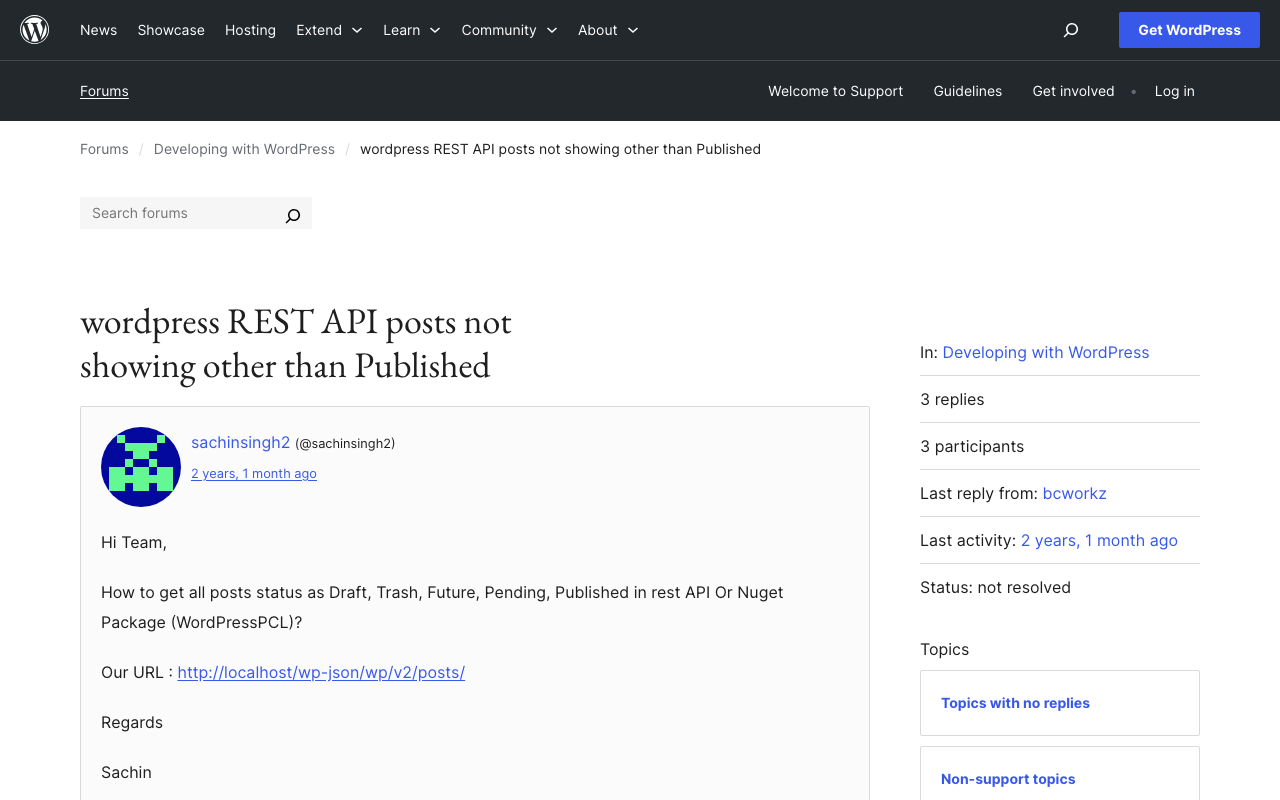
背景 WordPress REST APIで非公開の投稿も含めて検索する方法の備忘録です。 以下が参考になりました。 https://wordpress.org/support/topic/wordpress-rest-api-posts-not-showing-other-than-published/ 具体的には、以下のように、引数statusを使い、複数の状態を指定することで、それらを含む記事の一覧を取得できました。 GET /wp-json/wp/v2/posts?status=publish,draft,trash 参考になりましたら幸いです。

cwrcのwikidata-entity-lookupを試す

cwrcのwikidata-entity-lookupを試す

概要 以下の記事の続きです。 LEAF-WRITERの特徴として、以下が挙げられています。 the ability to look up and select identifiers for named entity tags (persons, organizations, places, or titles) from the following Linked Open Data authorities: DBPedia, Geonames, Getty, LGPN, VIAF, and Wikidata. この機能は、以下のようなライブラリが使用されています。 https://github.com/cwrc/wikidata-entity-lookup この機能を試しています。 使い方 以下などで、npmパッケージが公開されています。 https://www.npmjs.com/search?q=cwrc 上記のリストにはありませんが、今回は以下を対象にします。 https://www.npmjs.com/package/wikidata-entity-lookup 以下でインストールします。 npm i wikidata-entity-lookup wikidataLookup.findPersonは、以下のように実行することができました。 <script lang="ts" setup> // @ts-ignore import wikidataLookup from "wikidata-entity-lookup"; interface Entity { id: string; name: string; description: string; uri: string; } const query = ref<string>(""); const results = ref<Entity[]>([]); const search = () => { wikidataLookup.findPerson(query.value).then((result: Entity[]) => { results.value = result; }); }; </script> デモ Nuxtでの実装例を用意しました。 ...

ArchivematicaでAmazon S3を処理対象およびAIPの保存先に設定する

ArchivematicaでAmazon S3を処理対象およびAIPの保存先に設定する

概要 Archivematicaにおいて、Amazon S3上のファイルやフォルダを処理対象として、さらに処理結果であるAIPをS3に保存する方法に関する備忘録です。 S3をストレージとして利用することにより、他のシステムとの連携の容易化や、AIPの長期保存に関する選択肢が増えると考えられます。 ウェルカムコレクションの以下の記事が参考になりました。 https://docs.wellcomecollection.org/archivematica/administering-archivematica/bootstrapping Amazon S3の設定 バケットを作成します。今回、us-east-1リージョンに、archivematica.aws.ldas.jpというバケットを作成しました。 そして処理対象のファイルなどを格納する「transfer_source」、処理結果であるAIPを格納する「aip_storage」というフォルダを作成しておきます。これらの名前や階層は任意で、後述の過程でどのフォルダを使用するか設定できます。 Archivematica Storage Serviceの設定 Dockerを使ってArchivematicaをインストールした場合、以下のようなURLでArchivematica Storage Serviceにアクセスできます。 http://127.0.0.1:62081/ ログイン後、以下にアクセスします。「Create new space」リンクをクリックします。 /spaces/ 「Create Space」の画面で、以下のように入力します。「Access protocol」にS3を選択し、Access Keyなどを入力します。 Staging pathについてはよくわからず、以下の記事の値を入力します。 https://docs.wellcomecollection.org/archivematica/administering-archivematica/bootstrapping#step_7 Spaceを作成後、「Create Location here」を押して、ロケーションを作成します。2つリンクがありますが、どちらも同じでした。 ここで、2つのロケーションを作成します。一つは、以下のような、Purposeを「Transfer Source」とするロケーションです。 Relative Pathについては、「Browse」ボタンから、先に作成したフォルダから選択します。 また上記ではPipelineがひとつですが、複数のPipelineを作成している場合には、関連づけるものを選択することになると思います。 もう一つは、以下のような、Purposeを「AIP Storage」とするロケーションです。 それぞれの画面で、「Set as global default location for its purpose:」という項目がありますが、これをチェックしておくと、後述するデフォルト設定などが不要になります。 確認 ここまでの設定により、/spaces/にアクセスすると、デフォルトのAccess Protocolが「Local Filesystem」のスペースに加えて、Access Protocolが「S3」のスペースが追加されていることが確認できます。 さらに、/locations/にアクセスすると、追加した2つのロケーションが追加されていることが確認できます。 Archivematica Dashboardの設定 Dockerを使ってArchivematicaをインストールした場合、以下のようなURLでArchivematica Dashboardにアクセスできます。 http://127.0.0.1:62080/ AIPの格納先の設定 そして以下にアクセスして、例えばプロセスautomatedを編集します。 /administration/processing/ ...

Omeka Classicでコレクションを一括削除する方法

Omeka Classicでコレクションを一括削除する方法

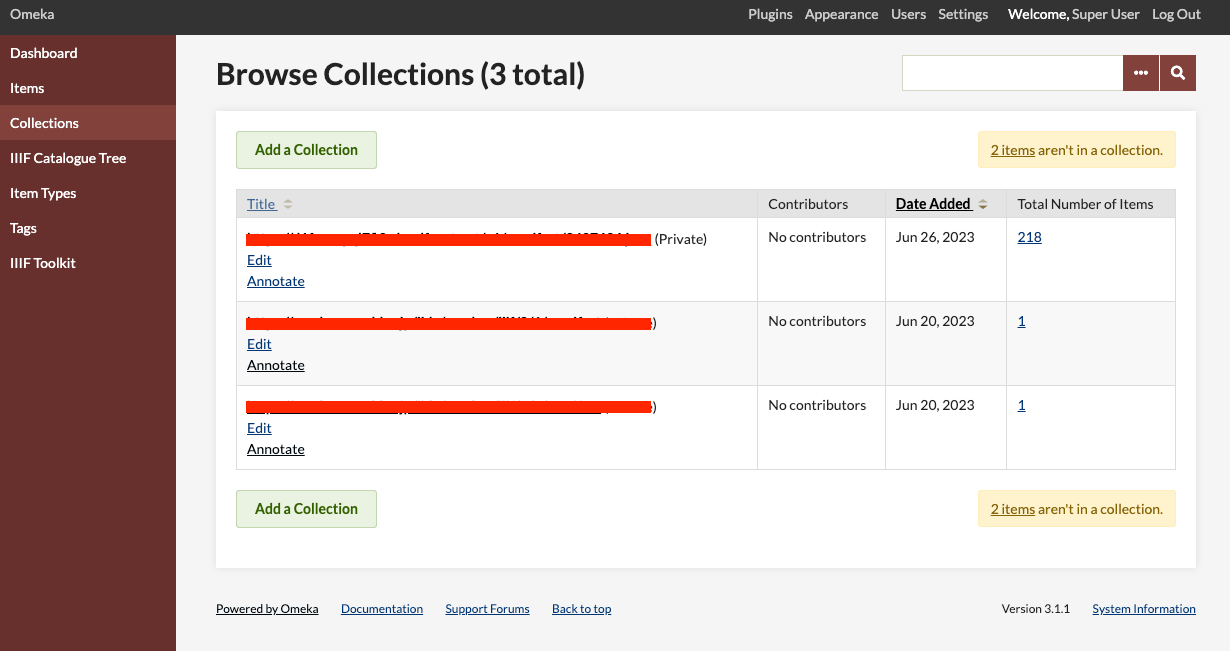
概要 Omeka Classicでコレクションを一括削除する方法の一例を紹介します。Omeka Classic (Version 3.1.1)では、コレクションを複数選択して削除するGUIは提供されていません。アイテムについては、同機能が提供されています。 そこで、APIを用いてコレクションの一括削除を行います。 APIキーの取得 以下を参考に、APIの有効化とAPIキーの発行を行います。 https://omeka.org/classic/docs/Admin/Settings/API_Settings/ 具体的には、まず以下のページにアクセスします。 /admin/settings/edit-api そして、ユーザ毎のページにアクセスして、「API Keys」のタブを選択します。「New key label」からAPIキーを発行します。 /admin/users/api-keys/1 Pythonスクリプト 以下のようなPythonスクリプトにより、コレクションの一括削除を行うことができます。以下では、アイテム数が0のコレクションのみを削除するように設定しています。 import requests api_key = "<取得したAPIキー>" # 要変更 endpoint = "https://example.org/omeka/api" # 要変更 params = { "key": api_key } # コレクション一覧の取得 url = f"{endpoint}/collections" collections = requests.get(url, params=params).json() for collection in collections: # コレクションに含まれるアイテム数を取得 items_count = collection["items"]["count"] # アイテム数が0の場合 if items_count == 0: url_collection = collection["url"] requests.delete(f"{url_collection}", params=params) まとめ Omeka Classicでコレクションを一括削除する際の参考になりましたら幸いです。

ArchivematicaのAPIを用いて、TransferからAIPのダウンロードまでを行う。

ArchivematicaのAPIを用いて、TransferからAIPのダウンロードまでを行う。

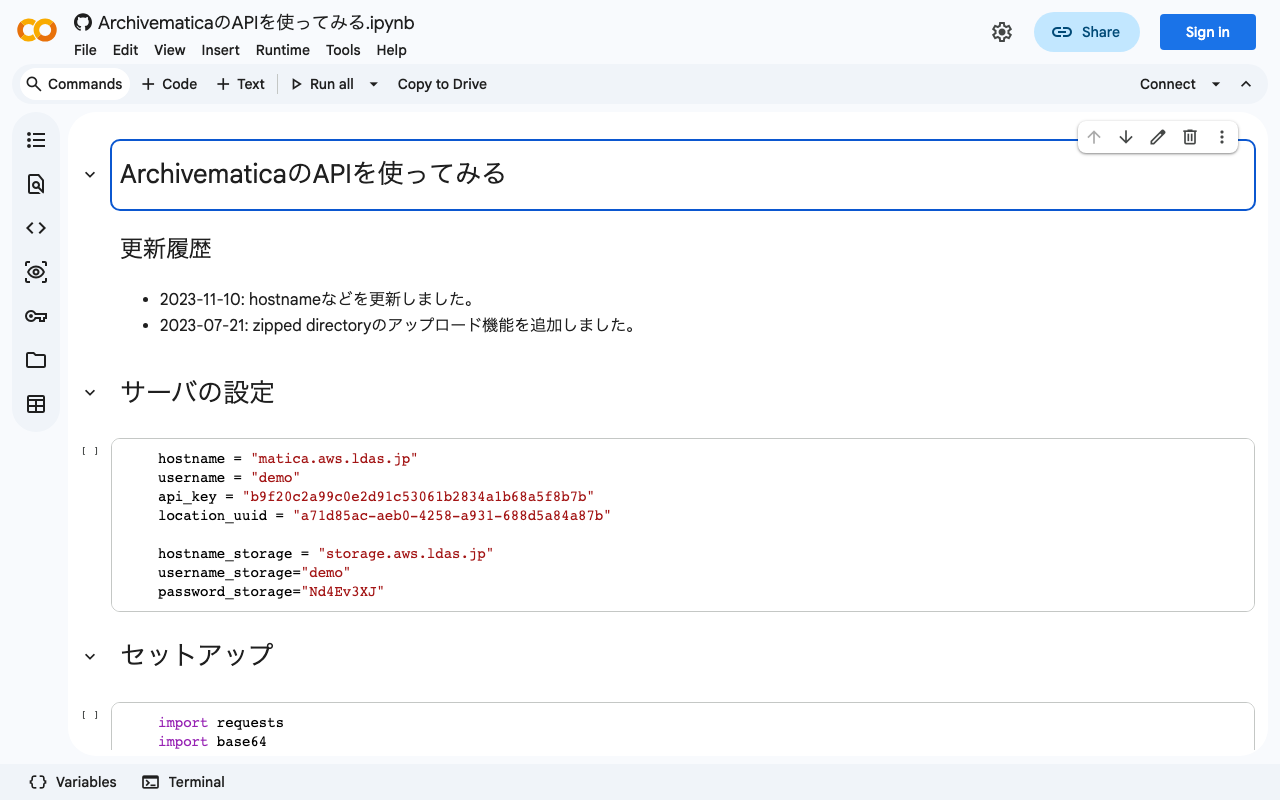
背景 ArchivematicaのAPIを用いて、TransferからAIPのダウンロードまでを行うことができましたので、メモします。 以前、ArchivematicaのAPI利用と、Storage ServiceのAPI利用をそれぞれ記事にしました。 今回は、上記を組み合わせて、TransferからAIPのダウンロードまでを行います。 方法 以下のノートブックに方法を記載しました。 https://colab.research.google.com/github/nakamura196/ndl_ocr/blob/main/ArchivematicaのAPIを使ってみる.ipynb まとめ ArchivematicaのAPI利用にあたり、参考になりましたら幸いです。 今後は、サーバへの処理対象ファイルのアップロードや、上記のAPIを使用したフロントエンドの開発にも取り組みたいと思います。

DrupalとAmazon OpenSearch Serviceを接続する

DrupalとAmazon OpenSearch Serviceを接続する

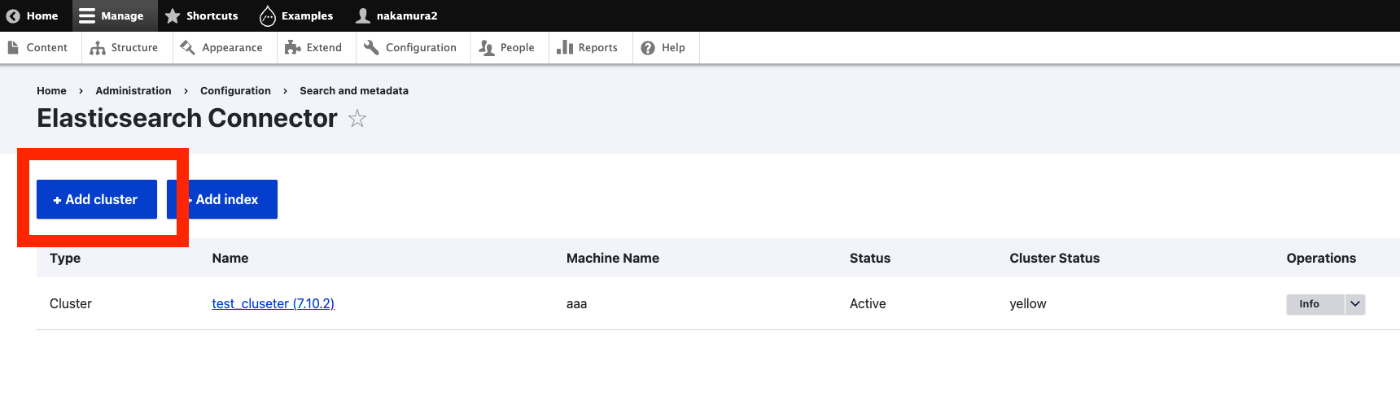
概要 DrupalとAmazon OpenSearch Serviceを接続する機会がありましたので、その備忘録です。以下の記事が参考になりました。 https://www.acquia.com/jp/blog/intergration-with-drupal-and-elasticsearch モジュールのインストール drupal/search_apiとdrupal/elasticsearch_connectorに加えて、nodespark/des-connectorをインストールする必要がありました。 (バージョンの指定方法など、改善の余地があるかもしれません。) composer require "nodespark/des-connector:^7.x-dev" composer require 'drupal/search_api:^1.29' composer require "drupal/elasticsearch_connector ^7.0@alpha" 続けて、以下で有効化します。 drush pm:enable search_api elasticsearch_connector DrupalをElasticsearchに接続する クラスタ 以下にアクセス /admin/config/search/elasticsearch-connector 「Add cluster」をクリックします。 そして、以下のように値を入力します。Amazon OpenSearch ServiceでBasic認証をかけている方法を前提としています。注意点として、「Server URL」に入力する値の末尾に、:443が必要でした。 Elasticsearchサーバーへの接続が成功すると、Cluster Statusに yellow や green と表示されます。 インデックス 次に、任意の作業ですが、インデックスを作成します。「Add index」ボタンを押して、nameだけ入力してみます。結果、以下のようにインデックスが作成されました。 Search APIの設定 今度は、Search API側の設定を行います。以下にアクセスします。 /admin/config/search/search-api サーバの追加 「Add Server」ボタンを押します。特に、BackendにElasticsearchを選択して、Clusterに先程作成したクラスタを選択します。 インデックスの追加 以下の画面には出ていませんが、「Datasources」のところで、「Content」を選択しています。また「Server」で、上記で作成したサーバを選択しています。 次に、末尾の「Save and add fields」ボタンをクリックします。 フィールドの追加 今回は最低限のフィールドとして、Titleを追加しておきます。 追加したフィールドに対するFulltext検索を可能とするために、「Type」を変更します。これらの設定は適宜変更してください。 再インデクシング 「Save changes」を押すと、以下のように、reindexingへのリンク(黄色)が表示されます。 ...

Nuxt 3のserver/apiでjsonファイルを操作する方法の一例

Nuxt 3のserver/apiでjsonファイルを操作する方法の一例

Nuxt 3のserver/apiでjsonファイルを(インポートして)操作する方法の一例です。以下の記事を参考にしました。 https://github.com/nuxt/framework/discussions/775#discussioncomment-1470136 型定義などの改善の余地は多々ありますが、以下のような書き方で動作確認ができました。 // async/await を使用しています。 export default defineEventHandler(async (event) => { const items_: any = await import('~/assets/index.json') // .defaultをつける点に注意 const items_total: any[] = items_.default // 以下の参考リンクを参照してください。 const query = getQuery(event) const page: number = Number(query.page) || 1; const size: number = Number(query.size) || 20; const items: any[] = items_total.slice((page - 1) * size, page * size); return { "hits": { "total": { "value": items_total.length, }, "hits": items } } }); 上記により、例えば/api/items?page=2&size=40のようなクエリを用いることで、インポート元のjsonファイル(~/assets/index.json)の一部を返却することができました。パスはassets以外でも大丈夫のようですが、十分に検証できていません。 色々と改善の余地があるかと思いますが、参考になりましたら幸いです。 参考 https://v3.nuxtjs.org/guide/directory-structure/server/#handling-requests-with-query-parameters

Hugging Face SpacesでJSONを返却する

Hugging Face SpacesでJSONを返却する

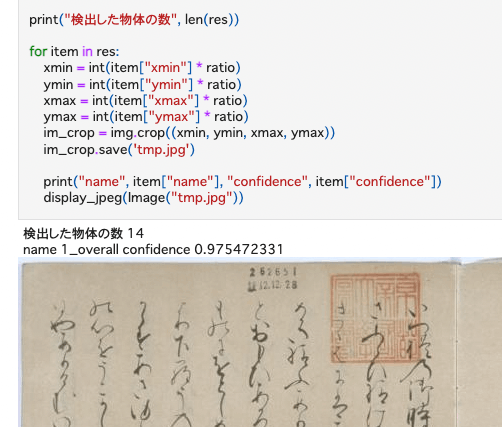
以前、Hugging Face SpacesとYOLOv5モデル(NDL-DocLデータセットで学習済み)を使った推論アプリの構築を行いました。 今回は上記のアプリを一部変更して、以下の差分に示すように、JSON出力を追加しました。 https://huggingface.co/spaces/nakamura196/yolov5-ndl-layout/commit/4d48b95ce080edd28d68fba2b5b33cc17b9b9ecb#d2h-120906 これにより、以下のノートブックのように、返却結果を利用した処理が可能になりました。 https://github.com/nakamura196/ndl_ocr/blob/main/GradioのAPIを用いた物体検出例.ipynb 他により良い方法があるかと思いますが、参考になりましたら幸いです。

The New York Public LibraryのAPIを使ってみる

The New York Public LibraryのAPIを使ってみる

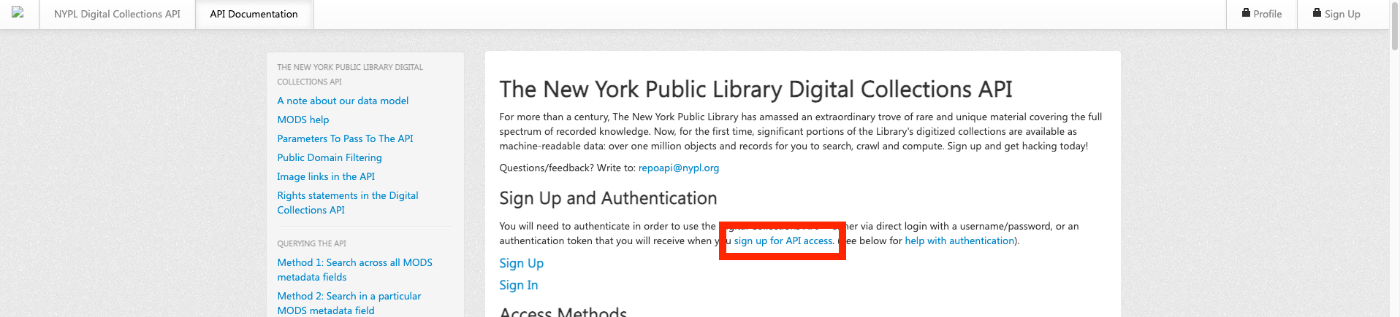
概要 The New York Public Libraryでは、Digital Collections APIを提供しています。 http://api.repo.nypl.org/ 本記事では、このAPIの使い方の一例について説明します。 サインアップ まず以下のリンクをクリックして、サインアップを行います。 以下のようなフォームが表示されますので、必要な情報を入力します。 入力後、 Welcome to NYPL API という件名のメールが届きます。このメールの中に、 Authentication Token が記載されています。 メタデータの抽出 The New York Public Library Digital Collections APIではさまざまなendpointが提供されています。今回は以下のendpointを利用して、各アイテムのメタデータを抽出してみます。 http://api.repo.nypl.org/api/v1/items/item_details/[:id] 具体的には、以下のアイテムを例としてます。 https://digitalcollections.nypl.org/items/510d47e1-d3b0-a3d9-e040-e00a18064a99 そして、以下に示したメタデータの抽出を試みます。 以下のGoogle Colabにメタデータの抽出サンプルプログラムを作成しました。参考になりましたら幸いです。 https://colab.research.google.com/drive/1sO9plTqraPwdBF61sArlD6k6pZRpfJL8?usp=sharing 上記プログラムを実行すると、例えば以下のようなメタデータが得られます。 { "title": "Genji monogatari: Sakaki no maki|The Tale of Genji", "collection": " > Genji monogatari : Sakaki no maki", "dateIssued": "1650 (start)|1700 (end)", "place": "Kyoto", "identifier": "Hades Collection Guide ID (legacy): 443|Hades struc ID (legacy): 747877|Universal Unique Identifier (UUID): ce4bcd90-c60d-012f-9d19-58d385a7bc34" } まとめ APIを利用したデータ活用の参考になりましたら幸いです。 ...

IIIF Presentation APIのバリデーション方法とその実例の紹介ほか

IIIF Presentation APIのバリデーション方法とその実例の紹介ほか

概要 先日、以下の記事に書いた通り、IIIFのマニフェストファイルの配信と、IIIF Content Search APIを提供するアプリを開発しました。 https://zenn.dev/nakamura196/articles/76bdc86b1b7524 ただそれぞれ、APIに準拠しない記述をしていた部分がありました。 本記事では、その修正内容を共有するとともに、バリデーションを行うPresentation API Validatorの使用方法について、実例とともに紹介します。 https://presentation-validator.iiif.io/ マニフェストファイルの修正 上記のPresentation API Validatorのサイトにアクセスし、URL of Manifest to ValidateにマニフェストファイルのURLを入力し、対応したAPIのバージョン(今回は3.0)を選択します。 その結果、以下のように、エラーがある場合には、その内容が表示されます。 冒頭で紹介した私が開発したアプリが配信するマニフェストファイルは、そのサイズが大きいため、そのまま本バリデータにURLを入力すると、検証結果が表示されるまで時間がかかります。 そのため、マニフェストファイルの1canvas目のデータのみを残したマニフェストファイルを別途作成しました。それをバリデータにかけた結果、59件のエラーメッセージが表示されました。 以下、それぞれのエラー内容への対応方法を記述します。 Error 1 of 59. Message: ['https://ocr.aws.ldas.jp/v1/manifest/3437686.json'] is not of type 'string' before { "id": [ "https://ocr.aws.ldas.jp/v1/manifest/3437686.json" ] } 誤って、マニフェストファイルのidを配列の形で与えていました。以下のように修正しました。 after { "id": "https://ocr.aws.ldas.jp/v1/manifest/3437686.json" } Error 2 of 59. Message: 'Persistent ID' is not of type 'object' before { "metadata": [ { "label": "Persistent ID", "value": "info:ndljp/pid/3437686" } ] } この類のエラーは、2-23、26-59まで共通でした。(主に、metadataの記述箇所) 以下のような形で、言語(ここではnone)を指定し、値は配列として与える必要がありました。必要に応じて、jaやenといった言語を与えることができます。 ...