Mirador3プラグイン開発: Text Overlay pluginで縦書き対応を行う
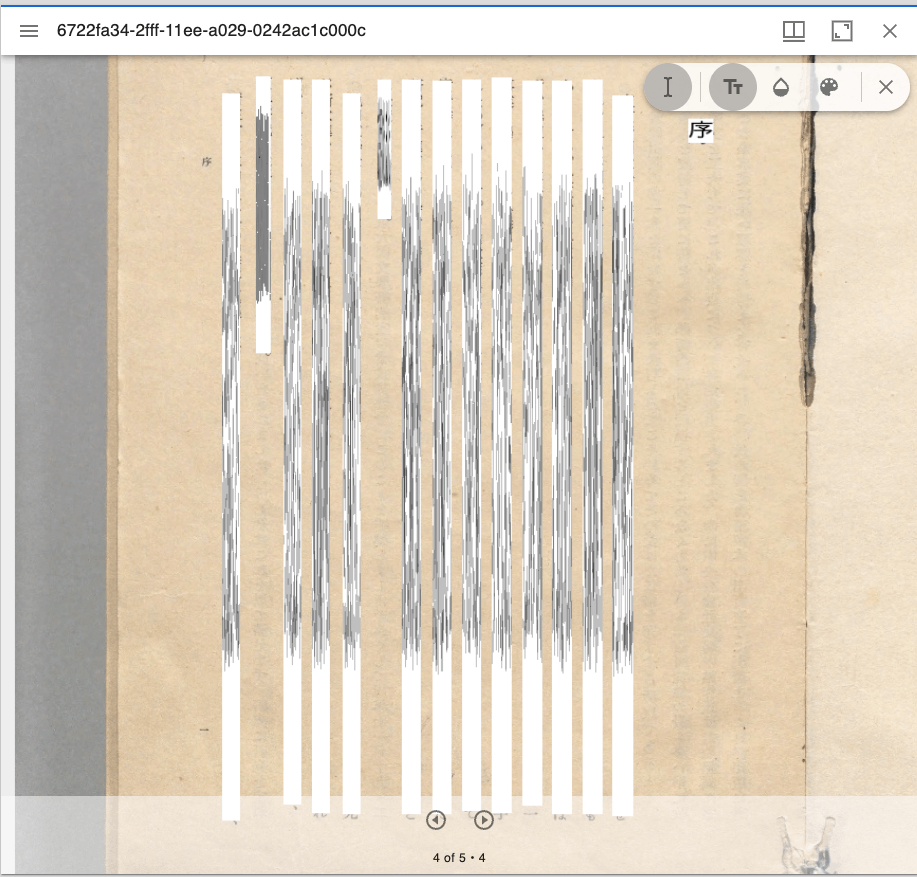
概要 Text Overlay plugin for Mirador 3は、OCRまたはトランスクリプションに基づいて選択可能なテキストオーバーレイを表示するMirador3のプラグインです。 https://github.com/dbmdz/mirador-textoverlay 以下でデモページが公開されています。 https://mirador-textoverlay.netlify.app/ 一方、日本語などの縦書きテキストを表示してみると、以下のようにうまく表示ができませんでした。 そこで、上記のリポジトリをフォークして、縦書きテキストも表示できるようにしました。以下のリポジトリでソースコードを公開しています。(いずれプルリクエストも検討したいと思います。) https://github.com/nakamura196/mirador-textoverlay 結果、以下のように縦書きテキストも表示できるようになりました。 デモページは以下です。 https://nakamura196.github.io/mirador-integration-textoverlay/?manifest=https://nakamura196.github.io/static/iiif/6722fa34-2fff-11ee-a029-0242ac1c000c/manifest_o.json&annotationState=1&canvasIndex=3 以下、本モジュール開発に関連する事項をメモします。 マニフェストファイルの構造 本モジュールでは、以下の要件を満たすIIIFマニフェストが必要とのことでした。 https://github.com/dbmdz/mirador-textoverlay#requirements-for-supported-iiif-manifests いくつかのオプションがありますが、以下のwellcome collectionのマニフェストを参考にしました。 https://iiif.wellcomecollection.org/presentation/v2/b18035723 Canvas毎にseeAlsoでALTO XMLファイルへのURLが指定されています。 { "@id": "https://iiif.wellcomecollection.org/presentation/b18035723/canvases/b18035723_0003.JP2", "@type": "sc:Canvas", "label": "-", "thumbnail": { "@id": "https://iiif.wellcomecollection.org/thumbs/b18035723_0003.JP2/full/72,100/0/default.jpg", "@type": "dctypes:Image", "service": { "@context": "http://iiif.io/api/image/2/context.json", "@id": "https://iiif.wellcomecollection.org/thumbs/b18035723_0003.JP2", "profile": "http://iiif.io/api/image/2/level0.json", "protocol": "http://iiif.io/api/image", "width": 732, "height": 1024, "sizes": [ { "width": 72, "height": 100 }, { "width": 143, "height": 200 }, { "width": 286, "height": 400 }, { "width": 732, "height": 1024 } ] } }, "seeAlso": { "@id": "https://api.wellcomecollection.org/text/alto/b18035723/b18035723_0003.JP2", "profile": "http://www.loc.gov/standards/alto/v3/alto.xsd", "format": "text/xml", "label": "METS-ALTO XML" }, "height": 3372, "width": 2411, "images": [ { "@id": "https://iiif.wellcomecollection.org/presentation/b18035723/canvases/b18035723_0003.JP2/painting/anno", "@type": "oa:Annotation", "motivation": "sc:painting", "resource": { "@id": "https://iiif.wellcomecollection.org/image/b18035723_0003.JP2/full/732,1024/0/default.jpg", "@type": "dctypes:Image", "format": "image/jpeg", "height": 1024, "width": 732, "service": { "@context": "http://iiif.io/api/image/2/context.json", "@id": "https://iiif.wellcomecollection.org/image/b18035723_0003.JP2", "profile": "http://iiif.io/api/image/2/level1.json", "protocol": "http://iiif.io/api/image", "width": 2411, "height": 3372 } }, "on": "https://iiif.wellcomecollection.org/presentation/b18035723/canvases/b18035723_0003.JP2" } ], "otherContent": [ { "@id": "https://iiif.wellcomecollection.org/annotations/v2/b18035723/b18035723_0003.JP2/line", "@type": "sc:AnnotationList", "label": "Text of page -" } ], "within": "" } まとめ 開発したプラグインについて、xmlファイルのロードが完了しない時があるなど、引き続き改善が必要ですが、Mirador3のプラグイン開発やIIIF、OCR結果の活用にあたり、参考になりましたら幸いです。 ...