本記事はAIが作成し、人間が追記しました。
概要
IIIF Georeference ViewerにおけるマップコンポーネントをLeafletからMapLibre GLへ移行し、複数の機能改善を実施しました。本記事では、実装した主要な機能とその技術的詳細について説明します。
https://nakamura196.github.io/iiif_geo/
主要な改善点
1. 画像の自動回転機能
IIIF画像を地図上に正しい向きで表示するため、コントロールポイント(対応点)から自動的に回転角度を計算する機能を実装しました。
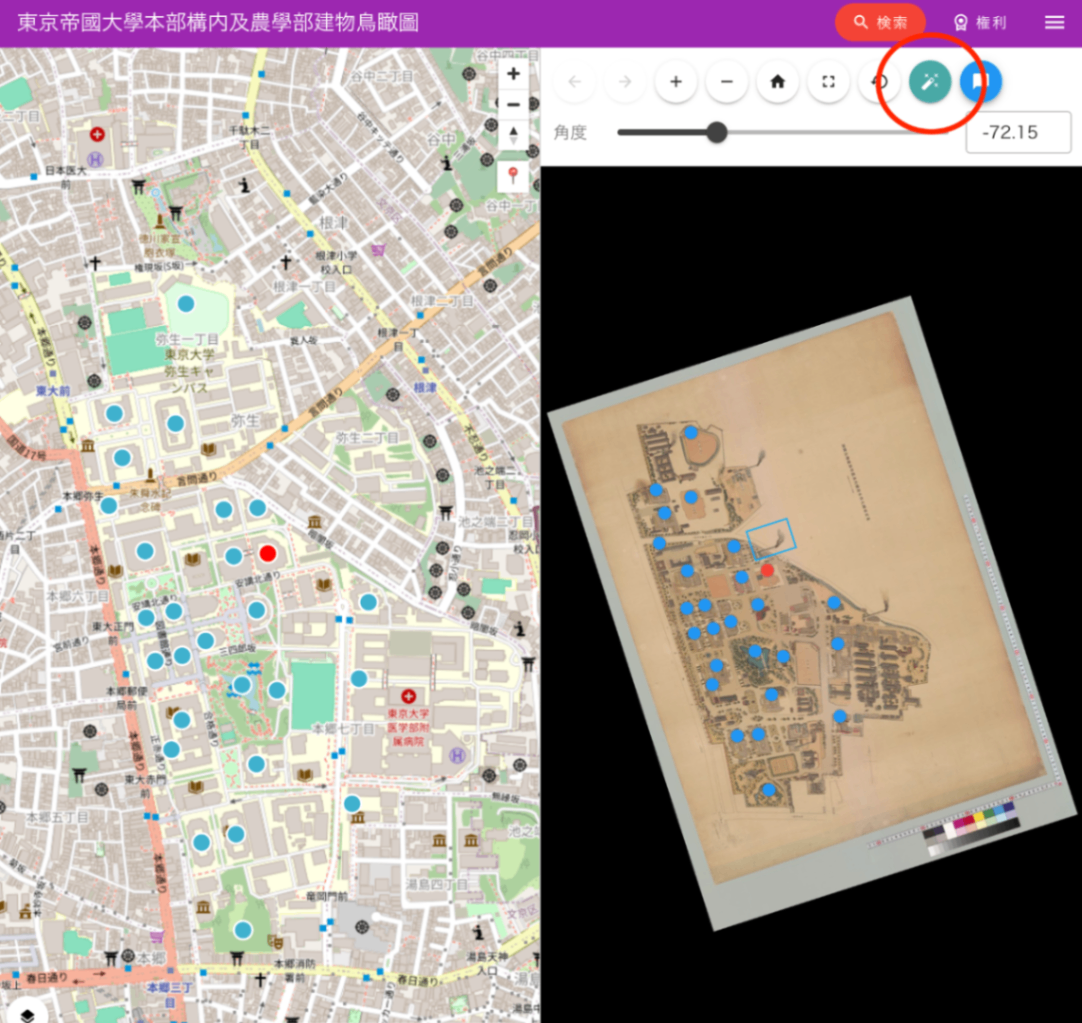
機能概要
- 画像座標と地理座標の対応点から、画像を北が上になるように回転させる角度を自動計算
- 2点間または3点以上の分布パターンから最適な回転角度を決定
- URLパラメータによる回転角度の保存と復元
実装のポイント
// utils/calculateImageRotation.ts
export function calculateImageRotation(features: Feature[]): RotationCalculationResult | null {
  // 最も離れた2点を見つける(より正確な角度計算のため)
  const validFeatures = features.filter((f) =>
    f.properties?.resourceCoords && f.geometry?.coordinates
  );

  // 画像座標系でのベクトルと地理座標系でのベクトルから回転角度を計算
  const imgVector = { x: img2.x - img1.x, y: img2.y - img1.y };
  const geoVector = { x: geo2.lng - geo1.lng, y: geo2.lat - geo1.lat };

  // 北を基準とした角度の差を計算
  const rotationDeg = geoAngleFromNorthDeg - imgAngleDeg;
  return normalizeAngle(rotationDeg);
}
UI実装
- 自動回転ボタン(🔧アイコン)をOSDビューアーに配置
- rotationパラメータが未指定の場合は自動的に回転角度を計算
- 手動での角度調整用スライダーも提供
2. LeafletからMapLibre GLへの移行
移行の背景
- パフォーマンス向上 : MapLibre GLはWebGLベースのレンダリングにより、大量のマーカー表示時のパフォーマンスが向上
- スムーズなアニメーション : 地図の移動やズーム時のアニメーションがより滑らかに
- ベクタータイルのサポート : ラスタータイルに加えてベクタータイルの表示が可能
実装のポイント
import { Map, NavigationControl, Marker, Popup } from "maplibre-gl";
import "maplibre-gl/dist/maplibre-gl.css";

const mapInstance = ref<Map | null>(null);

// MapLibre GL初期化
mapInstance.value = new Map({
  container: mapContainer.value!,
  style: mapStyles.value[0].style,
  center: initialCenter,
  zoom: zoom_.value,
  attributionControl: false
});
3. 現在地表示機能
ブラウザのGeolocation APIを使用して、ユーザーの現在地を地図上に表示する機能を実装しました。
実装内容
- カスタムコントロールボタンの追加(📍アイコン)
- 現在地取得と地図の自動移動
- 青色マーカーによる現在地の可視化
const focusCurrentLocation = () => {
  if (navigator.geolocation) {
    navigator.geolocation.getCurrentPosition(
      (position) => {
        const { latitude, longitude } = position.coords;
        const currentLngLat: LngLatLike = [longitude, latitude];

        mapInstance.value!.flyTo({
          center: currentLngLat,
          zoom: 15
        });

        currentLocationMarker.value = new Marker({ color: '#4080FF' })
          .setLngLat(currentLngLat)
          .setPopup(new Popup().setHTML(t('現在地')))
          .addTo(mapInstance.value);
      },
      (error) => {
        alert(t('位置情報の取得に失敗しました'));
      }
    );
  }
};
4. 複数地図スタイルの切り替え機能
異なる地図スタイルを動的に切り替える機能を実装しました。
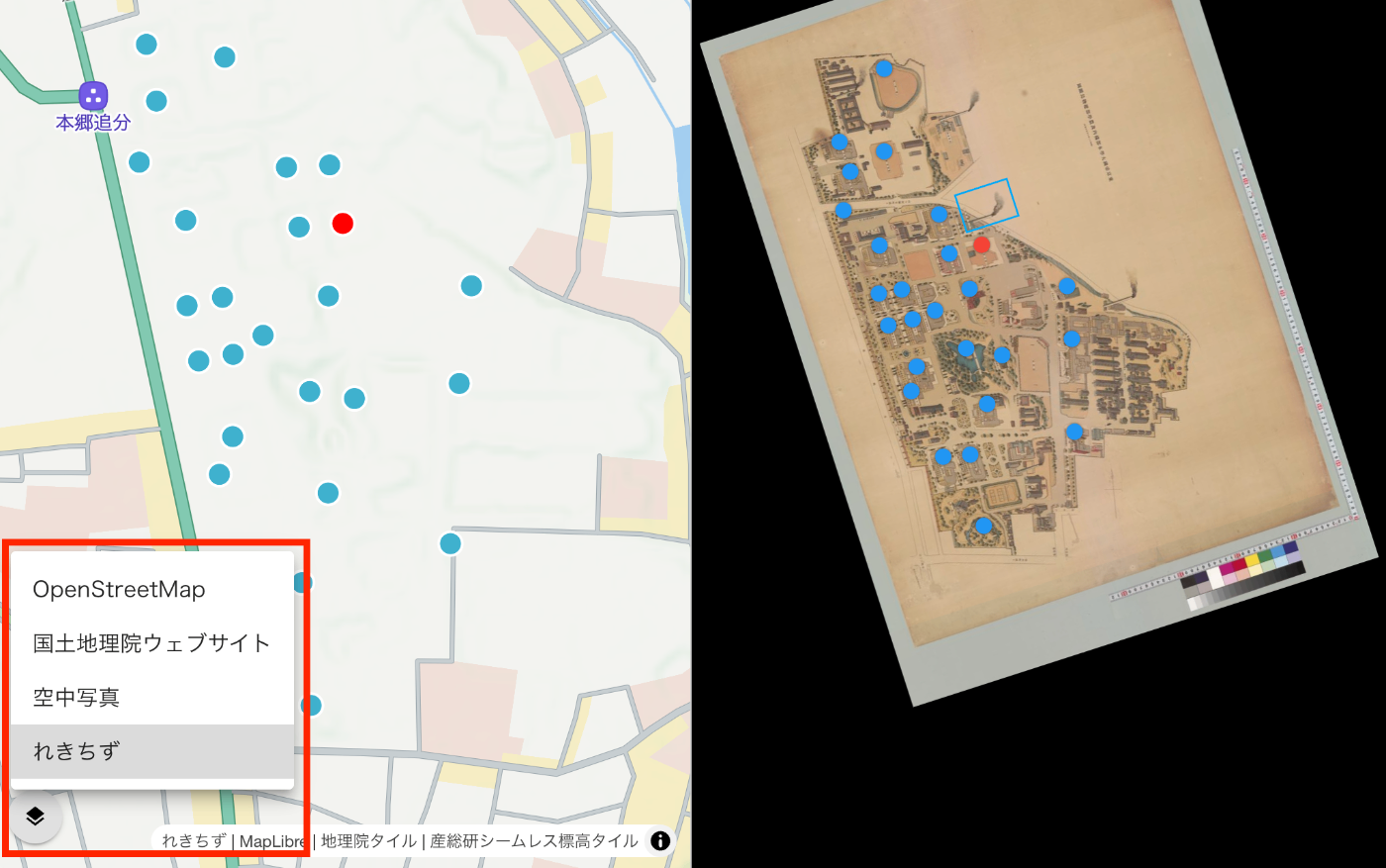
対応する地図スタイル
- OpenStreetMap : 標準的な地図表示
- 空中写真 : 国土地理院提供の航空写真
- れきちず : Mierune提供の歴史的地図スタイル
実装のポイント
- スタイル切り替え時のデータ永続化
- クラスタリングやマーカーの再設定
- レイヤーセレクターUIの提供
const switchMapStyle = (index: number) => {
  if (index === currentStyleIndex.value) return;

  currentStyleIndex.value = index;
  const style = mapStyles.value[index].style;

  // スタイル変更前にデータを保存
  let currentLocationData = currentLocationMarker.value ? {...} : null;

  // 新しいスタイルを適用
  mapInstance.value.setStyle(style);

  // スタイル読み込み後にデータを復元
  mapInstance.value.once('idle', () => {
    if (currentLocationData) {
      // 現在地マーカーを再追加
    }
    if (geojsonData.value) {
      setupClusteringWithData(geojsonData.value);
    }
  });
};
5. マーカークラスタリング機能
大量のマーカーを効率的に表示するためのクラスタリング機能を実装しました。
機能詳細
- 近接するマーカーの自動グループ化
- クラスター内のマーカー数表示
- クリック時のズームイン動作
- 個別マーカーのポップアップ表示
const setupClusteringWithData = (geojson: any) => {
  mapInstance.value.addSource('points', {
    type: 'geojson',
    data: geojson,
    cluster: true,
    clusterMaxZoom: 14,
    clusterRadius: 50
  });

  // クラスターレイヤー
  mapInstance.value.addLayer({
    id: 'clusters',
    type: 'circle',
    source: 'points',
    filter: ['has', 'point_count'],
    paint: {
      'circle-color': [
        'step', ['get', 'point_count'],
        '#51bbd6', 10,
        '#f1f075', 30,
        '#f28cb1'
      ],
      'circle-radius': [
        'step', ['get', 'point_count'],
        20, 10,
        30, 30,
        40
      ]
    }
  });
};
6. URLパラメータによる状態管理
地図の状態(ズームレベル、中心座標)をURLパラメータとして保存し、共有可能なリンクを生成する機能を実装しました。
対応パラメータ
mapZoom: ズームレベルmapLat: 緯度mapLng: 経度lat,lng: 直接座標指定(レガシーサポート)
const updateMapURLParams = () => {
  const params = new URLSearchParams(window.location.search);
  params.set('mapZoom', zoom_.value.toString());
  params.set('mapLat', lat.toFixed(6));
  params.set('mapLng', lng.toFixed(6));

  const newUrl = `${window.location.pathname}?${params.toString()}`;
  window.history.replaceState({}, '', newUrl);
};
7. その他の改善点
TypeScript対応の強化
- 型定義の追加によるコード品質向上
- MapLibre GLの型定義活用
レスポンシブ対応
- モバイルデバイスでの操作性向上
- タッチジェスチャーのサポート
パフォーマンス最適化
- debounceによるURL更新の最適化
- スタイル切り替え時の効率的なデータ管理
技術スタック
- フレームワーク : Vue 3 + Nuxt 3
- 地図ライブラリ : MapLibre GL JS v4.7.1
- UI : Vuetify 3
- 言語 : TypeScript
まとめ
LeafletからMapLibre GLへの移行により、パフォーマンスの向上と機能の拡充を実現しました。特に複数の地図スタイル切り替え機能により、歴史的地図と現代地図の比較が容易になり、IIIF画像の地理的コンテキストをより深く理解できるようになりました。
今後は、3D地形表示やより高度な可視化機能の追加を検討しています。