大規模な点群データ(LiDAR/LAZ)をWebブラウザで表示しようとすると、メモリ不足でクラッシュしてしまうことがあります。本記事では、Potree のLOD(Level of Detail)技術を使って、数百万点の点群をストレスなく表示する方法を紹介します。
https://3dtiles-viewer.vercel.app/potree-lod-viewer.html
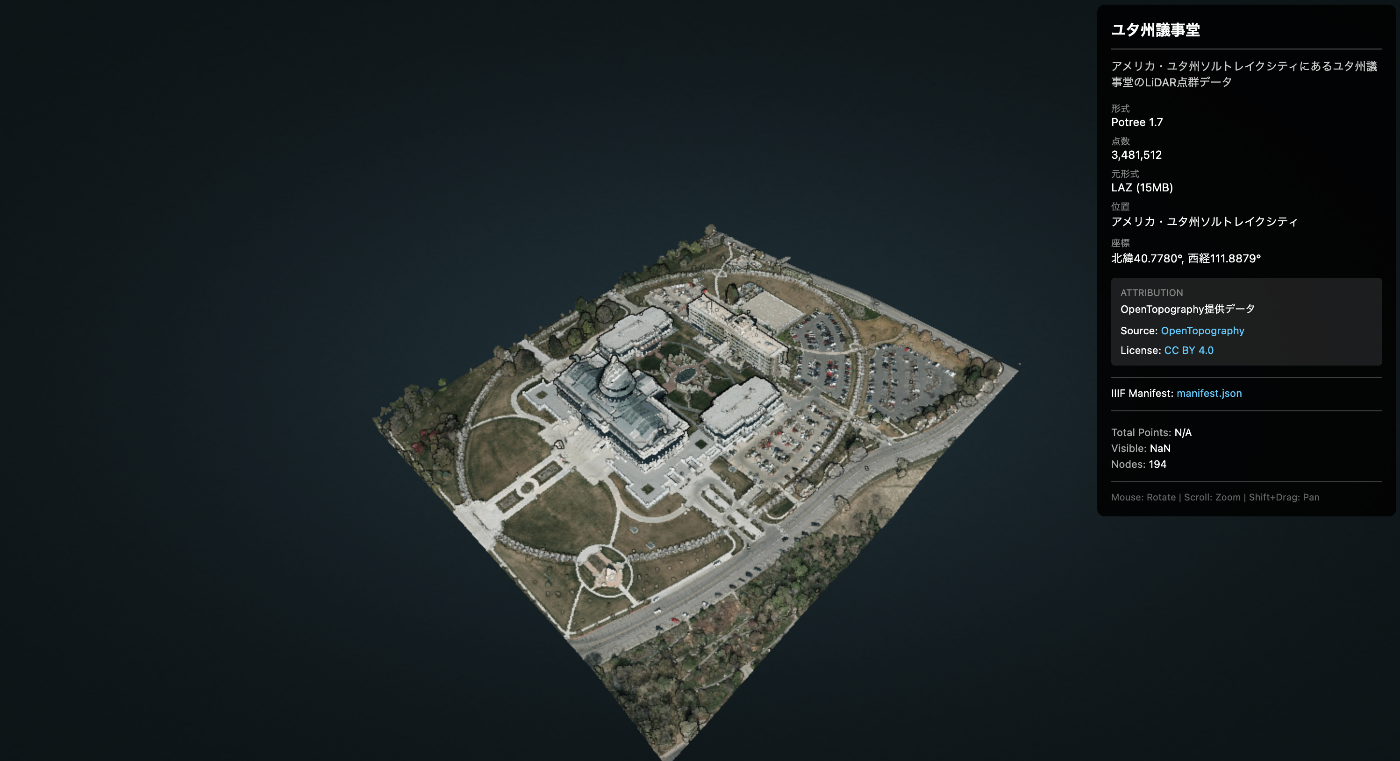
使用データ
- データ名 : Utah State Capitol(ユタ州議事堂)
- 出典 : OpenTopography
- ダウンロードURL : https://object.cloud.sdsc.edu/v1/AUTH_opentopography/www/education/MatlabTopo/Utah_state_capitol.laz
- ファイルサイズ : 15MB(LAZ圧縮)
- 点数 : 3,481,512点
- 位置 : Salt Lake City, Utah, USA
課題
このデータをそのままThree.jsなどで読み込もうとすると、ブラウザがフリーズする可能性があります。
解決策:Potree
Potreeは、大規模点群データのためのWebGLベースのビューアです。**LOD(Level of Detail)**により、カメラに近い部分は詳細に、遠い部分は粗く表示することで、数十億点のデータでもスムーズに動作します。
仕組み
- 点群をオクトリー構造 で空間分割
- 各ノードに異なる詳細度のデータを格納
- 視点に応じて必要なノードのみ動的に読み込み
手順
1. LAZファイルのダウンロード
curl -L -o utah_capitol.laz \
  "https://object.cloud.sdsc.edu/v1/AUTH_opentopography/www/education/MatlabTopo/Utah_state_capitol.laz"
2. LAZからPotree形式への変換
PotreeConverterをDockerで実行します。
# Dockerイメージの取得
docker pull synth3d/potreeconverter

# 変換実行
docker run --rm \
  -v $(pwd):/data \
  -v $(pwd)/output:/output \
  synth3d/potreeconverter \
  PotreeConverter /data/utah_capitol.laz -o /output/utah_capitol
出力結果 :
AABB:
min: [424889, 4.51427e+06, 1350.42]
max: [425270, 4.51471e+06, 1458.57]

spacing calculated from diagonal: 3.78973
conversion finished
3481512 points were processed and 3481512 points (100%) were written to the output.
duration: 1.819s
変換後のサイズ : 54MB
生成されるファイル構造:
utah_capitol/
├── cloud.js          # メタデータ
├── sources.json
└── data/
    └── r/
        ├── r.bin     # ルートノード
        ├── r.hrc     # 階層情報
        └── ...       # 多数のノード
3. Potreeライブラリの準備
Potree 1.8をダウンロードして配置します。
# ダウンロード
curl -L -o potree-1.8.zip \
  https://github.com/potree/potree/releases/download/1.8/Potree_1.8.zip

# 解凍して配置
unzip potree-1.8.zip
mv Potree_1.8 js/libs/

# 不要なフォルダを削除(サイズ削減: 121MB → 64MB)
rm -rf js/libs/Potree_1.8/pointclouds
rm -rf js/libs/Potree_1.8/examples
rm -rf js/libs/Potree_1.8/docs
4. ビューアHTMLの作成
<!DOCTYPE html>
<html lang="ja">
<head>
  <meta charset="UTF-8">
  <title>Point Cloud Viewer (Potree)</title>

  <!-- Potree dependencies -->
  <script src="js/libs/Potree_1.8/libs/jquery/jquery-3.1.1.min.js"></script>
  <script src="js/libs/Potree_1.8/libs/spectrum/spectrum.js"></script>
  <script src="js/libs/Potree_1.8/libs/jquery-ui/jquery-ui.min.js"></script>
  <script src="js/libs/Potree_1.8/libs/three.js/build/three.min.js"></script>
  <script src="js/libs/Potree_1.8/libs/other/BinaryHeap.js"></script>
  <script src="js/libs/Potree_1.8/libs/tween/tween.min.js"></script>
  <script src="js/libs/Potree_1.8/libs/d3/d3.js"></script>
  <script src="js/libs/Potree_1.8/libs/proj4/proj4.js"></script>
  <script src="js/libs/Potree_1.8/libs/i18next/i18next.js"></script>
  <script src="js/libs/Potree_1.8/libs/jstree/jstree.js"></script>
  <script src="js/libs/Potree_1.8/build/potree/potree.js"></script>

  <!-- Potree CSS -->
  <link rel="stylesheet" href="js/libs/Potree_1.8/libs/spectrum/spectrum.css">
  <link rel="stylesheet" href="js/libs/Potree_1.8/libs/jquery-ui/jquery-ui.min.css">
  <link rel="stylesheet" href="js/libs/Potree_1.8/libs/jstree/themes/mixed/style.css">
  <link rel="stylesheet" href="js/libs/Potree_1.8/build/potree/potree.css">

  <style>
    html, body { width: 100%; height: 100%; margin: 0; overflow: hidden; }
    #potree_container { position: absolute; width: 100%; height: 100%; }
  </style>
</head>
<body>
  <div id="potree_container"></div>

  <script>
    // ビューア初期化
    const viewer = new Potree.Viewer(document.getElementById("potree_container"));
    viewer.setEDLEnabled(true);           // Eye-Dome Lighting
    viewer.setFOV(60);
    viewer.setPointBudget(3_000_000);     // 一度に表示する最大点数
    viewer.setBackground("gradient");

    // URLパラメータからデータパスを取得
    const params = new URLSearchParams(window.location.search);
    const dataPath = params.get('data') || 'files/utah_capitol/cloud.js';

    // 点群を読み込み
    Potree.loadPointCloud(dataPath, "pointcloud", function(e) {
      const pointcloud = e.pointcloud;

      // マテリアル設定
      pointcloud.material.size = 1;
      pointcloud.material.pointSizeType = Potree.PointSizeType.ADAPTIVE;
      pointcloud.material.shape = Potree.PointShape.CIRCLE;

      viewer.scene.addPointCloud(pointcloud);
      viewer.fitToScreen();
    });
  </script>
</body>
</html>
5. デプロイ
GitHubにpushしてVercel/GitHub Pagesで公開します。
git add docs/potree-lod-viewer.html docs/js/libs/Potree_1.8 docs/files/utah_capitol
git commit -m "Add Potree LOD point cloud viewer with Utah Capitol data"
git push origin main
結果
デモURL : https://3dtiles-viewer.vercel.app/potree-lod-viewer.html?data=files/utah_capitol/cloud.js
| 項目 | 値 |
|---|---|
| データ出典 | OpenTopography |
| LAZサイズ | 15MB |
| 変換後サイズ | 54MB |
| 総点数 | 3,481,512 |
| Point Budget | 3,000,000 |
| 動作 | スムーズ |
カメラをズームすると、自動的に詳細なノードが読み込まれます。
パフォーマンスのポイント
- Point Budget :
viewer.setPointBudget(3_000_000)で一度に描画する点数を制限 - Adaptive Point Size : 距離に応じてポイントサイズを自動調整
- EDL (Eye-Dome Lighting) : 深度感を強調して視認性向上
IIIF Presentation API 3.0 との統合
点群データにメタデータ(タイトル、出典、ライセンスなど)を付与するため、IIIF Presentation API 3.0を活用します。
IIIFマニフェストの作成
{
  "@context": [
    "http://iiif.io/api/presentation/3/context.json",
    {
      "potree": "https://potree.github.io/ns#",
      "cloudUrl": "potree:cloudUrl",
      "pointCount": "potree:pointCount"
    }
  ],
  "id": "https://example.com/iiif/utah_capitol/manifest.json",
  "type": "Manifest",
  "label": {
    "en": ["Utah State Capitol"],
    "ja": ["ユタ州議事堂"]
  },
  "summary": {
    "en": ["LiDAR point cloud of the Utah State Capitol building"],
    "ja": ["ユタ州議事堂のLiDAR点群データ"]
  },
  "metadata": [
    {
      "label": { "en": ["Format"] },
      "value": { "en": ["Potree 1.7"] }
    },
    {
      "label": { "en": ["Point Count"] },
      "value": { "en": ["3,481,512"] }
    },
    {
      "label": { "en": ["Location"] },
      "value": { "en": ["Salt Lake City, Utah, USA"] }
    }
  ],
  "rights": "https://creativecommons.org/licenses/by/4.0/",
  "requiredStatement": {
    "label": { "en": ["Attribution"] },
    "value": { "en": ["Data provided by OpenTopography"] }
  },
  "provider": [
    {
      "id": "https://opentopography.org/",
      "type": "Agent",
      "label": { "en": ["OpenTopography"] },
      "homepage": [
        {
          "id": "https://opentopography.org/",
          "type": "Text",
          "format": "text/html"
        }
      ]
    }
  ],
  "items": [
    {
      "id": "https://example.com/iiif/utah_capitol/manifest.json/scene/1",
      "type": "Scene",
      "items": [
        {
          "id": "https://example.com/iiif/utah_capitol/manifest.json/annotation-page/1",
          "type": "AnnotationPage",
          "items": [
            {
              "id": "https://example.com/iiif/utah_capitol/manifest.json/annotation/1",
              "type": "Annotation",
              "motivation": "painting",
              "body": {
                "id": "https://example.com/files/utah_capitol/cloud.js",
                "type": "Model",
                "format": "application/json",
                "cloudUrl": "https://example.com/files/utah_capitol/cloud.js",
                "pointCount": 3481512
              },
              "target": "https://example.com/iiif/utah_capitol/manifest.json/scene/1"
            }
          ]
        }
      ]
    }
  ]
}
マニフェストの主要プロパティ
| プロパティ | 説明 |
|---|---|
label | タイトル(多言語対応) |
summary | 説明文 |
metadata | 形式、点数、位置などのメタデータ |
rights | ライセンスURL |
requiredStatement | 必須の帰属表示 |
provider | データ提供者情報 |
items[].body.cloudUrl | Potree cloud.jsへのURL |
ビューアでのマニフェスト読み込み
// マニフェストURLからメタデータを取得
const manifestUrl = 'iiif/utah_capitol/manifest.json';

fetch(manifestUrl)
  .then(res => res.json())
  .then(manifest => {
    // タイトル表示
    const title = manifest.label?.ja?.[0] || manifest.label?.en?.[0];
    document.getElementById('title').textContent = title;

    // ライセンス表示
    if (manifest.rights) {
      const licenseName = manifest.rights.includes('by/4.0') ? 'CC BY 4.0' : 'License';
      document.getElementById('license').innerHTML =
        `<a href="${manifest.rights}">${licenseName}</a>`;
    }

    // 点群データのURL取得
    const cloudUrl = manifest.items[0].items[0].items[0].body.cloudUrl;
    loadPointCloud(cloudUrl);
  });
使用方法
# マニフェストから読み込み(メタデータ表示あり)
potree-lod-viewer.html?manifest=iiif/utah_capitol/manifest.json

# 直接データを指定(メタデータなし)
potree-lod-viewer.html?data=files/utah_capitol/cloud.js
IIIFを使うメリット
- 標準化されたメタデータ形式 - 他のIIIF対応ツールとの互換性
- 多言語対応 -
labelやsummaryで複数言語をサポート - ライセンス・帰属の明示 -
rightsとrequiredStatementで法的情報を提供 - データ提供者情報 -
providerでデータの出典を明確化 - 拡張性 - カスタムコンテキストでPotree固有のプロパティを追加可能
まとめ
- 大規模点群の表示にはLOD が必須
- PotreeConverter (Docker)で簡単に変換可能
- Potree 1.8 で数百万点以上もスムーズに表示
- IIIF Presentation API 3.0 でメタデータを標準化
- 追加データは
?manifest=path/to/manifest.jsonで読み込み可能
参考リンク
- Potree GitHub
- PotreeConverter Docker (synth3d)
- OpenTopography - 点群データ出典
- IIIF Presentation API 3.0 - メタデータ仕様
- デモ - 実際のビューア