Amazon Lightsailを用いたOmeka Classicサイトの構築(独自ドメイン+SSL化を含む)
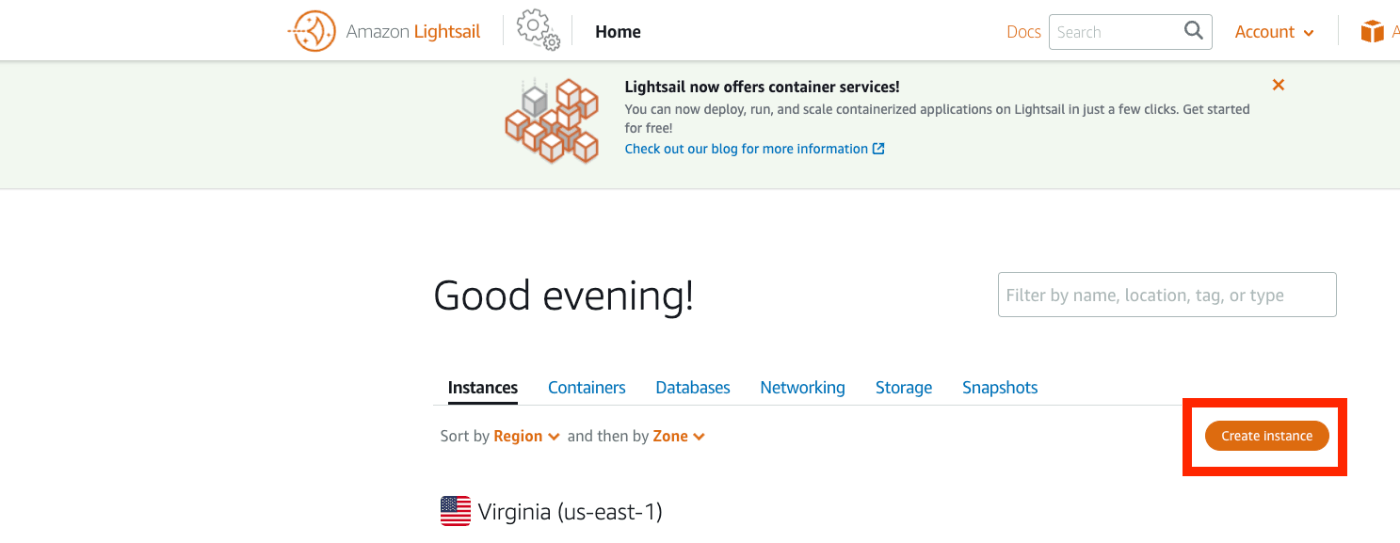
概要 Amazon Lightsailを用いたOmkea Sの構築方法を以下の記事にまとめました。 今回はAmazon Lightsailを用いたOmeka Classicの構築法方について紹介します。Omeka Classicは以下の本で紹介しているように、IIIF Toolkitを用いたアノテーション付与環境の構築などに有用です。 https://zenn.dev/nakamura196/books/2a0aa162dcd0eb Amazon Lightsail インスタンスの作成 以下のページにアクセスします。 https://lightsail.aws.amazon.com/ls/webapp/home/instances そして、以下の「Create Instance」ボタンをクリックします。 「Select a blueprint」において、「LAMP (PHP 7)」を選択します。 「Choose your instance plan」において、インスタンスプランを選択します。今回は最も低価格のプランを選びました。 起動したら、以下のインスタンスのページにアクセスして、「Connect using SSH」ボタンを押します。 以下の画面が表示されます。 Linux ip-172-26-9-30 4.19.0-20-cloud-amd64 #1 SMP Debian 4.19.235-1 (2022-03-17) x86_64 The programs included with the Debian GNU/Linux system are free software; the exact distribution terms for each program are described in the individual files in /usr/share/doc/*/copyright. Debian GNU/Linux comes with ABSOLUTELY NO WARRANTY, to the extent permitted by applicable law. ___ _ _ _ | _ |_) |_ _ _ __ _ _ __ (_) | _ \ | _| ' \/ _` | ' \| | |___/_|\__|_|_|\__,_|_|_|_|_| *** Welcome to the LAMP packaged by Bitnami 7.4.29-0 *** *** Documentation: https://docs.bitnami.com/aws/infrastructure/lamp/ *** *** https://docs.bitnami.com/aws/ *** *** Bitnami Forums: https://community.bitnami.com/ *** bitnami@ip-172-26-9-30:~$ インスタンス内での作業 ファイルの移動 まず、必要なファイルのダウンロードや移動を行います。 ...