Home Articles Books Search About
日本語
GakuNin RDM Search API (`/api/v1/search/`) Investigation Memo

GakuNin RDM Search API (`/api/v1/search/`) Investigation Memo

Investigation date: 2026-02-24 Target: GakuNin RDM (GRDM) Search API Source code: RCOSDP/RDM-osf.io (website/search/ directory) Developer guide: RCOSDP/RDM-developer-guide Note: Official documentation for the Search API could not be found. This article is an investigation record based on both the actual API behavior and the source code. Overview GakuNin RDM is a fork of OSF (Open Science Framework), and its source code is available on GitHub (RCOSDP/RDM-osf.io). The search functionality implementation is in the website/search/ directory and consists mainly of the following files. ...

Developing an RDF Metadata Management System Integrating GakuNin RDM and Dydra

Developing an RDF Metadata Management System Integrating GakuNin RDM and Dydra

Overview This article describes the development of a metadata management system for research data that integrates GakuNin RDM (Research Data Management) with the Dydra RDF database. This system can handle file management for research projects and the registration and search of Dublin Core metadata in a unified manner. System Overview Architecture ┌─────────────────┐ │ Next.js 14 │ │ (App Router) │ └────────┬────────┘ │ ┌────┴────┐ │ │ ┌───▼───┐ ┌──▼─────┐ │GakuNin│ │ Dydra │ │ RDM │ │ RDF │ │ API │ │ DB │ └───────┘ └────────┘ Technology stack: ...

Prototyping a TEI/XML File Creation App Using Google Cloud Vision API and GakuNin RDM

Prototyping a TEI/XML File Creation App Using Google Cloud Vision API and GakuNin RDM

Overview I prototyped a TEI/XML file creation app using Google Cloud Vision API and GakuNin RDM, so this is a memo of that work. Background I needed an environment for creating TEI/XML files that reflect OCR results using Google Cloud Vision API. So I prototyped an environment that uses GakuNin RDM as the backend to manage files per user and execute OCR. How to Use Creating a Folder Access the following. ...

Searching Files in Linked Storage Using the GakuNin RDM API

Searching Files in Linked Storage Using the GakuNin RDM API

Overview In the following article, I introduced building applications using the GakuNin RDM API. In this article, I introduce how to search files in linked storage using the GakuNin RDM API. Implementation Example I implemented the search API as follows. Since directly accessing https://rdm.nii.ac.jp/api/v1/search/file/ from the client caused CORS errors, I implemented it as a Next.js API Route. import { NextResponse } from "next/server"; import { authOptions } from "@/app/api/auth/[...nextauth]/authOptions"; import { getServerSession } from "next-auth"; export async function GET(req: Request) { const session = await getServerSession(authOptions); // Get query parameters from URL const url = new URL(req.url); const query = url.searchParams.get("filter[fulltext]") || ""; const offset = parseInt(url.searchParams.get("page[offset]") || "0", 10); const size = parseInt(url.searchParams.get("page[limit]") || "20", 10); const accessToken = session?.accessToken; const apiUrl = "https://rdm.nii.ac.jp/api/v1/search/file/"; const params = { api_version: { vendor: "grdm", version: 2 }, sort: "created_desc", highlight: "title:30,name:30,user:30,text:124,comments.*:124", elasticsearch_dsl: { query: { filtered: { query: { query_string: { default_field: "_all", fields: [ "_all", "title^4", "description^1.2", "job^1", "school^1", "all_jobs^0.125", "all_schools^0.125", ], query, analyze_wildcard: true, lenient: true, }, }, }, }, from: offset, size, }, }; const res = await fetch(apiUrl, { method: "POST", headers: { "Content-Type": "application/json", Authorization: `Bearer ${accessToken}`, }, body: JSON.stringify(params), }); const data = await res.json(); return NextResponse.json(data); } Usage Example You can try it at the following URL. (Login to GakuNin RDM is required.) ...

Adding mdx.jp Object Storage to GakuNin RDM Storage

Adding mdx.jp Object Storage to GakuNin RDM Storage

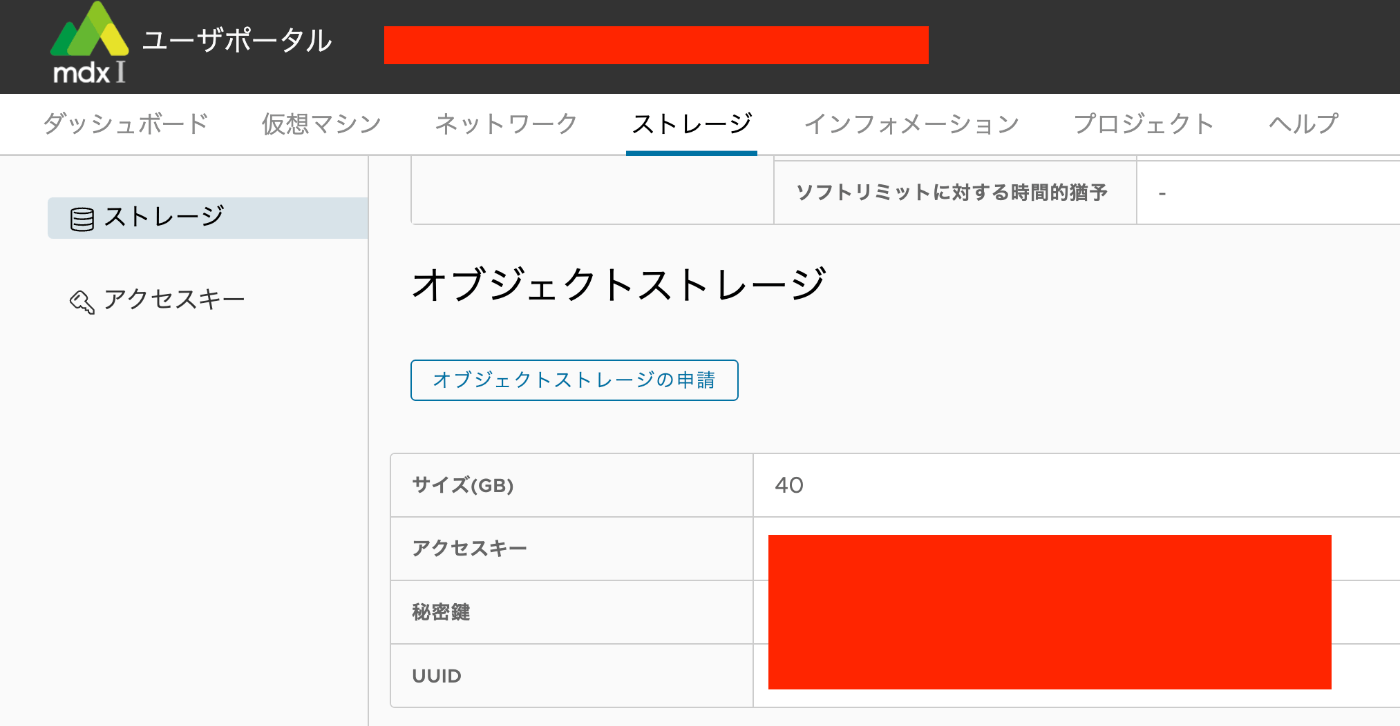
Overview This article describes how to add mdx.jp object storage to GakuNin RDM storage. Procedure mdx.jp Submit a usage application for mdx.jp object storage and note down the access key and secret key. GakuNin RDM Enable S3 Compatible Storage. Select mdx S3DS as the S3-compatible service and enter the access key and secret key you noted earlier. A list of buckets will be displayed. Select the bucket you want to connect to. ...

Prototyping a TEI/XML File Editing Environment Using LEAF Writer and GakuNin RDM

Prototyping a TEI/XML File Editing Environment Using LEAF Writer and GakuNin RDM

Overview This is a memo about prototyping a TEI/XML file editing environment using LEAF Writer and GakuNin RDM. References The following article introduced how to use LEAF Writer from Next.js. In particular, the following npm package is used. https://www.npmjs.com/package/@cwrc/leafwriter For the input/output of TEI/XML files to be edited above, GakuNin RDM is used. The following article may also be helpful regarding how to use the GakuNin RDM API from JavaScript. ...

Using Filters with the GakuNin RDM (OSF) API

Using Filters with the GakuNin RDM (OSF) API

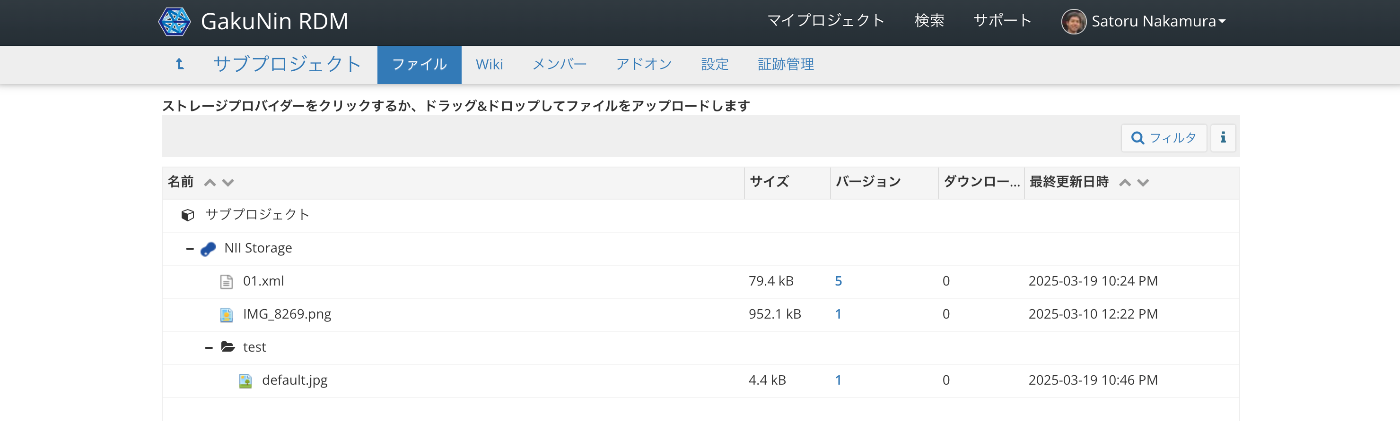
Overview This is a memo on how to use filters with the GakuNin RDM (OSF) API. Target Data We target “NII Storage” with the following file structure. Via the API, we target data accessible at URLs like the following. https://api.rdm.nii.ac.jp/v2/nodes/wzv9g/files/osfstorage/ An example of the JSON data is shown below. { "data": [ { "id": "67ce5b0b2fe4740010f753c0", "type": "files", "attributes": { "guid": "ungd3", "checkout": null, "name": "IMG_8269.png", "kind": "file", "path": "/67ce5b0b2fe4740010f753c0", "size": 952107, "provider": "osfstorage", "materialized_path": "/IMG_8269.png", "last_touched": null, "date_modified": "2025-03-10T03:22:51.750550Z", "date_created": "2025-03-10T03:22:51.750550Z", "extra": { "hashes": { "md5": "e57192b30103a7e995597ceaea39cbbf", "sha256": "5e282187067a53aaab0f1f00daaefb9519d60b064831403e671662cfbcf6f41f" }, "downloads": 0 }, "tags": [], "current_user_can_comment": true, "current_version": 1 }, "relationships": { "parent_folder": { "links": { "related": { "href": "https://api.rdm.nii.ac.jp/v2/files/674034a483bdc200108b8a95/?format=json", "meta": {} } }, "data": { "id": "674034a483bdc200108b8a95", "type": "files" } }, "versions": { "links": { "related": { "href": "https://api.rdm.nii.ac.jp/v2/files/67ce5b0b2fe4740010f753c0/versions/?format=json", "meta": {} } } }, "comments": { "links": { "related": { "href": "https://api.rdm.nii.ac.jp/v2/nodes/wzv9g/comments/?format=json&filter%5Btarget%5D=ungd3", "meta": {} } } }, "metadata_records": { "links": { "related": { "href": "https://api.rdm.nii.ac.jp/v2/files/67ce5b0b2fe4740010f753c0/metadata_records/?format=json", "meta": {} } } }, "node": { "links": { "related": { "href": "https://api.rdm.nii.ac.jp/v2/nodes/wzv9g/?format=json", "meta": {} } }, "data": { "id": "wzv9g", "type": "nodes" } }, "target": { "links": { "related": { "href": "https://api.rdm.nii.ac.jp/v2/nodes/wzv9g/", "meta": { "type": "node" } } }, "data": { "type": "node", "id": "wzv9g" } } }, "links": { "info": "https://api.rdm.nii.ac.jp/v2/files/67ce5b0b2fe4740010f753c0/", "move": "https://files.rdm.nii.ac.jp/v1/resources/wzv9g/providers/osfstorage/67ce5b0b2fe4740010f753c0", "upload": "https://files.rdm.nii.ac.jp/v1/resources/wzv9g/providers/osfstorage/67ce5b0b2fe4740010f753c0", "delete": "https://files.rdm.nii.ac.jp/v1/resources/wzv9g/providers/osfstorage/67ce5b0b2fe4740010f753c0", "download": "https://rdm.nii.ac.jp/download/ungd3/", "render": "https://mfr.rdm.nii.ac.jp/render?url=https://rdm.nii.ac.jp/download/ungd3/?direct%26mode=render", "html": "https://rdm.nii.ac.jp/wzv9g/files/osfstorage/67ce5b0b2fe4740010f753c0", "self": "https://api.rdm.nii.ac.jp/v2/files/67ce5b0b2fe4740010f753c0/" } }, { "id": "67da847416000900109e0454", "type": "files", "attributes": { "guid": "b45mp", "checkout": null, "name": "01.xml", "kind": "file", "path": "/67da847416000900109e0454", "size": 79397, "provider": "osfstorage", "materialized_path": "/01.xml", "last_touched": null, "date_modified": "2025-03-19T13:24:27.868078Z", "date_created": "2025-03-19T08:46:44.636107Z", "extra": { "hashes": { "md5": "a3824b2f49471842d1046a2abe623284", "sha256": "83d18a6e52a52597ebac6fa1eb8a137ed6e1e64b9c0e2c1a0b49cf746a777d0a" }, "downloads": 0 }, "tags": [], "current_user_can_comment": true, "current_version": 5 }, "relationships": { "parent_folder": { "links": { "related": { "href": "https://api.rdm.nii.ac.jp/v2/files/674034a483bdc200108b8a95/?format=json", "meta": {} } }, "data": { "id": "674034a483bdc200108b8a95", "type": "files" } }, "versions": { "links": { "related": { "href": "https://api.rdm.nii.ac.jp/v2/files/67da847416000900109e0454/versions/?format=json", "meta": {} } } }, "comments": { "links": { "related": { "href": "https://api.rdm.nii.ac.jp/v2/nodes/wzv9g/comments/?format=json&filter%5Btarget%5D=b45mp", "meta": {} } } }, "metadata_records": { "links": { "related": { "href": "https://api.rdm.nii.ac.jp/v2/files/67da847416000900109e0454/metadata_records/?format=json", "meta": {} } } }, "node": { "links": { "related": { "href": "https://api.rdm.nii.ac.jp/v2/nodes/wzv9g/?format=json", "meta": {} } }, "data": { "id": "wzv9g", "type": "nodes" } }, "target": { "links": { "related": { "href": "https://api.rdm.nii.ac.jp/v2/nodes/wzv9g/", "meta": { "type": "node" } } }, "data": { "type": "node", "id": "wzv9g" } } }, "links": { "info": "https://api.rdm.nii.ac.jp/v2/files/67da847416000900109e0454/", "move": "https://files.rdm.nii.ac.jp/v1/resources/wzv9g/providers/osfstorage/67da847416000900109e0454", "upload": "https://files.rdm.nii.ac.jp/v1/resources/wzv9g/providers/osfstorage/67da847416000900109e0454", "delete": "https://files.rdm.nii.ac.jp/v1/resources/wzv9g/providers/osfstorage/67da847416000900109e0454", "download": "https://rdm.nii.ac.jp/download/b45mp/", "render": "https://mfr.rdm.nii.ac.jp/render?url=https://rdm.nii.ac.jp/download/b45mp/?direct%26mode=render", "html": "https://rdm.nii.ac.jp/wzv9g/files/osfstorage/67da847416000900109e0454", "self": "https://api.rdm.nii.ac.jp/v2/files/67da847416000900109e0454/" } }, { "id": "67daca9916000900109e1d98", "type": "files", "attributes": { "guid": null, "checkout": null, "name": "test", "kind": "folder", "path": "/67daca9916000900109e1d98/", "size": null, "provider": "osfstorage", "materialized_path": "/test/", "last_touched": null, "date_modified": null, "date_created": null, "extra": { "hashes": { "md5": null, "sha256": null } }, "tags": [], "current_user_can_comment": true, "current_version": 1 }, "relationships": { "parent_folder": { "links": { "related": { "href": "https://api.rdm.nii.ac.jp/v2/files/674034a483bdc200108b8a95/?format=json", "meta": {} } }, "data": { "id": "674034a483bdc200108b8a95", "type": "files" } }, "files": { "links": { "related": { "href": "https://api.rdm.nii.ac.jp/v2/nodes/wzv9g/files/osfstorage/67daca9916000900109e1d98/?format=json", "meta": {} } } }, "node": { "links": { "related": { "href": "https://api.rdm.nii.ac.jp/v2/nodes/wzv9g/?format=json", "meta": {} } }, "data": { "id": "wzv9g", "type": "nodes" } }, "target": { "links": { "related": { "href": "https://api.rdm.nii.ac.jp/v2/nodes/wzv9g/", "meta": { "type": "node" } } }, "data": { "type": "node", "id": "wzv9g" } } }, "links": { "info": "https://api.rdm.nii.ac.jp/v2/files/67daca9916000900109e1d98/", "move": "https://files.rdm.nii.ac.jp/v1/resources/wzv9g/providers/osfstorage/67daca9916000900109e1d98/", "upload": "https://files.rdm.nii.ac.jp/v1/resources/wzv9g/providers/osfstorage/67daca9916000900109e1d98/", "delete": "https://files.rdm.nii.ac.jp/v1/resources/wzv9g/providers/osfstorage/67daca9916000900109e1d98/", "new_folder": "https://files.rdm.nii.ac.jp/v1/resources/wzv9g/providers/osfstorage/67daca9916000900109e1d98/?kind=folder", "self": "https://api.rdm.nii.ac.jp/v2/files/67daca9916000900109e1d98/" } } ], "links": { "first": null, "last": null, "prev": null, "next": null, "meta": { "total": 3, "per_page": 10 } } } Search Examples Since it conforms to JSON:API, the filter parameter is used. ...

Processing Dataverse Data with Archivematica

Processing Dataverse Data with Archivematica

Overview I confirmed the workflow for processing Dataverse data with Archivematica, so here are my notes. Background Archivematica provides a feature to input data from Dataverse. https://www.archivematica.org/en/docs/archivematica-1.17/user-manual/transfer/dataverse/ I learned about this feature at the following lecture, so I decided to try it out. https://www.kulib.kyoto-u.ac.jp/bulletin/1402322 Dataverse I used the Demo Dataverse that was also used in the following article. I uploaded the following data. https://demo.dataverse.org/dataset.xhtml?persistentId=doi:10.70122/FK2/IHQZL3 From here, download both the image data itself and the JSON data. Go to the Metadata tab and select JSON from Export Metadata. ...

Authenticating with GakuNin RDM Using Nuxt 3 and @sidebase/nuxt-auth

Authenticating with GakuNin RDM Using Nuxt 3 and @sidebase/nuxt-auth

Overview This article describes how to authenticate with GakuNin RDM using Nuxt 3 and @sidebase/nuxt-auth. Demo App https://nuxt-rdm.vercel.app/ Repository https://github.com/nakamura196/nuxt-rdm Notes Initially, the following warning was displayed. AUTH_NO_ORIGIN: No origin - this is an error in production, see https://sidebase.io/nuxt-auth/resources/errors. You can ignore this during development Therefore, based on the following reference: https://auth.sidebase.io/resources/error-reference I configured it as follows, which resulted in an error. ... auth: { baseURL: process.env.NEXTAUTH_URL, }, ... The cause was that I was using an rc version of the library. ...

Connecting GakuNin RDM and figshare

Connecting GakuNin RDM and figshare

Overview I had the opportunity to connect GakuNin RDM and figshare, so this is a note for reference. Work on figshare Create a folder to be linked with GakuNin RDM. First, create a project. In the following example, a project called “My First Project” is created. It appeared that linking with GakuNin RDM could be done on a per-project basis. Configuration on GakuNin RDM Select the project created on the GakuNin RDM side (in this case, “My First Project”). ...

Using GakuNin RDM from Next.js

Using GakuNin RDM from Next.js

Overview This is a memo on using GakuNin RDM from Next.js. Background In the following article, I introduced how to authenticate with GakuNin RDM using NextAuth.js. As an extension of this, I prototyped a Next.js app that loads data from GakuNin RDM. Demo This is limited to those who can use GakuNin RDM authentication, but you can try it from the following link. https://rdm-app.vercel.app/ For example, below is a page for viewing the list of connected storage. ...

Uploading Files and More Using the GakuNin RDM API

Uploading Files and More Using the GakuNin RDM API

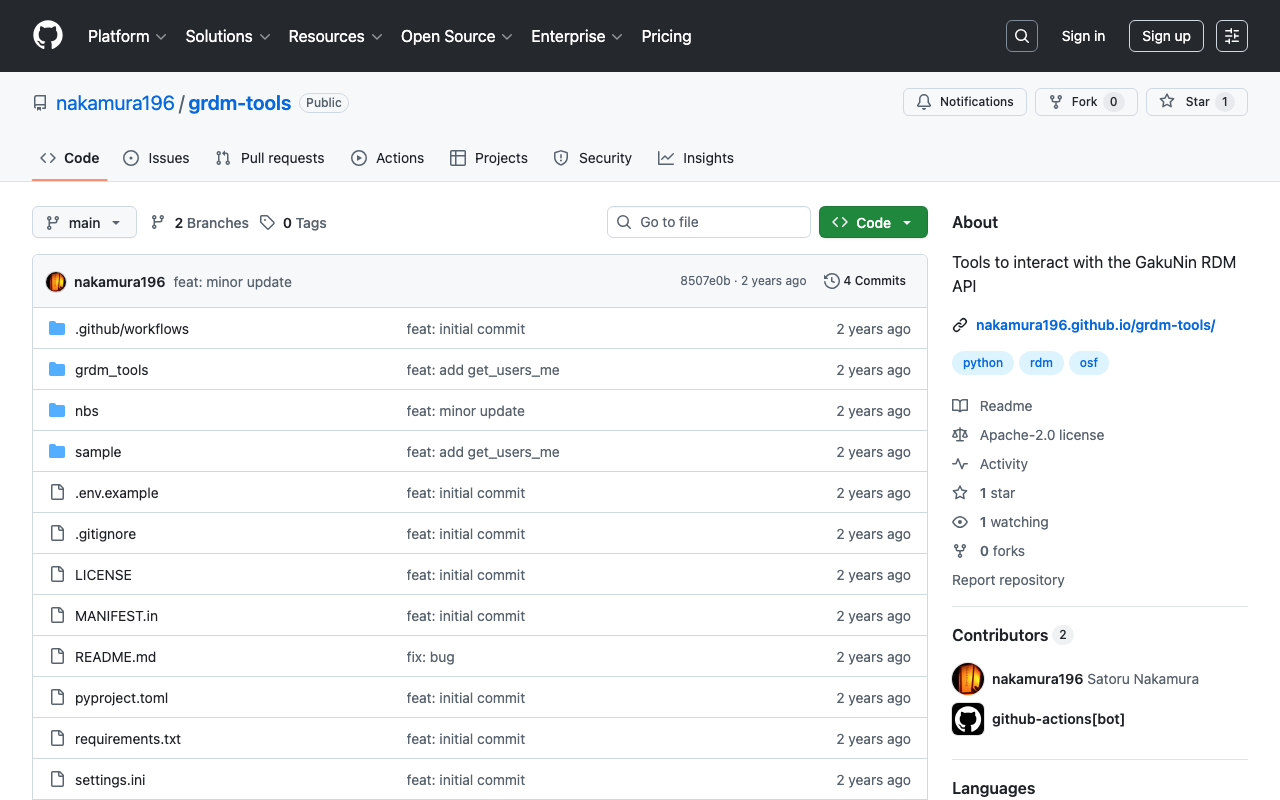
Background These are notes on how to upload files and perform other operations using the GakuNin RDM API. References The following article explains how to obtain a PAT (Personal Access Token). The following article introduces a method using OAuth (Open Authorization). If you are using it from a web application, this may be helpful. Method I created the following repository using nbdev. https://github.com/nakamura196/grdm-tools The documentation can be found here. ...

Connecting GakuNin RDM with Amazon S3 and Processing Files with Archivematica

Connecting GakuNin RDM with Amazon S3 and Processing Files with Archivematica

Overview This is a note on how to connect GakuNin RDM with Amazon S3 and process files with Archivematica. https://rcos.nii.ac.jp/service/rdm/ Background In the following article, I described how to use Amazon S3 as a processing target in Archivematica. This allows you to upload files and folders to a specified bucket and use them as processing targets in Archivematica to create AIPs and DIPs. However, this approach required creating an IAM user for each project member. ...

Publishing Materials on Zenodo

Publishing Materials on Zenodo

Overview I registered materials on Zenodo as part of learning how to use it, so here are my notes. The DOI assigned to the registered material is: https://zenodo.org/doi/10.5281/zenodo.12508032 DOI Regarding DOIs, there is one that accesses the latest version and ones assigned to each version. The DOI above is the former. Version 1 is: https://zenodo.org/doi/10.5281/zenodo.12508033 For more information about versioning, please also refer to the following article: Versioning It seems unnecessary to change the version unless you add or update files. When I uploaded a PDF, a DOI was assigned, and even after subsequently editing the metadata, the version did not change. ...