Home Articles Books Search About
日本語
Building an Annotation Environment Using Omeka Classic + IIIF Toolkit

Building an Annotation Environment Using Omeka Classic + IIIF Toolkit

This article describes building an environment for annotating IIIF images using Omeka Classic and the IIIF Toolkit plugin. It also covers the basic installation of Omeka Classic. I created two types of documentation: a summary article on Hatena Blog and a book on Zenn. Zenn https://zenn.dev/nakamura196/books/2a0aa162dcd0eb Hatena Blog https://nakamura196.hatenablog.com/entry/2022/03/22/234917 I hope this is helpful for learning how to use Omeka.net (Classic).
Installing Omeka Classic

Installing Omeka Classic

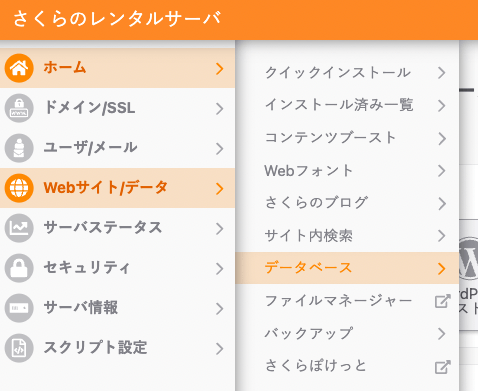
This guide assumes the use of Sakura Rental Server. If you are using a different server, please adapt the instructions accordingly. Creating a Database On Sakura Rental Server, create a new database as follows. Installing Omeka Classic Connect to Sakura Rental Server via SSH. The command looks like the following, where xxxx is your username. ssh xxxx@xxxx.sakura.ne.jp In this case, we will install a new Omeka Classic at the following path. ...

Created a Summary Article and Zenn Book Explaining How to Use Omeka.net (Classic)

Created a Summary Article and Zenn Book Explaining How to Use Omeka.net (Classic)

This explains how to use Omeka.net (Classic). From Chapter 3 onwards, the usage is common with Omeka Classic. I created two types: a summary article on Hatena Blog and a Zenn book. Zenn https://zenn.dev/nakamura196/books/a06c31c1cc3c37 Hatena Blog https://nakamura196.hatenablog.com/entry/2022/03/22/232710 I hope this serves as a useful reference for using Omeka.net (Classic).

[Summary Article] How to Use Omeka.net (Classic)

[Summary Article] How to Use Omeka.net (Classic)

This explains how to use Omeka.net. Chapters 3 and beyond are common with Omeka Classic usage. Creative Commons - BY – 2014 Use Case: Scholars, Omeka.net, http://info.omeka.net/omeka-net-help/use-case-scholars/ (Translation & Revision: Satoru Nakamura) — - Chapter 1 Overview - Chapter 2 Sign Up and Plan Selection - Chapter 3 Adding Items - Chapter 4 Managing Tags - Chapter 5 Exhibit Builder - Chapter 6 Simple Pages - Chapter 7 Managing Users