![[Omeka S] How to Set Custom Identifiers in the IIIF Server Module](https://storage.googleapis.com/zenn-user-upload/c3fc17f4edcb-20220411.png)
[Omeka S] How to Set Custom Identifiers in the IIIF Server Module
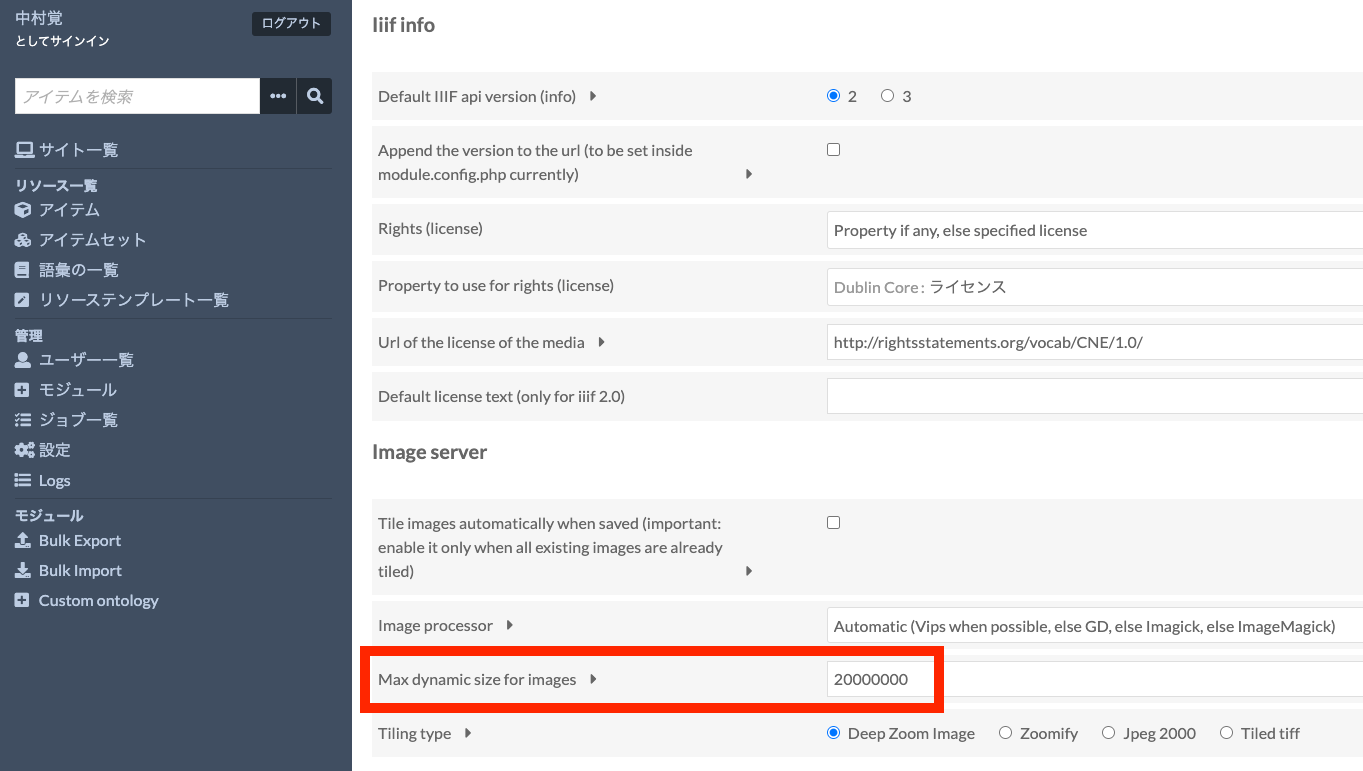
With the default settings of the Omeka S IIIF Server module, you can access IIIF manifest files using URLs like the following. /iiif///manifest Example (version 2): https://shared.ldas.jp/omeka-s/iiif/2/1267/manifest Example (version 3): https://shared.ldas.jp/omeka-s/iiif/3/1267/manifest However, since this uses Omeka’s internal ID, it is recommended to use custom identifiers. The solution is to additionally install the Clean Url module and enable Use the identifiers from Clean Url in the IIIF Server module settings screen shown below. ...
![[Omeka S] How to Configure Attribution in the IIIF Server Module](https://storage.googleapis.com/zenn-user-upload/d54d4ada597d-20220411.png)
![[Omeka S Theme Development] Published a Bootstrap 5 Theme for Omeka S](https://storage.googleapis.com/zenn-user-upload/b8004aa5bf1f-20220323.png)
![[Omeka S Module] How to Use Clean Url](https://storage.googleapis.com/zenn-user-upload/7149eca99fe3-20220323.png)
![[Summary Article] How to Use Omeka.net (Classic)](/images/articles/hatena-2022-03-22-232710.png)


![[Omeka S Development] Created a Program to Generate CSV Files for Registering Dummy Data in Omeka S](https://cdn-ak.f.st-hatena.com/images/fotolife/n/nakamura196/20220217/20220217215525.png)
![[Omeka S Module Introduction] How to Use the Mapping Module (Especially Batch Registration via the CSV Import Module)](https://cdn-ak.f.st-hatena.com/images/fotolife/n/nakamura196/20220215/20220215150947.png)
![[Omeka S Module Development] Developed a Module to Add Various Export Links to the Item Detail Page](https://cdn-ak.f.st-hatena.com/images/fotolife/n/nakamura196/20220214/20220214000202.png)