Home Articles Books Search About
日本語
Minor Modifications to openai-assistants-quickstart

Minor Modifications to openai-assistants-quickstart

Overview When building a chat interface using RAG (Retrieval-augmented generation) with OpenAI’s Assistants API, I used the following repository. https://github.com/openai/openai-assistants-quickstart A modification was needed regarding the handling of citation, so I am documenting it here as a memo. Background I used the above repository to try RAG with OpenAI’s Assistants API. With the default settings, citation markers like “4:13†” were displayed as-is, as shown below. Solution I modified annotateLastMessage as follows. By changing file_path to file_citation, the citation markers could be replaced. ...

Using GakuNin RDM from Next.js

Using GakuNin RDM from Next.js

Overview This is a memo on using GakuNin RDM from Next.js. Background In the following article, I introduced how to authenticate with GakuNin RDM using NextAuth.js. As an extension of this, I prototyped a Next.js app that loads data from GakuNin RDM. Demo This is limited to those who can use GakuNin RDM authentication, but you can try it from the following link. https://rdm-app.vercel.app/ For example, below is a page for viewing the list of connected storage. ...

Authenticating with ORCID, The Open Science Framework, and GakuNin RDM Using NextAuth.js

Authenticating with ORCID, The Open Science Framework, and GakuNin RDM Using NextAuth.js

Overview This article describes how to perform authentication with ORCID, OSF (The Open Science Framework), and GRDM (GakuNin RDM) using NextAuth.js. Demo Apps ORCID https://orcid-app.vercel.app/ OSF https://osf-app.vercel.app/ GRDM https://rdm-app.vercel.app/ Repository ORCID https://github.com/nakamura196/orcid_app Below is an example of the options configuration. https://github.com/nakamura196/orcid_app/blob/main/src/app/api/auth/[…nextauth]/authOptions.js export const authOptions = { providers: [ { id: "orcid", name: "ORCID", type: "oauth", clientId: process.env.ORCID_CLIENT_ID, clientSecret: process.env.ORCID_CLIENT_SECRET, authorization: { url: "https://orcid.org/oauth/authorize", params: { scope: "/authenticate", response_type: "code", redirect_uri: process.env.NEXTAUTH_URL + "/api/auth/callback/orcid", }, }, token: "https://orcid.org/oauth/token", userinfo: { url: "https://pub.orcid.org/v3.0/[ORCID]", async request({ tokens }) { const res = await fetch(`https://pub.orcid.org/v3.0/${tokens.orcid}`, { headers: { Authorization: `Bearer ${tokens.access_token}`, Accept: "application/json", }, }); return await res.json(); }, }, profile(profile) { return { id: profile["orcid-identifier"].path, // Get ORCID ID name: profile.person?.name?.["given-names"]?.value + " " + profile.person?.name?.["family-name"]?.value, email: profile.person?.emails?.email?.[0]?.email, }; }, }, ], callbacks: { async session({ session, token }) { session.accessToken = token.accessToken; session.user.id = token.orcid; // Add ORCID ID to session return session; }, async jwt({ token, account }) { if (account) { token.accessToken = account.access_token; token.orcid = account.orcid; } return token; }, }, }; OSF https://github.com/nakamura196/osf-app ...

Using Knight Lab's TimelineJS and StoryMapJS from Next.js

Using Knight Lab's TimelineJS and StoryMapJS from Next.js

Overview This is a memo on how to use Knight Lab’s TimelineJS and StoryMapJS from Next.js. Background Knight Lab’s TimelineJS and StoryMapJS are open source tools for digital storytelling. https://knightlab.northwestern.edu/ Data We use text data from “Shibusawa Eiichi Biographical Materials” published at the following location. https://github.com/shibusawa-dlab/lab1 Repository Published at the following location. https://github.com/nakamura196/shibusawa StoryMap By preparing a component like the following, it was possible to use it from Next.js. ...

Using the Zotero API from Next.js

Using the Zotero API from Next.js

Overview I looked into how to use the Zotero API from Next.js, so this is a memo. As a result, I created the following application. https://zotero-rouge.vercel.app/ Library I used the following library. https://github.com/tnajdek/zotero-api-client Getting the API Key and Other Information Please refer to the following article. Usage Collection List // app/api/zotero/collections/route.js import { NextResponse } from "next/server"; import api from "zotero-api-client"; import { prisma } from "@/lib/prisma"; import { decrypt } from "../../posts/encryption"; import { getSession } from "@auth0/nextjs-auth0"; async function fetchZoteroCollections( zoteroApiKey: string, zoteroUserId: string ) { const myapi = api(zoteroApiKey).library("user", zoteroUserId); const collectionsResponse = await myapi.collections().get(); return collectionsResponse.raw; } Specific Collection // app/api/zotero/collection/[id]/route.ts import { NextResponse } from "next/server"; import api from "zotero-api-client"; import { prisma } from "@/lib/prisma"; import { decrypt } from "@/app/api/posts/encryption"; import { getSession } from "@auth0/nextjs-auth0"; async function fetchZoteroCollection( zoteroApiKey: string, zoteroUserId: string, collectionId: string ) { const myapi = api(zoteroApiKey).library("user", zoteroUserId); const collectionResponse = await myapi.collections(collectionId).get(); return collectionResponse.raw; } List of Items in a Specific Collection // app/api/zotero/collection/[id]/items/route.ts import { NextResponse, NextRequest } from "next/server"; import api from "zotero-api-client"; import { prisma } from "@/lib/prisma"; import { decrypt } from "@/app/api/posts/encryption"; import { getSession } from "@auth0/nextjs-auth0"; async function fetchZoteroCollection( zoteroApiKey: string, zoteroUserId: string, collectionId: string ) { const myapi = api(zoteroApiKey).library("user", zoteroUserId); const collectionResponse = await myapi .collections(collectionId) .items() .get(); return collectionResponse.raw; References The application is hosted on Vercel, using Vercel Postgres for the database and Prisma as the ORM. The UI was built with Tailwind CSS, using design suggestions from ChatGPT. Auth0 was adopted for authentication. ...

Using LEAF Writer from Next.js

Using LEAF Writer from Next.js

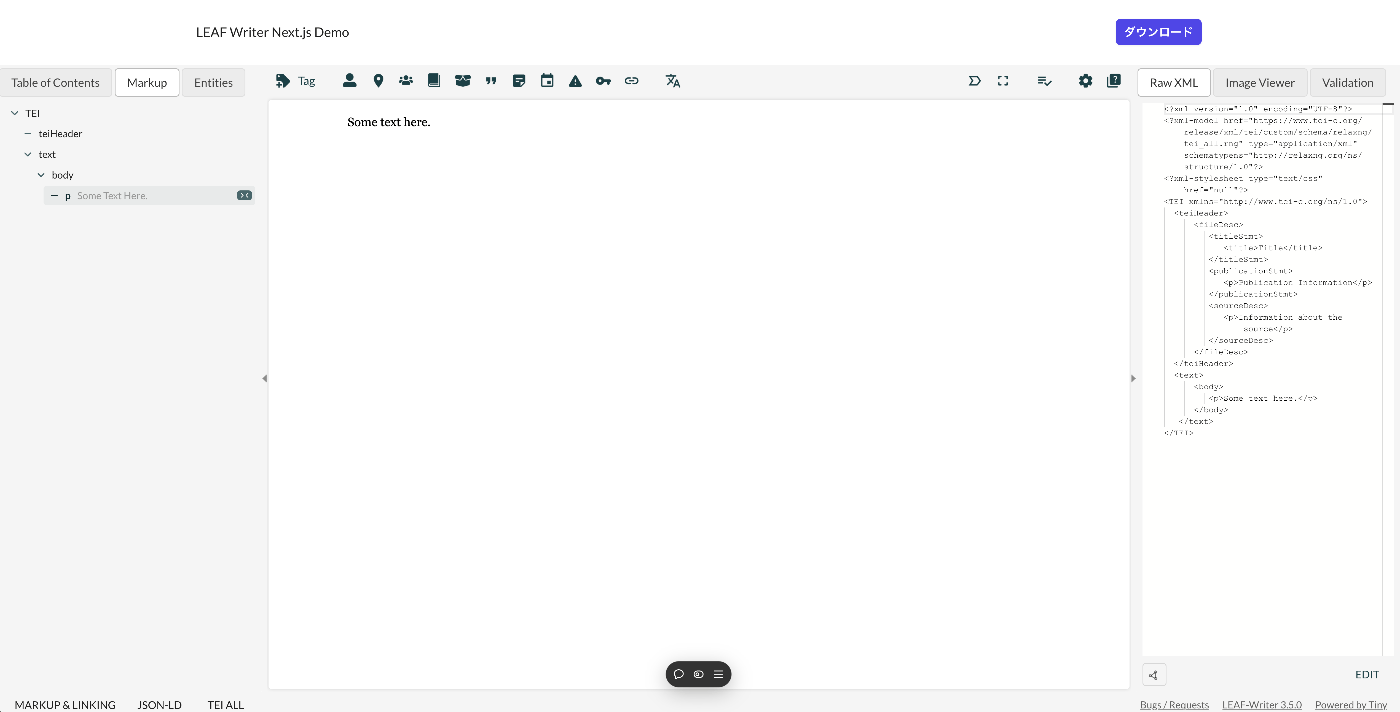
Overview This article introduces how to use LEAF Writer from Next.js. Demo You can try it from the following URL. https://leaf-writer-nextjs.vercel.app/ Below is a screenshot example. The header section is the part added using Next.js. The editor section uses LEAF Writer. The source code is available at the following link. https://github.com/nakamura196/leaf-writer-nextjs Usage Instructions are described at the following link. https://gitlab.com/calincs/cwrc/leaf-writer/leaf-writer/-/tree/main/packages/cwrc-leafwriter?ref_type=heads As a note, the div container’s id must be set to leaf-writer-container. I found that not doing so causes the styling to break. I would like to submit a pull request regarding this in the future. ...

Using URL Segments Starting with Underscores in Next.js

Using URL Segments Starting with Underscores in Next.js

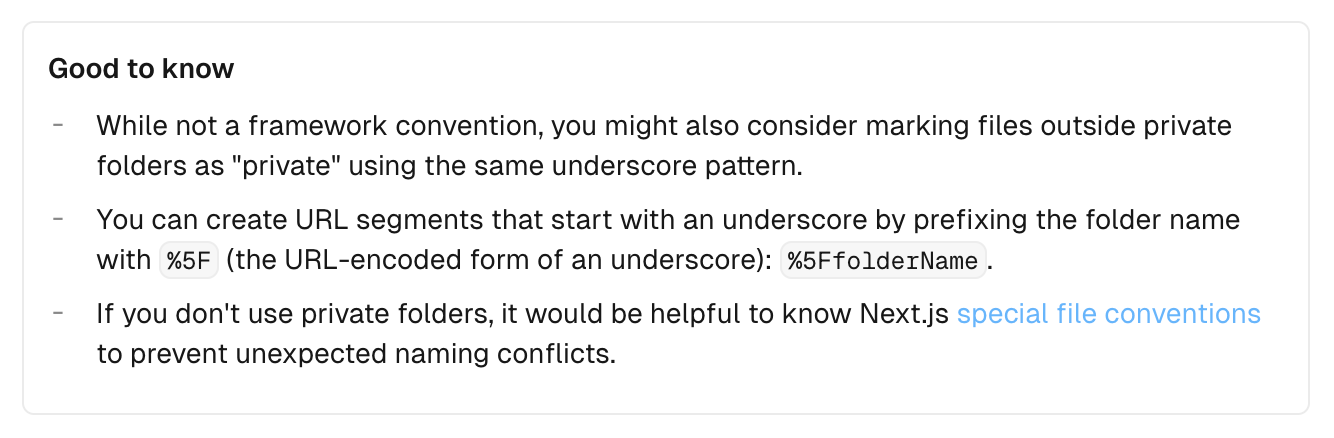
Overview When creating an API like </api/_search>, I looked into how to create URL segments starting with underscores, so this is a personal note for future reference. Method The information was found in the following documentation. https://nextjs.org/docs/app/building-your-application/routing/colocation#:~:text=js file conventions.-,Good to know,-While not a The key point is: To create URL segments that start with an underscore, prefix the folder name with %5F (the URL-encoded form of an underscore). Example: %5FfolderName. ...

Created a Simple TEI/XML File Viewer Using Next.js

Created a Simple TEI/XML File Viewer Using Next.js

Overview I created a simple viewer that displays the contents of TEI/XML files. https://github.com/utda/tei-viewer Here is a display example targeting TEI/XML of the Koui Genji Monogatari: https://utda.github.io/tei-viewer/?u=https://kouigenjimonogatari.github.io/tei/01.xml&v=true Usage As a minimum feature, when a IIIF manifest file is associated, the Mirador viewer is displayed. The association method is based on the following format: https://github.com/TEI-EAJ/jp_guidelines/wiki/IIIF画像とのリンク Additionally, when the n attribute is given to the pb tag, a page number display feature is provided. Furthermore, for Japanese language support, when v=true is given as a query parameter, vertical text is displayed. ...

Using Japan Search Web Parts with Next.js

Using Japan Search Web Parts with Next.js

Overview Japan Search provides Web Parts, a feature that allows UI components used within Japan Search to be used as parts on websites outside of Japan Search. https://jpsearch.go.jp/static/developer/webparts/ja.html I had the opportunity to use this feature with Next.js, so here are my notes. Usage Example You can see it on the following page. https://jps-2023-next.vercel.app/jps Source Code It is published at the following URL. https://github.com/nakamura196/jps_2023_next By loading the JS file using the Script tag as shown below, I was able to display it successfully. ...