Home Articles Books Search About
日本語
Adding a Table of Contents to Videos Using iiif-prezi3

Adding a Table of Contents to Videos Using iiif-prezi3

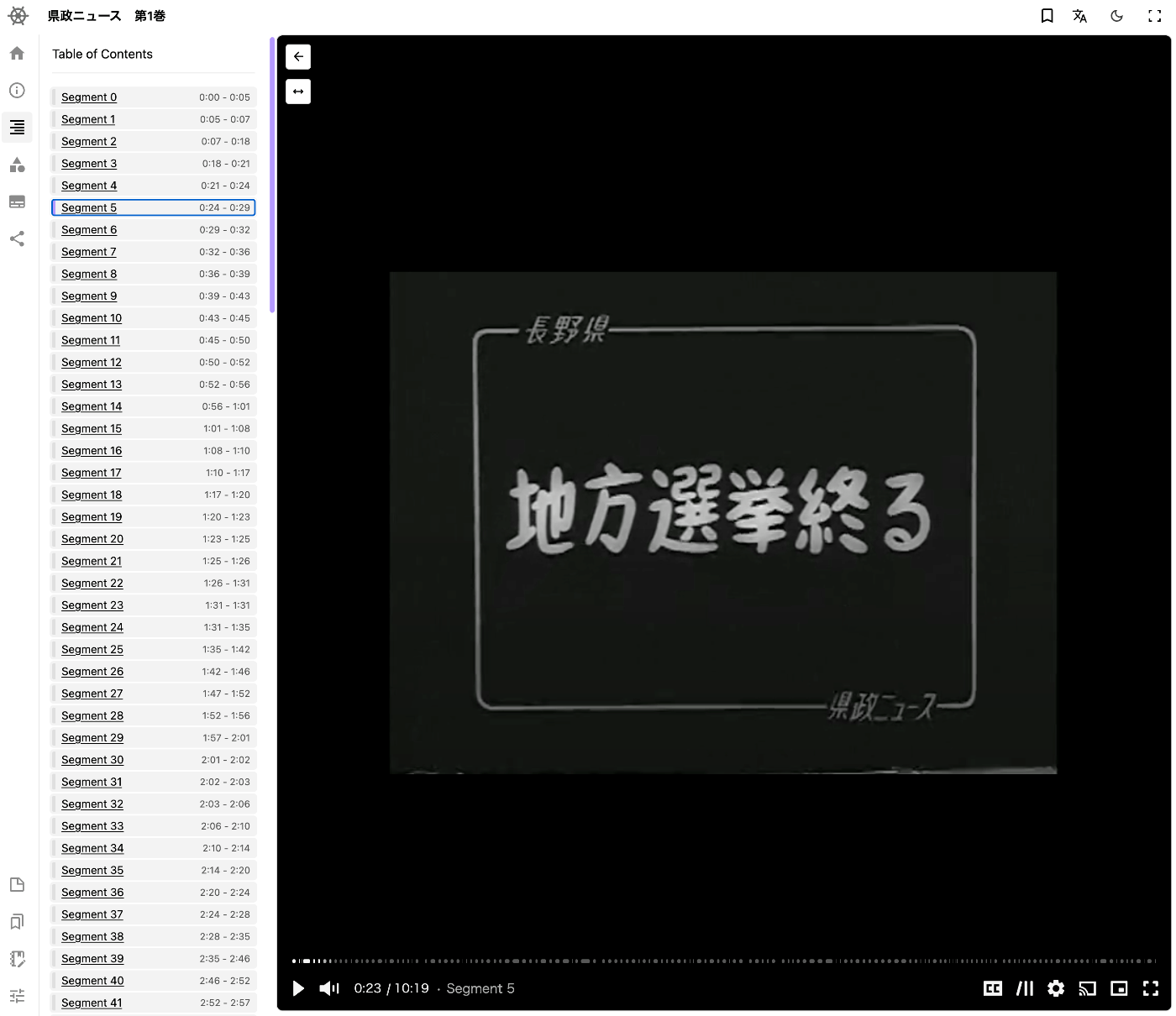
Overview This is a memo on how to add a table of contents to videos using iiif-prezi3. Segment Detection We use Amazon Rekognition’s video segment detection. https://docs.aws.amazon.com/ja_jp/rekognition/latest/dg/segments.html Sample code is available at the following link. https://docs.aws.amazon.com/ja_jp/rekognition/latest/dg/segment-example.html Data Used We use “Prefectural News Volume 1” (Nagano Prefectural Library). https://www.ro-da.jp/shinshu-dcommons/library/02FT0102974177 Reflecting in the Manifest File We assume that a manifest file has already been created by referring to the following article. The following script adds a VTT file to the manifest file. ...

Setting Subtitles on Videos Using iiif-prezi3

Setting Subtitles on Videos Using iiif-prezi3

Overview This is a memo on how to set subtitles on videos using iiif-prezi3. Creating Subtitles Subtitle files were created using the OpenAI API. The video file is converted to an audio file. from openai import OpenAI from pydub import AudioSegment from dotenv import load_dotenv class VideoClient: def __init__(self): load_dotenv(verbose=True) api_key = os.getenv("OPENAI_API_KEY") self.client = OpenAI(api_key=api_key) def get_transcriptions(self, input_movie_path): audio = AudioSegment.from_file(input_movie_path) # Write audio to a temporary file with tempfile.NamedTemporaryFile(suffix=".mp3") as temp_audio_file: audio.export(temp_audio_file.name, format="mp3") # Export in MP3 format temp_audio_file.seek(0) # Reset file pointer to the beginning # Get transcript with Whisper API with open(temp_audio_file.name, "rb") as audio_file: # Get transcript with Whisper API transcript = self.client.audio.transcriptions.create( model="whisper-1", file=audio_file, response_format="vtt" ) return transcript Data Used “Kensei News Volume 1” (Nagano Prefectural Library) is used. ...

Adding Annotations to Videos Using iiif-prezi3

Adding Annotations to Videos Using iiif-prezi3

Overview This is a note on how to add annotations to videos using iiif-prezi3. Adding Annotations Amazon Rekognition’s label detection is used. https://docs.aws.amazon.com/rekognition/latest/dg/labels.html?pg=ln&sec=ft Sample code is available at the following link. https://docs.aws.amazon.com/ja_jp/rekognition/latest/dg/labels-detecting-labels-video.html In particular, by setting the aggregation in GetLabelDetection to SEGMENTS, you can obtain StartTimestampMillis and EndTimestampMillis. However, please note the following. When aggregated by SEGMENTS, information about detected instances with bounding boxes is not returned. Data Used The video “Prefectural News Vol. 1” (Nagano Prefectural Library) is used. ...

Creating IIIF v3 Manifests for Video Using iiif-prezi3

Creating IIIF v3 Manifests for Video Using iiif-prezi3

Overview I had the opportunity to create an IIIF v3 manifest for video using iiif-prezi3, so this is a note for reference. https://github.com/iiif-prezi/iiif-prezi3 References Examples of IIIF manifest files and implementation examples using iiif-prezi3 are published in the IIIF Cookbook. Below is an example of creating an IIIF v3 manifest for video. https://iiif.io/api/cookbook/recipe/0003-mvm-video/ An implementation example using iiif-prezi3 is published at the following. https://iiif-prezi.github.io/iiif-prezi3/recipes/0003-mvm-video/ from iiif_prezi3 import Manifest, AnnotationPage, Annotation, ResourceItem, config config.configs['helpers.auto_fields.AutoLang'].auto_lang = "en" manifest = Manifest(id="https://iiif.io/api/cookbook/recipe/0003-mvm-video/manifest.json", label="Video Example 3") canvas = manifest.make_canvas(id="https://iiif.io/api/cookbook/recipe/0003-mvm-video/canvas") anno_body = ResourceItem(id="https://fixtures.iiif.io/video/indiana/lunchroom_manners/high/lunchroom_manners_1024kb.mp4", type="Video", format="video/mp4") anno_page = AnnotationPage(id="https://iiif.io/api/cookbook/recipe/0003-mvm-video/canvas/page") anno = Annotation(id="https://iiif.io/api/cookbook/recipe/0003-mvm-video/canvas/page/annotation", motivation="painting", body=anno_body, target=canvas.id) hwd = {"height": 360, "width": 480, "duration": 572.034} anno_body.set_hwd(**hwd) hwd["width"] = 640 canvas.set_hwd(**hwd) anno_page.add_item(anno) canvas.add_item(anno_page) print(manifest.json(indent=2)) Summary Many other samples and implementation examples are also published. I hope this is helpful. ...

Publishing 3D Models in Omeka S

Publishing 3D Models in Omeka S

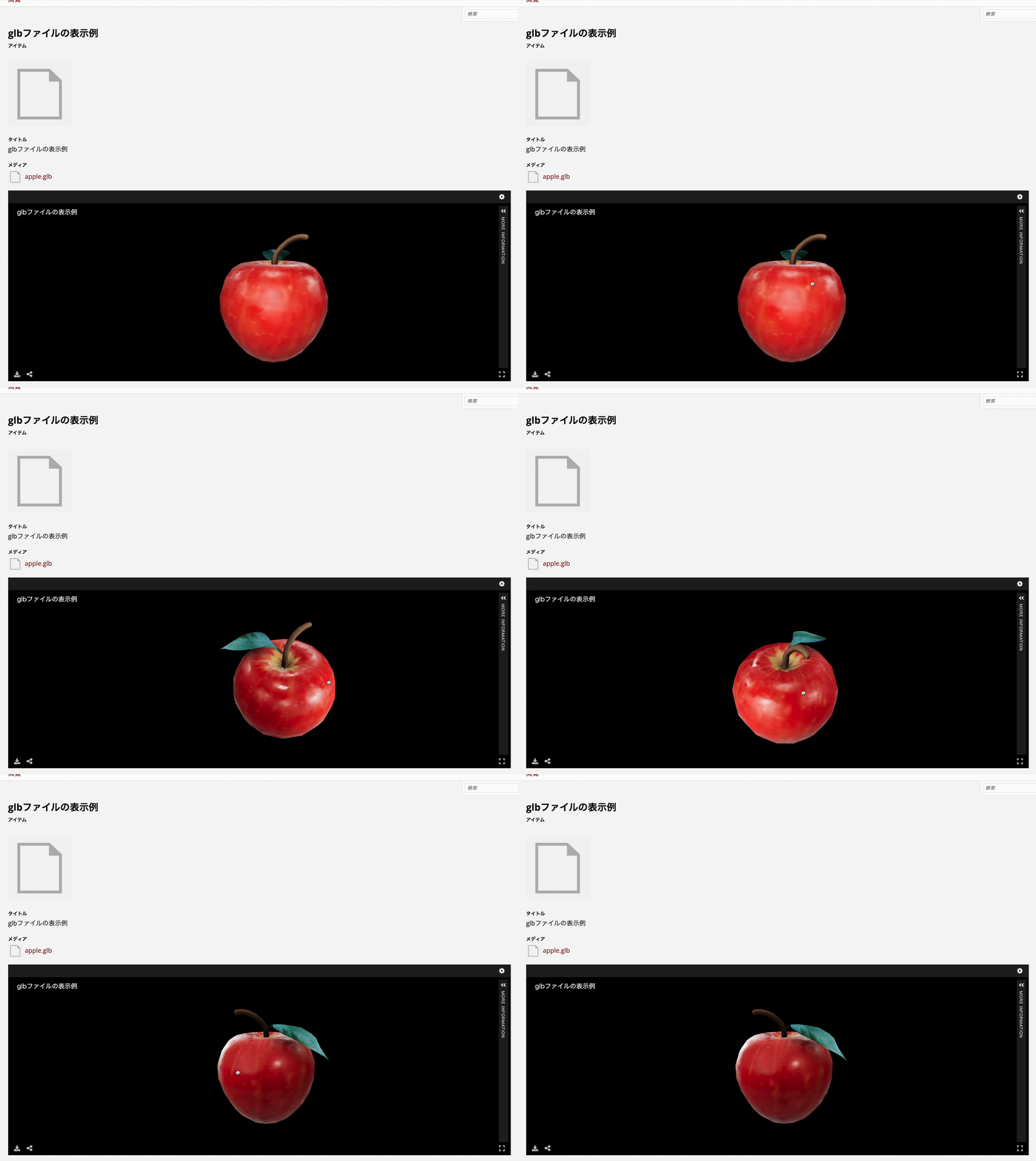
Overview I looked into how to publish 3D models in Omeka S, so here are my notes. As a result, I was able to handle 3D models in Omeka S as shown below. https://omeka.aws.ldas.jp/s/sample/item/43 Versions The versions of Omeka S and modules used are as follows. Omeka S 4.1.1 Common 3.4.62 IIIF Server 3.6.21 Universal Viewer 3.6.9 Module Installation Install the Common, IIIF Server, and Universal Viewer modules. Module Configuration Configure two settings for the IIIF Server module. ...

[2024 Edition] Building an IIIF Image Server with AWS Serverless Applications

[2024 Edition] Building an IIIF Image Server with AWS Serverless Applications

Overview This is a 2024 edition article on building an IIIF Image Server using AWS serverless applications. Background The following repository called serverless-iiif is publicly available. Using this repository, it is claimed that a cost-effective and infinitely scalable IIIF Image Server can be built using AWS services. https://github.com/samvera/serverless-iiif I introduced how to use it as of 2022 in the following article, but today’s service has become more user-friendly. Method There are several build methods, but for a GUI-based approach, refer to the following. Basic setup follows the instructions on the site below. Here, I introduce the procedure including custom domain setup with CloudFront and Route 53. ...

Describing Annotations Using SVG in IIIF Presentation API v3

Describing Annotations Using SVG in IIIF Presentation API v3

Overview I had an opportunity to describe annotations using SVG in IIIF Presentation API v3, so here are my notes. Method By writing the following, I was able to display annotations using SVG: { "@context": "http://iiif.io/api/presentation/3/context.json", "id": "http://127.0.0.1:62816/api/iiif/3/11/manifest", "type": "Manifest", "label": { "none": [ "きりつぼ" ] }, "rights": "http://creativecommons.org/licenses/by/4.0/", "requiredStatement": { "label": { "none": [ "Attribution" ] }, "value": { "none": [ "Provided by Example Organization" ] } }, "items": [ { "id": "http://127.0.0.1:62816/api/iiif/3/11/canvas/p1", "type": "Canvas", "width": 6642, "height": 4990, "label": { "none": [ "[1]" ] }, "thumbnail": [ { "format": "image/jpeg", "id": "https://iiif.dl.itc.u-tokyo.ac.jp/iiif/genji/TIFF/A00_6587/01/01_0023.tif/full/200,/0/default.jpg", "type": "Image" } ], "annotations": [ { "id": "http://127.0.0.1:62816/api/iiif/3/11/canvas/p1/annos", "type": "AnnotationPage", "items": [ { "id": "http://127.0.0.1:62816/api/iiif/3/11/canvas/p1/annos/1", "type": "Annotation", "motivation": "commenting", "body": { "type": "TextualBody", "value": "<p>校異源氏物語 p.21 開始位置</p><p><a href=\"http://dl.ndl.go.jp/info:ndljp/pid/3437686/30\">国立国会図書館デジタルコレクション</a>でみる</p>" }, "target": { "source": "http://127.0.0.1:62816/api/iiif/3/11/canvas/p1", "type": "SpecificResource", "selector": { "type": "SvgSelector", "value": "<svg xmlns='http://www.w3.org/2000/svg'><path xmlns=\"http://www.w3.org/2000/svg\" d=\"M2798,1309c0,-34 17,-68 51,-102c0,-34 -17,-51 -51,-51c-34,0 -51,17 -51,51c34,34 51,68 51,102z\" id=\"pin_abc\" fill-opacity=\"0.5\" fill=\"#F3AA00\" stroke=\"#f38200\"/></svg>" } } } ] } ], "items": [ { "id": "http://127.0.0.1:62816/api/iiif/3/11/canvas/p1/page", "type": "AnnotationPage", "items": [ { "id": "http://127.0.0.1:62816/api/iiif/3/11/canvas/p1/page/imageanno", "type": "Annotation", "motivation": "painting", "body": { "id": "http://127.0.0.1:62816/api/iiif/3/11/image", "type": "Image", "format": "image/jpeg", "service": [ { "id": "https://iiif.dl.itc.u-tokyo.ac.jp/iiif/genji/TIFF/A00_6587/01/01_0023.tif", "type": "ImageService2", "profile": "level2" } ], "width": 6642, "height": 4990 }, "target": "http://127.0.0.1:62816/api/iiif/3/11/canvas/p1" } ] } ] } ] } The display result is shown below: ...

Mirador Repository with Vertical Text Support for the Text Overlay Plugin

Mirador Repository with Vertical Text Support for the Text Overlay Plugin

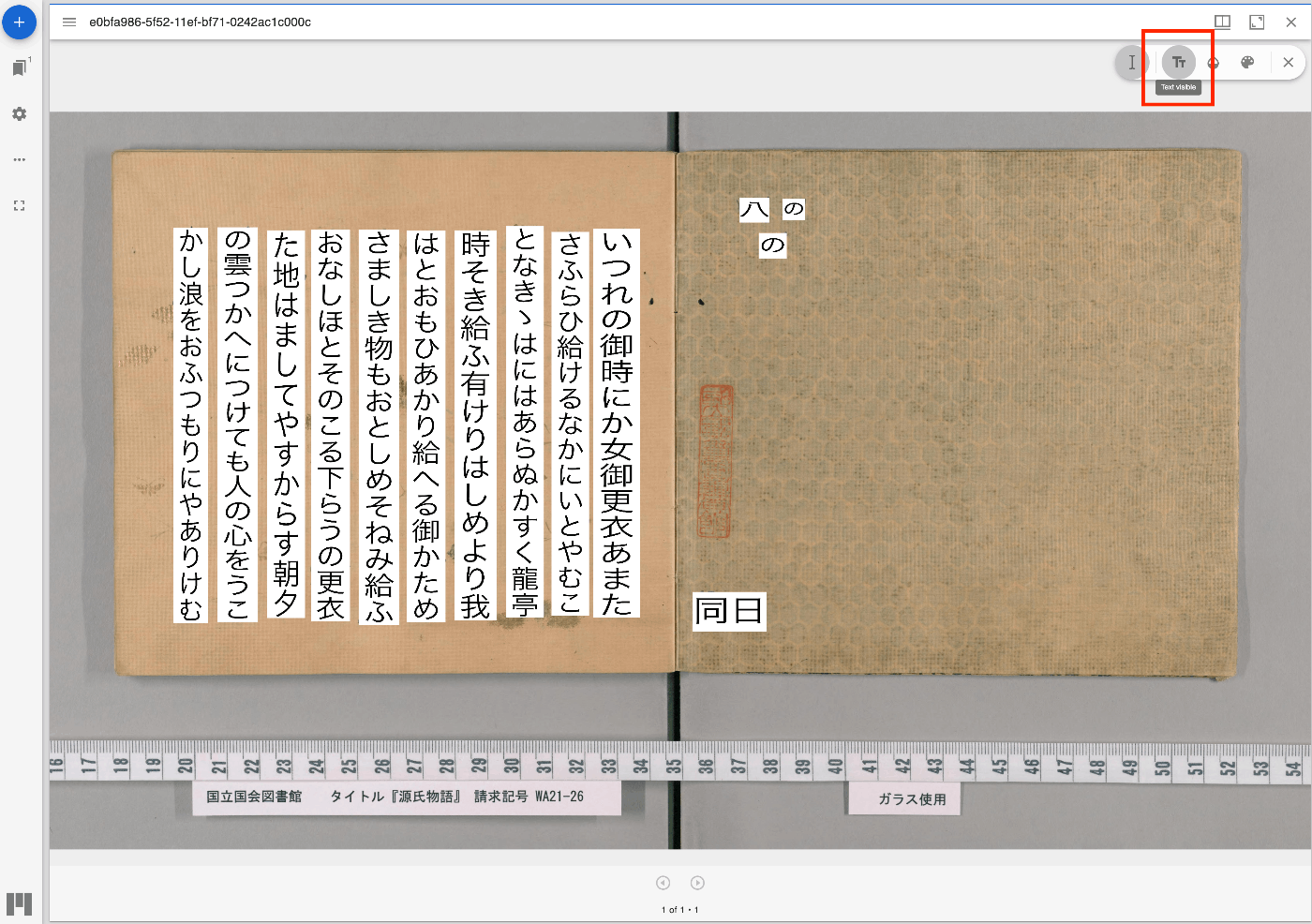
Overview I have updated the Mirador repository with the Text Overlay plugin that supports vertical text. https://github.com/nakamura196/mirador-integration-textoverlay References The original Text Overlay plugin repository is below. https://github.com/dbmdz/mirador-textoverlay Demo You can check the behavior on the following page. https://nakamura196.github.io/mirador-integration-textoverlay/ Press the “Text visible” button in the upper right to display the text. If it remains in a loading state, try reloading the page. References The Text Overlay plugin was added to Mirador 3 using the method introduced in the following article. ...

Sample Program Using the Annotorious OpenSeadragon Plugin

Sample Program Using the Annotorious OpenSeadragon Plugin

Overview I created a sample program using the Annotorious OpenSeadragon Plugin that allows adding annotations to multiple images loaded from an IIIF manifest file. You can try it at the following link. https://nakamura196.github.io/nuxt3-demo/annotorious Source Code Please refer to the following. https://github.com/nakamura196/nuxt3-demo/blob/main/pages/annotorious/index.vue Key Points npm install –force The library @recogito/annotorious-openseadragon does not appear to support openseadragon v5, so a forced installation was necessary. npm error Could not resolve dependency: npm error peer openseadragon@"^3.0.0 || ^4.0.0" from @recogito/annotorious-openseadragon@2.7.18 npm error node_modules/@recogito/annotorious-openseadragon npm error @recogito/annotorious-openseadragon@"^2.7.18" from the root project plugins I loaded Annotorious as a plugin. ...

Applying Google Cloud Vision to Image Files to Create IIIF Manifests and TEI/XML Files

Applying Google Cloud Vision to Image Files to Create IIIF Manifests and TEI/XML Files

Overview I created a library that applies Google Cloud Vision to image files and generates IIIF manifest and TEI/XML files. https://github.com/nakamura196/iiif_tei_py This article explains how to use the library. Usage You can check the usage and more at the following page. https://nakamura196.github.io/iiif_tei_py/ Installing the Library Install the library from the GitHub repository. pip install https://github.com/nakamura196/iiif_tei_py Creating a GC Service Account Download a GC (Google Cloud) service account key (JSON file) by referring to articles such as the following. ...

Bug in Omeka S IIIF Server Module [3.6.19, 3.6.20]

Bug in Omeka S IIIF Server Module [3.6.19, 3.6.20]

Overview A bug has been confirmed in versions 3.6.19 and 3.6.20 of the Omeka S IIIF Server module where URIs are malformed. Specifically, the FQDN becomes incorrect, like the following. https://xxx.yyy.zzz.jp//aaa.bbb.ccc.jp/iiif/3/1234/manifest Workaround As of the time of writing this article, version 3.6.21 has not been released, so I recommend using version 3.6.18 or earlier of the module. Summary I hope this serves as a useful reference.

Adding Images to IIIF Manifest Files for Audio Materials

Adding Images to IIIF Manifest Files for Audio Materials

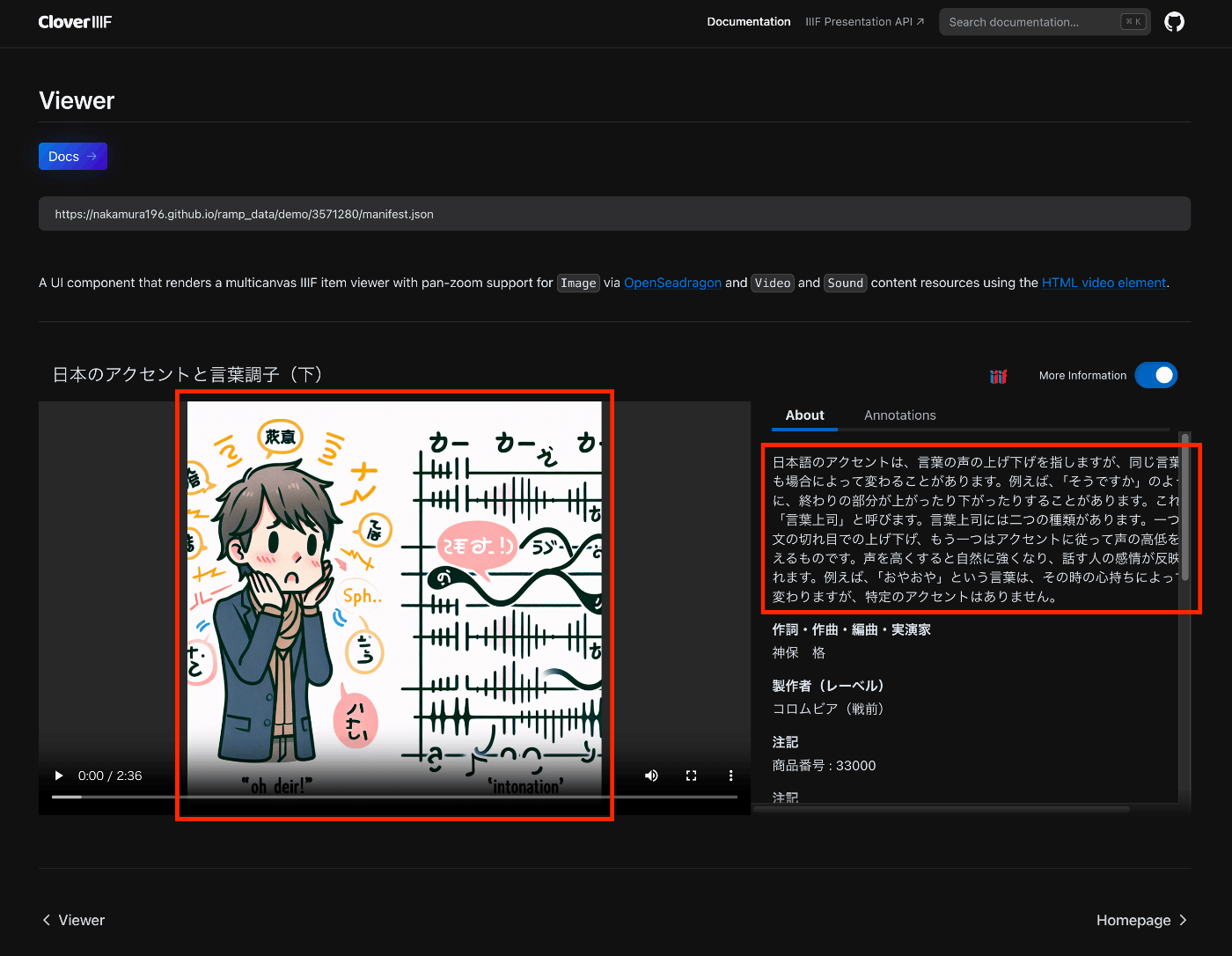
Overview This is a note on trying out the Audio Presentation with Accompanying Image recipe. https://iiif.io/api/cookbook/recipe/0014-accompanyingcanvas/ The following is an example displayed in Clover, where the configured image appears in the player. https://samvera-labs.github.io/clover-iiif/docs/viewer/demo?iiif-content=https://nakamura196.github.io/ramp_data/demo/3571280/manifest.json Manifest File Description An example is stored at the following location. https://github.com/nakamura196/ramp_data/blob/main/docs/demo/3571280/manifest.json Specifically, it was necessary to add an accompanyingCanvas to the Canvas as follows. { "id": "https://nakamura196.github.io/ramp_data/demo/3571280/canvas", "type": "Canvas", "duration": 156.07999999999998, "accompanyingCanvas": { "id": "https://nakamura196.github.io/ramp_data/demo/3571280/canvas/accompanying", "type": "Canvas", "height": 1024, "width": 1024, "items": [ { "id": "https://nakamura196.github.io/ramp_data/demo/3571280/canvas/accompanying/annotation/page", "type": "AnnotationPage", "items": [ { "id": "https://nakamura196.github.io/ramp_data/demo/3571280/canvas/accompanying/annotation/image", "type": "Annotation", "motivation": "painting", "body": { "id": "https://nakamura196.github.io/ramp_data/demo/3571280/3571280_summary_image.jpg", "type": "Image", "height": 1024, "width": 1024, "format": "image/jpeg" }, "target": "https://nakamura196.github.io/ramp_data/demo/3571280/canvas/accompanying/annotation/page" } ] } ] }, It may be a bit hard to follow, but here is the code example using iiif_prezi3. The accompanyingCanvas is created via create_accompanying_canvas() and associated with the canvas. ...

IIIF Audio/Visual: Describing Multiple VTT Files

IIIF Audio/Visual: Describing Multiple VTT Files

Overview This is a note on how to describe multiple VTT files for Audio/Visual materials using IIIF. Here, we describe transcription text in both Japanese and English as shown below. https://ramp.avalonmediasystem.org/?iiif-content=https://nakamura196.github.io/ramp_data/demo/3571280/manifest.json Manifest File Description An example is stored at the following location. https://github.com/nakamura196/ramp_data/blob/main/docs/demo/3571280/manifest.json Please also refer to the following article. Specifically, by describing them as multiple annotations as shown below, they were correctly processed by the Ramp viewer. ...

Displaying Audio Files with Subtitles in an IIIF Viewer

Displaying Audio Files with Subtitles in an IIIF Viewer

Overview I had the opportunity to display audio files with subtitles in an IIIF viewer, so this is a memo. The target is “Accents and Intonation of the Japanese Language (Part 2)” published in the National Diet Library Historical Sound Archive. OpenAI’s Speech to text was used. Please note that the transcription results may contain errors. The following is a display example in Ramp. https://ramp.avalonmediasystem.org/?iiif-content=https://nakamura196.github.io/ramp_data/demo/3571280/manifest.json The following is a display example in Clover. ...

Customizing Ramp

Customizing Ramp

Overview This is a memo on how to customize Ramp. As a result of customization, the UI is partially localized to Japanese, with the media player and metadata/transcription displayed side by side. Additionally, the query parameter t can be used to specify the playback start time for audio. For example, playback starting from the 140-second mark can be accessed from the following URL. https://ramp-iiif.vercel.app/?iiif-content=https://nakamura196.github.io/ramp_data/demo/3571280/manifest.json&t=140 Below is the pre-customization state. ...

Running Ramp Locally

Running Ramp Locally

Overview This is a memo on running Ramp locally. Background Ramp is described as follows. Interactive, IIIF powered audio/video media player React components library. The source code is available on the following GitHub repository. https://github.com/samvera-labs/ramp Starting Up It can be started with the following commands. git clone https://github.com/samvera-labs/ramp pnpm i pnpm demo Details are described here. https://github.com/samvera-labs/ramp?tab=readme-ov-file#styleguidist-development Note that the following command will display the style guide page instead. ...

Trying the Mirador 3 Annotations Plugin with an IIIF Manifest Specified via URL Parameters

Trying the Mirador 3 Annotations Plugin with an IIIF Manifest Specified via URL Parameters

Overview I prepared a demo page where you can try the Mirador 3 annotations plugin with an IIIF manifest specified via URL parameters. https://mirador-annotations.vercel.app/ By using the iiif-content or manifest parameter, you can target a specified IIIF manifest. https://mirador-annotations.vercel.app/?iiif-content=https://dl.ndl.go.jp/api/iiif/1301543/manifest.json This article is a memo about creating this demo page. Background There is an annotation plugin for Mirador 3 called mirador-annotations. https://github.com/ProjectMirador/mirador-annotations I introduced usage examples in the following article. A demo page is already available at the following link, but it does not provide the ability to specify an IIIF manifest file via URL parameters. ...

Delivering IIIF Images Using mdx.jp Object Storage and Cantaloupe Image Server

Delivering IIIF Images Using mdx.jp Object Storage and Cantaloupe Image Server

Overview This is a personal note on how to deliver IIIF images using mdx.jp object storage and Cantaloupe Image Server, one of the IIIF image servers. Background In the following article, I introduced how to deliver images using mdx.jp object storage. In the following article, I introduced how to deliver images stored in Amazon S3 using Cantaloupe Image Server. By combining these approaches, we aim to address the cost challenges of IIIF image delivery in digital archives. ...

Using Scroll View in Mirador 3

Using Scroll View in Mirador 3

Overview These are notes on how to use Scroll View in Mirador 3. The following example uses “Kagoshima Seitoki no Uchi: The Battle at Takase River Crossing - Nozu’s Brigade Recaptures the Regimental Flag” (held by the National Diet Library). This IIIF manifest consists of three canvases (images), and in the default display mode (Single), images are shown one at a time. Our goal is to display all three connected together. ...

Survey of IIIF-Compatible Viewers

Survey of IIIF-Compatible Viewers

Overview I conducted a survey of IIIF-compatible viewers and would like to share the results. There may be some gaps, but I hope it serves as a useful reference. Name URL Icon Mirador https://projectmirador.org/embed/?iiif-content= mirador3.svg Universal Viewer https://uv-v3.netlify.app/#?manifest= uv.jpg Annona https://ncsu-libraries.github.io/annona/tools/#/display?url= annoa.png Clover https://samvera-labs.github.io/clover-iiif/docs/viewer/demo?iiif-content= clover.png Glycerine Viewer https://demo.viewer.glycerine.io/viewer?iiif-content= glycerine.jpg IIIF Curation Viewer http://codh.rois.ac.jp/software/iiif-curation-viewer/demo/?manifest= icp-logo.svg Image Annotator https://www.kanzaki.com/works/2016/pub/image-annotator?u= ia-logo.png TIFY https://tify.rocks/?manifest= tify-logo.svg References The following IIIF 3.0 Viewer Matrix was particularly helpful. ...