Home Articles Books Search About
日本語
Why Contentful's Publish Button Is Greyed Out — A Locale Configuration Pitfall

Why Contentful's Publish Button Is Greyed Out — A Locale Configuration Pitfall

Introduction While building a multilingual site with Contentful, a content editor reported that the Publish button remained greyed out when creating new pages. Existing pages could be updated without issue — only new entries were affected. This article walks through the debugging process and the fix. Environment Contentful (headless CMS) Locales: Japanese (ja, default) + English (en) Next.js + Contentful Delivery API for the frontend Symptoms Creating a new Page entry and filling in all fields still leaves the Publish button greyed out Updating existing pages (editing title or body) works fine Saving as Draft works normally Narrowing Down the Cause 1. Check Content Type Validation First, I reviewed the field definitions for the page content type. ...

Trying Strapi's Data Transfer

Trying Strapi's Data Transfer

Overview I had the opportunity to deploy local environment data to a production environment in Strapi, so I tried using the following Data transfer feature. https://docs.strapi.io/dev-docs/data-management/transfer Steps Production Environment Side Issue a Transfer Token on the production environment side. Local Environment Let’s say the production site is https://strapi.example.org and the token is xxx. With the following command, I was able to deploy the local environment data to the production environment. ...

Trying Nuxt 3 and Decap CMS

Trying Nuxt 3 and Decap CMS

Overview I tried out Nuxt 3 and Decap CMS, so here are my notes. https://decapcms.org/ Preparing the Nuxt 3 Project I referred to the following for adding Decap CMS to an existing site. https://decapcms.org/docs/add-to-your-site/ First, prepare a Nuxt 3 project that includes the nuxt/content module. Here is an example of the source code. https://github.com/nakamura196/nuxt3-decapcms The following two files were created. # when using the default proxy server port local_backend: true # This line should *not* be indented publish_mode: editorial_workflow backend: name: git-gateway branch: main # Branch to update (optional; defaults to master) media_folder: public/img public_folder: /img collections: - name: 'blog' label: 'Blog' folder: 'content/blog' format: 'frontmatter' create: true slug: '{{year}}-{{month}}-{{day}}-{{slug}}' fields: - { label: 'Title', name: 'title', widget: 'string' } - { label: 'Publish Date', name: 'date', widget: 'datetime' } - { label: 'Description', name: 'description', widget: 'string' } - { label: 'Body', name: 'body', widget: 'markdown' } <!DOCTYPE html> <html> <head> <meta charset="utf-8" /> <meta name="viewport" content="width=device-width, initial-scale=1.0" /> <title>Content Manager</title> <!-- Include the script that enables Netlify Identity on this page. --> <script src="https://identity.netlify.com/v1/netlify-identity-widget.js"></script> </head> <body> <!-- Include the script that builds the page and powers Decap CMS --> <script src="https://unpkg.com/decap-cms@^3.0.0/dist/decap-cms.js"></script> </body> </html> Then, it was pushed to GitHub. ...

Sending Google Spreadsheet Update Notifications to GitHub

Sending Google Spreadsheet Update Notifications to GitHub

Overview I investigated how to send notifications to GitHub when a Google Spreadsheet is updated using Google Apps Script. I also looked into how to send notifications from Strapi and Contentful to GitHub, so I am recording this as a reference. Google Apps Script By preparing a script like the following, I was able to send spreadsheet update notifications to GitHub. const token = "ghp_xxx" const owner = "yyy" const repo = "zzz" const event_type = "aaa" function postSheetChange() { const headers = { "Accept": "application/vnd.github+json", "Authorization": `Bearer ${token}`, "Content-Type": "application/json" } var payload = JSON.stringify({ event_type }); var requestOptions = { method: 'POST', headers, payload, }; UrlFetchApp.fetch(`https://api.github.com/repos/${owner}/${repo}/dispatches`, requestOptions) } The following article was helpful for setting up triggers. ...

Adding GraphQL to Strapi

Adding GraphQL to Strapi

Overview In the following article, I launched Strapi on Amazon Lightsail. This time, I add GraphQL and try using it. Installing the GraphQL Plugin I ran the following. Please adjust paths like backend as needed. cd /opt/bitnami/apache2/htdocs/backend yarn add @strapi/plugin-graphql Then, start the application. yarn develop Accessing /graphql displays the following screen. I had already created a content type called services with a field called title. So by issuing the following query, I was able to retrieve the list and metadata. ...

Trying Omeka Classic as a Headless CMS

Trying Omeka Classic as a Headless CMS

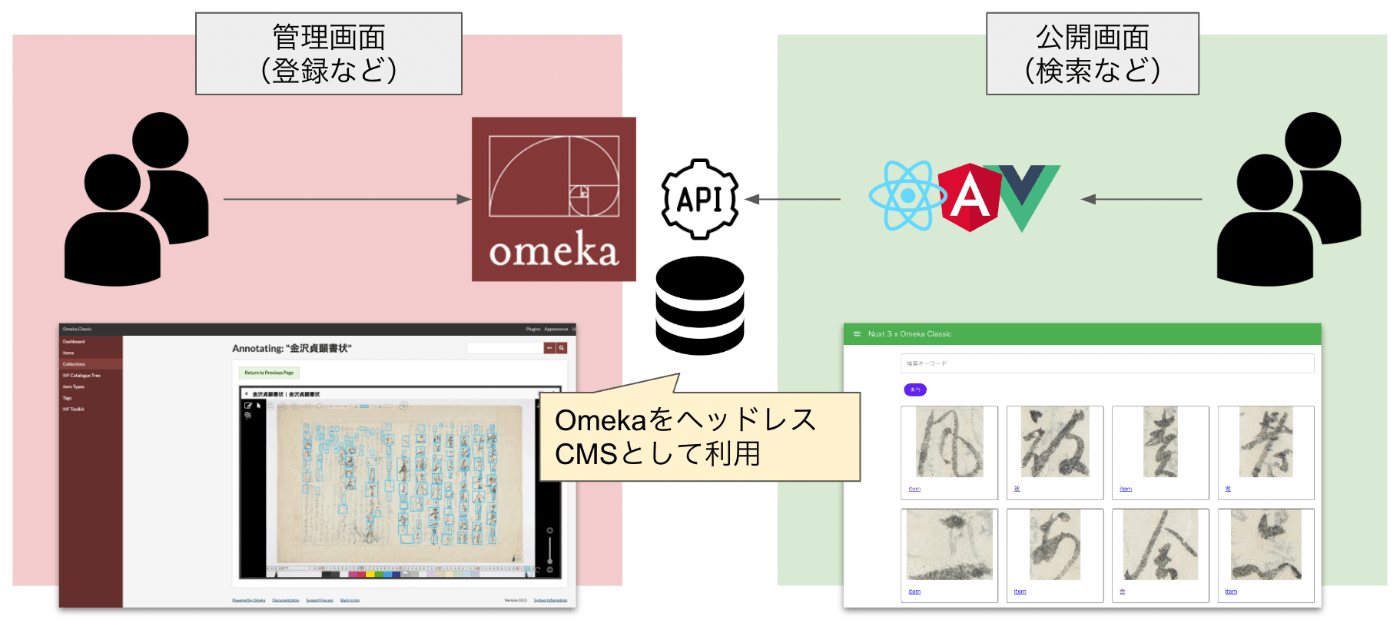
Overview Omeka S and Omeka Classic are very useful tools for building digital archives and for humanities (informatics) research. https://omeka.org/ They come with a REST API as standard and have high extensibility through the addition of modules and plugins. Various existing assets can also be used, including IIIF-related tools, transcription support tools, and tools for handling spatiotemporal information. On the other hand, I (personally) feel that theme development for changing the appearance of sites requires knowledge of PHP and Omeka, making it relatively difficult. On this point, the Headless CMS approach, where the backend and frontend are separated, has been gaining popularity in recent years. ...