Home Articles Books Search About
日本語
Trying Out the Viewer from the "Pre-modern Japan-Asia Relations Digital Archive"

Trying Out the Viewer from the "Pre-modern Japan-Asia Relations Digital Archive"

Overview The “Pre-modern Japan-Asia Relations Digital Archive” was released on July 25, 2025. https://asia-da.lit.kyushu-u.ac.jp/ The viewer is also available at: https://github.com/localmedialabs/tei_comparative_viewer In this article, I share my experience trying out this viewer. As a result, I was able to self-host it as shown below: https://tei-comparative-viewer.aws.ldas.jp/ It loads the following XML file of “Kaitoshokokki” (Record of Countries and Peoples in the Eastern Sea): https://asia-da.lit.kyushu-u.ac.jp/viewer/300 Running Locally Detailed instructions are provided at the following link, which I followed to get it running: ...

Next.js 15 Compatible Multilingual and Dark Mode SSG Template

Next.js 15 Compatible Multilingual and Dark Mode SSG Template

This article was reviewed by a human for implementation and written by AI. Overview This template is a starting point for web application development that supports static site generation (SSG) with Next.js 15, with built-in multilingual support and dark mode. It combines TypeScript, Tailwind CSS, next-intl, and next-themes. https://nextjs-i18n-themes-ssg-template.vercel.app/ja/ Key Features 1. Static Site Generation (SSG) Full static export with output: 'export' Fast page loading and SEO optimization Reduced hosting costs 2. Internationalization (i18n) Full multilingual support with next-intl Japanese and English support (easy to add more languages) URL-based language switching (/ja/about, /en/about) Type-safe translation keys 3. Dark Mode System-linked dark mode with next-themes Automatic detection of user preferences Smooth theme switching animation Persistent settings via LocalStorage 4. Improved Developer Experience Type safety with TypeScript Efficient styling with Tailwind CSS Code quality management with ESLint Unified component structure Tech Stack { "dependencies": { "next": "^15.4.4", "react": "^19.1.0", "next-intl": "^4.3.4", "next-themes": "^0.4.6", "tailwindcss": "^4.1.11", "@tailwindcss/typography": "^0.5.16" } } Project Structure src/ ├── app/ │ ├── [locale]/ │ │ ├── layout.tsx # Root layout │ │ ├── page.tsx # Home page │ │ ├── about/ # About page │ │ └── example/ # Sample page │ ├── icon.svg # Favicon │ └── sitemap.ts # Sitemap generation ├── components/ │ ├── layout/ # Layout components │ │ ├── Header.tsx │ │ ├── Footer.tsx │ │ ├── PageLayout.tsx │ │ ├── ToggleTheme.tsx │ │ └── ToggleLanguage.tsx │ └── page/ # Page-specific components ├── i18n/ │ └── routing.ts # i18n configuration └── messages/ # Translation files ├── en.json └── ja.json Notable Implementations 1. Static Export Support for sitemap.ts export const dynamic = 'force-static'; export const revalidate = false; export default function sitemap(): MetadataRoute.Sitemap { // Implementation } 2. Unified Page Layout <PageLayout breadcrumbItems={breadcrumbItems} title={t('title')} description={t('description')} > <YourContent /> </PageLayout> 3. Configuration via Environment Variables # .env.example NEXT_PUBLIC_SITE_URL=http://localhost:3000 NEXT_PUBLIC_BASE_PATH= Usage Installation git clone [repository-url] cd nextjs-i18n-themes-ssg-template npm install Development npm run dev Build npm run build Customization Points Adding languages: src/i18n/routing.ts and messages/ directory Adding pages: Create new directories under src/app/[locale]/ Theme customization: tailwind.config.js and global CSS Metadata: generateMetadata function in each page Best Practices Component naming: Use PascalCase Translation keys: Organize with nested structure Type safety: Maximize use of TypeScript types Performance: Cache strategy utilizing static generation Summary This template aims to enable quick construction of static sites optimized for SEO, with built-in internationalization and dark mode features. The goal is to improve developer productivity while providing an excellent experience for end users. ...

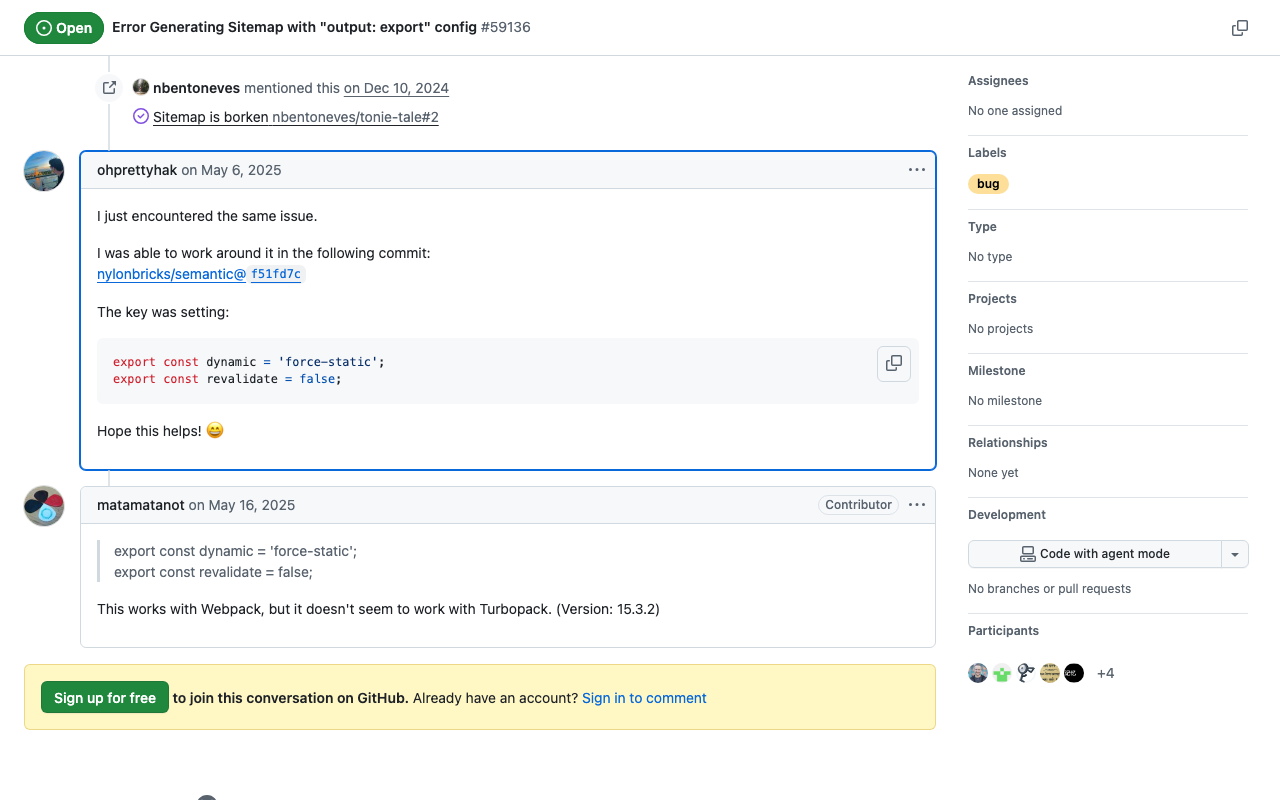
How to Implement sitemap.ts When Using output: 'export' in Next.js 15

How to Implement sitemap.ts When Using output: 'export' in Next.js 15

This article was written by AI after a human verified the implementation. Background When using static site generation (output: 'export') in Next.js 15, you may encounter an error with the sitemap.ts implementation: Error: export const dynamic = "force-static"/export const revalidate not configured on route "/sitemap.xml" with "output: export". Solution This problem can be solved by adding the following two exports to sitemap.ts: // src/app/sitemap.ts import { MetadataRoute } from 'next'; export const dynamic = 'force-static'; export const revalidate = false; export default function sitemap(): MetadataRoute.Sitemap { // sitemap generation logic } Implementation Example import { MetadataRoute } from 'next'; import { routing } from '@/i18n/routing'; export const dynamic = 'force-static'; export const revalidate = false; export default function sitemap(): MetadataRoute.Sitemap { const baseUrl = process.env.NEXT_PUBLIC_SITE_URL || 'http://localhost:3000'; const staticPages = [ '', // Home page '/about', '/example', ]; const sitemapEntries: MetadataRoute.Sitemap = routing.locales.flatMap((locale) => staticPages.map((page) => ({ url: `${baseUrl}/${locale}${page}`, lastModified: new Date(), changeFrequency: page === '' ? 'daily' : 'weekly' as const, priority: page === '' ? 1 : 0.8, })) ); return sitemapEntries; } Verification With this implementation, /out/sitemap.xml is correctly generated when running npm run build. ...

Next.js x Search UI x Fuse.js Search Application

Next.js x Search UI x Fuse.js Search Application

Overview This article explains the technical architecture and implementation of a search application combining Next.js, Elastic Search UI, and Fuse.js. The created site is available here. https://nsf-psi.vercel.app/ja/ The GitHub repository is here. https://github.com/nakamura196/nsf Sample data uses the “Bird’s-eye View of the Main Campus and Faculty of Agriculture Buildings, Tokyo Imperial University (Graduate School of Agricultural and Life Sciences / Faculty of Agriculture, The University of Tokyo).” https://da.dl.itc.u-tokyo.ac.jp/portal/assets/187cc82d-11e6-9912-9dd4-b4cca9b10970 The following was generated by AI. ...

Testing IIIF Authentication API 2.0

Testing IIIF Authentication API 2.0

Overview I had the opportunity to test the IIIF Authentication API 2.0, so here are my notes. https://iiif.io/api/auth/2.0/ I created the following demo site. https://iiif-auth-nextjs.vercel.app/ja The repository is available here. https://github.com/nakamura196/iiif-auth-nextjs The following explanation is AI-generated. Note that I was unable to get it working with Mirador, which remains a future task. Overview This article explains the authentication flow of IIIF Authentication API 2.0 in detail at the HTTP request/response level. We will trace what requests are sent and what responses are returned at each step. ...

Trying Text Annotation with Recogito

Trying Text Annotation with Recogito

Overview I had the opportunity to try text annotation using Recogito, so this is a personal note for future reference. Recogito is available at the following link. https://recogito.pelagios.org/ It is described as follows. Semantic Annotation without the pointy brackets. Recogito is an annotation tool for texts and images - not just for Digital Humanities scholars. Sample Data We will use the following resource published by the National Diet Library as an example. ...

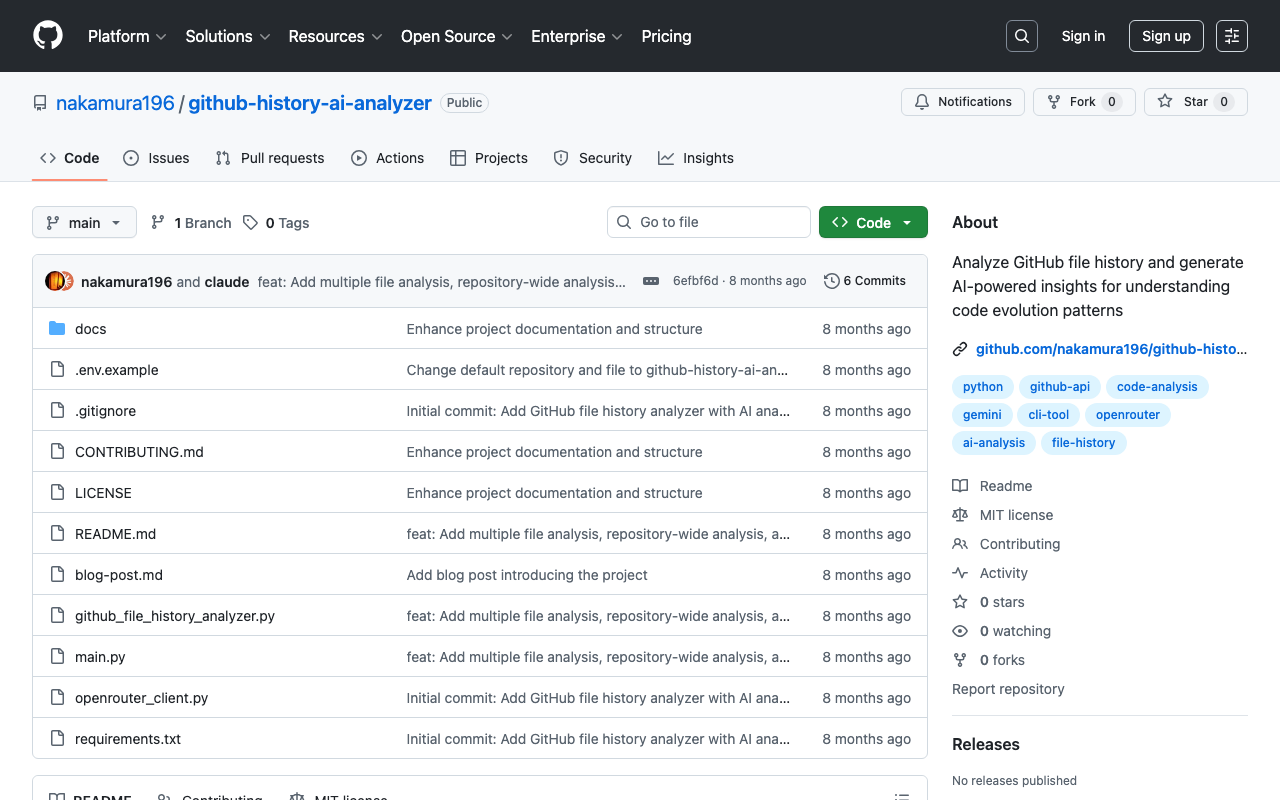
Introducing GitHub File History Analyzer: A Tool for Analyzing File Edit History with AI

Introducing GitHub File History Analyzer: A Tool for Analyzing File Edit History with AI

This article was created by AI. Introduction Have you ever wanted to analyze the edit history of files managed in a GitHub repository? There are cases where you want to understand change patterns of files that have been updated over a long period, or the evolution process of a project. GitHub File History Analyzer is a command-line tool developed to meet such needs. Tool Overview This tool provides the following features: ...

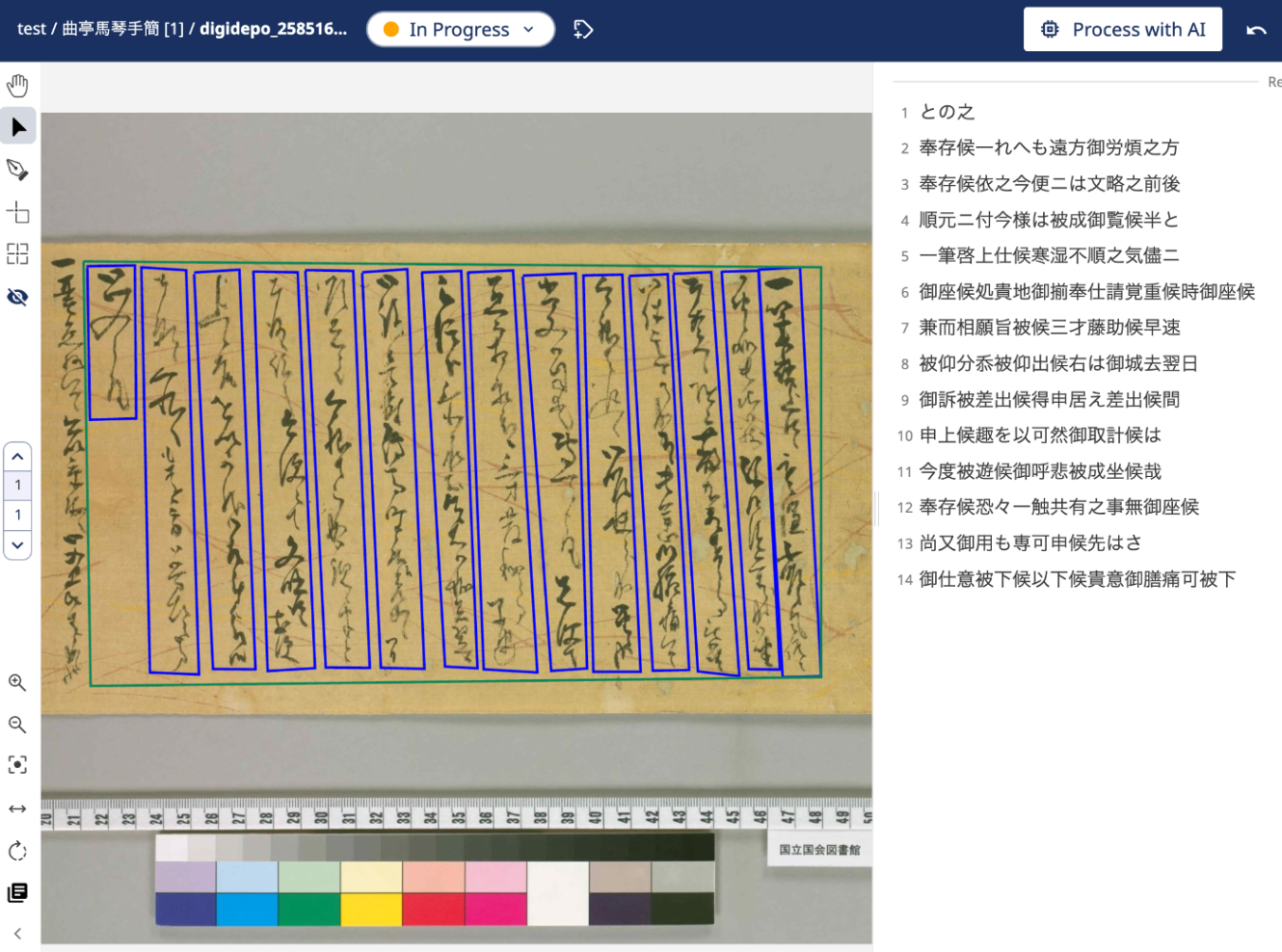
Trying Out Transkribus

Trying Out Transkribus

Overview I had the opportunity to try text annotation using Transkribus, so this is a memo of my experience. Transkribus is available at the following link. https://www.transkribus.org/ It is described as follows: Transkribus enables you to automatically recognise text easily, edit seamlessly, collaborate effortlessly, and even train your custom AI for digitizing and interpreting historical documents of any form. References The following was very helpful as a Japanese-language explanation of Transkribus. ...

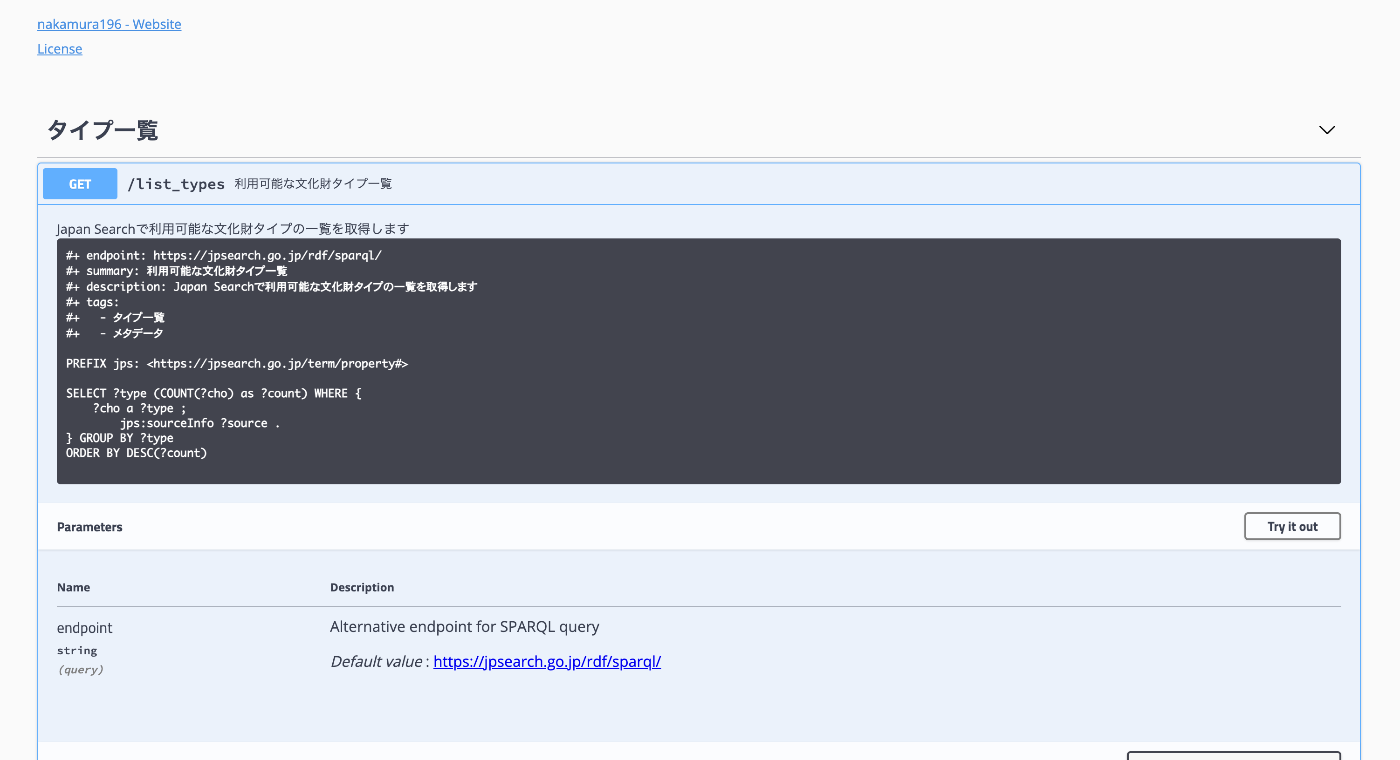
Trying grlc (git repository linked data API constructor)

Trying grlc (git repository linked data API constructor)

Overview The GitHub repository for grlc is as follows. https://github.com/CLARIAH/grlc It is described as follows. grlc, the git repository linked data API constructor, automatically builds Web APIs using shared SPARQL queries. I tried out this tool, so here are my notes. The API endpoint created targeting the Japan Search SPARQL Endpoint is as follows. https://grlc.io/api-git/nakamura196/grlc-jps Background While researching Odeuropa, I found this tool mentioned on the following page. https://odeuropa.eu/nosebooks/ ...

Trying Odeuropa-Related Tools

Trying Odeuropa-Related Tools

Overview I had the opportunity to try tools related to Odeuropa, so this is a memo about that experience. What is Odeuropa? An explanation is available on the following page. https://odeuropa.eu/ Below is a machine-translated description. Odeuropa is an innovative EU-funded project that studies Europe’s “olfactory cultural heritage.” Project objectives: To investigate and document the role that smells have played in European culture from 1600 to 1920. Using cutting-edge AI technology, it extracts smell-related information from approximately 43,000 images and 167,000 historical texts (in English, Italian, French, Dutch, German, and Slovenian). ...

Added Route Registration Feature to "Rekichizu x Next.js"

Added Route Registration Feature to "Rekichizu x Next.js"

Overview “Rekichizu x Next.js” is a web application built with Rekichizu and Next.js. I have added a route registration feature to this web application, which I will introduce here. Feature Introduction Access the top page and click the “Manage My Routes” button. You will be prompted to log in, so click the “Login” button in the upper right corner. After logging in, a list screen like the following will be displayed. ...

Trying DToC: Dynamic Table of Contexts

Trying DToC: Dynamic Table of Contexts

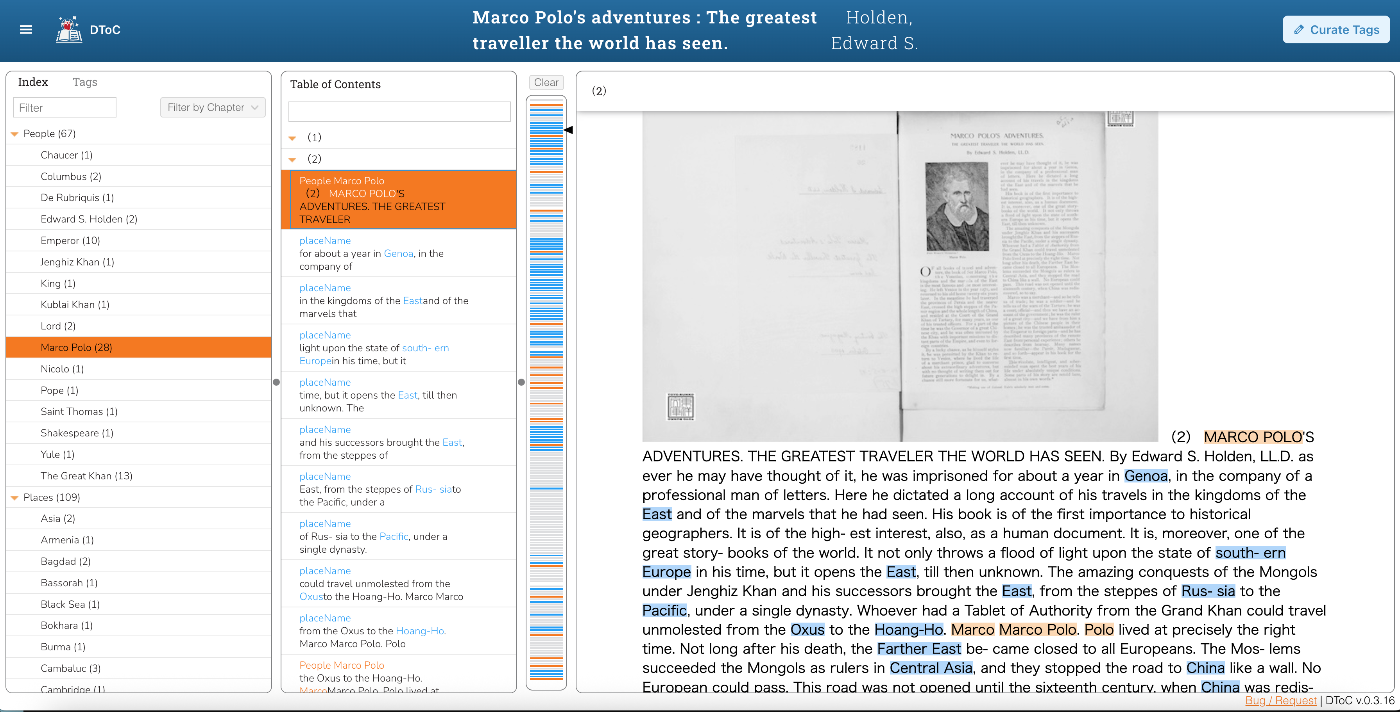
Overview I had an opportunity to try DToC: Dynamic Table of Contexts, so this is a memorandum. https://www.leaf-vre.org/docs/features/dtoc The machine-translated description is as follows: It brings innovation to electronic reading by combining the power of semantic markup with book navigation features. The traditional overview functions of printed books – the table of contents and keyword index – are dynamically integrated with full-text search and tag-based indexing features, creating a new reading experience. ...

Handling Insufficient Disk Space in Ontotext GraphDB Desktop Edition

Handling Insufficient Disk Space in Ontotext GraphDB Desktop Edition

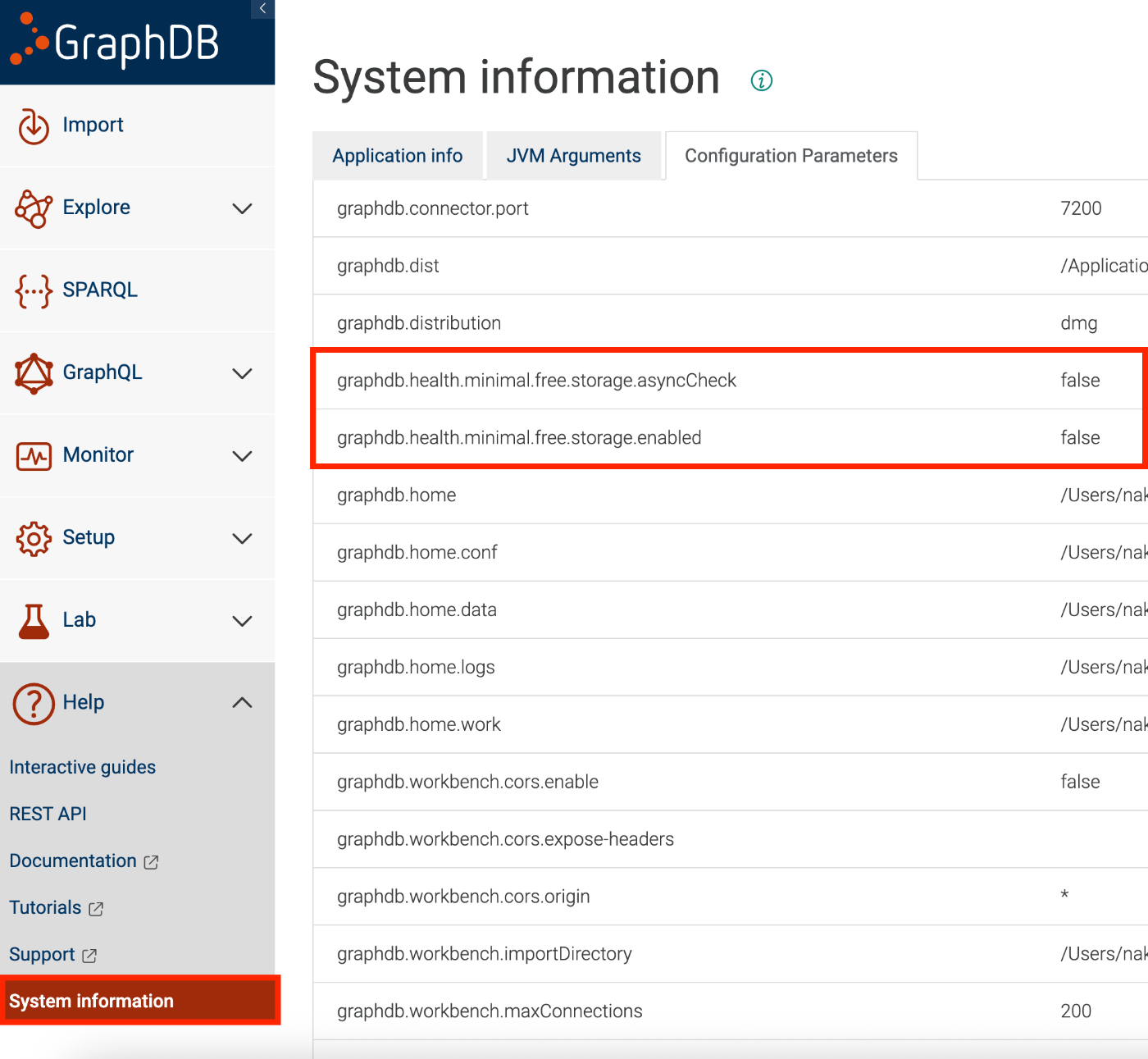
Overview When using the desktop edition of Ontotext GraphDB, https://www.ontotext.com/products/graphdb/ I encountered a situation where data imports and other operations could not be performed due to insufficient disk space: File not loaded; Insufficient disk space to start a transaction for repository ‘xxx’ due to: The repository ‘abc’ is critically low on free disk space with 4.6% (xxx GB) free left This article introduces one temporary workaround for this issue. ...

Trying AllegroGraph

Trying AllegroGraph

Overview I had the opportunity to try AllegroGraph, so this is a memo of my experience. https://allegrograph.com/ Usage There appear to be several setup methods, but I will try the following cloud version. https://allegrograph.cloud/ After setup, the following screen is displayed. After logging in, multiple repositories are displayed. Enabling Anonymous Access For example, the SPARQL endpoint for the “actors” repository is: https://ag1edt2www58hzzy.allegrograph.cloud/repositories/actors/sparql By default, Basic authentication is required. ...

Fixing the 'ref' Bug in DHConvalidator

Fixing the 'ref' Bug in DHConvalidator

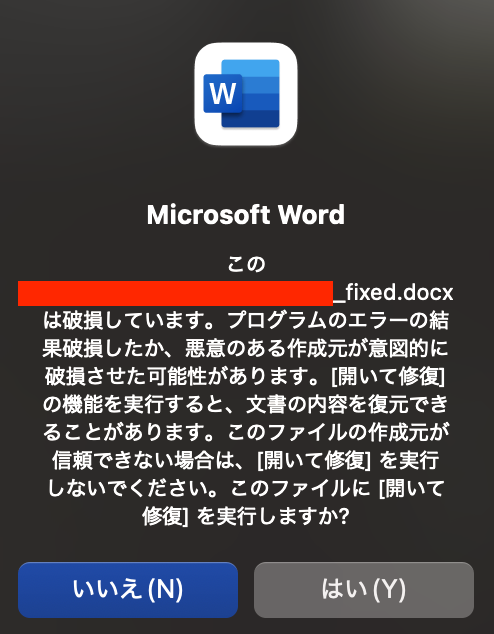
This article was partially written by AI. Overview DHConvalidator is a tool for converting Digital Humanities (DH) conference abstracts into a consistent TEI (Text Encoding Initiative) text base. https://github.com/ADHO/dhconvalidator When using this tool, the following error occurred during the conversion process from Microsoft Word format (DOCX) to TEI XML format: ERROR: nu.xom.ParsingException: cvc-complex-type.2.4.a: Invalid content was found starting with element 'ref' This article shares the cause and solution for this issue. ...

Building an MCP Server for Searching the Koui Genji Monogatari Text DB

Building an MCP Server for Searching the Koui Genji Monogatari Text DB

Overview This is a memo on building an MCP server for searching the Koui Genji Monogatari Text DB. As an example, it can be used from Claude Desktop as follows: https://youtu.be/8s2R9V2hEvc?si=p9SW-IvhdNSzwTLN Background In the following article, I introduced the construction of an API server for searching the Koui Genji Monogatari Text DB. As an application of this, I built an MCP server to try interacting with AI agents. ...

Building an API Server for Searching the Koui Genji Monogatari Text DB

Building an API Server for Searching the Koui Genji Monogatari Text DB

Overview I built an API server for searching the Koui Genji Monogatari (Collated Tale of Genji) Text DB, so here are my notes. https://genji-api.aws.ldas.jp/ Background The following page publishes the text data of “Koui Genji Monogatari” in a TEI/XML-compliant format. https://kouigenjimonogatari.github.io/ This text data is registered in Elasticsearch to create an API that enables searching by text segments. Usage The usage documentation page using OpenAPI and Swagger is accessible at the following URL: ...

Creating a Castle Generation Command as a Minecraft Mod [Fabric 1.21 + Claude]

Creating a Castle Generation Command as a Minecraft Mod [Fabric 1.21 + Claude]

Note: Most of this article was written by AI. Introduction For the purpose of learning Minecraft Mod development, I created a Mod that generates a castle with a single command. Development Environment The technology stack used: Minecraft: 1.21 Modding Framework: Fabric Mod Java: 21 Development Environment: Cursor (AI-integrated editor) AI Assistance: Claude 4 Sonnet Environment Setup Java 21 installation was needed, so I installed it with Homebrew: brew install openjdk@21 Project initialization was done by cloning Fabric’s official template: ...

NFT Support for the Digital Cultural Heritage Management System (Prototype)

NFT Support for the Digital Cultural Heritage Management System (Prototype)

Notice: 2025-06-14 Development progress is summarized here. https://zenn.dev/nakamura196/books/41693d2d017082 Overview Starting with the following article, I have been prototyping a digital cultural heritage management system using blockchain. This time, I modified the system so that uploaded data is recognized as NFTs. This is a learning process, so there may be incomplete aspects, but I hope it serves as a helpful reference. Usage Page The file upload method remains the same as before. A link to the detail page was added to the list page displayed after upload. ...

Creating TEI/XML Files from IIIF Manifest Files Using NDL Kotenseki OCR-Lite

Creating TEI/XML Files from IIIF Manifest Files Using NDL Kotenseki OCR-Lite

Overview This article introduces a Gradio app that creates TEI/XML files from IIIF manifest files using NDL Kotenseki OCR-Lite. It can be accessed at the following URL: https://nakamura196-ndlkotenocr-lite-iiif.hf.space/ Background This is a continuation of the following articles: Previously, two separate apps were needed, but with this update, the entire conversion process can be completed within a single Gradio app. Additionally, issues such as difficulty tracking progress when processing manifest files with many image pages, and the inability to copy processing results, have been fixed. ...