Overview
This is a memo on how to register objects using the AtoM (Access to Memory) API.
Enabling the API
Access the following.
/sfPluginAdminPlugin/plugins
Enable arRestApiPlugin.

Obtaining an API Key
The following explains how to generate an API key.
While it appears you can also connect to the API with a username and password, this time I issued a REST API Key.
Endpoints
AtoM provides multiple menus such as “Authority records” and “Functions,” but it appears that only the following are available via the API.
See the subsequent pages for more details on each endpoint, and available parameters. There are three endpoints available:
Browse taxonomy terms Browse information objects Read information object Download digital objects Add physical objects
In this regard, ArchivesSpace may have an advantage as it provides a richer set of APIs.
https://archivesspace.github.io/archivesspace/api/
Also, checking the following source code revealed that CreateAction is limited to informationobjects, physicalobjects, and digitalobjects.
https://github.com/artefactual/atom/tree/qa/2.x/plugins/arRestApiPlugin/modules/api/actions
However, since the main use case for batch registration is likely informationobjects, these features alone may be sufficient.
Registering Physical Objects

Prepare a class like the following.
#| export
class ApiClient:
    def __init__(self):

        load_dotenv(override=True)

        self.url = os.getenv("atom_url")
        username = os.getenv("username")
        password = os.getenv("password")

        api_key = os.getenv("api_key")

        if api_key:
            self.headers = {
                "REST-API-Key": api_key,
                "Content-Type": "application/json"
            }
        else:
            # Create Basic authentication header
            auth_string = f"{username}:{password}"
            auth_bytes = auth_string.encode('ascii')
            auth_b64 = base64.b64encode(auth_bytes).decode('ascii')

            self.headers = {
                "Authorization": f"Basic {auth_b64}",
                "Content-Type": "application/json"
            }

    def add_physical_objects(self, physical_objects):


        url = f"{self.url}/api/physicalobjects"


        print(url, self.headers, physical_objects)
        response = requests.post(url, headers=self.headers, json=physical_objects)

        # Check the response
        if response.status_code in [200, 201]:
            print("Physical object created!")
            print(f"Status code: {response.status_code}")
            print(f"Response: {response.text}")

            # Information about the created object
            result = response.json()
            print(f"Created physical object ID: {result.get('id')}")

            print(json.dumps(result, indent=4))
        else:
            print(f"Error: {response.status_code}")
            print(f"Response: {response.text}")
Execute as follows.
api_client = ApiClient()

# Physical object data
physical_data = {
    "name": "T-01",
    "location": "Example location",
    "type": "Shelf"
}

api_client.add_physical_objects(physical_data)

Physical object created!
Status code: 201
Response: {"slug":"t-01"}
Created physical object ID: None
{
    "slug": "t-01"
}
As a result, it is registered as follows.

Registering Information Objects
Registering a Parent Record
    def add_information_objects(self, information_objects):
        url = f"{self.url}/api/informationobjects"

        response = requests.post(url, headers=self.headers, json=information_objects)

        if response.status_code in [200, 201]:
            print("Information object created!")
            print(f"Status code: {response.status_code}")
            print(f"Response: {response.text}")
        else:
            print(f"Error: {response.status_code}")
            print(f"Response: {response.text}")
Execute the following.
parent_data = {
    "title": "Parent Collection",
    "identifier": "PARENT-001",
    "level_of_description": "Collection",
}

api_client.add_information_objects(parent_data)

Information object created!
Status code: 201
Response: {"id":453,"slug":"ftb7-3bzd-8759","parent_id":1}
It was registered as follows.

Searching by Identifier
This process allows you to retrieve the slug of a registered record.
    def find_information_objects(self, identifier):
        url = f"{self.url}/api/informationobjects"
        params = {
            "sq0": identifier,
            "sf0": "identifier",
        }
        response = requests.get(url, headers=self.headers, params=params)

        return response.json()
Use it as follows.
identifier = "PARENT-001"
info_objects = api_client.find_information_objects(identifier)
print(json.dumps(info_objects, indent=4))

{
    "total": 1,
    "results": [
        {
            "reference_code": "PARENT-001",
            "slug": "ftb7-3bzd-8759",
            "title": "\u89aa\u30b3\u30ec\u30af\u30b7\u30e7\u30f3",
            "level_of_description": "Collection"
        }
    ]
}
Refer to the following for query parameters sq0 and sf0.
https://www.accesstomemory.org/en/docs/2.9/dev-manual/api/browse-io/#api-browse-io
Registering a Child Record
Now that we know the parent record’s slug is ftb7-3bzd-8759, register as follows.
# Child information object
child_data = {
    "title": "Child Record",
    "identifier": "CHILD-008",
    "level_of_description": "File",
    "parent_slug": "ftb7-3bzd-8759"
}

api_client.add_information_objects(child_data)

Information object created!
Status code: 201
Response: {"id":471,"slug":"nsaa-ywyw-2sx7","parent_id":453}
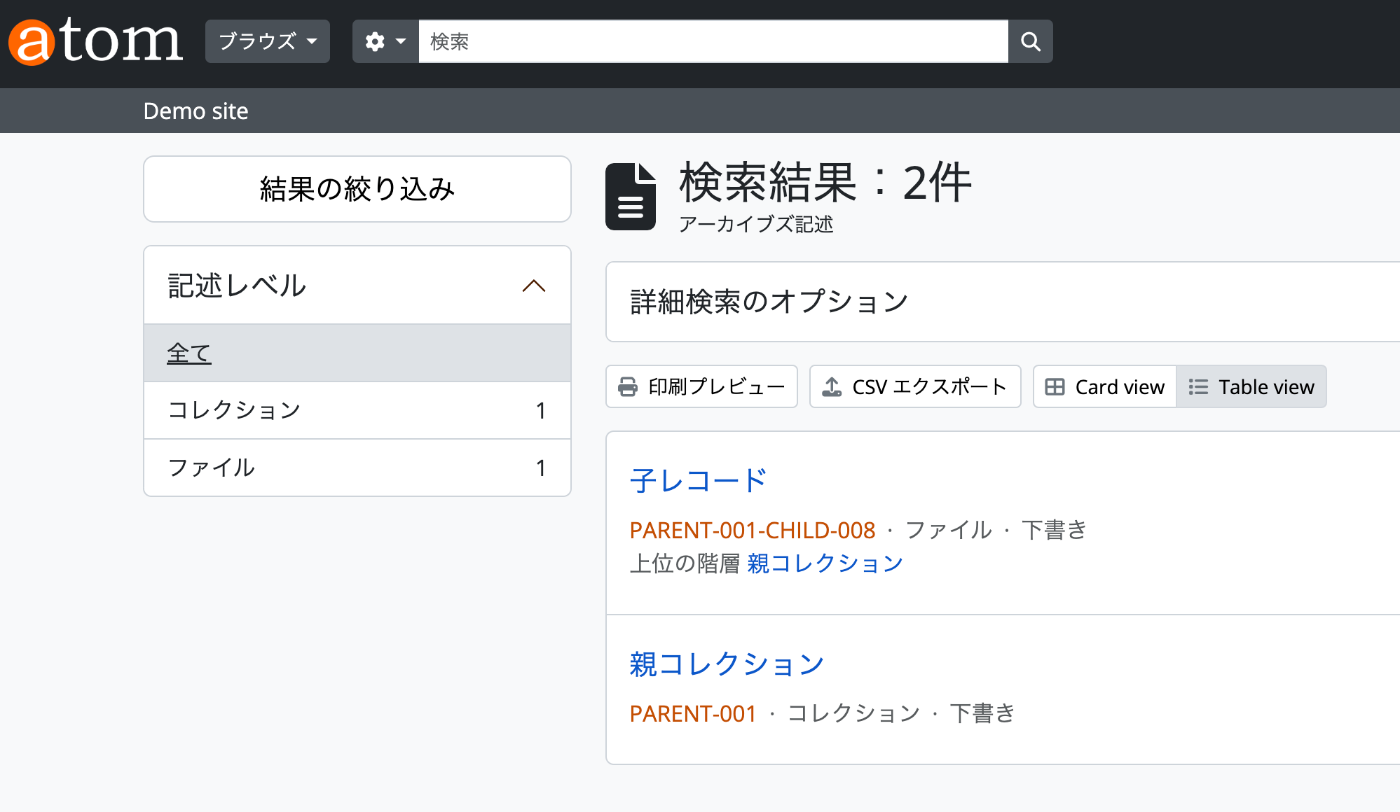
As a result, the child record was registered as a subordinate record under the parent record.
Registering Digital Objects
    def add_digital_objects(self, slug, file_path):

        file_name = os.path.basename(file_path)

        # Upload file with multipart form data
        with open(file_path, 'rb') as f:
            files = {
                'file': (file_name, f, 'application/pdf'),
            }

            data = {
                'title': file_name,
                'informationObjectSlug': slug,
                'usage': 'Reference'  # Master or Reference
            }

            do_response = requests.post(f"{self.url}/api/digitalobjects",
                                  headers=self.headers,  # Content-Type is set automatically
                                  files=files,
                                  data=data)

            if do_response.status_code in [200, 201]:
                do_result = do_response.json()
                print(f"Digital object created successfully: ID {do_result.get('id')}")
            else:
                print(f"Failed to create digital object: {do_response.status_code}")
                print(f"Error message: {do_response.text}")
However, executing the following still resulted in an error.
file_path = "_01.pdf"
slug = "nsaa-ywyw-2sx7"

api_client.add_digital_objects(slug, file_path)
I would like to continue investigating this issue.
Summary
I introduced usage examples of the AtoM (Access to Memory) API.
From a brief investigation, the impression is that API functionality is limited, with only information objects being deletable via API, among other restrictions.
If API-based usage is a prerequisite, it may be worth considering alternatives to AtoM.
We hope this is helpful when evaluating the adoption of AtoM or ArchivesSpace.