Overview
This is a memo on how to perform simple backups of Omeka S using gdrive.
As an example, we target Omeka S installed on a LAMP environment launched on Amazon Lightsail. Please refer to the following for installation instructions.
Installing gdrive
This time, we will back up files to Google Drive. For this purpose, we use gdrive. Please install gdrive by referring to the following article.
Prepare a Backup Script
In the $HOME directory, create a file such as backup.sh. An example of the file contents is as follows.
# Configuration values

## Omeka S installation directory
OMEKA_DIRNAME=htdocs
OUTPUT_DIRNAME=`date +%y-%m-%d`
## MySQL username
USERNAME=root
## MySQL password. Can be checked with the following command:
## cat /home/bitnami/bitnami_application_password
PASSWORD=<password>
## Omeka S database name. Example: omekas
DATABASE_NAME=<database_name>
FOLDER_ID=<Google_Drive_folder_ID>

# Create output folder (folder name based on date)
mkdir -p "$OUTPUT_DIRNAME"
# SQL backup
mysqldump -u $USERNAME -p$PASSWORD $DATABASE_NAME > $OUTPUT_DIRNAME/dump.sql
# Compress Omeka-related folders
zip -q $OUTPUT_DIRNAME/$OMEKA_DIRNAME -r $OMEKA_DIRNAME
# Upload to Google Drive
./go/bin/gdrive upload --recursive --parent $FOLDER_ID $OUTPUT_DIRNAME
# Delete output folder
rm -rf $OUTPUT_DIRNAME
After creating the above file, execute the following command.
bitnami@ip-172-26-1-210:~$ sh backup.sh
Creating directory 22-05-12
Uploading 22-05-12/htdocs.zip
Uploading 22-05-12/dump.sql
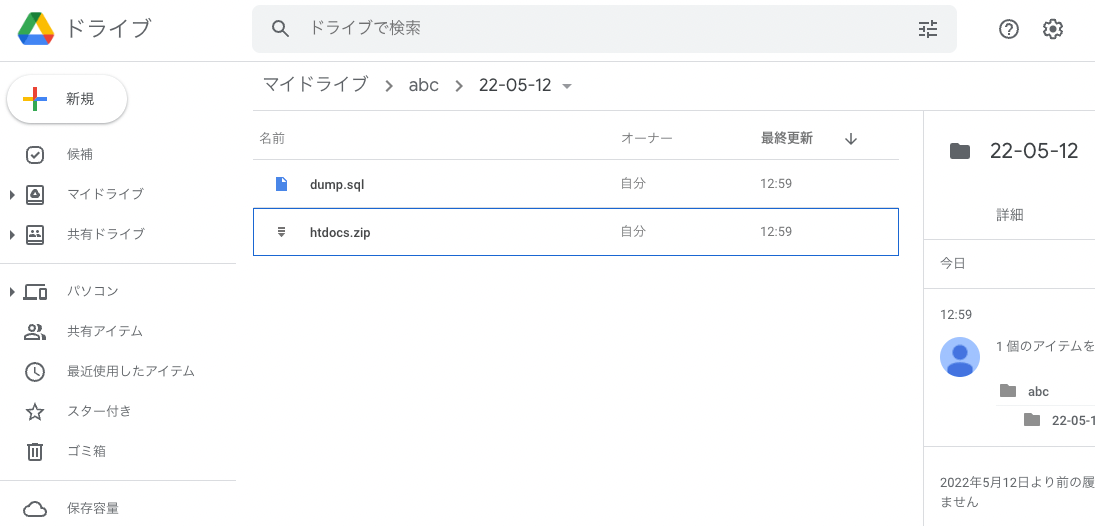
As a result, a folder based on the date is created, and the zip file and SQL file are saved within it.
Setting Up cron
Set up the above backup.sh script to run periodically. Execute the following.
bitnami@ip-172-26-1-210:~$ crontab -e
Add the following. The example below runs at 0:00 every day.
0 0 * * * sh /home/bitnami/backup.sh
With the above, periodic backups using Google Drive become possible.
Summary
The contents of backup.sh shown here may need to be modified depending on your environment, but we hope this serves as a useful reference for simple backup methods of Omeka S using Google Drive.