!
After manual verification, an AI wrote this article.
Introduction
When editing TEI (Text Encoding Initiative) XML, in addition to structural validation of elements and attributes, more complex business rule validation may be needed. This article explains how to combine RELAX NG (RNG) and Schematron to achieve both structural and content validation, using challenges encountered in an actual project as examples.
The Problem to Solve
When editing classical Japanese literary texts in TEI XML, the following requirements arose:
- Dynamic validation of ID references: Validate that IDs referenced by
correspattributes actually exist inwitnesselements within the document - Completion functionality in Oxygen XML Editor: Automatically display ID candidates during editing
- Multiple ID reference support: Allow specifying multiple IDs separated by spaces
- Restricting references to specific elements: Only allow references to
witnesselement IDs, and error ifpersonelement IDs are included
Why RNG + Schematron?
RELAX NG Strengths
- Element and attribute structure definition
- Data type specification
- Basic content model definition
Schematron Strengths
- XPath-based complex validation rules
- Cross-reference checks within documents
- Custom error message provision
Combining these two enables strict validation from both structural and content perspectives.
Implementation Examples
1. Basic RNG Schema Structure
<?xml version="1.0" encoding="UTF-8"?>
<grammar xmlns="http://relaxng.org/ns/structure/1.0"
         xmlns:a="http://relaxng.org/ns/compatibility/annotations/1.0"
         xmlns:sch="http://purl.oclc.org/dsdl/schematron"
         datatypeLibrary="http://www.w3.org/2001/XMLSchema-datatypes"
         ns="http://www.tei-c.org/ns/1.0">

  <!-- Schematron namespace declaration -->
  <sch:ns prefix="tei" uri="http://www.tei-c.org/ns/1.0"/>

  <!-- Embed Schematron rules here -->

  <start>
    <ref name="TEI"/>
  </start>

  <!-- Structural definition by RNG -->
</grammar>
2. ID Definition and Use of anyURI Type
Use the anyURI type to achieve auto-completion in Oxygen XML Editor:
<!-- Witness list -->
<define name="listWit">
  <element name="listWit">
    <oneOrMore>
      <element name="witness">
        <attribute name="xml:id">
          <data type="ID"/>
        </attribute>
        <text/>
      </element>
    </oneOrMore>
  </element>
</define>

<!-- Base text reading -->
<define name="lem">
  <element name="lem">
    <attribute name="corresp">
      <a:documentation>
        Reference to witnesses
        Internal reference in IDREF format with #
        In Oxygen, a list of xml:id with # is displayed
      </a:documentation>
      <list>
        <oneOrMore>
          <data type="anyURI"/>
        </oneOrMore>
      </list>
    </attribute>
    <text/>
  </element>
</define>
Key points:
data type="ID"guarantees uniquenessdata type="anyURI"allows internal references with#- The
listelement allows space-separated multiple values
3. Advanced Validation with Schematron
<sch:pattern id="witness-references">
  <sch:title>Witness ID Reference Validation</sch:title>

  <sch:rule context="tei:lem[@corresp]">
    <sch:let name="listWitIds" value="//tei:listWit/tei:witness/@xml:id"/>
    <sch:let name="listPersonIds" value="//tei:listPerson/tei:person/@xml:id"/>
    <sch:let name="correspTokens" value="tokenize(normalize-space(@corresp), '\s+')"/>

    <!-- Should only reference witnesses -->
    <sch:assert test="every $token in $correspTokens
                      satisfies (
                        starts-with($token, '#') and
                        substring($token, 2) = $listWitIds
                      )" role="error">
      The corresp attribute should only reference witness IDs.
      Available witness IDs: #<sch:value-of select="string-join($listWitIds, ', #')"/>
    </sch:assert>

    <!-- Error if person IDs are included -->
    <sch:report test="some $token in $correspTokens
                      satisfies (
                        starts-with($token, '#') and
                        substring($token, 2) = $listPersonIds
                      )" role="error">
      The corresp attribute contains person IDs.
      Detected person IDs: <sch:value-of select="
        string-join(
          for $token in $correspTokens
          return if (starts-with($token, '#') and substring($token, 2) = $listPersonIds)
                 then $token
                 else (),
          ', '
        )
      "/>
    </sch:report>
  </sch:rule>
</sch:pattern>
Key points:
- Define variables with
sch:letand dynamically retrieve values with XPath - Parse multiple ID references with
tokenize() sch:assertraises errors when conditions are not metsch:reportraises errors when conditions are metrole="error"specifies the error level (warning and info are also available)
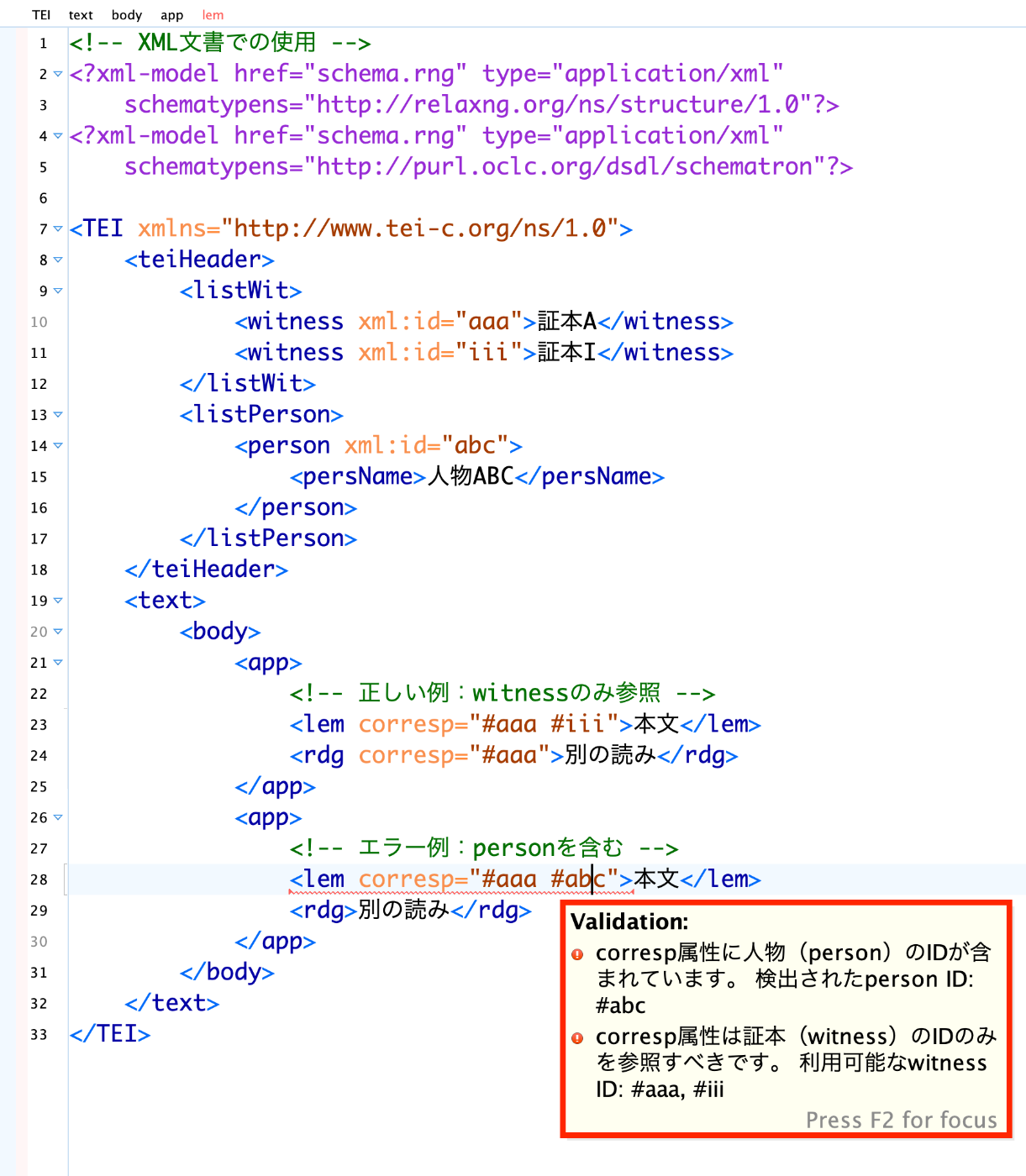
4. Actual Usage Example
<!-- Usage in XML document -->
<?xml-model href="schema.rng" type="application/xml"
    schematypens="http://relaxng.org/ns/structure/1.0"?>
<?xml-model href="schema.rng" type="application/xml"
    schematypens="http://purl.oclc.org/dsdl/schematron"?>

<TEI xmlns="http://www.tei-c.org/ns/1.0">
    <teiHeader>
        <listWit>
            <witness xml:id="aaa">Witness A</witness>
            <witness xml:id="iii">Witness I</witness>
        </listWit>
        <listPerson>
            <person xml:id="abc">
                <persName>Person ABC</persName>
            </person>
        </listPerson>
    </teiHeader>
    <text>
        <body>
            <app>
                <!-- Correct example: referencing only witnesses -->
                <lem corresp="#aaa #iii">Main text</lem>
                <rdg corresp="#aaa">Alternative reading</rdg>
            </app>
            <app>
                <!-- Error example: including person -->
                <lem corresp="#aaa #abc">Main text</lem>
                <rdg>Alternative reading</rdg>
            </app>
        </body>
    </text>
</TEI>
Implementation Notes
1. XPath 2.0 Syntax
Pay attention to the for expression syntax in XPath expressions within Schematron:
<!-- Correct -->
let $invalid := (
  for $token in $correspTokens
  return
    let $id := substring($token, 2)
    return if ($id = $validIds) then () else $token
)

<!-- Will cause an error -->
let $invalid := for $token in $correspTokens
                let $id := substring($token, 2)
                return if ($id = $validIds) then () else $token
2. IDREF vs anyURI
- IDREF type: Cannot include
#, limiting completion in Oxygen - anyURI type: Allows values with
#, and Oxygen automatically provides ID completion
3. Schematron’s role Attribute
role="error": Red error markerrole="warning": Yellow warning markerrole="info": Blue information marker
Application Examples
Complex Cross-Reference Validation
<sch:pattern id="cross-references">
  <!-- app element must have exactly one lem element -->
  <sch:rule context="tei:app">
    <sch:assert test="count(tei:lem) = 1">
      app element must have exactly one lem element
    </sch:assert>
  </sch:rule>

  <!-- rdg element's corresp must not duplicate lem element's -->
  <sch:rule context="tei:rdg[@corresp]">
    <sch:let name="lemCorresp" value="../tei:lem/@corresp"/>
    <sch:assert test="not(@corresp = $lemCorresp)">
      rdg element's corresp must be different from lem element's
    </sch:assert>
  </sch:rule>
</sch:pattern>
Conditional Required Attributes
<sch:pattern id="conditional-attributes">
  <sch:rule context="tei:date[@when]">
    <!-- when attribute must be in ISO format -->
    <sch:assert test="matches(@when, '^\d{4}-\d{2}-\d{2}$')">
      when attribute must be specified in YYYY-MM-DD format
    </sch:assert>
  </sch:rule>
</sch:pattern>
Summary
By combining RELAX NG and Schematron:
- Separation of structural and content validation: Design leveraging each tool’s strengths
- Dynamic validation rules: Flexible validation based on document content
- Editor support: Advanced editing assistance in Oxygen XML Editor and similar tools
- Clear error messages: Custom messages in any language
Especially for editing documents with complex structures like TEI XML, this combination becomes an extremely powerful tool.
References
- RELAX NG Compact Syntax Tutorial
- Schematron Quick Reference
- TEI Guidelines
- Oxygen XML Editor Documentation
The complete schema code introduced in this article is from an actual project. I hope it serves as a reference for those facing similar challenges.