Overview
This is a note on how to add annotations to videos using iiif-prezi3.
Adding Annotations
Amazon Rekognition’s label detection is used.
https://docs.aws.amazon.com/rekognition/latest/dg/labels.html?pg=ln&sec=ft
Sample code is available at the following link.
https://docs.aws.amazon.com/ja_jp/rekognition/latest/dg/labels-detecting-labels-video.html
In particular, by setting the aggregation in GetLabelDetection to SEGMENTS, you can obtain StartTimestampMillis and EndTimestampMillis.
However, please note the following.
When aggregated by SEGMENTS, information about detected instances with bounding boxes is not returned.
Data Used
The video “Prefectural News Vol. 1” (Nagano Prefectural Library) is used.
https://www.ro-da.jp/shinshu-dcommons/library/02FT0102974177
Reflecting in the Manifest File
Assume that a manifest file has already been created, referring to the following article.
The following script adds a VTT file to the manifest file.
from iiif_prezi3 import Manifest, AnnotationPage, Annotation, ResourceItem, config, HomepageItem, KeyValueString

#| export
class IiifClient:

    def load_manifest(self, manifest_path):
        with open(manifest_path, "r") as f:
            manifest_json = json.load(f)

        manifest = Manifest(**manifest_json)

        return manifest


    def add_label_segment(self, manifest_path):
        manifest = self.load_manifest(manifest_path)

        label_path = f"{self.input_dir}/output_label_seg.json"

        with open(label_path, "r") as f:
            label_seg = json.load(f)

        canvas = manifest.items[0]

        labels = label_seg["Labels"]

        anno_page_id = f"{canvas.id}/page1"

        anno_page = AnnotationPage(id=anno_page_id)

        canvas.annotations.append(anno_page)

        for i in range(len(labels)):
            label = labels[i]
            start = label["StartTimestamp"] / 1000
            end = label["EndTimestamp"] / 1000
            name = label["Label"]["Name"]

            anno_id = f"{anno_page_id}/a{i}"

            anno = Annotation(
                id=anno_id,
                motivation="tagging",
                target=canvas.id + "#t=" + str(start) + "," + str(end),
                body={
                    "type": "TextualBody",
                    "value": name,
                    "format": "text/plain",
                }
            )

            anno_page.add_item(
                anno
            )

        output_path = f"{self.input_dir}/manifest_label_seg.json"

        with open(output_path, "w") as f:
            f.write(manifest.json(indent=2))

        return output_path
The following manifest file is generated.
https://d1u7hq8ziluwl9.cloudfront.net/sdcommons_npl-02FT0102974177/manifest_label_seg.json
{
  "@context": "http://iiif.io/api/presentation/3/context.json",
  "id": "https://d1u7hq8ziluwl9.cloudfront.net/sdcommons_npl-02FT0102974177/manifest.json",
  "type": "Manifest",
  "label": {
    "ja": [
      "県政ニュース 第1巻"
    ]
  },
  "requiredStatement": {
    "label": {
      "ja": [
        "Attribution"
      ]
    },
    "value": {
      "ja": [
        "『県政ニュース 第1巻』(県立長野図書館)を改変"
      ]
    }
  },
  "homepage": [
    {
      "id": "https://www.ro-da.jp/shinshu-dcommons/library/02FT0102974177",
      "type": "Text",
      "label": {
        "ja": [
          "信州デジタルコモンズ 県立長野図書館所蔵資料"
        ]
      }
    },
    {
      "id": "https://jpsearch.go.jp/item/sdcommons_npl-02FT0102974177",
      "type": "Text",
      "label": {
        "ja": [
          "ジャパンサーチ"
        ]
      }
    }
  ],
  "items": [
    {
      "id": "https://d1u7hq8ziluwl9.cloudfront.net/sdcommons_npl-02FT0102974177/canvas",
      "type": "Canvas",
      "height": 480,
      "width": 640,
      "duration": 619.61962,
      "items": [
        {
          "id": "https://d1u7hq8ziluwl9.cloudfront.net/sdcommons_npl-02FT0102974177/canvas/page",
          "type": "AnnotationPage",
          "items": [
            {
              "id": "https://d1u7hq8ziluwl9.cloudfront.net/sdcommons_npl-02FT0102974177/canvas/page/annotation",
              "type": "Annotation",
              "motivation": "painting",
              "body": {
                "id": "https://d1u7hq8ziluwl9.cloudfront.net/sdcommons_npl-02FT0102974177/video.mp4",
                "type": "Video",
                "height": 480,
                "width": 640,
                "duration": 619.61962,
                "format": "video/mp4"
              },
              "target": "https://d1u7hq8ziluwl9.cloudfront.net/sdcommons_npl-02FT0102974177/canvas"
            }
          ]
        }
      ],
      "annotations": [
...
        {
          "id": "https://d1u7hq8ziluwl9.cloudfront.net/sdcommons_npl-02FT0102974177/canvas/page1",
          "type": "AnnotationPage",
          "items": [
            {
              "id": "https://d1u7hq8ziluwl9.cloudfront.net/sdcommons_npl-02FT0102974177/canvas/page1/a0",
              "type": "Annotation",
              "motivation": "tagging",
              "body": {
                "type": "TextualBody",
                "value": "Text",
                "format": "text/plain"
              },
              "target": "https://d1u7hq8ziluwl9.cloudfront.net/sdcommons_npl-02FT0102974177/canvas#t=0.0,3.503"
            },
            {
              "id": "https://d1u7hq8ziluwl9.cloudfront.net/sdcommons_npl-02FT0102974177/canvas/page1/a1",
              "type": "Annotation",
              "motivation": "tagging",
              "body": {
                "type": "TextualBody",
                "value": "Advertisement",
                "format": "text/plain"
              },
              "target": "https://d1u7hq8ziluwl9.cloudfront.net/sdcommons_npl-02FT0102974177/canvas#t=8.008,9.009"
            },
...
            {
              "id": "https://d1u7hq8ziluwl9.cloudfront.net/sdcommons_npl-02FT0102974177/canvas/page1/a1139",
              "type": "Annotation",
              "motivation": "tagging",
              "body": {
                "type": "TextualBody",
                "value": "Snow",
                "format": "text/plain"
              },
              "target": "https://d1u7hq8ziluwl9.cloudfront.net/sdcommons_npl-02FT0102974177/canvas#t=616.182,616.182"
            }
          ]
        }
      ]
    }
  ]
}
Viewer Display Example
Here is a display example in a viewer.

The source code published in “IIIF Video Annotation” by UTokyo Digital Humanities is used.
https://dh.l.u-tokyo.ac.jp/activity/iiif/video-annotation
References
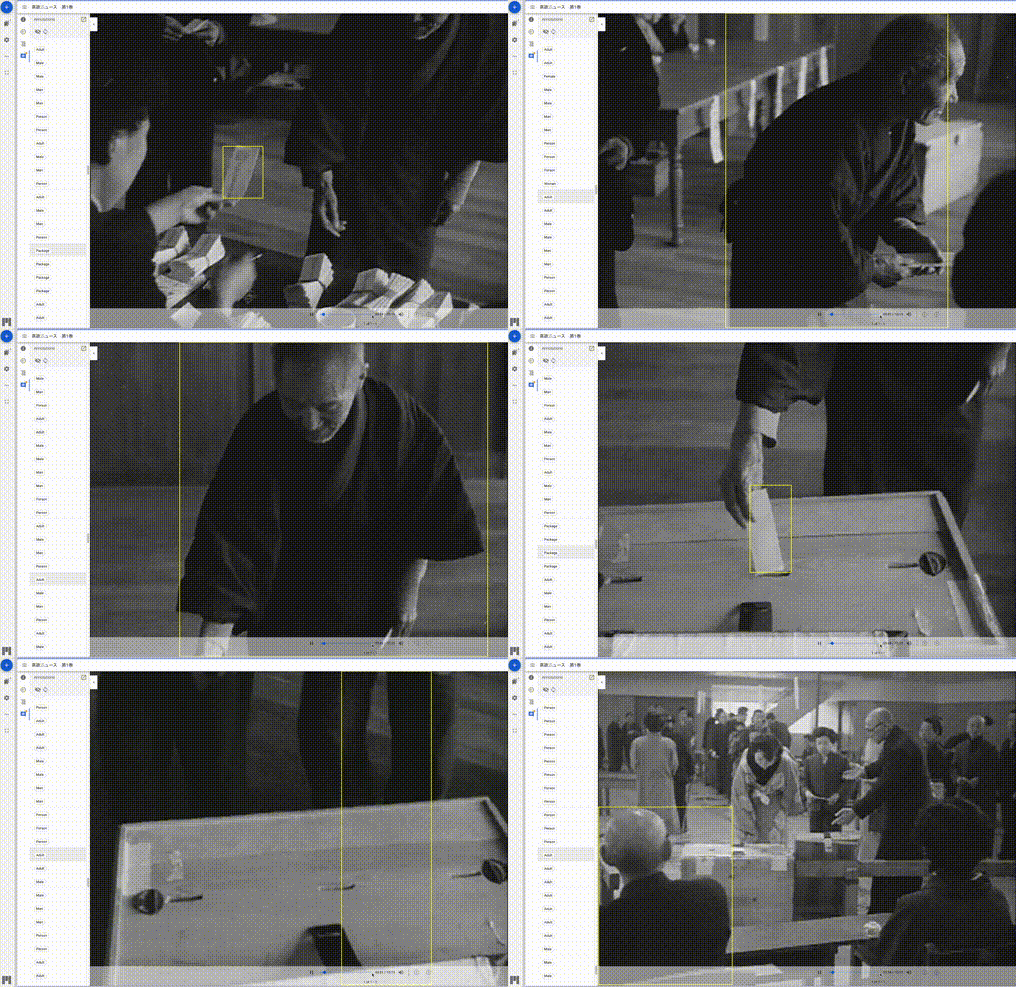
By setting the aggregation in GetLabelDetection of Amazon Rekognition to TIMESTAMP, bounding boxes can be obtained for some annotations.
Using this, annotations can be displayed together with rectangles as shown below.
Summary
I hope this is helpful for adding annotations to video files using IIIF.