Overview
I looked into how to use the Files/Markers tabs of the @samvera/ramp viewer, one of the viewers compatible with IIIF Audio/Visual, so this is a personal note for future reference.
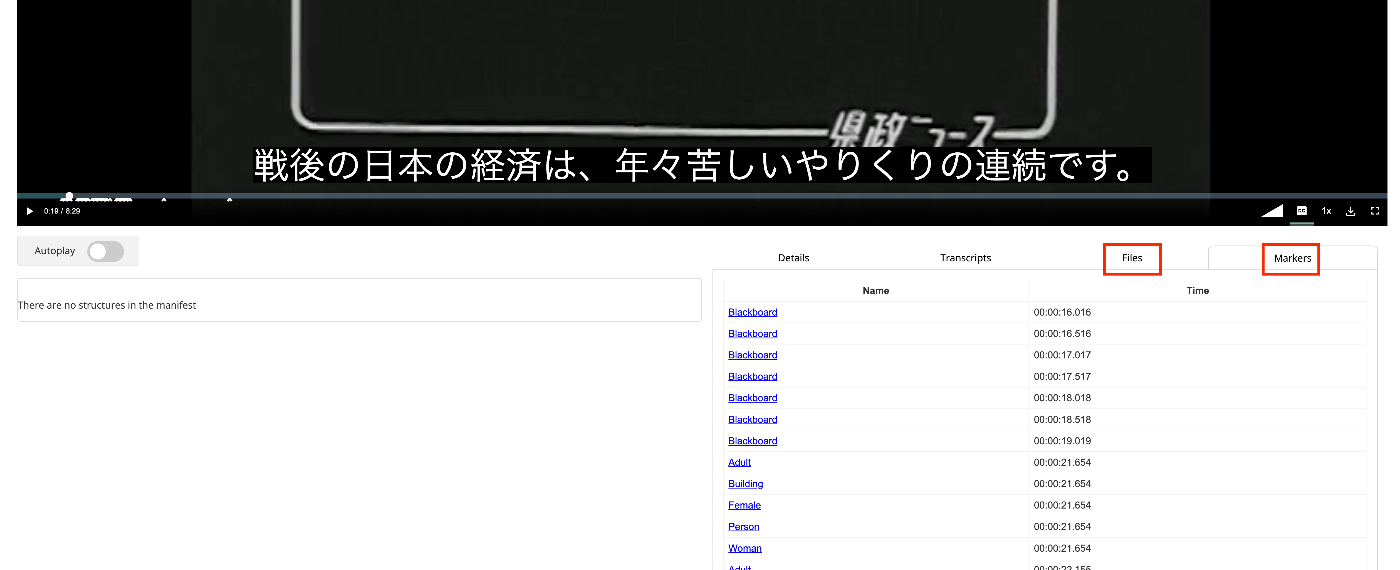
Documentation
For Files, documentation was found at the following.
https://samvera-labs.github.io/ramp/#supplementalfiles
For Markers, documentation is found at the following.
https://samvera-labs.github.io/ramp/#markersdisplay
Data Used
“Kensei News Volume 1” (Nagano Prefectural Library) is used.
https://www.ro-da.jp/shinshu-dcommons/library/02FT0102974177
Files Tab
It is documented that it reads the rendering property. The rendering property is also featured in the following Cookbook.
https://iiif.io/api/cookbook/recipe/0046-rendering/
The following script adds the rendering property to the manifest file.
def add_rendering(self, manifest_path):
        manifest = self.load_manifest(manifest_path)

        japan_search_id = manifest.homepage[1].id.split("/")[-1]

        japan_search_api_url = f"https://jpsearch.go.jp/api/item/{japan_search_id}"

        rendering = ResourceItem(
            label={
                "ja": ["アイテム参照API"],
            },
            id=japan_search_api_url,
            type="Dataset",
            format="application/json"
        )

        manifest.rendering = rendering

        output_path = f"{self.input_dir}/manifest_rendering.json"

        with open(output_path, "w") as f:
            f.write(manifest.json(indent=2))

        return output_path
The following manifest file is created.
{
  "@context": "http://iiif.io/api/presentation/3/context.json",
  "id": "https://d1u7hq8ziluwl9.cloudfront.net/sdcommons_npl-02FT0102974177/manifest.json",
  "type": "Manifest",
  "label": {
    "ja": [
      "県政ニュース 第1巻"
    ]
  },
  "requiredStatement": {
    "label": {
      "ja": [
        "Attribution"
      ]
    },
    "value": {
      "ja": [
        "『県政ニュース 第1巻』(県立長野図書館)を改変"
      ]
    }
  },
  "rendering": [
    {
      "id": "https://jpsearch.go.jp/api/item/sdcommons_npl-02FT0102974177",
      "type": "Dataset",
      "label": {
        "ja": [
          "アイテム参照API"
        ]
      },
      "format": "application/json"
    }
  ],
...
}
Below is a display example in the viewer.

Note that the rendering property was displayed as follows in Clover IIIF.

Markers Tab
It is documented that annotations with highlighting motivation that have time information are displayed.
The following script adds annotations with highlighting motivation to the manifest file.
def add_highlight(self, manifest_path, threshold=400):
        manifest = self.load_manifest(manifest_path)

        label_path = f"{self.input_dir}/output_label.json"

        if os.path.exists(label_path):

            with open(label_path, "r") as f:
                label_seg = json.load(f)

            canvas = manifest.items[0]

            labels = label_seg["Labels"]

            anno_page = canvas.annotations[0]

            anno_page_id = anno_page.id

            # duration = 100

            canvas_width = canvas.width
            canvas_height = canvas.height

            for i in tqdm(range(len(labels))):
                label = labels[i]

                if "Timestamp" not in label:
                    continue

                start = label["Timestamp"] / 1000
                # end = start + duration
                name = label["Label"]["Name"]

                if "Instances" not in label["Label"]:
                    continue

                instances = label["Label"]["Instances"]

                for j in range(len(instances)):

                    anno_id = f"{anno_page_id}/a{i}-{j}"

                    bb = instances[j]["BoundingBox"]

                    x = bb["Left"] * canvas_width
                    y = bb["Top"] * canvas_height
                    w = bb["Width"] * canvas_width
                    h = bb["Height"] * canvas_height

                    anno = Annotation(
                        id=anno_id,
                        motivation="highlighting",
                        # target=f"{canvas.id}#xywh={x},{y},{w},{h}&t={start},{end}",
                        target=f"{canvas.id}#t={start}&xywh={x},{y},{w},{h}",
                        # target=f"{canvas.id}#t={start}",
                        body={
                            "type": "TextualBody",
                            "value": name,
                            "format": "text/html",
                        }
                    )

                    anno_page.add_item(
                        anno
                    )

                if threshold > 0 and i > threshold:
                    break

        output_path = f"{self.input_dir}/manifest_highlight.json"

        with open(output_path, "w") as f:
            f.write(manifest.json(indent=2))

        return output_path
As a note, the markers were not displayed when the target was written as follows.
target=f"{canvas.id}#xywh={x},{y},{w},{h}&t={start},{end}",
It appeared that a format including #t= with only the start point is required, as shown below. xywh is optional.
target=f"{canvas.id}#t={start}&xywh={x},{y},{w},{h}",
As a result, the following manifest file is created.
{
  "@context": "http://iiif.io/api/presentation/3/context.json",
  "id": "https://d1u7hq8ziluwl9.cloudfront.net/sdcommons_npl-02FT0102974177/manifest.json",
  "type": "Manifest",
  "label": {
    "ja": [
      "県政ニュース 第1巻"
    ]
  },
  "requiredStatement": {
    "label": {
      "ja": [
        "Attribution"
      ]
    },
    "value": {
      "ja": [
        "『県政ニュース 第1巻』(県立長野図書館)を改変"
      ]
    }
  },
  "homepage": [
    {
      "id": "https://www.ro-da.jp/shinshu-dcommons/library/02FT0102974177",
      "type": "Text",
      "label": {
        "ja": [
          "信州デジタルコモンズ 県立長野図書館所蔵資料"
        ]
      }
    },
    {
      "id": "https://jpsearch.go.jp/item/sdcommons_npl-02FT0102974177",
      "type": "Text",
      "label": {
        "ja": [
          "ジャパンサーチ"
        ]
      }
    }
  ],
  "items": [
    {
      "id": "https://d1u7hq8ziluwl9.cloudfront.net/sdcommons_npl-02FT0102974177/canvas",
      "type": "Canvas",
      "height": 480,
      "width": 640,
      "duration": 619.61962,
      "items": [
        {
          "id": "https://d1u7hq8ziluwl9.cloudfront.net/sdcommons_npl-02FT0102974177/canvas/page",
          "type": "AnnotationPage",
          "items": [
            {
              "id": "https://d1u7hq8ziluwl9.cloudfront.net/sdcommons_npl-02FT0102974177/canvas/page/annotation",
              "type": "Annotation",
              "motivation": "painting",
              "body": {
                "id": "https://d1u7hq8ziluwl9.cloudfront.net/sdcommons_npl-02FT0102974177/video.mp4",
                "type": "Video",
                "height": 480,
                "width": 640,
                "duration": 619.61962,
                "format": "video/mp4"
              },
              "target": "https://d1u7hq8ziluwl9.cloudfront.net/sdcommons_npl-02FT0102974177/canvas"
            }
          ]
        }
      ],
      "annotations": [
        {
          "id": "https://d1u7hq8ziluwl9.cloudfront.net/sdcommons_npl-02FT0102974177/canvas/page2",
          "type": "AnnotationPage",
          "items": [
            {
              "id": "https://d1u7hq8ziluwl9.cloudfront.net/sdcommons_npl-02FT0102974177/canvas/page2/a1",
              "type": "Annotation",
              "label": {
                "ja": [
                  "WebVTT Transcript (machine-generated)"
                ]
              },
              "motivation": "supplementing",
              "body": {
                "id": "https://d1u7hq8ziluwl9.cloudfront.net/sdcommons_npl-02FT0102974177/video.vtt",
                "type": "Text",
                "format": "text/vtt"
              },
              "target": "https://d1u7hq8ziluwl9.cloudfront.net/sdcommons_npl-02FT0102974177/canvas"
            },
            {
              "id": "https://d1u7hq8ziluwl9.cloudfront.net/sdcommons_npl-02FT0102974177/canvas/page2/a69-0",
              "type": "Annotation",
              "motivation": "highlighting",
              "body": {
                "type": "TextualBody",
                "value": "Blackboard",
                "format": "text/html"
              },
              "target": "https://d1u7hq8ziluwl9.cloudfront.net/sdcommons_npl-02FT0102974177/canvas#t=21.021&xywh=33.72299909591675,23.859649300575256,555.8640289306641,422.45238304138184"
            },
            {
              "id": "https://d1u7hq8ziluwl9.cloudfront.net/sdcommons_npl-02FT0102974177/canvas/page2/a71-0",
              "type": "Annotation",
              "motivation": "highlighting",
              "body": {
                "type": "TextualBody",
                "value": "Blackboard",
                "format": "text/html"
              },
              "target": "https://d1u7hq8ziluwl9.cloudfront.net/sdcommons_npl-02FT0102974177/canvas#t=21.521&xywh=5.045213103294373,5.737994760274887,627.296028137207,472.2190475463867"
            },
...
}
As a note, only one annotation list was processed as a target. Therefore, annotations are stored in the same array as the supplementing motivation annotations.
Below is a display example in the viewer. Markers were displayed in a table format as shown below. Clicking the link attached to the marker name navigated to the specified time.
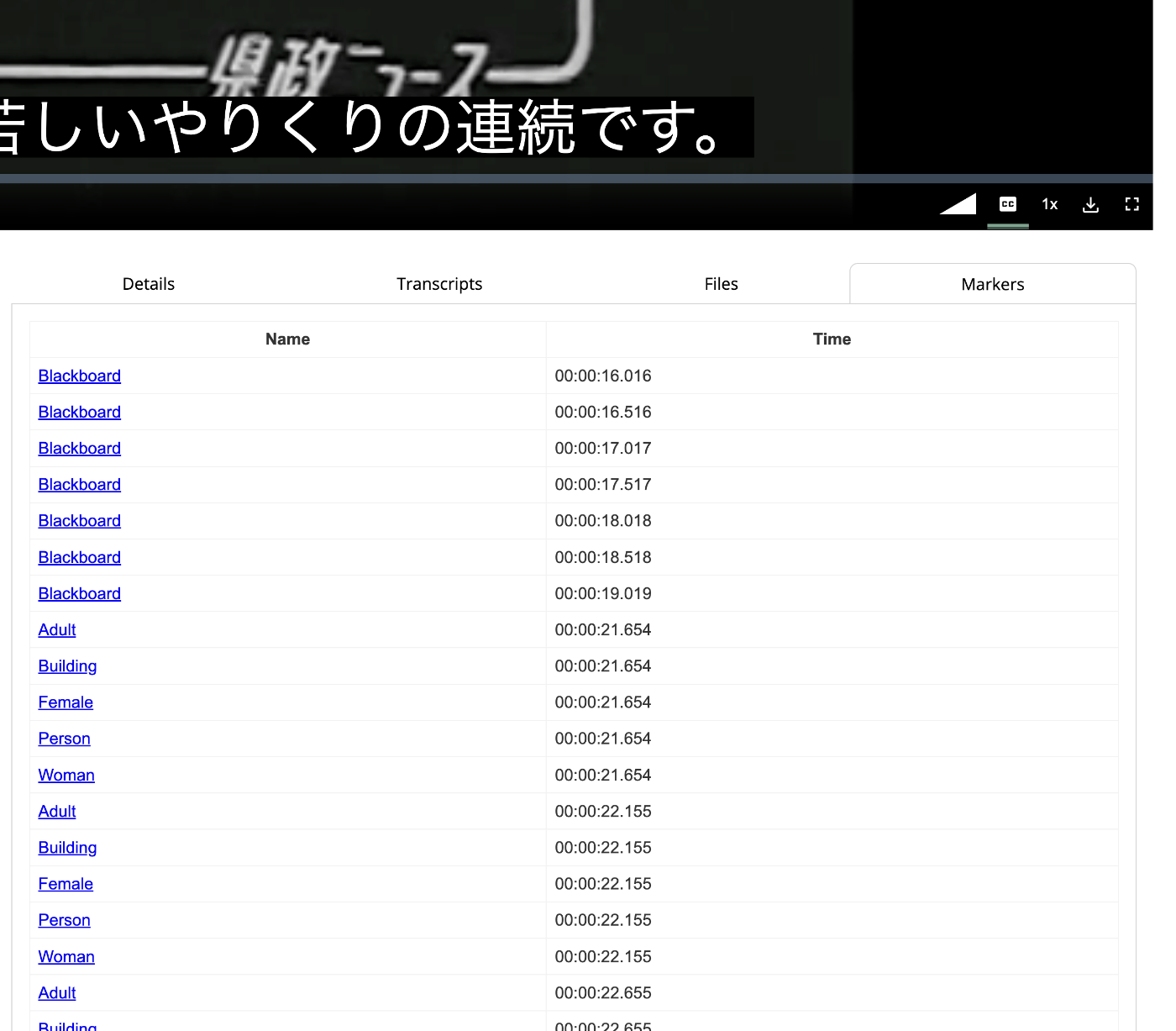
Additionally, in the above, supplementing annotations were not displayed and were only shown in the Transcripts tab.
Summary
I hope this serves as a useful reference for handling annotations in IIIF A/V.