Overview
We had the opportunity to train a YOLOv11 classification model (for kuzushiji/classical Japanese character recognition) using mdx.jp, so this article serves as a reference.
Dataset
We target the following “Kuzushiji Dataset”:
http://codh.rois.ac.jp/char-shape/book/
Creating the Dataset
We format the dataset to match the YOLO format. First, we merge the data, which is separated by book title, into a flat structure.
#| export
class Classification:

    def create_dataset(self, input_file_path, output_dir):
        # "../data/*/characters/*/*.jpg"
        files = glob(input_file_path)

        # output_dir = "../data/dataset"

        for file in tqdm(files):
            cls = file.split("/")[-2]

            output_file = f"{output_dir}/{cls}/{file.split('/')[-1]}"

            if os.path.exists(output_file):
                continue

            # print(f"Copying {file} to {output_file}")

            os.makedirs(f"{output_dir}/{cls}", exist_ok=True)

            shutil.copy(file, output_file)
Next, we split the dataset using the following script:
def split(self, input_dir, output_dir, train_ratio = 0.7, val_ratio = 0.15):
        if os.path.exists(output_dir):
             shutil.rmtree(output_dir)

        # Get class directories
        classes = [d for d in os.listdir(input_dir) if os.path.isdir(os.path.join(input_dir, d))]

        # Split and save data
        for cls in tqdm(classes):
            class_dir = os.path.join(input_dir, cls)
            files = [os.path.join(class_dir, f) for f in os.listdir(class_dir) if os.path.isfile(os.path.join(class_dir, f))]

            # Shuffle and split
            random.shuffle(files)
            train_end = int(len(files) * train_ratio)
            val_end = int(len(files) * (train_ratio + val_ratio))

            train_files = files[:train_end]
            val_files = files[train_end:val_end]
            test_files = files[val_end:]

            # Create save directories
            for split, split_files in zip(["train", "val", "test"], [train_files, val_files, test_files]):
                split_dir = os.path.join(output_dir, split, cls)
                os.makedirs(split_dir, exist_ok=True)

                # Copy files
                for file in split_files:
                    shutil.copy(file, os.path.join(split_dir, os.path.basename(file)))

        print("Data splitting completed.")
As a result, a dataset of 1,086,326 images was created.
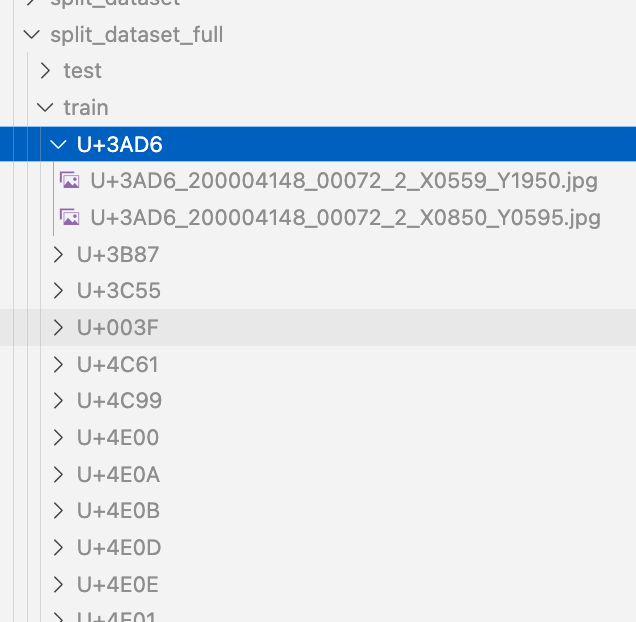
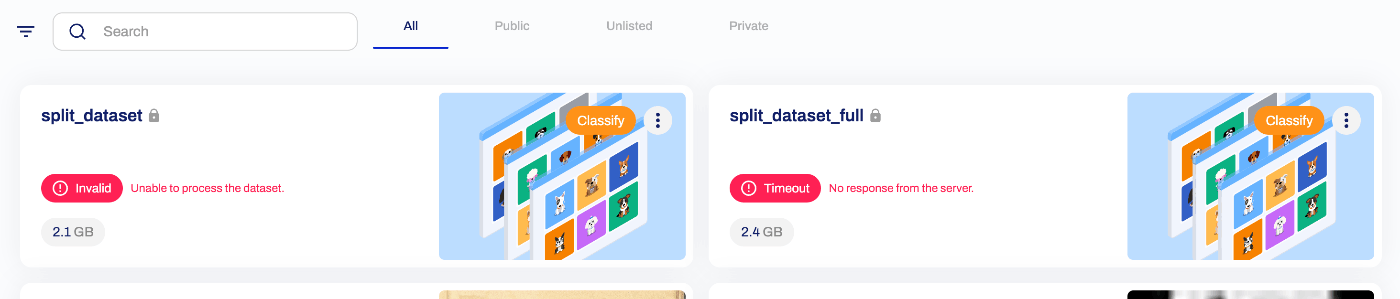
Using Ultralytics HUB (Failed)
First, we considered using Ultralytics HUB and attempted to upload the dataset, but an error occurred as shown below. We were unable to determine whether the cause was an issue with how the dataset was created.
Uploading to mdx.jp Object Storage
The dataset is uploaded to object storage using the following command:
s3cmd sync data/split_dataset_full.zip s3://satoru196/dataset/
Reference: Initial Setup
The official manual is available at:
https://docs.mdx.jp/ja/index.html#object-storage-usage-example
sudo apt install s3cmd
s3cmd --configure
...
Access key and Secret key are your identifiers for Amazon S3. Leave them empty for using the env variables.
Access Key: (enter your access key)
Secret Key: (enter your secret key)
Default Region [US]: us-east-1

Use "s3.amazonaws.com" for S3 Endpoint and not modify it to the target Amazon S3.
S3 Endpoint [s3.amazonaws.com]: s3ds.mdx.jp

Use "%(bucket)s.s3.amazonaws.com" to the target Amazon S3. "%(bucket)s" and "%(location)s" vars can be used
if the target S3 system supports dns based buckets.
DNS-style bucket+hostname:port template for accessing a bucket [%(bucket)s.s3.amazonaws.com]: s3ds.mdx.jp

Encryption password:
Path to GPG program [/usr/bin/gpg]:
Use HTTPS protocol [Yes]:
HTTP Proxy server name:

Test access with supplied credentials? [Y/n]
Please wait, attempting to list all buckets...
Success. Your access key and secret key worked fine :-)  == If you see this, it's OK!

Now verifying that encryption works...
Not configured. Never mind.
Save settings? [y/N] y
Upload:
s3cmd put (filename) s3://(bucket-name)
Download:
s3cmd get s3://(bucket-name)/(object-key)
Operations on mdx.jp
We use 1 GPU pack on mdx.jp.
Download the dataset from object storage using the following commands:
s3cmd get s3://satoru196/dataset/split_dataset_full.zip
unzip split_dataset_full.zip
Then execute training using the following script:
your_training_script.py
from ultralytics import YOLO

# Load the YOLOv8 classification model
model = YOLO('yolo11x-cls.pt')  # Nano-size classification model

# Dataset and training configuration
model.train(
    data='/home/mdxuser/yolo/split_dataset_full',  # Dataset path
    epochs=10,                 # Number of epochs
    # imgsz=224,                 # Input image size
    batch=256                   # Batch size (optional)
)
We use tmux so that training continues even if the SSH connection drops:
tmux new -s my_training_session
python your_training_script.py
After execution, the following checks are performed:
Downloading https://github.com/ultralytics/assets/releases/download/v8.3.0/yolo11x-cls.pt to 'yolo11x-cls.pt'...
100%|██████████| 56.9M/56.9M [00:0147.4MB/s]
Ultralytics 8.3.27 Python-3.10.12 torch-2.5.1+cu124 CUDA:0 (NVIDIA A100-SXM4-40GB, 40339MiB)
engine/trainer: task=classify, mode=train, model=yolo11x-cls.pt, data=/home/mdxuser/yolo/split_dataset_full, epochs=10, time=None, patience=100, batch=16, imgsz=224, save=True, save_period=-1, cache=False, device=None, workers=8, project=None, name=train, exist_ok=False, pretrained=True, optimizer=auto, verbose=True, seed=0, deterministic=True, single_cls=False, rect=False, cos_lr=False, close_mosaic=10, resume=False, amp=True, fraction=1.0, profile=False, freeze=None, multi_scale=False, overlap_mask=True, mask_ratio=4, dropout=0.0, val=True, split=val, save_json=False, save_hybrid=False, conf=None, iou=0.7, max_det=300, half=False, dnn=False, plots=True, source=None, vid_stride=1, stream_buffer=False, visualize=False, augment=False, agnostic_nms=False, classes=None, retina_masks=False, embed=None, show=False, save_frames=False, save_txt=False, save_conf=False, save_crop=False, show_labels=True, show_conf=True, show_boxes=True, line_width=None, format=torchscript, keras=False, optimize=False, int8=False, dynamic=False, simplify=True, opset=None, workspace=4, nms=False, lr0=0.01, lrf=0.01, momentum=0.937, weight_decay=0.0005, warmup_epochs=3.0, warmup_momentum=0.8, warmup_bias_lr=0.1, box=7.5, cls=0.5, dfl=1.5, pose=12.0, kobj=1.0, label_smoothing=0.0, nbs=64, hsv_h=0.015, hsv_s=0.7, hsv_v=0.4, degrees=0.0, translate=0.1, scale=0.5, shear=0.0, perspective=0.0, flipud=0.0, fliplr=0.5, bgr=0.0, mosaic=1.0, mixup=0.0, copy_paste=0.0, copy_paste_mode=flip, auto_augment=randaugment, erasing=0.4, crop_fraction=1.0, cfg=None, tracker=botsort.yaml, save_dir=runs/classify/train
train: /home/mdxuser/yolo/split_dataset_full/train... found 758321 images in 3538 classes: ERROR requires 4328 classes, not 3538
val: /home/mdxuser/yolo/split_dataset_full/val... found 162622 images in 2901 classes: ERROR requires 4328 classes, not 2901
test: /home/mdxuser/yolo/split_dataset_full/test... found 165383 images in 4328 classes
Overriding model.yaml nc=80 with nc=4328

                   from  n    params  module                                       arguments
  0                  -1  1      2784  ultralytics.nn.modules.conv.Conv             [3, 96, 3, 2]
  1                  -1  1    166272  ultralytics.nn.modules.conv.Conv             [96, 192, 3, 2]
  2                  -1  2    389760  ultralytics.nn.modules.block.C3k2            [192, 384, 2, True, 0.25]
  3                  -1  1   1327872  ultralytics.nn.modules.conv.Conv             [384, 384, 3, 2]
  4                  -1  2   1553664  ultralytics.nn.modules.block.C3k2            [384, 768, 2, True, 0.25]
  5                  -1  1   5309952  ultralytics.nn.modules.conv.Conv             [768, 768, 3, 2]
  6                  -1  2   5022720  ultralytics.nn.modules.block.C3k2            [768, 768, 2, True]
  7                  -1  1   5309952  ultralytics.nn.modules.conv.Conv             [768, 768, 3, 2]
  8                  -1  2   5022720  ultralytics.nn.modules.block.C3k2            [768, 768, 2, True]
  9                  -1  2   3264768  ultralytics.nn.modules.block.C2PSA           [768, 768, 2]
 10                  -1  1   6529768  ultralytics.nn.modules.head.Classify         [768, 4328]
YOLO11x-cls summary: 309 layers, 33,900,232 parameters, 33,900,232 gradients, 115.4 GFLOPs
Transferred 492/494 items from pretrained weights
Ultralytics HUB: View model at https://hub.ultralytics.com/models/VMzOVApOedDA0LLYqdho
AMP: running Automatic Mixed Precision (AMP) checks...
Training progress can be monitored by visiting the URL shown at “Ultralytics HUB: View model at”.
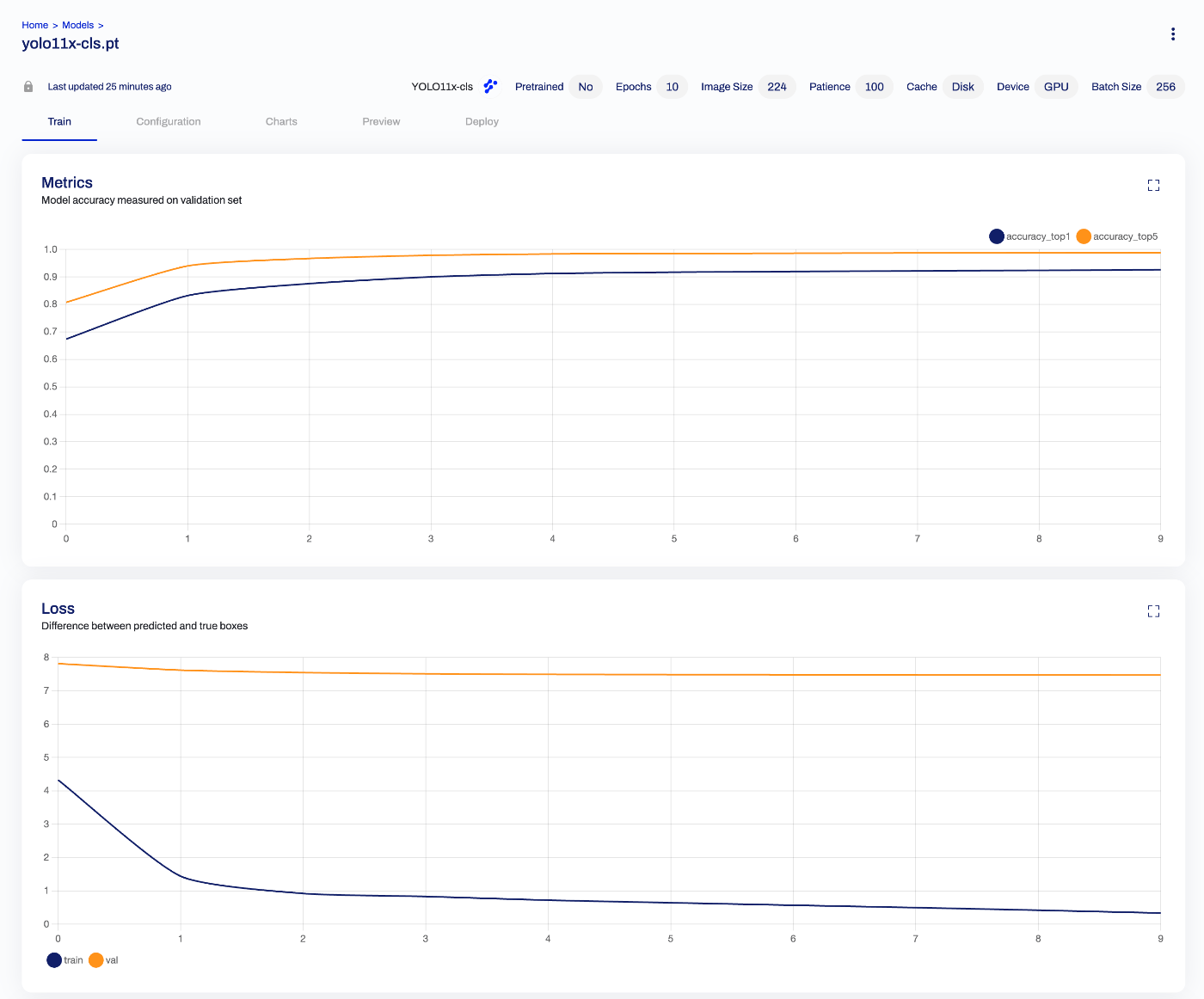
Batch Size
Initially, training was run without specifying a batch size. The default appears to be 16, but GPU memory usage was low as shown below:
Epoch    GPU_mem       loss  Instances       Size
       1/10      1.94G      5.908         16        224:  16%|          | 7471/47386 [08:1615.33it/s]
To take advantage of the A100’s 40 GB memory, we changed the batch size to 256. As a result, execution time per epoch was reduced:
Epoch    GPU_mem       loss  Instances       Size
       1/10      22.7G      8.017        256        224:  12%|          | 349/2962 [02:442.14it/s]
Reference: tmux
List current tmux sessions:
tmux ls
Reattach to a specific session:
tmux attach -t 0
Detach from a tmux session:
Press Ctrl + b, then press d.
Training Results
The trained model is available from the following Hugging Face Space:
https://huggingface.co/spaces/nakamura196/yolov11x-cls-codh-char
While there is room for improvement in accuracy, there were cases where correct results were returned:
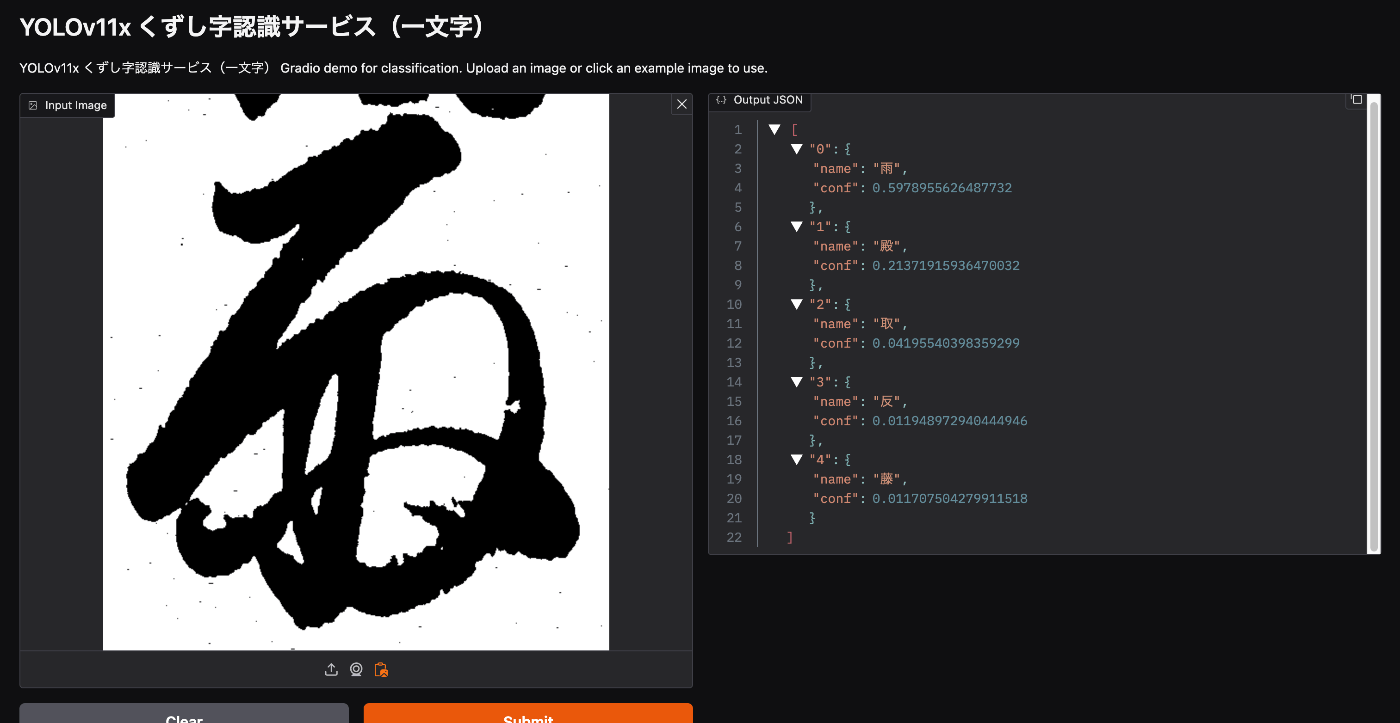
The character images above were sourced from:
https://mojiportal.nabunken.go.jp/
Summary
We hope this serves as a useful reference for training with YOLO, mdx.jp, and related tools.