Overview
This article presents the results of investigating how to customize “Snorql for Japan Search,” which is used by Japan Search. This document will be updated as needed. Please note that it may contain errors.
Menu
Changing the Page Title

snorql_def.js
_poweredByLabel: "Cultural Japan", // "Japan Search",
Changing the Query Endpoint
snorql_def.js
_endpoint: "https://ld.cultural.jp/sparql/", //"https://jpsearch.go.jp/rdf/sparql/",
Changing the poweredByLink URL

snorql_def.js
_poweredByLink: "https://cultural.jp/", // "https://jpsearch.go.jp/",
Editing Other Footer Sections

index.html
footer>
      a href="./">Snorqla> for a id="poweredby" href="#">Japan Searcha>.
      Use
      a href="https://ld.cultural.jp/sparql">basic SPARQL endpointa>
      basic SPARQL endpoint --> for
      your application.


        >SPARQLエンドポイント解説
      >
      -->
    footer>
Changing the Version

snorql_def.js
var _sldb_version = "v0.0.1"; //"v2.20.1";
Top Page Description

snorql_ldb.js
intro_tmpl = hdef.intro_tmpl || [
	"%s0%は、Snorql for Japan Searchを理解するためのチュートリアルです。"
	//"%s0%は、SPARQLクエリ構築支援と分かりやすい結果表示のために、%s1%を拡張したツールです。アプリケーションからのSPARQLクエリには%s2%を利用してください。",
	//"%s0% is an extension of %s1% to make SPARQL query building easier and show results much understandable. Use %s2% for application query."
],
Intro Description

snorql_def.js
intro: [
			["テスト", "Test"]
			//["入力欄下もしくは右にクエリ例があります。ジャパンサーチSPARQLエンドポイント解説も参照してください。", "Query examples are provided below (or right-hand side of) the text area. See also Japan Search RDF Model Primer for the general description."],
			//["エンドポイントの利用方法はSPARQLエンドポイント解説をご覧ください。", "See Japan Search RDF Model Primer for the general description of this endpoint."],
			//["用いているRDFモデルの概要は利活用スキーマ概説をご覧ください。", "See Introduction to Japan Search SPARQL Endpoint (in Japanese) for the RDF model."],
			//["Snorql for Japan Searchの概要はSnorql for Japan Seachを使うをご覧ください。", "About Snorql for Japan Search has basic explanation of this Snorql extension."]
		],
Adding Namespaces

namespaces.js
var D2R_namespacePrefixes = {
    "jps": "https://jpsearch.go.jp/term/property#",
    // ...
    owl: 'http://www.w3.org/2002/07/owl#',
    "dcndl": "http://ndl.go.jp/dcndl/terms/",
};
Changing the Default Query

snorql_def.js
//default query to be set on text area when loaded without user query ユーザクエリ無しでロードされた時にtextareaに表示
		//default_query: "SELECT DISTINCT * WHERE {\n\t?s schema:creator chname:葛飾北斎 ;\n\trdfs:label ?label .\n\tOPTIONAL {?s schema:image ?image}\n}\nLIMIT 100",
		default_query: `select distinct * where {
			?s ?v ?o .
		}`,
Changing Query Examples
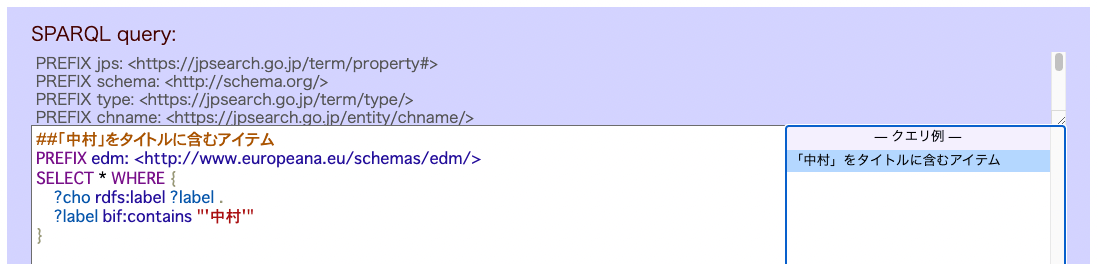
By specifying "ns": ["edm"], you can add prefixes to search queries. However, prefix information must also be added to the example_ns in the same file.
snorql_examples.js
Snorqldef.example = [
	{
		"mlabel": [
			"「中村」をタイトルに含むアイテム",
			"Example 1"
		],
		"query":
`SELECT * WHERE {
	?cho rdfs:label ?label .
	?label bif:contains "'中村'"
}
`,
		"ns": ["edm"]
	},
	/*
	{
		"mlabel": ["クラス(型)別コンテンツ数。シンプルな集約の例です。jps:sourceInfoを加えることでアイテムに限定しています。", "Count items by type. A simple example of aggregation. jps:sourceInfo ensures the resulting ?cho are items (not agents, locations, etc)"],
		"query" :
`SELECT ?type (count(?cho) as ?count) WHERE {
	?cho a ?type ;
		jps:sourceInfo ?source .
} GROUP BY ?type
`,
		"ns" : [ ]	//list of ns prefixes defined in example_ns, if necessary 必要に応じてexample_nsで定義した接頭辞リスト
	},`,
Changing Settings for Simultaneously Describing Sub-Resources with Requested URIs

By default, the fragment identifiers accessinfo and sourceinfo are added. Here is an example where only accessinfo is configured to be added.
snorql_def.js
data_frags: ["accessinfo"], //["accessinfo", "sourceinfo"],
The URI pattern to which this setting applies is specified as follows. Here is an example where https://ld.cultural.jp, which was added by default, has been removed.
snorql_def.js
//snorqlおよび_ldbのis_home_uriを範囲するためのエンドポイント基本データURIパターン。trueならラベルや他情報を追加取得する
		datauri_pat: "^(https://jpsearch.go.jp|http://purl.org/net/ld/jpsearch)/data/",
		//"^(https://jpsearch.go.jp|https://ld.cultural.jp|http://purl.org/net/ld/jpsearch)/data/",	//basic 'record' namespace pattern
With this setting, fragment identifiers will no longer be appended as shown below.
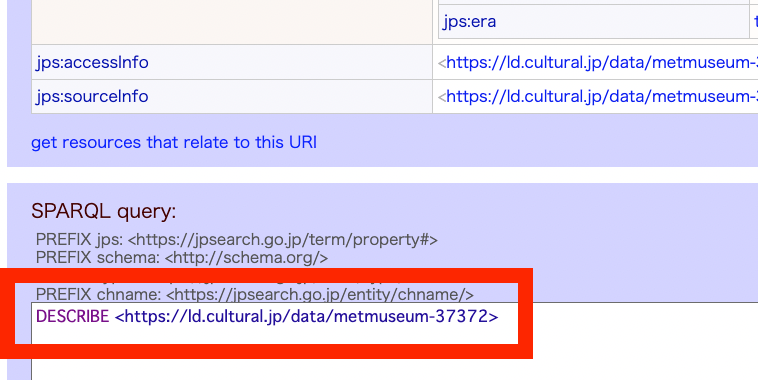
By modifying datauri_pat, you can change the base data URI pattern. For example, with the following setting, labels and additional information will be fetched for resources whose URIs contain xxx.yyy.zzz.
snorql_def.js
datauri_pat: "xxx.yyy.zzz",
Thumbnail Image Display

The property used for thumbnail images is specified as follows. Modify this if you want to use something other than schema:image.
snorql_def.js
thumb_prop: "schema:image", //maybe we should use schema:thumbnail
The DOM manipulation code is as follows.
snorql_ldb.js
/**
 * generates an image element and insert as the first child
 * @param {DOMNode} div	element node that has the description table
 * @param {Object} option	an object to pass extra parameters e.g. width, recover url
 * @param {String} url	target image source url
 * @param {String} recover_url	alternative image url to be used when the target url failed
 * @return {DOMNode}	 element
 */
prim_image_url: function(div, option, url, recover_url){
...
}
Default Maximum Display Count for Describe Results with Many Values for the Same Property (Folding)

snorql_def.js
//describeの結果表示で、同プロパティの値が多数ある時のデフォルト最大表示数(折りたたみ)
showrows: 10, //6,
Properties That Set Value URIs as Direct Links
For URIs such as image URLs, clicking the link navigates directly to that URL.

This is configured as follows.
snorql_def.js
//properties that set direct link rather than describe link
//値URIを直接のリンクとして設定するプロパティ(通常はdescribe=URIリンクを設定する)
dlink_props: [
	"schema:url",
	"schema:relatedLink",
	//"schema:image",
	"schema:associatedMedia",
	"schema:thumbnail",
	"schema:sameAs",
	"schema:usageInfo",	//2022-08-15
	"jps:sourceData",
	"rdfs:seeAlso"
],
License URI Badge

snorql_ldb.js
case this.ns.schema + "license":
			this.addex.if_indiv_policy(ovtd, myoval);
			break;
snorql_ldb.js
/// from more_on_property
	/**
	 * add a license badge, also test license uri is an individual (non conditional) policy, and add "ipd" class if true
	 * ライセンスURIバッヂを加え、さらに「単一ポリシー定義」であるかどうかを確認し、該当したら"ipd"クラスを設定する。
	 * @param {DOMNode} ovtd	 element that contains license uri node, to add a badge and "ipd" class
	 * @param {String} licenseuri	the license uri in question
	 */
	if_indiv_policy: function(ovtd, licenseuri){
		var that = this, binds,
		query = "PREFIX pds: \n" +
		"PREFIX dct: "+
		"select distinct ?ref ?ipd where { + licenseuri + "> dct:isVersionOf? ?ref .\n" +	//added distinct to avoid dup badges2021-01-22
		"?ref a pds:ReferencePolicy .\n" +
		"OPTIONAL{ + licenseuri + "> a ?ipd . ?ipd rdfs:subClassOf pds:IndividualPolicyDefinition}}";
		this.qh.handler(null, query, function(res){
			if(!(binds = that.qh.check_res(res, "ipd results", licenseuri + " (license uri)"))) return false;
			binds.forEach(function(bind){
				if(bind.ipd) ovtd.classList.add("ipd");	//individual policy definition
				if(bind.ref) test_icon(bind.ref.value, ovtd);
			});
			return true;
		});
		function test_icon(reflicense, ovtd){
			var src = that.license_badge(reflicense, "s");
			if(src){
				var imgelt = Util.dom.element("img");
				imgelt.src = src;
				ovtd.appendChild(imgelt);
			}
		}
	},
Prefix-to-Namespace URI Mapping for QName Display Beyond _namespace Settings

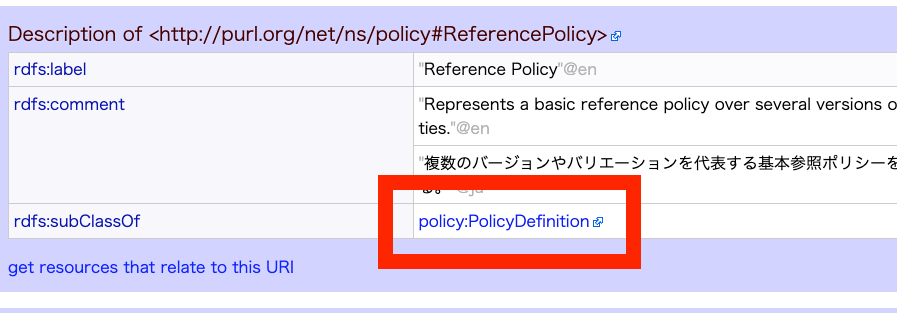
By default, http://purl.org/net/ns/policy# is not displayed as a QName. By configuring the following, you can add additional prefixes to be displayed as QNames.
snorql_def.js
//prefixes to display properties as QName (in addtion to basic snorql._namespace) used by SPARQLResultFormatter._formatURI
		//_namespace設定以外に表示時にQNameとする接頭辞:名前空間URIマッピング
		more_ns: {
			"ind": "https://jpsearch.go.jp/entity/ind/",
			...
			"policy": "http://purl.org/net/ns/policy#"
		}
EasySPARQL Query Content
For example, the “Where” query is configured as follows.
EasySPARQL.js
/**
	 * 場所をキーにしたクエリ生成
	 * @param {String} val	変数値
	 * @return {String}	WHERE句のトリプルパターン。緯度経度も加える
	 */
	where: function(val){
		var matched,
		query = "?s ",
		geopat = "schema:geo [schema:latitude ?lat; schema:longitude ?long ] ";
		if((matched = val.match(/^(.{2,3}?)[都府県]?$/))	//{2,3}のみだと"京都府"は"府"も含めてマッチする
			&& (this.prefectures.indexOf(matched[1]) !== -1)
		){
			//JPSのplace:は都道府県なし(place:三重 など)
			query += this.prop.spatial + " ?place . ?place " + this.prop.value + " place:" + matched[1] + " .\n" +
			"\tOPTIONAL {?place " + geopat + "}";

		}
		...
Configuring Property Display Order for Described Items

snorql_def.js
//preferred order of properties for described item. used in JsonRDFFormatter.
		//describeアイテムでのプロパティ表示順の設定
		proporder: {
			//the latter the heigher priority (top)
			//優先順位の「低い」順に指定するプロパティ定義配列
			showup: [
				"jps:within",
				"schema:longitude",
				// "schema:latitude",
				"schema:geo",
				...
Hiding EasySPARQL
index.html
div>
      form action="" method="get" id="moreform" class="ja">

       Whoだれ:
       Whereどこ:
       Whenいつ:
       Titleタイトル:
       Textテキスト:

	-->
      form>
	link rel="stylesheet" href="codemirror/lib/codemirror.css">
	...
div>