I improved the custom module “GitHub Webhook” that triggers GitHub Actions from Drupal’s admin interface.
https://github.com/nakamura196/Drupal-module-github_webhook
It was originally a basic module with multi-repository support, but I added features such as UI tab separation, granular permissions, workflow status display, and auto-triggering.
The Module Before Improvements
The original module had the following structure:
- File count: 5 files (
info.yml,routing.yml,links.menu.yml,permissions.yml,SettingsForm.php) - Supported version: Drupal 10 only
- Repositories: Multi-repository support (dynamic add/remove via AJAX)
- Interface: Settings and trigger on the same screen (2 accordions)
- Permissions: Single
access github webhook settingspermission (same for both settings and triggering) - Token management:
#default_valueset on password field (token output in plaintext in HTML source) - HTTP client: Direct instantiation of
new \GuzzleHttp\Client() - Exception classes: Written in catch blocks without
usestatements (incorrect namespace resolution)
// Before: Token was set in #default_value
$form['settings']['github_token'] = [
  '#type' => 'password',
  '#title' => $this->t('GitHub Token'),
  '#default_value' => $config->get('github_token'),  // Output in plaintext in HTML
];
// Before: Guzzle client was directly instantiated with new
$client = new \GuzzleHttp\Client();
Overview of Changes
Comparison of file structures before and after the improvements. * indicates modified files, + indicates newly added files.
github_webhook/
  Existing files (modified):
  * github_webhook.info.yml           # Drupal 11 support, PHP requirement added
  * github_webhook.routing.yml        # Expanded from 1 route to 4 routes
  * github_webhook.links.menu.yml     # Entry point changed
  * github_webhook.permissions.yml    # Split from 1 to 2 permissions
  * src/Form/SettingsForm.php         # Trigger section separated, Key module integration added

  New files:
  + composer.json                     # Composer package definition
  + github_webhook.links.task.yml     # Tab definition (3 tabs)
  + github_webhook.services.yml       # Service definition
  + github_webhook.libraries.yml      # JS/CSS library definition
  + github_webhook.module             # Entity hooks (auto-trigger)
  + src/Form/TriggerForm.php          # Manual trigger screen
  + src/Form/AutoTriggerForm.php      # Auto-trigger settings screen
  + src/Service/WebhookTriggerService.php  # Webhook execution service
  + src/Controller/StatusController.php    # Workflow status JSON API
  + js/github-webhook-status.js       # Status polling
  + css/github-webhook-status.css     # Status display styles
  + config/schema/github_webhook.schema.yml  # Configuration schema
  + translations/ja.po                # Japanese translation
  + Dockerfile                        # Docker environment for testing
  + docker-compose.yml
1. From Single Screen to Tab Separation
Before
Settings and trigger were on a single screen with accordions. Since administrators and content editors used the same screen, the token input field was visible to regular users.
/admin/config/github_webhook
+-- [Settings] Accordion  <- For administrators
|   +-- Owner / Repo / Token / Event Type
|   +-- Submit
+-- [Trigger Webhook] Accordion  <- For regular users
    +-- Trigger GitHub Webhook button
After
Using Drupal’s Local Tasks (tabs), the interface was separated into 3 screens. Regular users see only the “Trigger” tab.
/github-webhook/settings
+-- [Trigger] Tab         <- For regular users (default)
+-- [Repositories] Tab    <- Administrators only
+-- [Auto Trigger] Tab    <- Administrators only
# github_webhook.links.task.yml (new)
github_webhook.trigger_tab:
  route_name: github_webhook.trigger
  title: 'Trigger'
  base_route: github_webhook.trigger

github_webhook.repositories_tab:
  route_name: github_webhook.repositories
  title: 'Repositories'
  base_route: github_webhook.trigger

github_webhook.auto_trigger_tab:
  route_name: github_webhook.auto_trigger
  title: 'Auto Trigger'
  base_route: github_webhook.trigger
The most frequently used “Trigger” tab is set as the default route, ensuring content editors can navigate without confusion.
2. Permission Separation
Before
Only one custom permission access github webhook settings was defined, and both settings changes and triggering used the same permission.
# Before
access github webhook settings:
  title: 'Access GitHub Webhook Settings'
  description: 'Allow users to access GitHub webhook configuration.'
After
Separated into two permissions: one for administrators and one for regular users.
# github_webhook.permissions.yml
administer github webhook:
  title: 'Administer GitHub Webhook'
  description: 'Configure repositories, tokens, and auto-trigger settings.'
  restrict access: true

trigger github webhook:
  title: 'Trigger GitHub Webhook'
  description: 'Trigger repository_dispatch webhooks.'
Adding restrict access: true displays a warning mark on the administrator permission in Drupal’s permissions screen.
With this separation, once an administrator registers a PAT (Personal Access Token), regular users without GitHub accounts can trigger builds. The success message content also varies by role.
// Show GitHub Actions link to administrators
if (\Drupal::currentUser()->hasPermission('administer github webhook')) {
  $this->messenger()->addMessage(
    $this->t('... View Actions', [':url' => $actions_url])
  );
} else {
  // Show text only to regular users
  $this->messenger()->addMessage(
    $this->t("GitHub webhook triggered successfully for @repository.", [...])
  );
}
3. Token Security Improvements
Before
Setting #default_value on the password field caused the token to be output in plaintext in the HTML source.
// Before: Dangerous
'#default_value' => $config->get('github_token'),
After
Removed #default_value and used the description text to indicate whether a token is already saved.
$has_manual_token = !empty($repos[$row_no]["github_token"]);
$token_field = [
  "#type" => "password",
  "#title" => $this->t("GitHub Token"),
  "#placeholder" => "github_pat_XXXXXXXXXXXXXXXXXXXXXXXXXXXX",
  "#description" => $has_manual_token
    ? $this->t("A token is already saved. Leave blank to keep the current token.")
    : $this->t("Enter your GitHub personal access token. ..."),
];
When saving, if the field is empty, the existing token is preserved.
if (!empty($github_token)) {
  $current_repo["github_token"] = $github_token;
} else {
  $existing_config = $this->config('github_webhook.settings')->get('repositories');
  $current_repo["github_token"] = $existing_config[$row_no]["github_token"] ?? "";
}
Key Module Integration (New Feature)
When the Key module is installed, the token storage method can be switched. Drupal’s #states API is used to dynamically toggle form fields.
if ($key_module_available) {
  $form["repositories"]["repo" . $row_no][$row_no]["token_source"] = [
    "#type" => "select",
    "#options" => [
      "manual" => $this->t("Manual input"),
      "key" => $this->t("Key module"),
    ],
  ];
}
Using the Key module, tokens can be stored in environment variables or HashiCorp Vault, ensuring that tokens are not included in the Drupal database or drush config:export output.
4. Adding Configuration Schema and Extending Configuration Structure
Before
Although multi-repository support was already implemented, there was no configuration schema (schema.yml), so configuration validation and type checking were not active. There were also no auto-trigger related settings.
After
A new configuration schema was defined, and token_source, token_key, and workflow_file fields were added to repository settings. Auto-trigger related settings were also added.
# config/schema/github_webhook.schema.yml (new)
github_webhook.settings:
  type: config_object
  mapping:
    repositories:
      type: sequence
      sequence:
        type: mapping
        mapping:
          owner:
            type: string
          repo:
            type: string
          event_type:
            type: string
          token_source:
            type: string
          github_token:
            type: string
          token_key:
            type: string
          workflow_file:
            type: string
    auto_trigger_enabled:
      type: boolean
    auto_trigger_content_types:
      type: sequence
      sequence:
        type: string
    auto_trigger_repositories:
      type: sequence
      sequence:
        type: integer
5. Extracting Business Logic into a Service
Before
The webhook trigger logic was implemented directly in the form class’s triggerWebhook() method.
// Before: Logic written directly in form class
public function triggerWebhook(array &$form, FormStateInterface $form_state) {
  $client = new \GuzzleHttp\Client();
  // ... API call
}
After
Extracted into WebhookTriggerService as a service. It can be called from both forms and entity hooks (auto-trigger).
class WebhookTriggerService {
  public function triggerRepository(array $repository): bool { ... }
  public function resolveToken(array $repository): ?string { ... }
  public function getWorkflowRuns(array $repository, int $perPage = 5): array { ... }
}
# github_webhook.services.yml (new)
services:
  github_webhook.trigger:
    class: Drupal\github_webhook\Service\WebhookTriggerService
The HTTP client was also changed to \Drupal::httpClient(), obtaining it through Drupal’s service container.
6. GitHub Actions Status Display (New Feature)
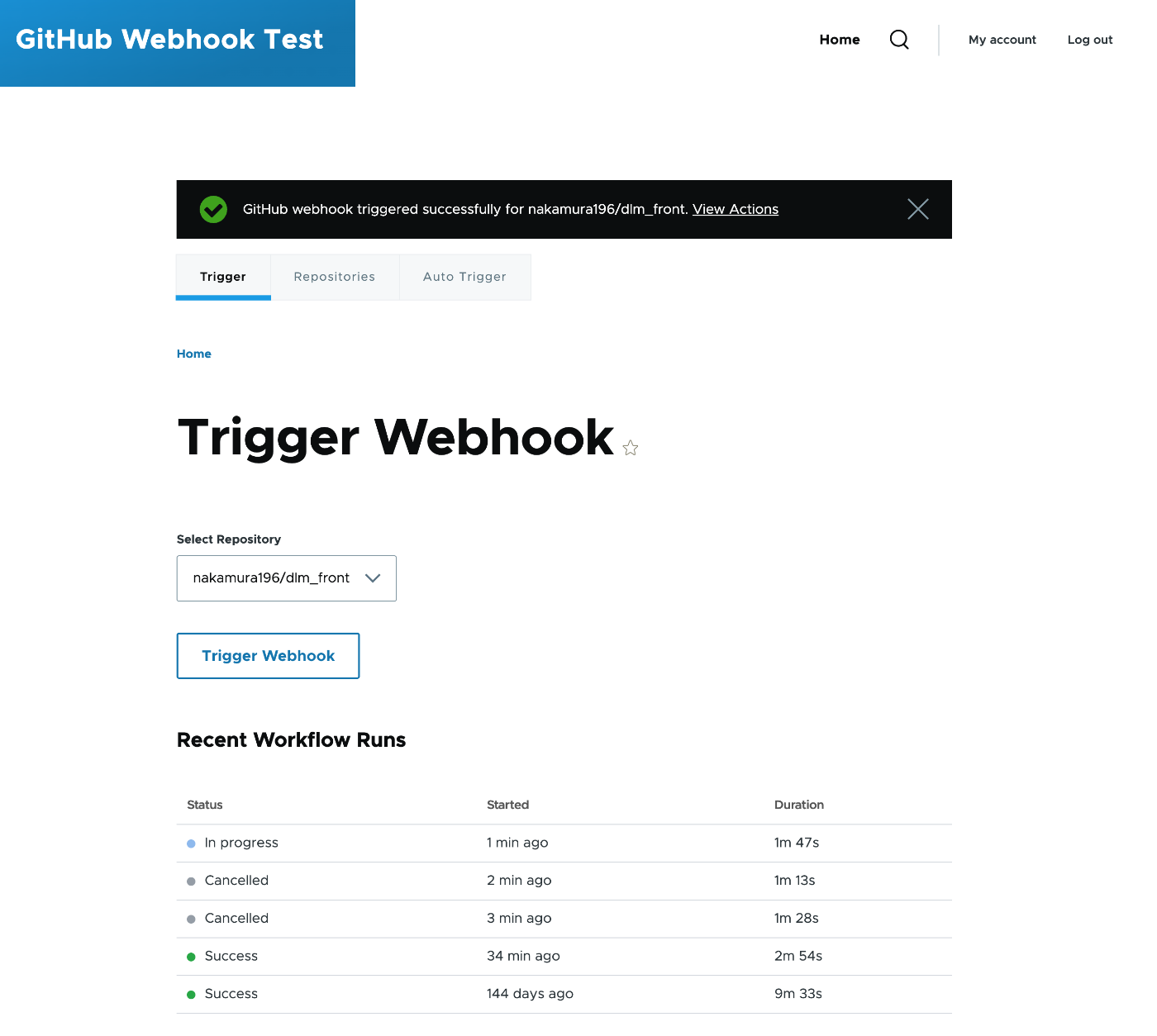
A feature was added to check workflow execution status within Drupal without accessing GitHub after triggering.
Architecture
[TriggerForm]
    | Pass settings via drupalSettings
[github-webhook-status.js]
    | Poll every 5 seconds via fetch()
[StatusController] /github-webhook/api/status/{repo_index}
    | Call GitHub API via service
[WebhookTriggerService::getWorkflowRuns()]
    | Filter by event=repository_dispatch
[GitHub API] /repos/{owner}/{repo}/actions/runs
Since the PAT registered by the administrator is used server-side to call the GitHub API, regular users can check the status even without a GitHub account.
Status is displayed visually with colored dots.
| Status | Color | Display |
|---|---|---|
| Queued | Yellow | Static |
| In progress | Blue | Pulse animation |
| Success | Green | Static |
| Failed | Red | Static |
| Cancelled | Grey | Static |
Administrators see a link to the GitHub URL of the workflow run, while regular users see text only.
Operation Under Subdirectories
When Drupal is hosted under a subdirectory (e.g., https://example.com/cms/), the status API path must also include the subdirectory. Initially, /github-webhook/api/status was hardcoded, but this does not work under subdirectories.
Drupal’s URL generator is used to dynamically generate the base URL from the route.
$status_url = \Drupal\Core\Url::fromRoute('github_webhook.status', ['repo_index' => 0])->toString();
$status_base_url = preg_replace('#/0$#', '', $status_url);
This correctly generates paths like /cms/github-webhook/api/status when under a subdirectory.
Note that the route parameter repo_index has a \d+ constraint, so passing a string to the placeholder would cause an error. The approach passes the numeric value 0 to construct the base URL and removes the trailing /0.
Note: Identifying the Triggered Run
The repository_dispatch API returns HTTP 204 (No Content), so the Run ID of the triggered workflow cannot be obtained directly. Therefore, the approach displays a list of recent runs filtered by event=repository_dispatch.
7. Auto-Trigger on Content Save (New Feature)
hook_entity_insert and hook_entity_update were implemented to automatically trigger webhooks when nodes are saved.
// github_webhook.module (new)
function _github_webhook_auto_trigger(EntityInterface $entity) {
  if ($entity->getEntityTypeId() !== 'node') {
    return;
  }

  $config = \Drupal::config('github_webhook.settings');
  if (!$config->get('auto_trigger_enabled')) {
    return;
  }

  // Check content type
  $content_types = $config->get('auto_trigger_content_types') ?? [];
  if (!in_array($entity->bundle(), $content_types)) {
    return;
  }

  // Trigger for target repositories
  $trigger_service = \Drupal::service('github_webhook.trigger');
  foreach ($auto_trigger_repos as $repo_index) {
    $trigger_service->triggerRepository($repositories[$repo_index]);
  }
}
The target content types and repositories can be selected from the “Auto Trigger” tab in the admin interface. Since the business logic was extracted into a service, the same processing can be called from both the form submit handler and entity hooks.
8. Drupal 11 Support
Before
core_version_requirement: ^10
After
core_version_requirement: ^10 || ^11
php: 8.3
The following code-level improvements were also made.
| Before | After | Reason |
|---|---|---|
new \GuzzleHttp\Client() | \Drupal::httpClient() | Should use Drupal’s service container |
Catching exceptions without use statements | Added use GuzzleHttp\Exception\... | Namespace resolution was incorrect |
\Drupal::messenger()->addMessage() | $this->messenger()->addMessage() | Should use MessengerTrait |
A composer.json was also newly created, compliant with Drupal.org standards.
{
  "name": "drupal/github_webhook",
  "type": "drupal-module",
  "require": {
    "drupal/core": "^10 || ^11",
    "php": ">=8.3"
  },
  "suggest": {
    "drupal/key": "For secure token storage via environment variables, files, or external services."
  }
}
9. Multilingual Support (New Feature)
All UI strings were wrapped with $this->t() / Drupal.t(), and a Japanese translation file was included.
# translations/ja.po
msgid "Trigger Webhook"
msgstr "Webhook をトリガー"

msgid "Loading workflow status..."
msgstr "ワークフローの状態を読み込み中..."

msgid "GitHub webhook triggered successfully for @repository."
msgstr "@repository の GitHub Webhook を正常にトリガーしました。"
JavaScript-side strings also use Drupal.t(), so they can be managed through Drupal’s translation system.
Auto-Import of Translation Files
Drupal does not automatically import .po files from custom module translations/ directories. While specifying interface translation server pattern in info.yml is an option, it requires hardcoding the module’s deployment path (e.g., modules/custom/ or modules/contrib/), which may not work across environments.
Instead, hook_locale_translation_projects_alter() is used to dynamically resolve the module path.
// github_webhook.module
function github_webhook_locale_translation_projects_alter(&$projects) {
  $module_handler = \Drupal::service('module_handler');
  $module_path = $module_handler->getModule('github_webhook')->getPath();
  $projects['github_webhook'] = [
    'info' => [
      'interface translation project' => 'github_webhook',
      'interface translation server pattern' => $module_path . '/translations/%language.po',
    ],
  ];
}
This ensures translation files are automatically imported regardless of where the module is placed. Simply adding Japanese in Drupal’s admin interface translates the UI.
10. Development Environment (Docker)
A Docker environment was added for local testing.
# Dockerfile (new)
FROM drupal:11-apache
RUN apt-get update && apt-get install -y unzip && rm -rf /var/lib/apt/lists/*
RUN composer require drush/drush --no-interaction --working-dir=/opt/drupal
The module directory is volume-mounted so that file changes on the host are immediately reflected in the container.
Appendix: Creating a Fine-grained PAT
This module uses GitHub’s Fine-grained Personal Access Token. Compared to Classic PATs, they offer finer permission control and can be limited to specific repositories.
Creation Steps
- Go to GitHub’s Settings > Developer settings > Personal access tokens > Fine-grained tokens
- Enter a descriptive Token name (e.g.,
drupal-webhook) - Set the Expiration period
- Under Repository access, choose Only select repositories and select the target repositories
- Under Repository permissions, configure the following:
| Permission | Value | Purpose |
|---|---|---|
| Contents | Read and write | Sending repository_dispatch events (required) |
| Actions | Read | Retrieving workflow execution status (optional) |
- Click Generate token and copy the generated token (starts with
github_pat_)
Important Notes
- If
Actions: Readis not granted, the status display feature will not work (triggering itself remains possible) - The
reposcope of Classic PATs grants overly broad permissions, so Fine-grained PATs are recommended - Be mindful of token expiration. When the expiration date approaches, regenerate the token from GitHub’s settings
Summary of Changes
| Item | Before | After |
|---|---|---|
| Supported versions | Drupal 10 only | Drupal 10 / 11 |
| UI structure | Settings and trigger on same screen | Separated into 3 tabs |
| Permissions | 1 permission (shared for settings and trigger) | 2-tier: administrator / regular user |
| Token storage | Set in #default_value (dangerous) | Password field + Key module integration |
| HTTP client | new GuzzleHttp\Client() | \Drupal::httpClient() |
| Business logic | Written directly in form class | Extracted into service class |
| Status display | None | GitHub API polling + JS rendering |
| Status filtering | None | Filterable by workflow file name |
| Auto-trigger | None | Automatic execution on content save via entity hooks |
| Multilingual support | None | .po file (Japanese support) |
| Configuration schema | None | github_webhook.schema.yml |
| composer.json | None | Drupal.org compliant |
| Docker environment | None | Dockerfile + docker-compose.yml |
Even regular users without access to GitHub can now trigger builds and check status from Drupal’s admin interface, making it easier to leverage for workflow automation in headless CMS configurations.