We developed a viewer that can display 3D Gaussian Splatting (3DGS) files in the browser. This article explains the overview of 3DGS, why standard PLY viewers cannot display them, and the implementation of a dedicated viewer.
Demo:
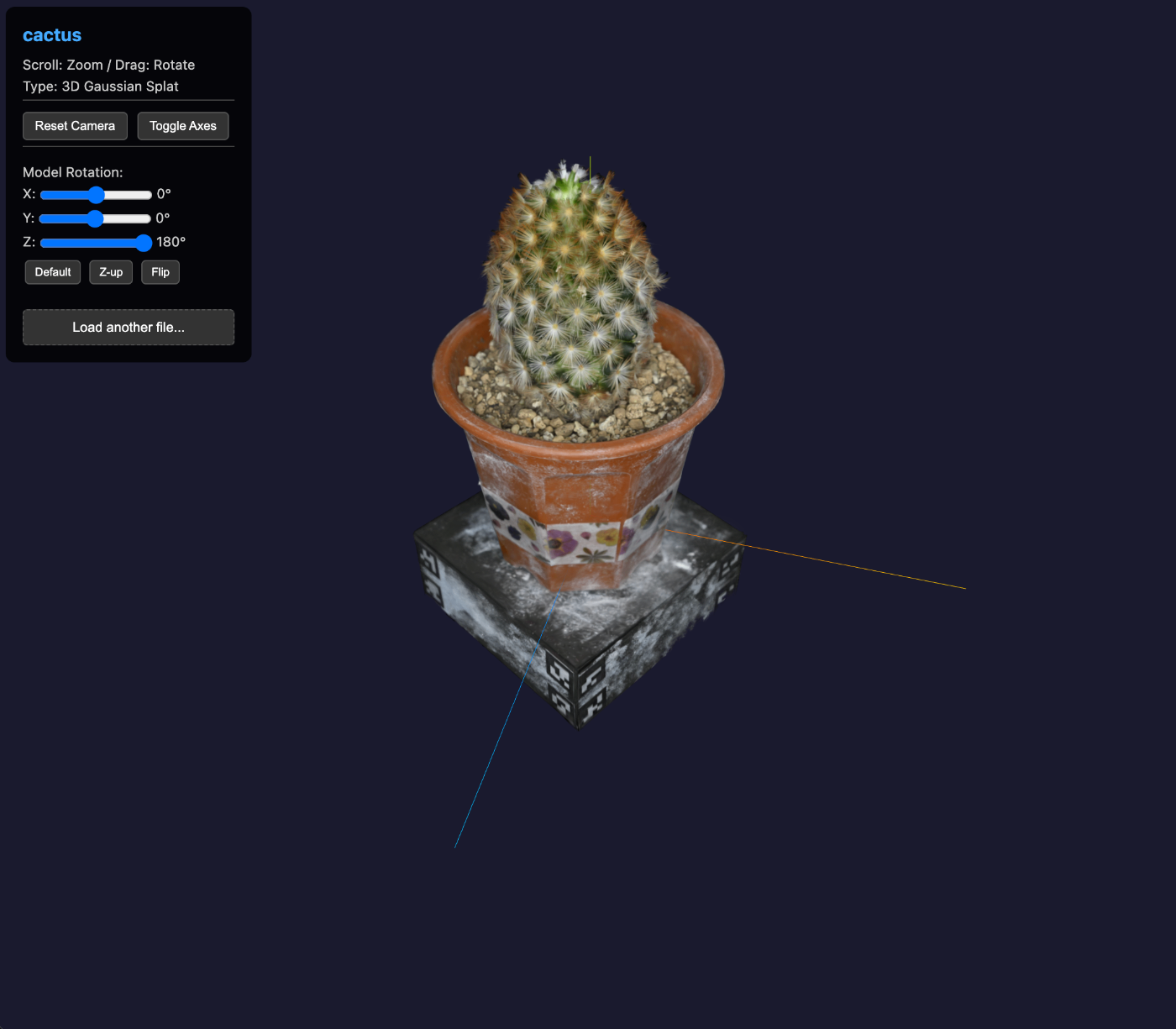
Why Standard PLY Viewers Cannot Display 3DGS
Since 3DGS files have the .ply extension, they appear to be handleable like standard PLY files at first glance. However, loading them with Three.js’s PLYLoader does not display them correctly.
Differences Between Standard PLY Files and 3DGS PLY Files
Standard PLY (mesh/point cloud):
element vertex 1000
property float x
property float y
property float z
property uchar red
property uchar green
property uchar blue
element face 500
property list uchar int vertex_indices
3DGS PLY:
element vertex 142000
property float x
property float y
property float z
property float f_dc_0      # Spherical harmonics (color)
property float f_dc_1
property float f_dc_2
property float opacity     # Opacity
property float scale_0     # Scale (ellipsoid size)
property float scale_1
property float scale_2
property float rot_0       # Rotation (quaternion)
property float rot_1
property float rot_2
property float rot_3
What Happens When Loaded with PLYLoader
Three.js’s PLYLoader cannot understand 3DGS-specific properties. Loading them causes the following issues:
- Missing color information:
f_dc_0,f_dc_1,f_dc_2are spherical harmonic coefficients, not RGB colors, so correct colors are not displayed - Displayed as a simple point cloud: The shape of each Gaussian (scale and rotation) is ignored, and they are displayed as mere points
- Reduced rendering quality: The smooth interpolation characteristic of Gaussian splatting is not performed
Why a Dedicated Renderer is Needed
To correctly display 3DGS, the following processing is required:
- Depth sorting: Sort all Gaussians by distance from the viewpoint (every frame)
- 2D projection: Project 3D Gaussians into 2D ellipses
- Alpha blending: Composite from back to front
These need to be processed efficiently by GPU shaders, which standard point cloud and mesh renderers cannot handle. Therefore, we used Spark.js, a dedicated library.
What is 3D Gaussian Splatting?
3D Gaussian Splatting (3DGS) is an innovative 3D representation technique presented at SIGGRAPH 2023. Compared to conventional NeRF (Neural Radiance Fields), it enables real-time rendering and can efficiently represent high-quality 3D scenes.
Comparison with Existing Technologies
| Technology | Rendering Speed | Quality | Editability |
|---|---|---|---|
| Mesh | Very fast | Medium | High |
| Point Cloud | Fast | Low-Medium | High |
| NeRF | Slow (seconds) | High | Low |
| 3DGS | Real-time | High | Medium |
How 3DGS Works
3DGS represents a 3D scene as a collection of many “3D Gaussians” (ellipsoidal points).
Each Gaussian has the following parameters:
- Position: Center coordinates in 3D space
- Covariance: Shape and orientation of the ellipsoid
- Opacity: Transparency
- SH coefficients (Spherical Harmonics): View-dependent color information
During rendering, these Gaussians are projected (splatted) onto the 2D screen and composited with alpha blending.
Supported File Formats
PLY Format (.ply)
The most common 3DGS format. Both standard PLY and compressed PLY (compressed.ply) are supported.
ply
format binary_little_endian 1.0
element vertex 142000
property float x
property float y
property float z
property float f_dc_0
property float f_dc_1
property float f_dc_2
property float opacity
property float scale_0
property float scale_1
property float scale_2
property float rot_0
property float rot_1
property float rot_2
property float rot_3
end_header
SPLAT Format (.splat)
A lightweight binary format suitable for web distribution.
KSPLAT Format (.ksplat)
An efficient format developed by Kevin Kwok.
SPZ Format (.spz)
A compression format proposed by Niantic that significantly reduces file size.
Implementation Details
Libraries Used
| Library | Version | Purpose |
|---|---|---|
| Three.js | 0.170.0 | 3D rendering foundation |
| OrbitControls | Bundled with Three.js | Camera controls |
| Spark.js | 0.1.10 | 3DGS rendering |
About Spark.js
Spark.js is a library for handling 3D Gaussian Splatting with Three.js. It uses WebGL shaders to efficiently perform Gaussian sorting and splatting.
import { SplatMesh } from '@sparkjsdev/spark';

// Create a SplatMesh and add it to the scene
const splatMesh = new SplatMesh({
  url: 'model.ply',
  onProgress: (progress) => {
    console.log(`${progress.loaded / progress.total * 100}%`);
  }
});

await splatMesh.loadPromise;
scene.add(splatMesh);
Using Import Maps
Libraries are loaded via CDN using ES Modules.
script type="importmap">
{
  "imports": {
    "three": "https://esm.sh/three@0.170.0",
    "three/": "https://esm.sh/three@0.170.0/",
    "@sparkjsdev/spark": "https://sparkjs.dev/releases/spark/0.1.10/spark.module.js"
  }
}
script>
This allows using the modern JavaScript module system without build tools.
Automatic Camera Adjustment
After loading a model, the camera position is automatically adjusted based on the bounding sphere.
if (currentSplat.geometry && currentSplat.geometry.boundingSphere) {
  const sphere = currentSplat.geometry.boundingSphere;
  const center = sphere.center;
  const radius = sphere.radius || 5;

  // Set camera target to model center
  controls.target.copy(center);

  // Position camera at appropriate distance from model
  camera.position.set(
    center.x + radius * 1.5,
    center.y + radius * 0.5,
    center.z + radius * 1.5
  );

  // Scale axes helper to match model
  axesHelper.scale.set(radius / 2, radius / 2, radius / 2);
  axesHelper.position.copy(center);
}
Model Rotation Feature
3DGS files may have different orientations depending on the coordinate system used during creation. Sliders and preset buttons allow adjustment.
function setRotation(x, y, z) {
  rotX.value = x;
  rotY.value = y;
  rotZ.value = z;
  currentSplat.rotation.set(
    x * Math.PI / 180,
    y * Math.PI / 180,
    z * Math.PI / 180
  );
}

// Presets
document.getElementById('preset-default').addEventListener('click', () => setRotation(0, 0, 0));
document.getElementById('preset-zup').addEventListener('click', () => setRotation(-90, 0, 0));
document.getElementById('preset-flip').addEventListener('click', () => setRotation(180, 0, 0));
Drag and Drop Implementation
An overlay UI is implemented to allow loading new files via drag and drop even while a file is being loaded.
// Show overlay during drag
document.body.addEventListener('dragenter', () => {
  dragCounter++;
  if (dropZone.classList.contains('hidden')) {
    dragOverlay.classList.add('visible');
  }
});

document.body.addEventListener('drop', e => {
  const files = e.dataTransfer.files;
  if (files.length > 0 && files[0].name.match(/\.(ply|splat|ksplat|spz)$/i)) {
    loadSplat(files[0]);
  }
});
IIIF Support
The viewer supports IIIF Presentation API 3.0 manifests. It extracts the 3DGS file URL from the manifest and loads it.
{
  "@context": ["http://iiif.io/api/presentation/3/context.json"],
  "type": "Manifest",
  "label": { "en": ["cactus"] },
  "items": [{
    "type": "Scene",
    "items": [{
      "type": "AnnotationPage",
      "items": [{
        "type": "Annotation",
        "body": {
          "id": "https://example.com/model.ply",
          "type": "Model",
          "format": "model/ply"
        }
      }]
    }]
  }]
}
Performance Considerations
Pixel Ratio Limiting
GPU load on high-resolution displays is reduced.
renderer.setPixelRatio(Math.min(window.devicePixelRatio, 2));
Memory Management
When loading a new model, the previous model is properly disposed of.
if (currentSplat) {
  scene.remove(currentSplat);
  if (currentSplat.dispose) currentSplat.dispose();
  currentSplat = null;
}
Limitations
| Limitation | Description |
|---|---|
| File size | Depends on browser memory limits (several hundred MB as a guideline) |
| Number of Gaussians | Up to several million (depends on GPU performance) |
| Mobile | Works but large files are not recommended |
Future Improvements
- LOD support: Switching level of detail based on viewing distance
- Multiple model support: Displaying multiple 3DGS files simultaneously
- Animation: Support for 4D Gaussian Splatting
- Export: Conversion to other formats
References
- 3D Gaussian Splatting for Real-Time Radiance Field Rendering - Original paper
- Spark.js - 3DGS rendering library
- Three.js - WebGL 3D library
- Luma AI - 3DGS capture service
- Polycam - 3D scanning app (with 3DGS output support)