Overview
In a previous article, we introduced an “Image Collection Management” tool designed for easily trying out IIIF features.
https://zenn.dev/nakamura196/articles/7d6bb4cdc414c4
This article introduces the technologies used behind the scenes of this tool.
Background
The Image Collection Management Tool is a web application for managing and publishing image collections in the IIIF (International Image Interoperability Framework) format, an international standard. This article explains the technical implementation of the tool, focusing particularly on the IIIF specification implementation and the handling of geospatial information.
Technology Stack
- Frontend: Next.js 14 (App Router), React, TypeScript
- Backend: Next.js API Routes
- Data storage: AWS S3-compatible object storage (Cloudflare R2)
- Authentication: NextAuth.js
- Map display: Leaflet, MapLibre GL JS
- IIIF viewers: Mirador 3, OpenSeadragon
IIIF Implementation Details
1. Support for Both IIIF Presentation API v2 and v3
This tool supports both version 2 and version 3 of the IIIF Presentation API, ensuring compatibility with various IIIF viewers.
Key Differences Between v2 and v3
// IIIF v2 structure
{
  "@context": "http://iiif.io/api/presentation/2/context.json",
  "@id": "https://example.com/manifest",
  "@type": "sc:Manifest",
  "label": "Title",
  "sequences": [{
    "@type": "sc:Sequence",
    "canvases": [...]
  }]
}

// IIIF v3 structure
{
  "@context": "http://iiif.io/api/presentation/3/context.json",
  "id": "https://example.com/manifest",
  "type": "Manifest",
  "label": { "en": ["Title"] },
  "items": [...] // Array of canvases
}
2. Multi-Language Support
In v3, labels and descriptions can be managed per language:
{
  "label": {
    "ja": ["Japanese Title"],
    "en": ["English Title"]
  },
  "summary": {
    "ja": ["Japanese description"],
    "en": ["English description"]
  }
}
3. IIIF Image API Support
Images served from external IIIF Image Servers can also be registered. By specifying an info.json URL, high-resolution images can be delivered efficiently:
// Register image from info.json
const handleInfoJsonAdd = async (infoJsonUrl: string) => {
  const infoJson = await fetch('/api/iiif-info', {
    method: 'POST',
    body: JSON.stringify({ url: infoJsonUrl })
  });

  const baseUrl = infoJson.id || infoJson['@id'];
  // Full-size image URL
  const imageUrl = `${baseUrl}/full/full/0/default.jpg`;
  // Thumbnail URL (400px width)
  const thumbnailUrl = `${baseUrl}/full/400,/0/default.jpg`;
};
Geospatial Information Implementation
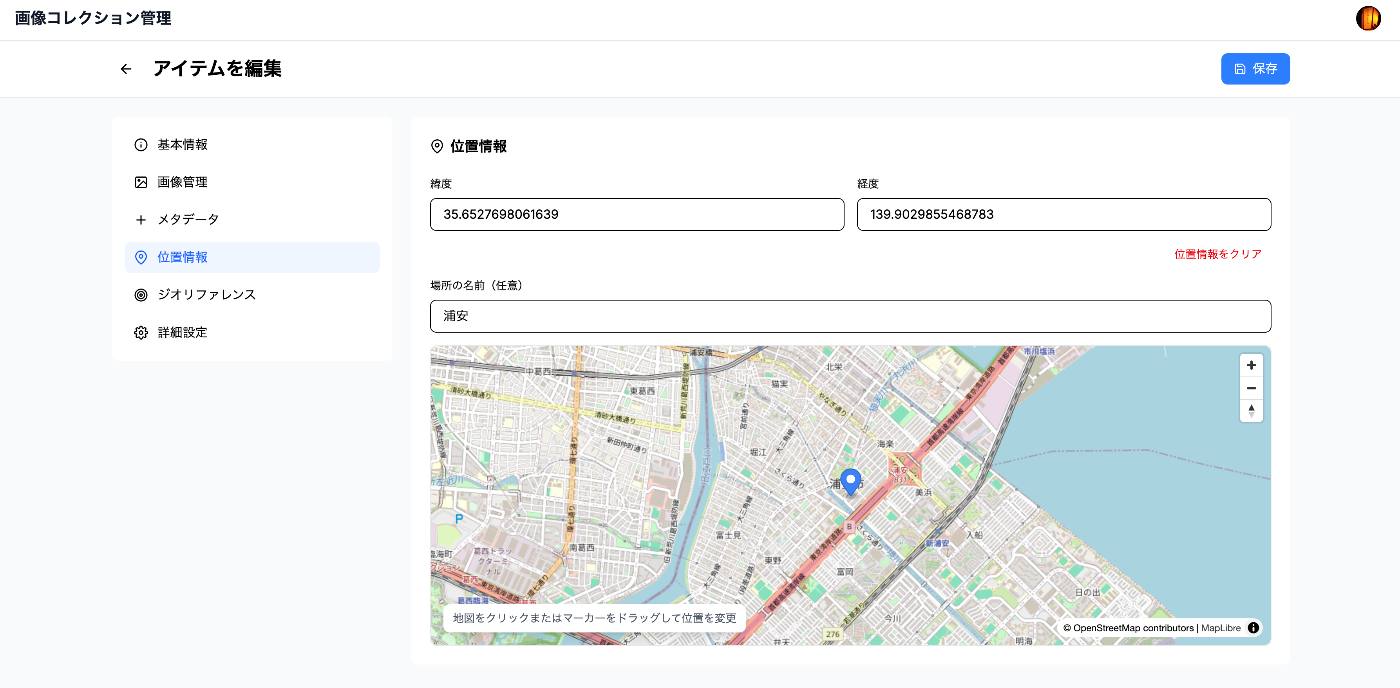
1. navPlace Extension (IIIF v3)
The navPlace extension is used to indicate the representative location of an entire manifest. It is utilized for displaying collections on maps.
interface NavPlace {
  id?: string;
  type: 'FeatureCollection';
  features: Array
    type: 'Feature';
    properties?: {
      label?: { [lang: string]: string[] };
    };
    geometry: {
      type: 'Point';
      coordinates: [number, number]; // [longitude, latitude]
    };
  }>;
}

// Adding location information to a manifest
const manifest = {
  "@context": [
    "http://iiif.io/api/presentation/3/context.json",
    "http://iiif.io/api/extension/navplace/context.json"
  ],
  "navPlace": {
    "type": "FeatureCollection",
    "features: [{
      "type": "Feature",
      "geometry": {
        "type": "Point",
        "coordinates": [139.7454, 35.6586] // Tokyo Station
      },
      "properties": {
        "label": { "en": ["Tokyo Station"] }
      }
    }]
  }
};
2. Georeference Extension (Image Georeferencing)
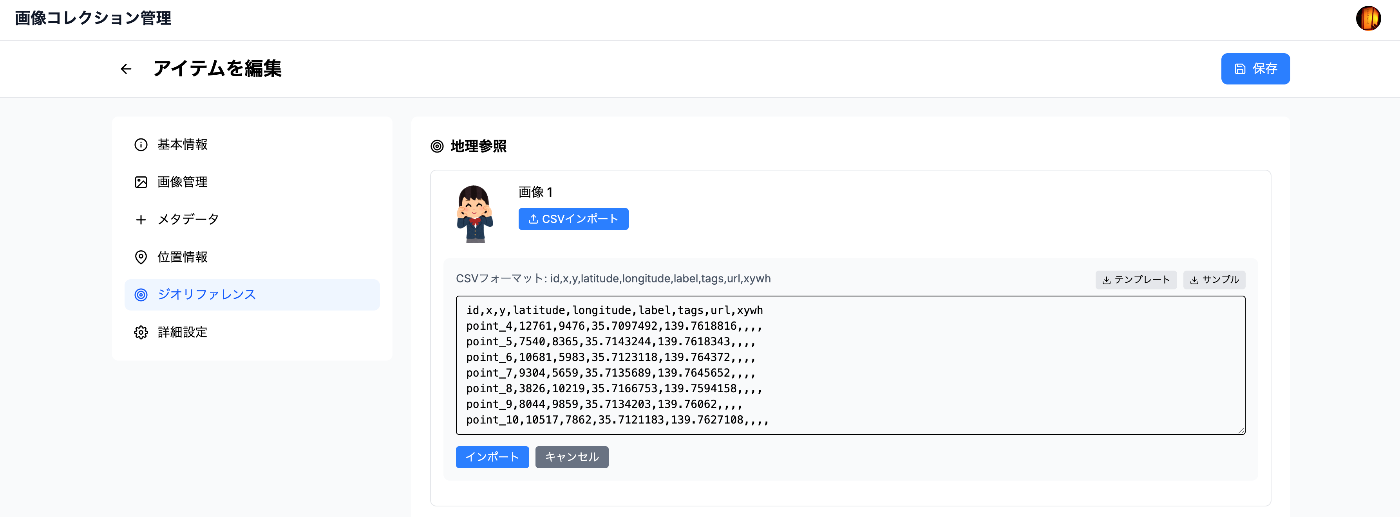
The Georeference extension allows mapping specific points in an image to real-world coordinates. It is used for georeferencing historical maps and similar tasks.
interface GeoAnnotation {
  type: 'Annotation';
  motivation: 'georeferencing';
  target: string; // Canvas URI
  body: {
    type: 'FeatureCollection';
    transformation?: {
      type: 'polynomial' | 'thin-plate-spline';
      options?: { order?: number };
    };
    features: Array
      type: 'Feature';
      properties: {
        resourceCoords: [number, number]; // Coordinates on the image
      };
      geometry: {
        type: 'Point';
        coordinates: [number, number]; // Geographic coordinates
      };
      metadata?: {
        label?: string;
        tags?: string[];
        url?: string;
      };
    }>;
  };
}
Implementation Example: Setting Control Points
// Set control points between image coordinates and geographic coordinates
const geoPoints = [
  {
    resourceCoords: [100, 200],  // Pixel coordinates on the image
    coordinates: [139.7454, 35.6586],  // Latitude/longitude of Tokyo Station
    label: "Tokyo Station"
  },
  {
    resourceCoords: [300, 400],
    coordinates: [139.7673, 35.6814],  // Ueno Station
    label: "Ueno Station"
  }
];

// Import from CSV is also possible
const csvData = `
resourceX,resourceY,longitude,latitude,label
100,200,139.7454,35.6586,Tokyo Station
300,400,139.7673,35.6814,Ueno Station
`;
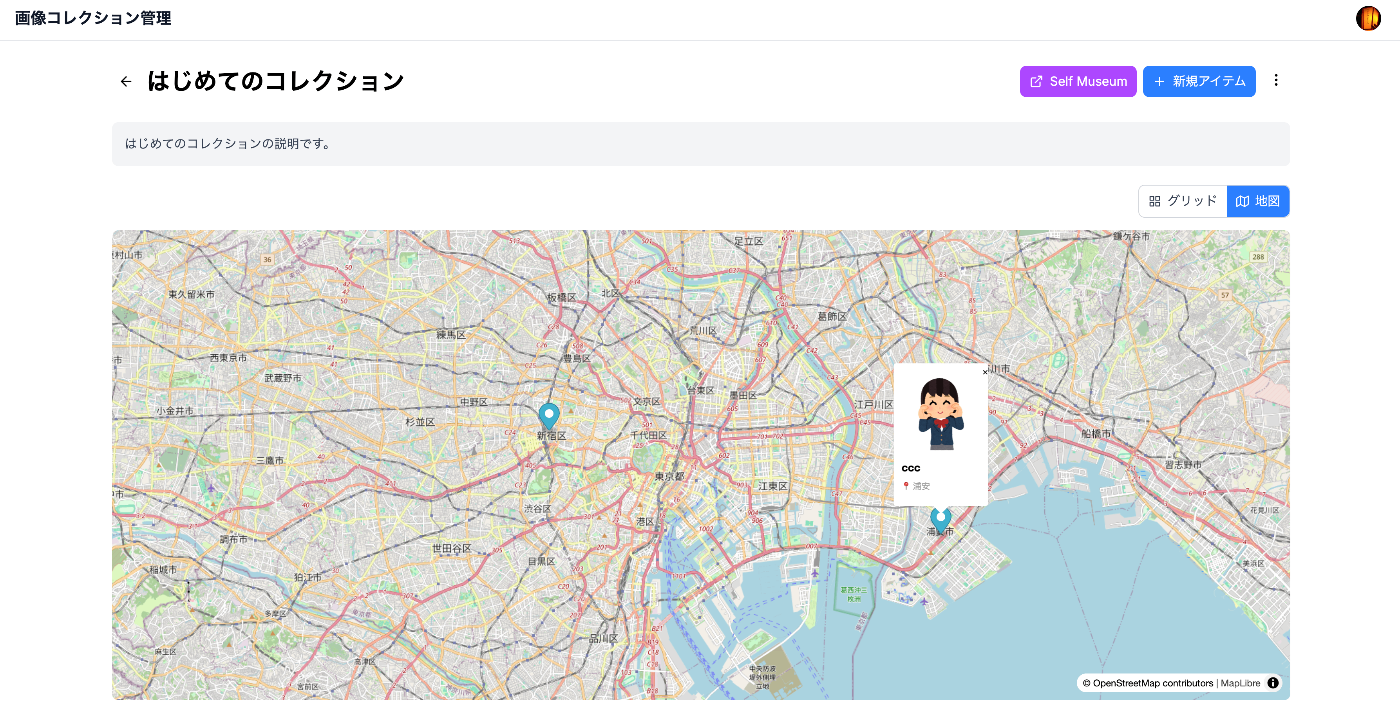
3. Map Display Implementation
Collection Map (Using Leaflet)
// Display items in a collection on a map
const CollectionMap = ({ items }) => {
  return (
    MapContainer center={[35.6762, 139.6503]} zoom={10}>
      //{s}.tile.openstreetmap.org/{z}/{x}/{y}.png" />
      {items.map(item => (
        item.location && (
          Marker
            position={[item.location.latitude, item.location.longitude]}
            key={item.id}
          >

              {item.title}


        )
      ))}

  );
};
Integration with External Viewers
The generated IIIF manifests can be visualized in various IIIF viewers that support the navPlace and Georeference extensions. For example, using the IIIF Map Viewer allows browsing collections with geographic information on a map.
Access Control Implementation (Planned)
The following access control features are being considered for future implementation:
1. Manifest-Level Control
- Public/private settings per manifest
- Access permission management by user groups
- Fine-grained access control by owners
2. IIIF Auth API
Implementation of an authentication system compliant with the IIIF Authentication API is planned:
- Token-based authentication
- Time-limited access token issuance
- Integration with external authentication providers
Avoiding CORS Errors
CORS issues when registering images from external URLs are resolved using a server-side proxy:
// /api/image-metadata/route.ts
export async function POST(request: NextRequest) {
  const { url } = await request.json();

  // Fetch image on the server side
  const response = await fetch(url);
  const buffer = await response.arrayBuffer();

  // Base64 encode and return to client
  const base64 = Buffer.from(buffer).toString('base64');
  const dataUrl = `data:${contentType};base64,${base64}`;

  // Also get image dimensions if Sharp is available
  try {
    const sharp = (await import('sharp')).default;
    const metadata = await sharp(Buffer.from(buffer)).metadata();
    return { dataUrl, width: metadata.width, height: metadata.height };
  } catch {
    return { dataUrl, width: 1920, height: 1080 };
  }
}
Performance Optimization
1. Progressive Image Loading
// Fetch appropriately sized images using IIIF Image API
const getThumbnailUrl = (iiifBaseUrl: string, targetWidth: number = 400) => {
  return `${iiifBaseUrl}/full/${targetWidth},/0/default.jpg`;
};

// Select optimal thumbnail size from size array
const selectOptimalSize = (sizes: Arraywidth: number, height: number}>) => {
  const targetWidth = 400;
  return sizes.find(s => s.width >= targetWidth && s.width  800)
    || sizes[sizes.length - 1];
};
2. S3-Compatible Storage Usage
// Image delivery using Cloudflare R2
const uploadToS3 = async (file: Buffer, key: string) => {
  const command = new PutObjectCommand({
    Bucket: process.env.S3_BUCKET_NAME,
    Key: key,
    Body: file,
    ContentType: 'image/jpeg'
  });

  await s3Client.send(command);

  // Return URL via CDN
  return `${process.env.S3_PUBLIC_URL}/${key}`;
};
Self-Hosting Integration
Integration with Self Museum
Generated IIIF collections can be easily published on Self Museum:
// Generate URL for Self Museum
const openInSelfMuseum = (collectionUrl: string) => {
  const selfMuseumUrl = `https://self-museum.cultural.jp/?collection=${encodeURIComponent(collectionUrl)}`;
  window.open(selfMuseumUrl, '_blank');
};
Summary
The Image Collection Management Tool is implemented to balance usability and performance while conforming to the latest IIIF specifications. Key technical features:
- Standards compliance: Full support for IIIF Presentation API v2/v3, Image API, and navPlace/Georeference extensions
- Flexible geospatial information: Support from simple location data to complex georeferencing
- Secure access control: JWT token-based authentication and fine-grained access control
- Performance: S3-compatible storage and CDN, automatic optimal image size selection
- Interoperability: Integration with various IIIF viewers and tools
Future plans include implementing the IIIF Change Discovery API and Content Search API, as well as adding more advanced geospatial analysis features.