This article was partially written by AI.
Overview
DHConvalidator is a tool for converting Digital Humanities (DH) conference abstracts into a consistent TEI (Text Encoding Initiative) text base.
https://github.com/ADHO/dhconvalidator
When using this tool, the following error occurred during the conversion process from Microsoft Word format (DOCX) to TEI XML format:
ERROR: nu.xom.ParsingException: cvc-complex-type.2.4.a: Invalid content was found starting with element 'ref'
This article shares the cause and solution for this issue.
Identifying the Cause
Investigation revealed that the cause of the problem was INCLUDEPICTURE field codes embedded within the Word document.
Specifically, when images were copied and pasted from Google Docs, field codes like the following remained in the document:
INCLUDEPICTURE "https://lh7-rt.googleusercontent.com/docsz/..." \* MERGEFORMATINET
These external image reference links were not properly processed during the TEI conversion process, causing XML validation errors.
Solution
To resolve this issue, a Python script was developed to automatically remove the problematic field codes from DOCX files.
Script Features
- Safe processing: Preserves the image content itself and only removes the field code portions
- ZIP format support: Properly handles the internal structure of DOCX files (ZIP + XML)
- Namespace support: Accurate element searching that considers Word document XML namespaces
Main Processing Logic
- Extract the DOCX file to a temporary directory
- Parse the field code structure in
word/document.xml - Identify fields containing
INCLUDEPICTURE - Remove only field control elements (begin/separate/end) while preserving image elements
- Generate a new DOCX file with the modified XML
Implementation Details
Field Code Detection
def is_includepicture_field(field_runs, ns):
    for run in field_runs:
        instr_text = run.find('.//w:instrText', ns)
        if instr_text is not None and instr_text.text:
            if 'INCLUDEPICTURE' in instr_text.text:
                return True
    return False
Selecting Elements for Removal
def should_remove_run(run, ns):
    # Check if it has field control elements
    has_field_control = (run.find('.//w:fldChar', ns) is not None or
                        run.find('.//w:instrText', ns) is not None)

    # Check if it has actual image content
    has_image_content = (run.find('.//w:drawing', ns) is not None or
                        run.find('.//w:pict', ns) is not None)

    # Remove elements that have field control elements but no image content
    return has_field_control and not has_image_content
Result
With this script, problematic field codes are removed and the TEI conversion process completes successfully. Images are preserved properly embedded within the document.
Usage
python fix_docx_fields.py input.docx [output.docx]
If no output file name is specified, it is saved as input_fixed.docx.
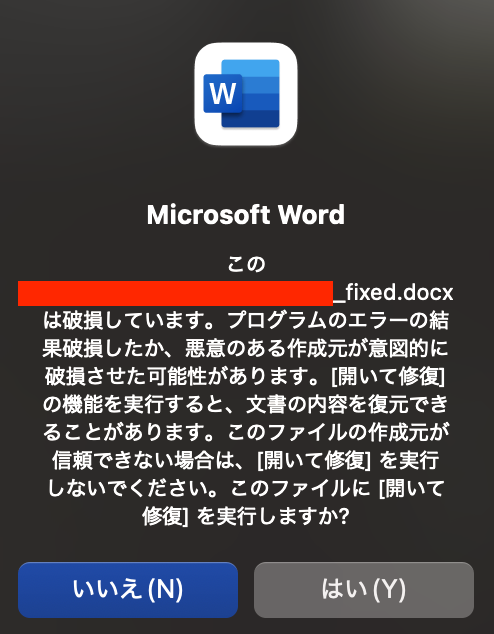
However, when opening the file, the following warning was displayed. I was unable to figure out how to fix this on the script side, but the file opened successfully by clicking the “Yes” button.
Summary
When copying images from Google Docs or web browsers, such external reference links may be embedded.
Since this issue may also occur in other DOCX processing systems, I hope this serves as a reference when encountering similar errors.
Script
#!/usr/bin/env python3
"""
DOCX Field Code Processor
Removes problematic field codes (like INCLUDEPICTURE) from Word documents
that cause TEI conversion issues.
"""

import zipfile
import xml.etree.ElementTree as ET
import tempfile
import os

def process_docx_fields(input_file, output_file=None):
    """
    Process DOCX file to remove problematic field codes.

    Args:
        input_file (str): Path to input DOCX file
        output_file (str): Path to output DOCX file (optional)
    """
    if output_file is None:
        output_file = input_file.replace('.docx', '_fixed.docx')

    # Create temporary directory
    with tempfile.TemporaryDirectory() as temp_dir:
        # Extract DOCX file
        with zipfile.ZipFile(input_file, 'r') as zip_ref:
            zip_ref.extractall(temp_dir)

        # Process document.xml
        doc_xml_path = os.path.join(temp_dir, 'word', 'document.xml')
        if os.path.exists(doc_xml_path):
            process_document_xml(doc_xml_path)

        # Create new DOCX file
        with zipfile.ZipFile(output_file, 'w', zipfile.ZIP_DEFLATED) as zip_out:
            for root, dirs, files in os.walk(temp_dir):
                for file in files:
                    file_path = os.path.join(root, file)
                    arc_path = os.path.relpath(file_path, temp_dir)
                    zip_out.write(file_path, arc_path)

    print(f"Fixed DOCX saved as: {output_file}")

def process_document_xml(xml_file_path):
    """
    Process the document.xml file to remove INCLUDEPICTURE field codes while preserving images.
    """
    # Parse XML
    tree = ET.parse(xml_file_path)
    root = tree.getroot()

    # Define namespaces
    ns = {
        'w': 'http://schemas.openxmlformats.org/wordprocessingml/2006/main'
    }

    # Find and remove field codes
    removed_count = 0

    # Process each paragraph
    for para in root.findall('.//w:p', ns):
        runs_to_remove = []

        # Find all runs in this paragraph
        runs = para.findall('.//w:r', ns)

        # Look for INCLUDEPICTURE field patterns
        i = 0
        while i < len(runs):
            run = runs[i]

            # Check for field begin
            fld_char = run.find('.//w:fldChar', ns)
            if fld_char is not None and fld_char.get(f'{{{ns["w"]}}}fldCharType') == 'begin':
                # Found field begin, look for the complete field structure
                field_runs = [run]
                j = i + 1

                # Collect all runs until field end
                while j < len(runs):
                    next_run = runs[j]
                    field_runs.append(next_run)

                    next_fld_char = next_run.find('.//w:fldChar', ns)
                    if next_fld_char is not None and next_fld_char.get(f'{{{ns["w"]}}}fldCharType') == 'end':
                        break
                    j += 1

                # Check if this is an INCLUDEPICTURE field
                if is_includepicture_field(field_runs, ns):
                    # Remove only field control runs, keep image content
                    for field_run in field_runs:
                        if should_remove_run(field_run, ns):
                            runs_to_remove.append(field_run)
                    removed_count += 1

                # Skip to after the field
                i = j + 1
            else:
                i += 1

        # Remove the problematic runs
        for run in runs_to_remove:
            para.remove(run)

    # Save the modified XML
    tree.write(xml_file_path, encoding='utf-8', xml_declaration=True)
    print(f"Removed {removed_count} INCLUDEPICTURE field codes while preserving images")

def is_includepicture_field(field_runs, ns):
    """
    Check if the field runs contain INCLUDEPICTURE.
    """
    for run in field_runs:
        instr_text = run.find('.//w:instrText', ns)
        if instr_text is not None and instr_text.text:
            if 'INCLUDEPICTURE' in instr_text.text:
                return True
    return False

def should_remove_run(run, ns):
    """
    Determine if a run should be removed (contains field codes but not image content).
    """
    # Check if run has field control elements (begin, separate, end, instrText)
    has_field_control = (run.find('.//w:fldChar', ns) is not None or
                        run.find('.//w:instrText', ns) is not None)

    # Check if run has actual image content (drawing elements)
    has_image_content = (run.find('.//w:drawing', ns) is not None or
                        run.find('.//w:pict', ns) is not None or
                        run.find('.//w:object', ns) is not None)

    # Remove runs with field control elements but no image content
    return has_field_control and not has_image_content

def main():
    """Main function for command line usage."""
    import sys

    if len(sys.argv) < 2:
        print("Usage: python fix_docx_fields.py <input.docx> [output.docx]")
        sys.exit(1)

    input_file = sys.argv[1]
    output_file = sys.argv[2] if len(sys.argv) > 2 else None

    if not os.path.exists(input_file):
        print(f"Error: Input file '{input_file}' not found")
        sys.exit(1)

    try:
        process_docx_fields(input_file, output_file)
        print("Processing completed successfully!")
    except Exception as e:
        print(f"Error processing file: {e}")
        sys.exit(1)

if __name__ == "__main__":
    main()