Introduction
When digitizing East Asian classical texts, it has become common to mark them up in XML following TEI (Text Encoding Initiative) guidelines. The “TEI Classical Text Viewer” developed by the International Institute of Humanistic Research is a convenient tool that can easily display such TEI/XML files in a browser.
- Official site: https://tei.dhii.jp/teiviewer4eaj
- Web version: https://candra.dhii.jp/nagasaki/tei/tei_viewer/
This time, I customized this viewer to support displaying <gap> tags that indicate illegible sections. This article introduces the customization method.
Challenge: gap Tags Not Displayed
In digitizing classical texts, sections that cannot be read due to worm damage or deterioration are marked up with <gap> tags.
<gap reason="illegible" quantity="2" unit="character"/>
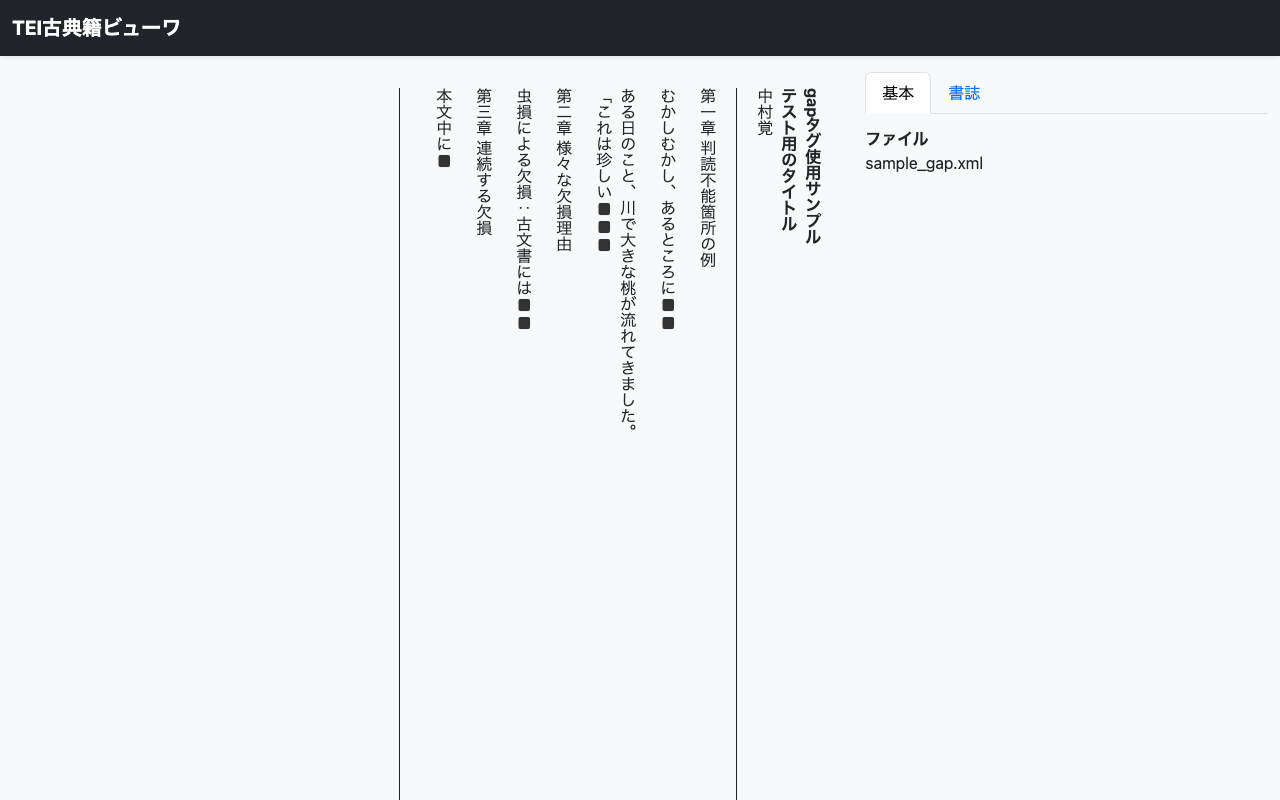
However, the standard TEI Classical Text Viewer does not display this tag appropriately. So I customized it to display black squares corresponding to the number of illegible characters, with the reason shown on mouse hover.
Customization Approach
The TEI Classical Text Viewer has the following file structure.
├── index.html
├── app.min.js      ← Viewer core (minified)
├── app.min.css
├── app_conf.js     ← Configuration file
└── lib/            ← Dependency libraries
Directly editing app.min.js would cause changes to be lost when the core is updated. Therefore, I achieved the customization by editing only app_conf.js, maintaining compatibility with the core.
Implementation
1. DOM Monitoring with MutationObserver
The TEI Classical Text Viewer parses XML and converts it to DOM. To process <gap> tags after this conversion, MutationObserver is used to monitor DOM changes.
// Monitor DOM changes with MutationObserver
const observer = new MutationObserver(mutations => {
    mutations.forEach(mutation => {
        mutation.addedNodes.forEach(node => {
            if (node.nodeType === Node.ELEMENT_NODE) {
                processGapElements(node);
            }
        });
    });
});

// Start observing body_result
document.addEventListener('DOMContentLoaded', () => {
    const bodyResult = document.getElementById('body_result');
    if (bodyResult) {
        observer.observe(bodyResult, { childList: true, subtree: true });
    }
});
2. Processing gap Tags
When a <gap> tag is detected, black squares are displayed according to the quantity attribute value, and the reason attribute is set as a tooltip.
function processGapElements(container) {
    const gaps = container.querySelectorAll('gap, .gap, [data-original-tag-name="gap"]');
    gaps.forEach(gap => {
        // Skip if already processed
        if (gap.dataset.gapProcessed) return;
        gap.dataset.gapProcessed = 'true';

        // Get values from attributes
        const quantity = parseInt(gap.getAttribute('quantity') || '1', 10);
        const reason = gap.getAttribute('reason') || '';

        // Generate black squares for the quantity
        const placeholder = '\u25A0'.repeat(quantity);
        gap.textContent = placeholder;

        // Tooltip settings (Japanese labels)
        const reasonMap = {
            'illegible': 'Illegible',
            'damage': 'Damaged',
            'worm': 'Worm damage',
            'omitted': 'Omitted',
            'cancelled': 'Cancelled',
            'lost': 'Lost'
        };
        const reasonText = reasonMap[reason] || reason;
        if (reasonText) {
            gap.setAttribute('title', reasonText);
        }
        gap.style.color = '#333';
        gap.style.cursor = 'help';
    });
}
Key Point: Attribute Access Method
When the TEI Classical Text Viewer converts XML to HTML, how attributes are handled varies by element. For <gap> tags, XML attributes are preserved as-is, so they can be retrieved directly with getAttribute().
// When XML attribute names are preserved as-is
const quantity = gap.getAttribute('quantity');

// When converted to data-* format, use dataset
const quantity = gap.dataset.quantity;
Checking the actual DOM structure with browser developer tools is important.
Additional Customizations
Using the same approach, the following features were also added.
Height Specification via GET Parameters
Made it possible to specify the height of the text display area via URL parameters.
index.html?height=800
const params = new URLSearchParams(window.location.search);
const height = params.get('height');
if (height) {
    const heightValue = parseInt(height, 10);
    if (!isNaN(heightValue) && heightValue > 0) {
        document.getElementById('text_body').style.height = heightValue + 'px';
    }
}
Setting the Page Title
When there are multiple <title> elements in the TEI/XML, the first title is set as the page title (by default, the last title is used).
<titleStmt>
  <title>Main Title</title>  <!-- This becomes the page title -->
  <title type="sub">Subtitle</title>
</titleStmt>
Improved Display of Bibliographic Information (sourceDesc/bibl)
To format <bibl> elements within <sourceDesc> for better readability, CSS was used to add labels to each element and display them as blocks.
.sourceDesc .bibl title,
.sourceDesc .bibl editor,
.sourceDesc .bibl publisher,
.sourceDesc .bibl date,
.sourceDesc .bibl idno,
.sourceDesc .bibl note {
    display: block;
    margin-bottom: 0.3em;
}
.sourceDesc .bibl title::before { content: "【Title】"; font-weight: bold; }
.sourceDesc .bibl editor::before { content: "【Editor】"; font-weight: bold; }
.sourceDesc .bibl publisher::before { content: "【Publisher】"; font-weight: bold; }
/* ... */
This produces a readable display like the following:
【Title】○○○○
【Editor】△△△△
【Publisher】□□堂
【Period】Edo period
【Call Number】A100:123
【Collection】○○ Library △△ Collection
Summary
The TEI Classical Text Viewer can be flexibly customized by editing the configuration file app_conf.js. The MutationObserver approach introduced here can also be applied to handle other TEI tags.
The customized code is published in the following repository.
Reference Links
- TEI Classical Text Viewer official site: https://tei.dhii.jp/teiviewer4eaj
- TEI Guidelines - gap element: https://tei-c.org/release/doc/tei-p5-doc/en/html/ref-gap.html
- Japanese TEI Guidelines: https://tei.dhii.jp/
Acknowledgments
I would like to express my gratitude to Dr. Kiyonori Nagasaki (International Institute of Humanistic Research) and Mr. Atsushi Honma (Felix Style) for developing and publishing the TEI Classical Text Viewer.