When delivering 3D models on the web, file size is a critical concern. This article describes a case where Draco compression was used to reduce a GLB file by 87%, along with precautions during compression (particularly regarding UV coordinates).
https://3dtiles-viewer.vercel.app/glb-viewer.html
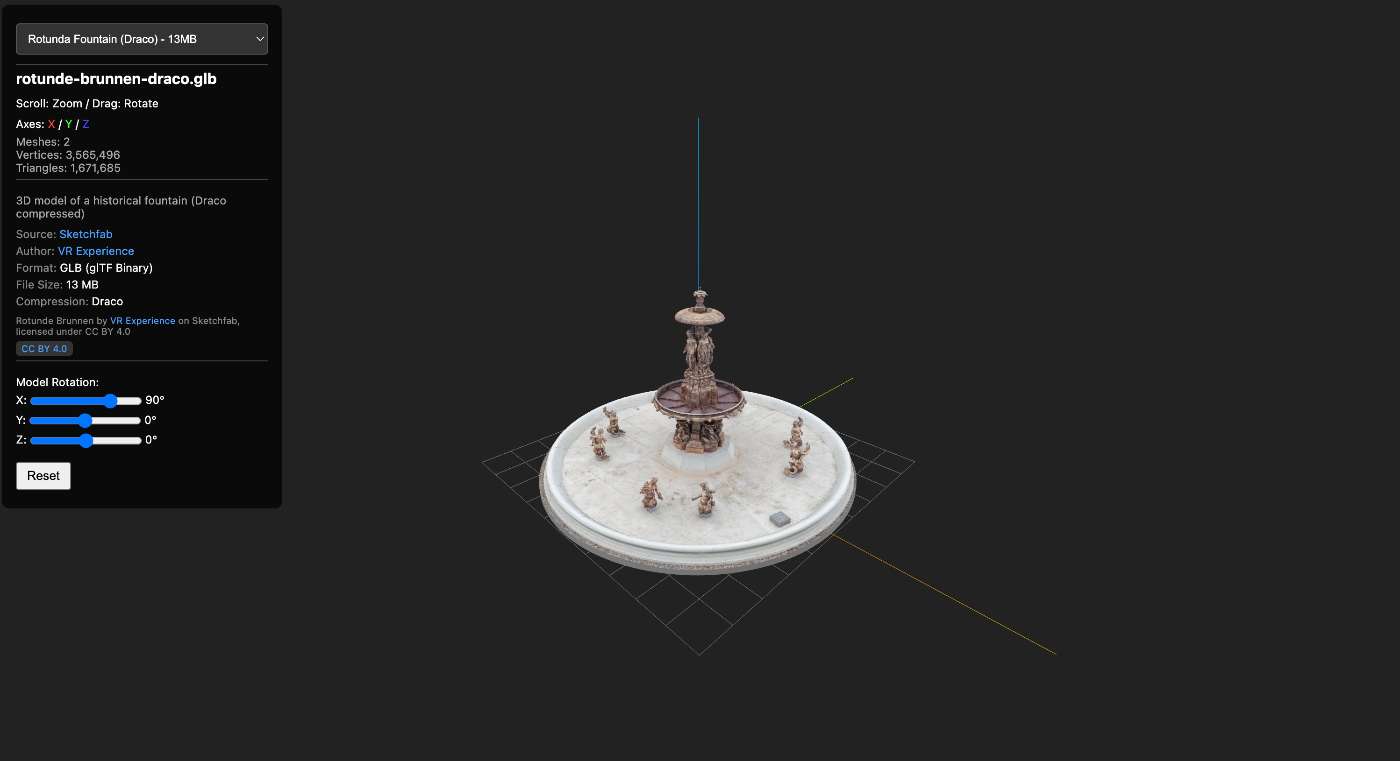
Data Used
- Model: Rotunde Brunnen (a rotunda with a fountain)
- Source: Sketchfab
- Format: GLB (glTF 2.0 Binary)
What is Draco Compression?
Draco is an open-source 3D mesh compression library developed by Google. It is supported as a standard extension in glTF 2.0 as KHR_draco_mesh_compression.
How Compression Works
- Quantization: Rounds vertex coordinates and UV coordinates to a specified number of bits
- Predictive Encoding: Encodes differences predicted from adjacent vertices
- Entropy Encoding: Efficiently compresses prediction errors
Compression Command
# Using gltf-transform
npx gltf-transform draco input.glb output-draco.glb

# With options (high quality settings)
npx gltf-transform draco input.glb output-draco.glb \
  --quantize-position 14 \
  --quantize-normal 10 \
  --quantize-texcoord 12
Compression Results Comparison
File Size
| File | Size | Reduction |
|---|---|---|
| rotunde-brunnen.glb (original) | 94.7 MB | - |
| rotunde-brunnen-draco.glb | 12.5 MB | 87% reduction |
Mesh Structure
| Item | Original | After Draco Compression |
|---|---|---|
| Number of meshes | 38 | 2 (merged) |
| Number of triangles | ~1.75M | ~1.67M |
| Textures | 1024x1024 PNG | Same |
| Bounding box | Nearly identical | Nearly identical |
Precision
There is no visual quality degradation.
- Bounding boxes are nearly identical, meaning shapes are preserved
- Default quantization settings (14-bit position) provide sufficient precision
- No issues unless used for scientific measurement purposes
Relationship with HTTP Transfer Compression
Web servers (Vercel, Nginx, etc.) automatically apply Brotli or gzip compression to HTTP responses. We verified the relationship with Draco compression using measured values.
Measurement: Transfer Sizes on Vercel
| File | File Size | Transfer Size (Brotli) | Brotli Effect |
|---|---|---|---|
| Original file | 94.7 MB | 58.5 MB | 38% reduction |
| Draco compressed | 12.5 MB | 12.4 MB | Nearly 0% |
# Original file HTTP response header
content-encoding: br
content-length: 61338605  # ~58.5MB

# Draco compressed file HTTP response header
content-encoding: br
content-length: 12991149  # ~12.4MB
Why Brotli Doesn’t Help Draco Files
Draco compression internally performs entropy encoding (removing data redundancy). This works on the same principle as Brotli and gzip, so double compression has virtually no effect.
Overall Comparison: Actual Transfer Efficiency
| Item | Original | Draco |
|---|---|---|
| File size | 94.7 MB | 12.5 MB |
| Transfer size (after Brotli) | 58.5 MB | 12.4 MB |
| Actual transfer reduction | - | 79% reduction |
| Download time (10Mbps) | ~47 sec | ~10 sec |
| Download time (100Mbps) | ~4.7 sec | ~1 sec |
Benefits of Using Draco (Transfer Perspective)
- Smaller transfer size - Faster downloads
- Reduced server storage - Lower hosting costs
- No CPU overhead for Brotli compression - Reduced server load
- Improved CDN cache efficiency - Smaller files have better cache hit rates
Note: Streaming Is Not Supported
GLB files are rendered only after all data has been downloaded. Progressive loading (gradual display) is not supported.
If progressive loading is needed, consider:
- 3D Tiles: Gradual loading with LOD (Level of Detail)
- glTF + EXT_meshopt_compression: Progressive mesh decoding
Quantization and UV Coordinate Issues
Problem: When UV Coordinates Are Outside the [0,1] Range
The most important consideration with Draco compression is UV coordinates.
Models that use texture tiling (repeating) may have UV coordinates that exceed the [0,1] range.
Example: UV for tiling
u: 0.0 ~ 10.0 (10 repetitions)
v: 0.0 ~ 10.0
Why Problems Occur
Draco compression performs quantization. UV coordinates are quantized to 10-12 bits by default.
| UV Range | Precision at 10-bit Quantization | Impact |
|---|---|---|
| [0, 1] | 1/1024 = 0.001 | No problem |
| [0, 10] | 10/1024 = 0.01 | Minor shift |
| [0, 100] | 100/1024 = 0.1 | Noticeable shift |
Problems That Can Occur
- Texture seams
- Texture shifting/distortion
- Discontinuity at tiling boundaries
Solutions
1. Increase UV Coordinate Quantization Bits
npx gltf-transform draco input.glb output.glb \
  --quantize-texcoord 14  # Increase from default 10 to 14
| Bits | Steps | Precision for [0,100] Range |
|---|---|---|
| 10 | 1,024 | 0.0977 |
| 12 | 4,096 | 0.0244 |
| 14 | 16,384 | 0.0061 |
| 16 | 65,536 | 0.0015 |
2. Normalize UVs to [0,1] Range Before Tiling
// Tiling in the shader
vec2 tiledUV = fract(uv * 10.0); // 10 repetitions
3. Exclude Meshes with Large UV Ranges from Draco Compression
# Exclude specific meshes (manual separation required)
Useful gltf-transform Commands
Checking File Information
# Display detailed information
npx gltf-transform inspect model.glb

# Validation
npx gltf-transform validate model.glb
Other Optimizations
# Texture compression (WebP)
npx gltf-transform webp input.glb output.glb

# Texture resize
npx gltf-transform resize input.glb output.glb --width 1024 --height 1024

# Remove duplicate vertices
npx gltf-transform dedup input.glb output.glb

# Optimization pipeline (multiple processes at once)
npx gltf-transform optimize input.glb output.glb
Loading in a Viewer
When loading Draco-compressed GLB in Three.js, DRACOLoader configuration is required.
import { GLTFLoader } from 'three/examples/jsm/loaders/GLTFLoader.js';
import { DRACOLoader } from 'three/examples/jsm/loaders/DRACOLoader.js';

const loader = new GLTFLoader();

// Draco decoder configuration
const dracoLoader = new DRACOLoader();
dracoLoader.setDecoderPath('https://www.gstatic.com/draco/versioned/decoders/1.5.6/');
loader.setDRACOLoader(dracoLoader);

// Load
loader.load('model-draco.glb', (gltf) => {
  scene.add(gltf.scene);
});
Summary
| Item | Details |
|---|---|
| Compression ratio | 80-90% size reduction possible |
| Precision | No visual degradation for typical use cases |
| Precautions | Settings adjustment needed if UV coordinates are outside [0,1] range |
| Tools | gltf-transform is convenient |
Recommended Settings
# For general web delivery
npx gltf-transform draco input.glb output.glb

# When high precision is needed
npx gltf-transform draco input.glb output.glb \
  --quantize-position 16 \
  --quantize-normal 12 \
  --quantize-texcoord 14

# When UV range is wide
npx gltf-transform draco input.glb output.glb \
  --quantize-texcoord 16