Overview
The following repository is provided as an environment for trying the IIIF Auth API.
https://github.com/digirati-co-uk/iiif-auth-server
In this article, we will use the above repository to try the IIIF Auth API.
Starting Up
Preparation
git clone https://github.com/digirati-co-uk/iiif-auth-server
cd iiif-auth-server
python -m venv venv
source venv/bin/activate
pip install --upgrade pip
pip install -r requirements.txt
If version conflicts occur during pip install -r requirements.txt, try removing the version information and running again, as shown below:
argparse
Flask
iiif2
itsdangerous
Jinja2
MarkupSafe
pbr
Pillow
six
stevedore
Werkzeug
Creating the Database
Then create the database.
export FLASK_APP=iiifauth
export FLASK_DEBUG=true
flask initdb
After executing the above, a file called iiifauth.db is created in iiif-auth-server/iiifauth.
You can inspect the database contents using tools like the following:
Starting the Server
Execute the following:
flask run
Then, accessing http://127.0.0.1:5000 will display the following screen.

Preparing the Viewer
Execute the following to download Mirador 3 and start it on a local server.
wget https://mirador.cultural.jp
python -m http.server
If the following screen appears when you access http://0.0.0.0:8000, you’re all set.
Loading into the Viewer
The http://127.0.0.1:5000 page is structured with Images listed first, followed by Manifests.
This time, we’ll load the Manifests at the bottom into Mirador 3.
As an easy-to-understand example, let’s try the 02 degraded case.
Access the following URL:
http://0.0.0.0:8000/?manifest=http://0.0.0.0:5000/manifest/02_degraded
The following is displayed. Note that a login banner appears at the top of the screen, and a desaturated (grayscale) image is displayed.

Let’s try logging in. A login screen like the following appears, so click the Login button.

After logging in, the banner changes to a Log out button, and the color image is displayed.
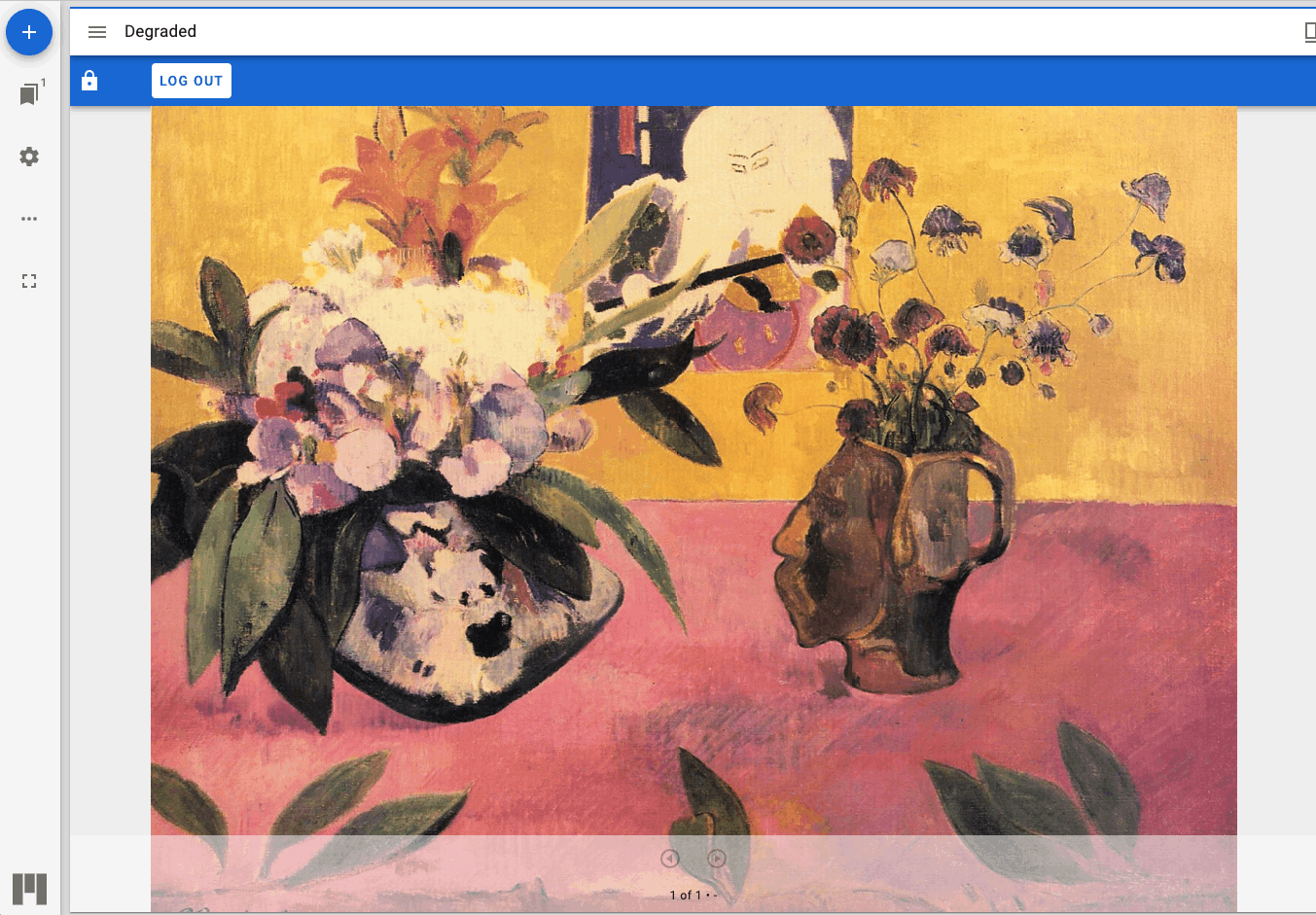
The above is one example of using the IIIF Auth API.
Below is a screenshot of iiifauth.db opened in DB Browser for SQLite (it may be small and hard to see). You can confirm that session_id and token values are stored.

Examining info.json
The info.json for the above example is as follows.
You can confirm that the strings described in the service section were displayed in the viewer.
{
  "@context": "http://iiif.io/api/image/2/context.json",
  "@id": "http://0.0.0.0:5000/img/02_gauguin_degraded.jpg",
  "height": 2506,
  "profile": [
    "http://iiif.io/api/image/2/level2.json"
  ],
  "protocol": "http://iiif.io/api/image",
  "service": {
    "@context": "http://iiif.io/api/auth/1/context.json",
    "@id": "http://0.0.0.0:5000/auth/cookie/login/02_gauguin.jpg",
    "confirmLabel": "Login",
    "description": "Example Institution requires that you log in with your example account to view the full-quality content.",
    "failureDescription": "You don't appear to have access to the full colour version. <a href=\"http://example.org/policy\">Access Policy</a>",
    "failureHeader": "Viewing greyscale version",
    "header": "Please Log In",
    "label": "Login to Example Institution for full quality",
    "profile": "http://iiif.io/api/auth/1/login",
    "service": [
      {
        "@id": "http://0.0.0.0:5000/auth/token/login/02_gauguin.jpg",
        "profile": "http://iiif.io/api/auth/1/token"
      },
      {
        "@id": "http://0.0.0.0:5000/auth/logout/login/02_gauguin.jpg",
        "label": "log out",
        "profile": "http://iiif.io/api/auth/1/logout"
      }
    ]
  },
  "tiles": [
    {
      "scaleFactors": [
        1,
        2,
        4,
        8,
        16
      ],
      "width": 256
    }
  ],
  "width": 3176
}
Furthermore, within service > service, there are entries like the following. Information needed for logout and other operations is described here.
"service": [
      {
        "@id": "http://0.0.0.0:5000/auth/token/login/02_gauguin.jpg",
        "profile": "http://iiif.io/api/auth/1/token"
      },
      {
        "@id": "http://0.0.0.0:5000/auth/logout/login/02_gauguin.jpg",
        "label": "log out",
        "profile": "http://iiif.io/api/auth/1/logout"
      }
    ]
So far, the following URLs have appeared:
- http://0.0.0.0:5000/auth/cookie/login/02_gauguin.jpg
- http://0.0.0.0:5000/auth/token/login/02_gauguin.jpg
- http://0.0.0.0:5000/auth/logout/login/02_gauguin.jpg


The processing for these is described in iiifauth/iiif_auth_server.py.
For example, the logout process is as follows, where you can see that the relevant record is deleted from the tokens table:
@app.route('/auth/logout/<pattern>/<identifier>')
def logout_service(pattern, identifier):
    """Log out service"""
    service_id = get_service_id(pattern, identifier)
    session.pop('service_id')
    database = get_db()
    database.execute('delete from tokens where session_id=? and service_id=?',
                     [get_session_id(), service_id])
    database.commit()
    return "You are now logged out"
It seems best to implement your own solution based on the above code, adapted to each institution’s environment.
The specific processing for login success/failure cases is described in the following:
{
    "comment" : "This is neither IIIF nor JSON-LD, even though it contains fragments of IIIF. Its purpose is configuration the demo",
    "01_Icarus_Breughel.jpg" : {
        "label": "Standard login",
        "auth_services" : [
            {
                "profile": "http://iiif.io/api/auth/1/login",
                "label": "Login to Example Institution",
                "header": "Please Log In",
                "description": "Example Institution requires that you log in with your example account to view this content.",
                "confirmLabel": "Login",
                "failureHeader": "Authentication Failed",
                "failureDescription": "<a href=\"http://example.org/policy\">Access Policy</a>"
            }
        ]
    },
    "02_gauguin.jpg" : {
        "label": "Login with degraded access for unauthed users",
        "auth_services" : [
            {
                "profile": "http://iiif.io/api/auth/1/login",
                "label": "Login to Example Institution for full quality",
                "header": "Please Log In",
                "description": "Example Institution requires that you log in with your example account to view the full-quality content.",
                "confirmLabel": "Login",
                "failureHeader": "Viewing greyscale version",
                "failureDescription": "You don't appear to have access to the full colour version. <a href=\"http://example.org/policy\">Access Policy</a>"
            }
        ],
        "degraded": "02_gauguin_degraded.jpg"
    },
    "02_gauguin_degraded.jpg" : {
        "label": "The degraded (open) form of the above",
        "open" : true,
        "degraded_for": "02_gauguin.jpg"
    },
    ...
]
Various processing scenarios should be possible, so it would be good to experiment using the above file and the following:
https://iiifauth.digtest.co.uk/
Summary
The IIIF Auth API has not been widely adopted in Japan, with few implementations apart from Shimane University. I hope this article serves as a helpful reference.
https://current.ndl.go.jp/ca1988
I plan to investigate specific implementation methods in the future.