Overview
The following page on TEI Publisher showcases various visualization examples.
In this and subsequent articles, I will introduce the above visualization examples.
Letter #6 from Robert Graves to William Graves (at Oundle School) November 15, 1957
Overview
https://teipublisher.com/exist/apps/tei-publisher/test/graves6.xml
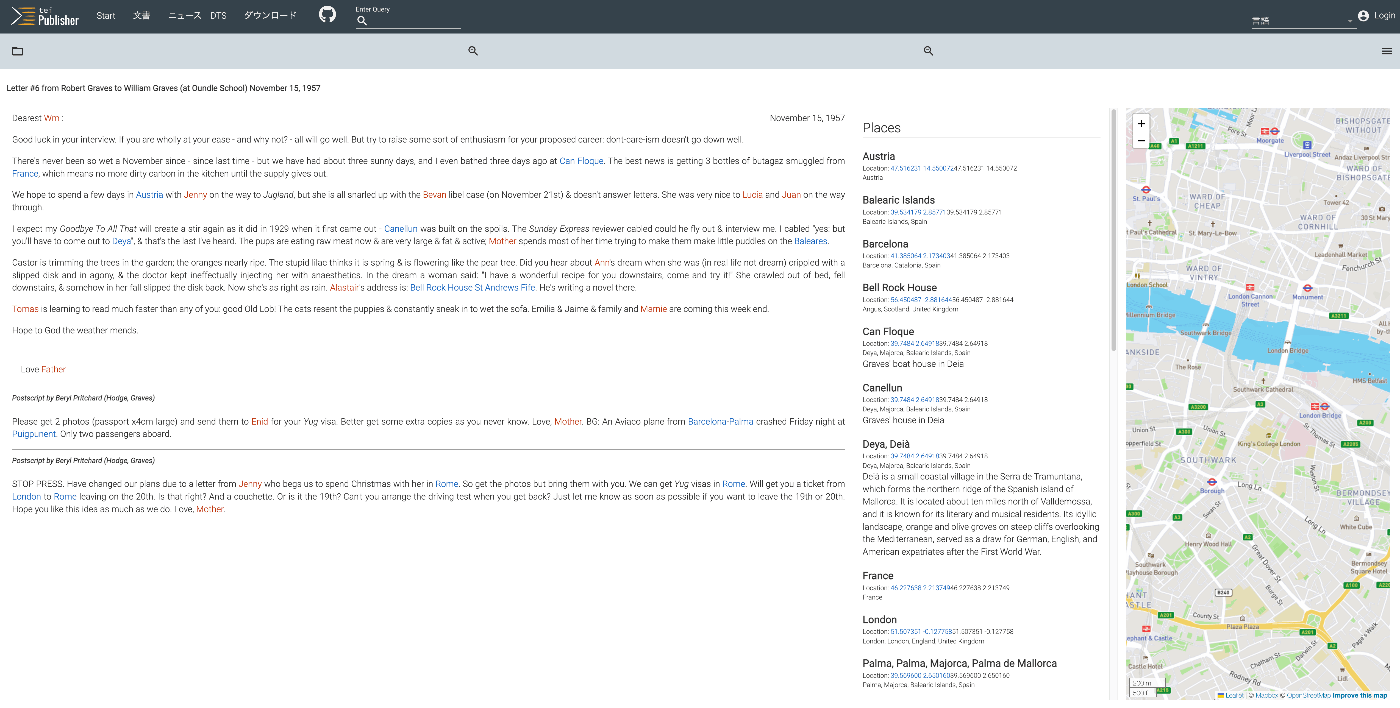
As shown below, the text is displayed alongside a list of place names and person names, as well as a map.
It is described as follows:
A 20th century manuscript letter from Robert Graves where emphasis has been put on visualizing rich encoding of semantic information in the letter, in particular geographic and prosopographical data. The map is displayed with a pb-leaflet component.
Data
Here are the characteristics of the XML file.
teiHeader > profileDesc > abstract
The contents of the abstract tag appear to be displayed on the search page mentioned above.
teiHeader > profileDesc > textClass
There are entries like the following. These were used for faceted search.
<textClass>
	<catRef scheme="#genre" target="#correspondence"/>
	<catRef scheme="#form" target="#manuscript"/>
	<catRef scheme="#feature" target="#pages"/>
	<catRef scheme="#feature" target="#person"/>
	<catRef scheme="#feature" target="#place"/>
	<catRef scheme="#feature" target="#map"/>
	<catRef scheme="#feature" target="#ltr"/>
	<catRef scheme="#period" target="#modern"/>
</textClass>
teiHeader > profileDesc > particDesc
A <listPerson> is described within <particDesc>.
<particDesc>
                <listPerson>
                    <person xml:id="GravesWilliam">
                        <persName>
                            <forename>William</forename>
                            <surname>Graves</surname>
                        </persName>
                        <birth when="1940">1940</birth>
                        <sex value="M">male</sex>
                        <note>Robert Graves' eldest son by Beryl</note>
                    </person>
                    <person xml:id="GravesRobert">
                        <persName>Robert Graves</persName>
                        <!-- to be completed by the students -->
                        <note>Robert Graves (1895-1985) was a poet, novelist, mythographer, critic
                            and historian. Probably best known as the author of
                                <title>I,Claudius</title>, and <title>Claudius the God</title> and
                            as a survivor and poet of the Great War, he is one of the great figures
                            of 20th Century English Poetry and Literature.</note>
                    </person>
		    ...
teiHeader > profileDesc > settingDesc
This section contains a list of place names. The <geo> tag includes latitude and longitude coordinates.
            <settingDesc>
                <listPlace>
                    <place xml:id="Deia">
                        <placeName>Deya</placeName>
                        <placeName>Deià</placeName>
                        <location>
                            <geo>39.7484 2.64918</geo>
                        </location>
                        <location type="geopolitical">
                            <settlement>Deya</settlement>
                            <region>Majorca</region>
                            <region>Balearic Islands</region>
                            <country>Spain</country>
                        </location>
                        <note>Deià is a small coastal village in the Serra de Tramuntana, which
                            forms the northern ridge of the Spanish island of Mallorca. It is
                            located about ten miles north of Valldemossa, and it is known for its
                            literary and musical residents. Its idyllic landscape, orange and olive
                            groves on steep cliffs overlooking the Mediterranean, served as a draw
                            for German, English, and American expatriates after the First World
                            War.</note>
                    </place>
                    <place xml:id="Canellun">
                        <placeName>Canellun</placeName>
                        <location>
                            <geo>39.7484 2.64918</geo>
                        </location>
                        <location type="geopolitical">
                            <settlement>Deya</settlement>
                            <region>Majorca</region>
                            <region>Balearic Islands</region>
                            <country>Spain</country>
                        </location>
                        <note>Graves' house in Deia</note>
                    </place>
		    ...
text
Named entities in the body text use the <name> tag, with the ref attribute referencing the id specified in the above lists. The type attribute is used to distinguish between person names and place names.
    <text>
        <body>
            <pb facs="WG.57.11.15.a.jpg"/>
            <opener>
                <dateline>
                    <date when="1957-11-15">November 15, 1957</date>
                </dateline>
                <salute> Dearest <name ref="#GravesWilliam" type="person">
                        <abbr>Wm</abbr>
                    </name>: </salute>
            </opener>
	    ...
ODD
Login may be required, but the ODD file is available at the following link:
name - model [inline] @type=‘place’
The following section defines the use of italic styling.

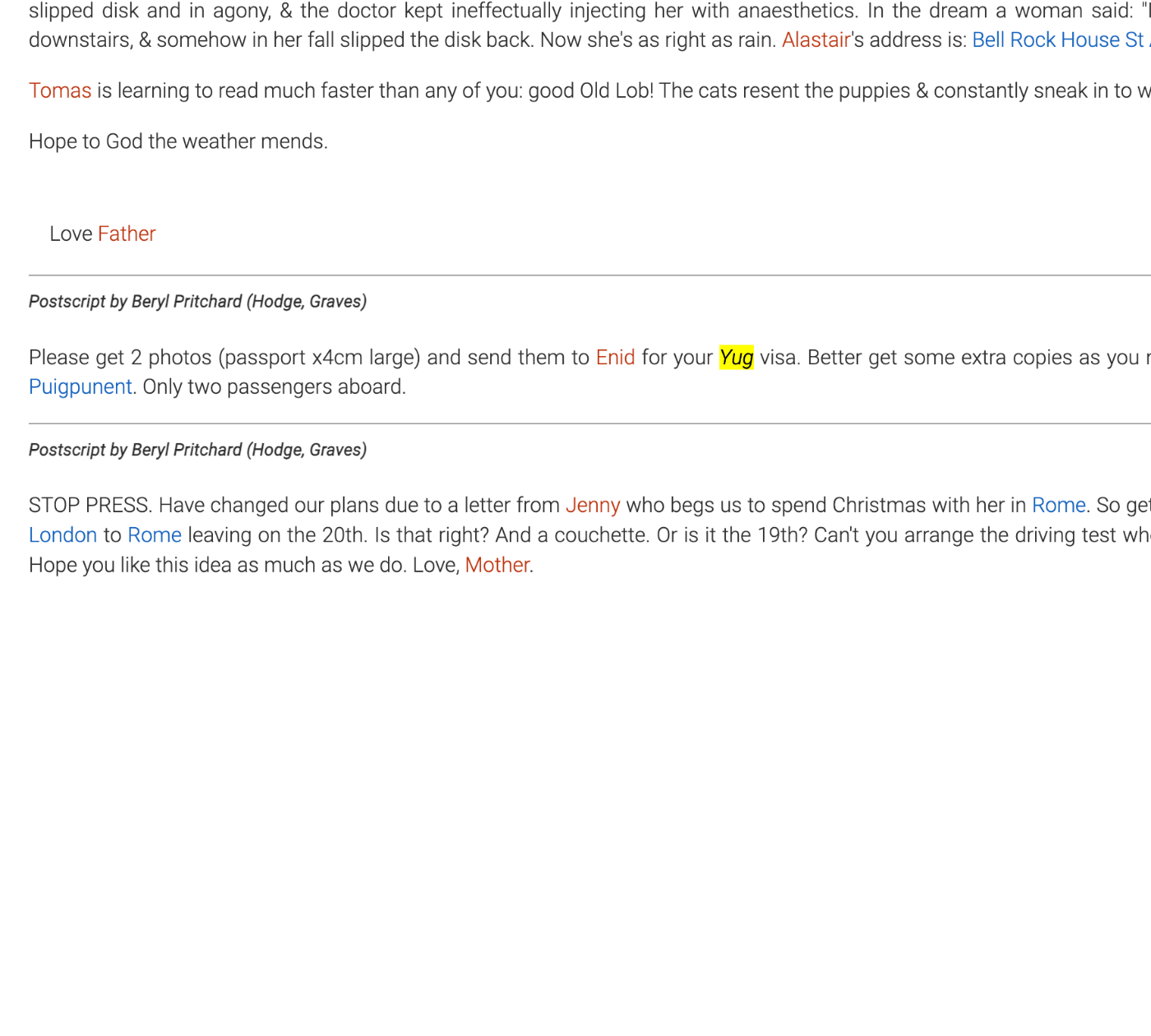
Indeed, “Yug” written as follows is displayed in italics.
for your <name ref="#Yugoslavia" type="place">Yug</name> visa.
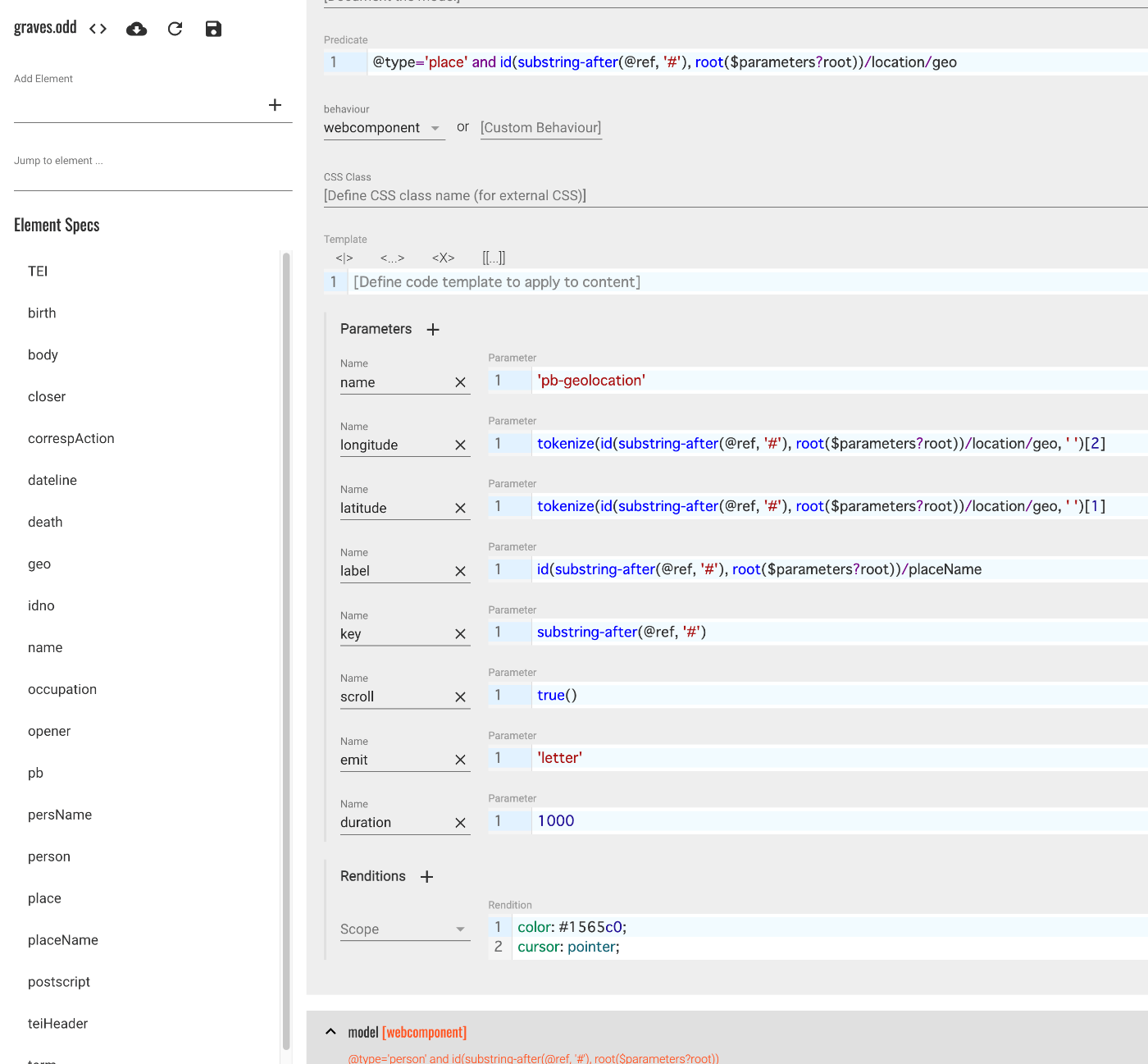
name - model [webcomponent] @type=‘place’ and id(substring-after(@ref, ‘#’), root($parameters?root))/location/geo
There is also an entry with the above description.
First, I asked GPT-4 to explain the content starting with id(....
This is part of a query language called XPath, used to select specific elements and attributes within XML documents. Specifically, this XPath expression performs the following operations:
id(substring-after(@ref, '#'), root($parameters?root)): This part extracts the portion after the hash symbol (#) from the@refattribute (using thesubstring-afterfunction) and passes the result to theidfunction. Theidfunction finds elements with the specified ID within the XML document. In this case,root($parameters?root)specifies the root element of the document in which to search./location/geo: Within the found element’s child elements, it searches for an element calledlocationand selects its child elementgeo.
Overall, this XPath expression is used to find a specific element based on a reference ID and select its location and geo child elements. This can be useful for retrieving specific geographic location information within an XML document.
In other words, this applies to elements that reference a place name with a geo tag. In this case, the style is defined as follows:
color: #1565c0;
cursor: pointer;
This style is applied to place names like the following.

Additionally, Parameters are specified in the ODD as shown below.
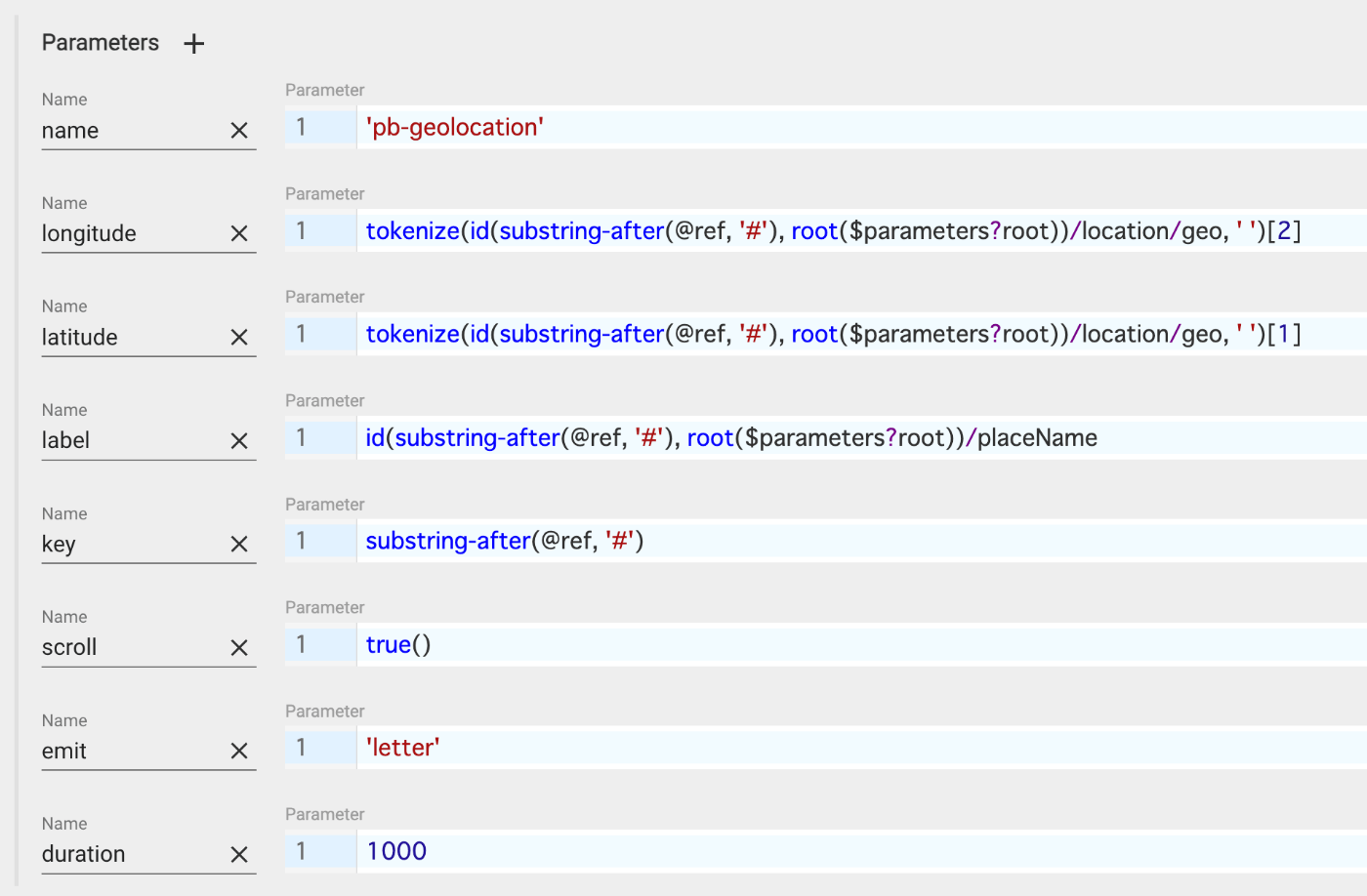
As a result, the HTML tags were written as follows. The name tag has been converted to a pb-geolocation tag, with attributes set based on the above XPath (or XQuery?).
<pb-geolocation
		class="tei-name4"
		longitude="2.64918"
		latitude="39.7484"
		label="Can Floque"
		key="CanFloque"
		scroll="scroll"
		emit="letter"
		duration="1000">
	Can Floque
</pb-geolocation>
.tei-name4 {
    color: #1565c0;
    cursor: pointer;
}
Template
Finally, let’s examine the template. The relevant file is:
/db/apps/tei-publisher/templates/pages/letter.html
<html>

<head>
    <meta charset="utf-8"/>
    <meta name="viewport" content="width=device-width, minimum-scale=1, initial-scale=1, user-scalable=yes"/>
    <link rel="shortcut icon" type="image/x-icon" href="resources/images/favicon.ico"/>
    <link rel="shortcut icon" type="image/png" href="resources/images/favicon-16.png" sizes="16x16"/>
    <link rel="shortcut icon" type="image/png" href="resources/images/favicon-24.png" sizes="24x24"/>
    <link rel="shortcut icon" type="image/png" href="resources/images/favicon-32.png" sizes="32x32"/>
    <link rel="shortcut icon" type="image/png" href="resources/images/favicon-64.png" sizes="64x64"/>

    <title data-template="config:app-title"/>
    <meta name="description" content="Graves' Letter"/>

    <link rel="stylesheet" href="resources/css/theme.css"/>
    <script type="module" src="pb-components-bundle.js" data-template="pages:load-components"/>
    <script type="module" src="pb-leaflet-map.js" data-template="pages:load-components"/>
    <style>
        body {
            --pb-view-height: calc(100vh - 220px);
        }

        pb-view {
            font: var(--pb-base-font);
        }

        #view1 {
            flex: 3 0;
            max-width: 60vw;
            margin: 8px 16px;
            height: var(--pb-view-height);
            overflow: auto;
        }

        .content-body {
            position: relative;
            display: flex;
            justify-content: center;
            margin: 0 10px;
        }

        aside {
            flex: 1 0;
            min-width: 360px;
            max-width: 480px;
            margin-right: 16px;
            height: var(--pb-view-height);
            overflow: auto;
        }

        aside pb-highlight {
            display: block;
            width: 100%;
            padding: 0 8px;
        }

        pb-leaflet-map {
            width: 100%;
            height: 100%;
        }

        .toc-toggle, pb-navigation {
            display: none;
        }
    </style>
</head>

<body>
    <pb-page data-template="pages:pb-page" unresolved="unresolved">
        <pb-document id="document1" data-template="pages:pb-document"/>
        <app-drawer-layout force-narrow="force-narrow">
            <app-drawer data-template="lib:include" data-template-path="templates/drawer.html"/>
            <app-header-layout>
                <app-header slot="header" reveals="reveals" fixed="fixed" effects="waterfall">
                    <app-toolbar data-template="lib:include" data-template-path="templates/menu.html"/>
                    <app-toolbar data-template="lib:include" data-template-path="templates/toolbar.html"/>
                </app-header>

                <section class="breadcrumbs">
                    <pb-view id="title-view1" src="document1" xpath="//teiHeader/fileDesc/titleStmt/title" view="single">
                        <pb-param name="header" value="short"/>
                    </pb-view>
                </section>
                <section class="content-body">
                    <pb-view id="view1" src="document1" column-separator=".tei-cb" append-footnotes="append-footnotes" subscribe="transcription" emit="transcription"/>
                    <aside class="places">
                        <pb-view src="document1" odd="graves" subscribe="transcription" emit="letter" wait-for="pb-leaflet-map">
                            <pb-param name="mode" value="facets"/>
                        </pb-view>
                    </aside>
                    <aside>
                        <pb-leaflet-map subscribe="letter" access-token="YOUR_MAPBOX_ACCESS_TOKEN"/>
                        <!--pb-map api-key="YOUR_GOOGLE_API_KEY" zoom="14" subscribe="letter"></pb-map-->
                    </aside>
                </section>
            </app-header-layout>
        </app-drawer-layout>
    </pb-page>
    <div class="splash"/>
</body>

</html>
pb-view and pb-leaflet-map are used. The second pb-view subscribes to transcription and emits letter. The ODD graves is also specified. Additionally, pb-leaflet-map subscribes to letter.
<section class="content-body">
    <pb-view id="view1" src="document1" column-separator=".tei-cb" append-footnotes="append-footnotes" subscribe="transcription" emit="transcription"/>
    <aside class="places">
	<pb-view src="document1" odd="graves" subscribe="transcription" emit="letter" wait-for="pb-leaflet-map">
	    <pb-param name="mode" value="facets"/>
	</pb-view>
    </aside>
    <aside>
	<pb-leaflet-map subscribe="letter" access-token="YOUR_MAPBOX_ACCESS_TOKEN"/>
	<!--pb-map api-key="YOUR_GOOGLE_API_KEY" zoom="14" subscribe="letter"></pb-map-->
    </aside>
</section>
Using the above relationships, it appears that geographic information including latitude and longitude from the TEI/XML is being exchanged.
Summary
In the next article, I will examine the contents of pb-view and pb-leaflet-map. While this article may be somewhat incomplete, I hope some parts serve as a helpful reference.