Overview
This is a memo on how to add a table of contents to videos using iiif-prezi3.
Segment Detection
We use Amazon Rekognition’s video segment detection.
https://docs.aws.amazon.com/ja_jp/rekognition/latest/dg/segments.html
Sample code is available at the following link.
https://docs.aws.amazon.com/ja_jp/rekognition/latest/dg/segment-example.html
Data Used
We use “Prefectural News Volume 1” (Nagano Prefectural Library).
https://www.ro-da.jp/shinshu-dcommons/library/02FT0102974177
Reflecting in the Manifest File
We assume that a manifest file has already been created by referring to the following article.
The following script adds a VTT file to the manifest file.
from iiif_prezi3 import Manifest, AnnotationPage, Annotation, ResourceItem, config, HomepageItem, KeyValueString

#| export
class IiifClient:

    def load_manifest(self, manifest_path):
        with open(manifest_path, "r") as f:
            manifest_json = json.load(f)

        manifest = Manifest(**manifest_json)

        return manifest


    def add_segment(self, manifest_path):
        manifest = self.load_manifest(manifest_path)

        path = f"{self.input_dir}/output_segment.json"

        with open(path, "r") as f:
            data = json.load(f)

        range_id = f"{self.prefix}/range"

        range_toc = manifest.make_range(
            id=f"{range_id}/r",
            label="Table of Contents"
        )

        canvas_id = manifest.items[0].id

        for s in data["Segments"]:

            s_type = s["Type"]

            if s_type != "SHOT":
                continue

            index = s["Shot Index"]

            start = s["Start Timestamp (milliseconds)"] / 1000
            end = s["End Timestamp (milliseconds)"] / 1000

            range_seg = range_toc.make_range(
                id=f"{range_id}/r{index}",
                label=f"Segment {index}",
            )

            range_seg.items.append({
                "id": f"{canvas_id}#t={start},{end}",
                "type": "Canvas"
            })

        output_path = f"{self.input_dir}/manifest_segment.json"

        with open(output_path, "w") as f:
            f.write(manifest.json(indent=2))

        return output_path
A manifest file like the following is created.
https://d1u7hq8ziluwl9.cloudfront.net/sdcommons_npl-02FT0102974177/manifest_segment.json
{
  "@context": "http://iiif.io/api/presentation/3/context.json",
  "id": "https://d1u7hq8ziluwl9.cloudfront.net/sdcommons_npl-02FT0102974177/manifest.json",
  "type": "Manifest",
  "label": {
    "ja": [
      "県政ニュース 第1巻"
    ]
  },
  "requiredStatement": {
    "label": {
      "ja": [
        "Attribution"
      ]
    },
    "value": {
      "ja": [
        "『県政ニュース 第1巻』(県立長野図書館)を改変"
      ]
    }
  },
  "homepage": [
    {
      "id": "https://www.ro-da.jp/shinshu-dcommons/library/02FT0102974177",
      "type": "Text",
      "label": {
        "ja": [
          "信州デジタルコモンズ 県立長野図書館所蔵資料"
        ]
      }
    },
    {
      "id": "https://jpsearch.go.jp/item/sdcommons_npl-02FT0102974177",
      "type": "Text",
      "label": {
        "ja": [
          "ジャパンサーチ"
        ]
      }
    }
  ],
  "items": [
    ...
  ],
  "structures": [
    {
      "id": "https://d1u7hq8ziluwl9.cloudfront.net/sdcommons_npl-02FT0102974177/range/r",
      "type": "Range",
      "label": {
        "ja": [
          "Table of Contents"
        ]
      },
      "items": [
        {
          "id": "https://d1u7hq8ziluwl9.cloudfront.net/sdcommons_npl-02FT0102974177/range/r0",
          "type": "Range",
          "label": {
            "ja": [
              "Segment 0"
            ]
          },
          "items": [
            {
              "id": "https://d1u7hq8ziluwl9.cloudfront.net/sdcommons_npl-02FT0102974177/canvas#t=0.0,5.338",
              "type": "Canvas"
            }
          ]
        },
        {
          "id": "https://d1u7hq8ziluwl9.cloudfront.net/sdcommons_npl-02FT0102974177/range/r1",
          "type": "Range",
          "label": {
            "ja": [
              "Segment 1"
            ]
          },
          "items": [
            {
              "id": "https://d1u7hq8ziluwl9.cloudfront.net/sdcommons_npl-02FT0102974177/canvas#t=5.372,6.74",
              "type": "Canvas"
            }
          ]
        },
        ...
        {
          "id": "https://d1u7hq8ziluwl9.cloudfront.net/sdcommons_npl-02FT0102974177/range/r151",
          "type": "Range",
          "label": {
            "ja": [
              "Segment 151"
            ]
          },
          "items": [
            {
              "id": "https://d1u7hq8ziluwl9.cloudfront.net/sdcommons_npl-02FT0102974177/canvas#t=618.651,619.586",
              "type": "Canvas"
            }
          ]
        }
      ]
    }
  ]
}
Viewer Display Example
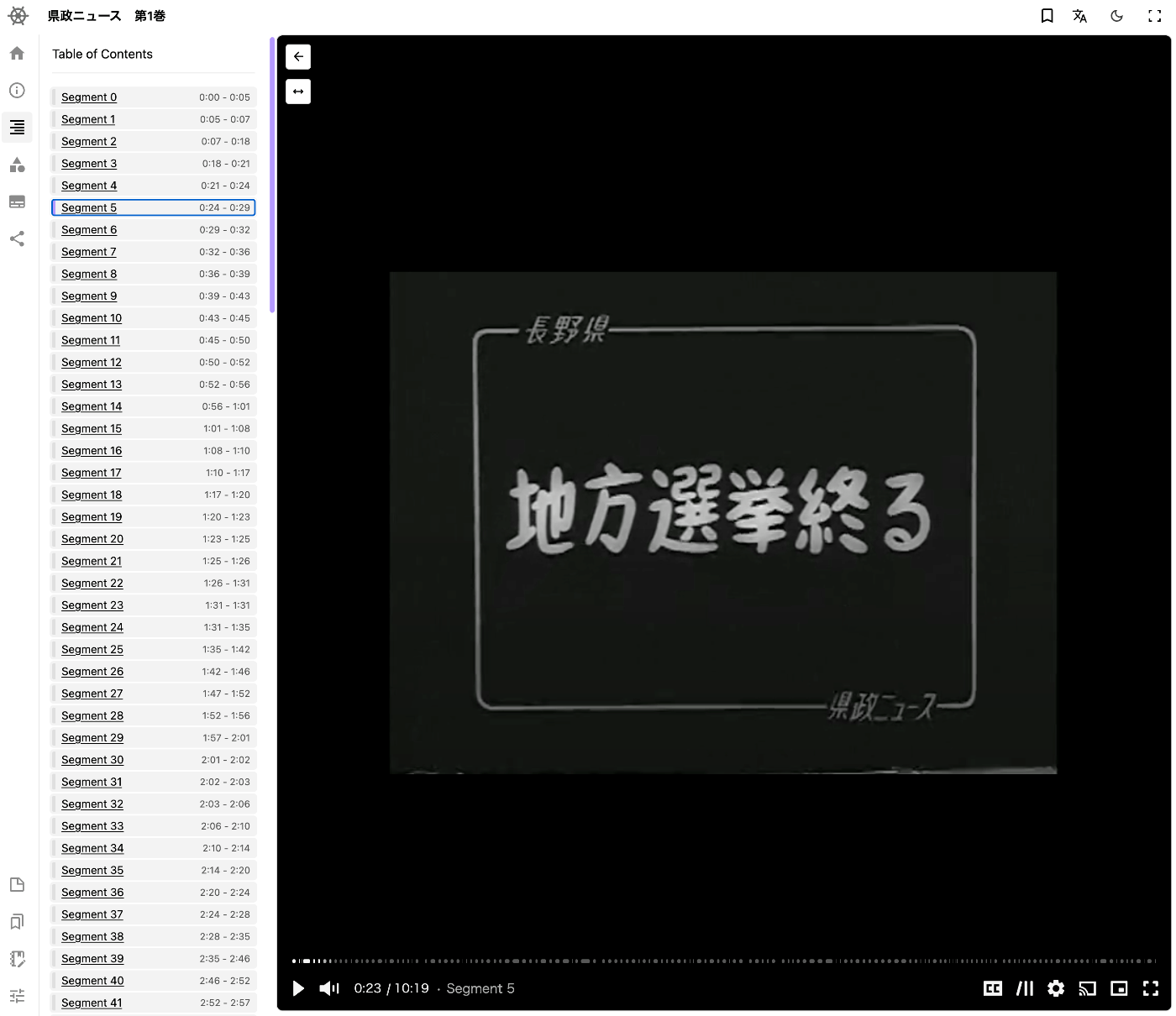
An example of the display in a viewer is shown below. Theseus Viewer is used.
Summary
I hope this serves as a helpful reference for adding table of contents to video files using IIIF.