Overview
This is an explanation of how to use the Image Map Editor in Oxygen XML Editor.
Video
https://youtu.be/9dZQ1v0Rky0?si=8EhAZdVsLqgPz2Rf
Usage
Prepare a TEI/XML file like the following. The url value of <graphic> can specify a relative path from the file, an absolute path on your PC, or a URL published on the internet.
In the following example, the file digidepo_3437686_pn_null_9c48d89b-e2ec-4593-8d00-6fbc1d29d1bd.jpg stored in the same folder as the TEI/XML file is referenced.
<?xml version="1.0" ?>
<?xml-model href="http://www.tei-c.org/release/xml/tei/custom/schema/relaxng/tei_all.rng" type="application/xml" schematypens="http://relaxng.org/ns/structure/1.0"?>
<TEI xmlns="http://www.tei-c.org/ns/1.0">
  <teiHeader>
    <fileDesc>
      <titleStmt>
        <title>Sample</title>
      </titleStmt>
      <publicationStmt>
        <ab/>
      </publicationStmt>
      <sourceDesc>
        <ab/>
      </sourceDesc>
    </fileDesc>
  </teiHeader>
  <facsimile>
    <surface>
      <graphic url="digidepo_3437686_pn_null_9c48d89b-e2ec-4593-8d00-6fbc1d29d1bd.jpg"/>
    </surface>
  </facsimile>
</TEI>
Clicking the “Author” button at the bottom of the screen displays the “Image Map Editor” as shown below. Refer to the video above to add annotations.
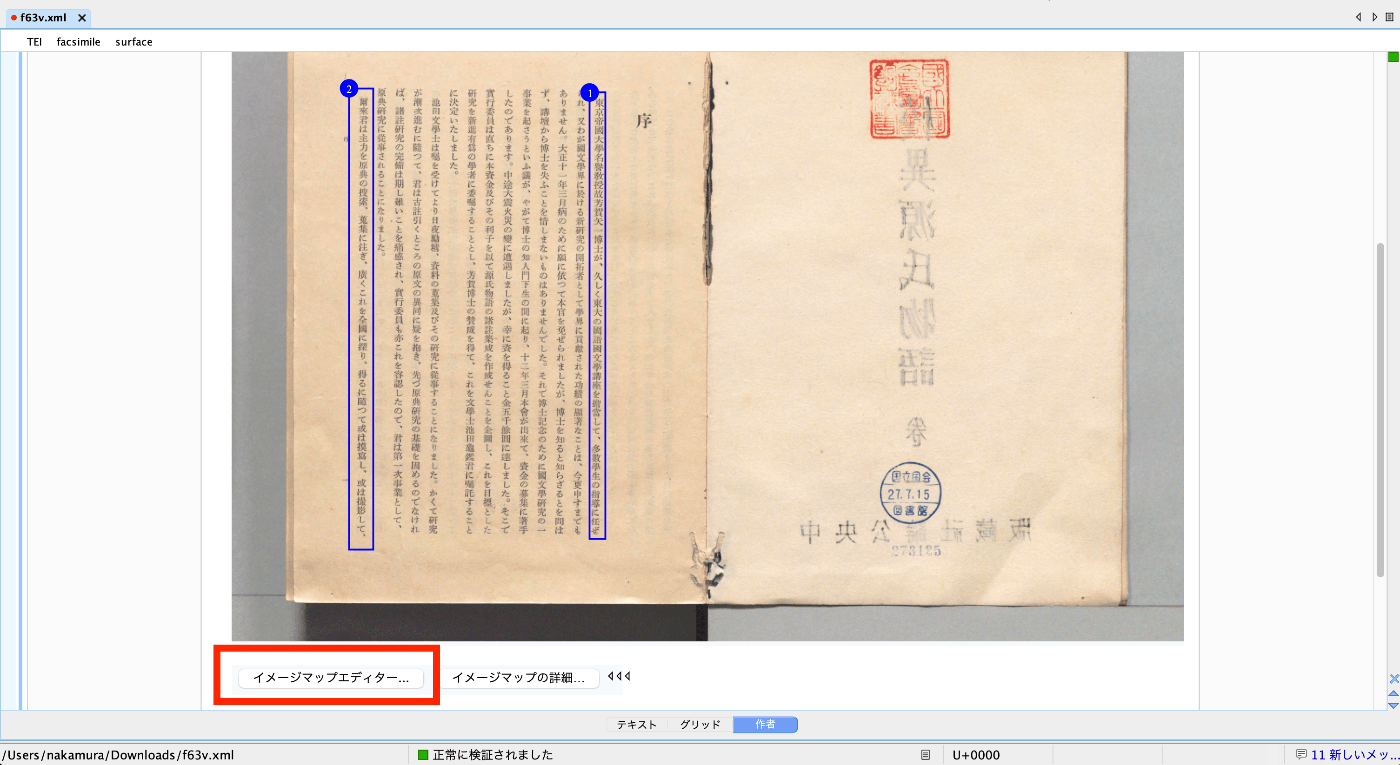
As a result, zone tags are automatically added as follows.
<?xml version="1.0" ?>
<?xml-model href="http://www.tei-c.org/release/xml/tei/custom/schema/relaxng/tei_all.rng" type="application/xml" schematypens="http://relaxng.org/ns/structure/1.0"?>
<TEI xmlns="http://www.tei-c.org/ns/1.0">
  <teiHeader>
    <fileDesc>
      <titleStmt>
        <title>Sample</title>
      </titleStmt>
      <publicationStmt>
        <ab/>
      </publicationStmt>
      <sourceDesc>
        <ab/>
      </sourceDesc>
    </fileDesc>
  </teiHeader>
  <facsimile>
    <surface>
      <graphic url="digidepo_3437686_pn_null_9c48d89b-e2ec-4593-8d00-6fbc1d29d1bd.jpg"/>
      <zone xml:id="zone_z3p_zll_szb" change="#ch1" lry="3960" lrx="2705" uly="730" ulx="2590"/>
      <zone xml:id="zone_fmm_xnv_szb" change="#ch2" lry="4038" lrx="1025" uly="700" ulx="850"/>
    </surface>
  </facsimile>
</TEI>
Summary
I hope this serves as a useful reference when using Oxygen XML Editor.