Overview
This is a memo about running the NDLOCR application published by NDL (National Diet Library) using a virtual machine on GCP (Google Cloud Platform). For details about this application, please refer to the following repository.
https://github.com/ndl-lab/ndlocr_cli
Creating a VM Instance
Access Compute Engine on GCP and click the “Create Instance” button at the top of the screen.

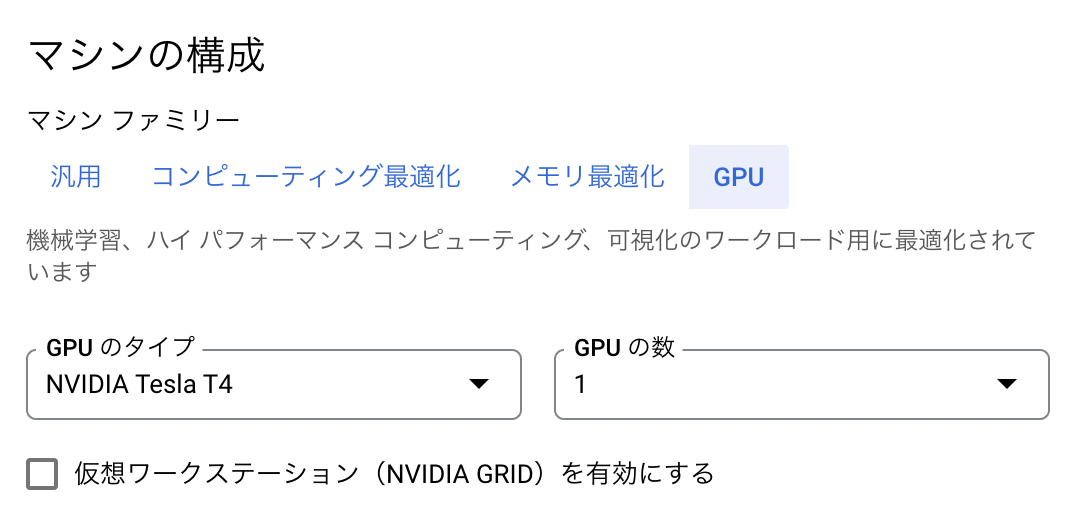
Under “Machine configuration” > “Machine family”, select “GPU”. Then for “GPU type”, select “NVIDIA T4”, which is the most affordable option. Set “Number of GPUs” to 1.
For “Series”, select “n1-standard-2”.
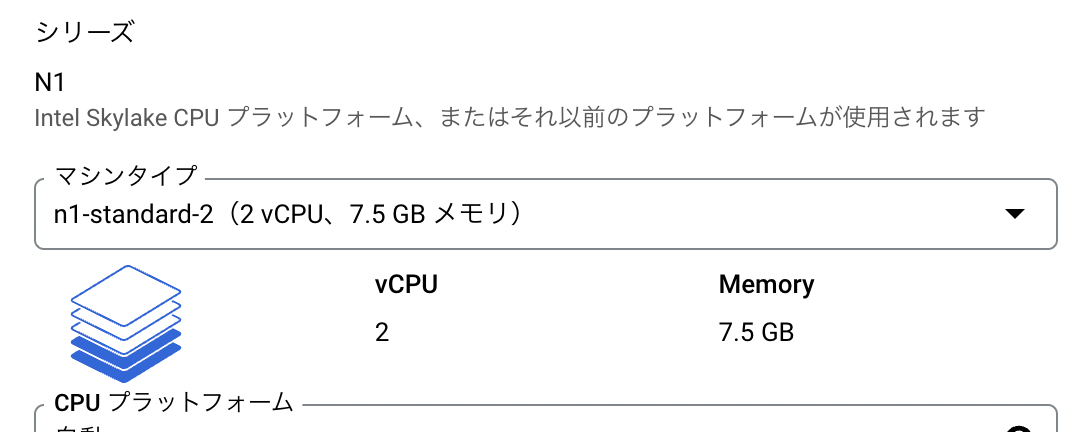
With “n1-standard-1”, a MemoryError occurred as shown below.

Next, under “Boot disk”, select “Switch image”. Then select the recommended “Deep Learning on Linux”.
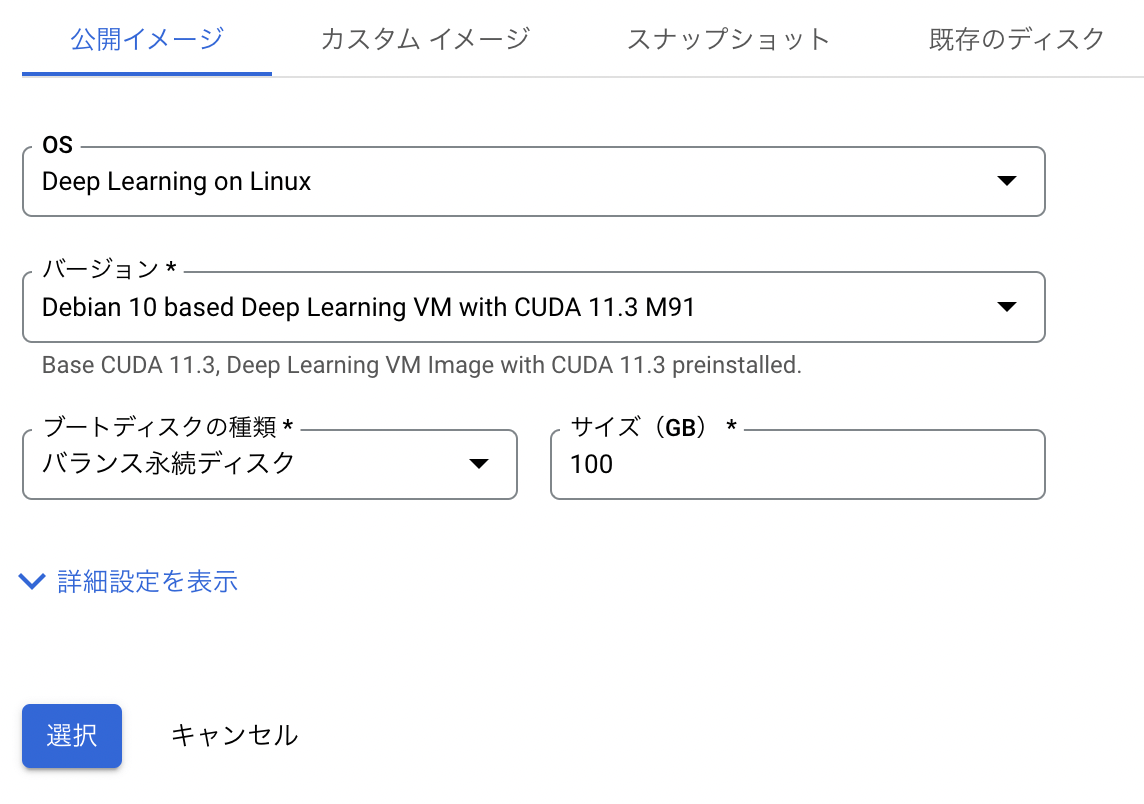
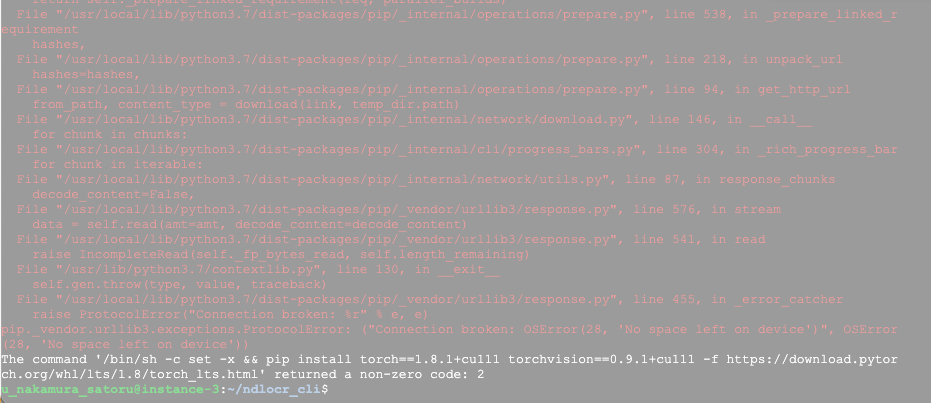
An important note here: change the “Size” from the default 50GB to 100GB. With 50GB, a “no space left” error occurred.
The following shows the information after the environment setup was completed. Since over 40GB was already used, I recommend setting a generous “Size”.
u_nakamura_satoru@instance-4:~$ df -h
Filesystem      Size  Used Avail Use% Mounted on
udev            7.4G     0  7.4G   0% /dev
tmpfs           1.5G  8.4M  1.5G   1% /run
/dev/sda1       492G   41G  432G   9% /
tmpfs           7.4G     0  7.4G   0% /dev/shm
tmpfs           5.0M     0  5.0M   0% /run/lock
tmpfs           7.4G     0  7.4G   0% /sys/fs/cgroup
/dev/sda15      124M  5.7M  119M   5% /boot/efi
tmpfs           1.5G     0  1.5G   0% /run/user/1001
After that, click the “Create” button at the bottom of the screen to complete the VM instance creation.
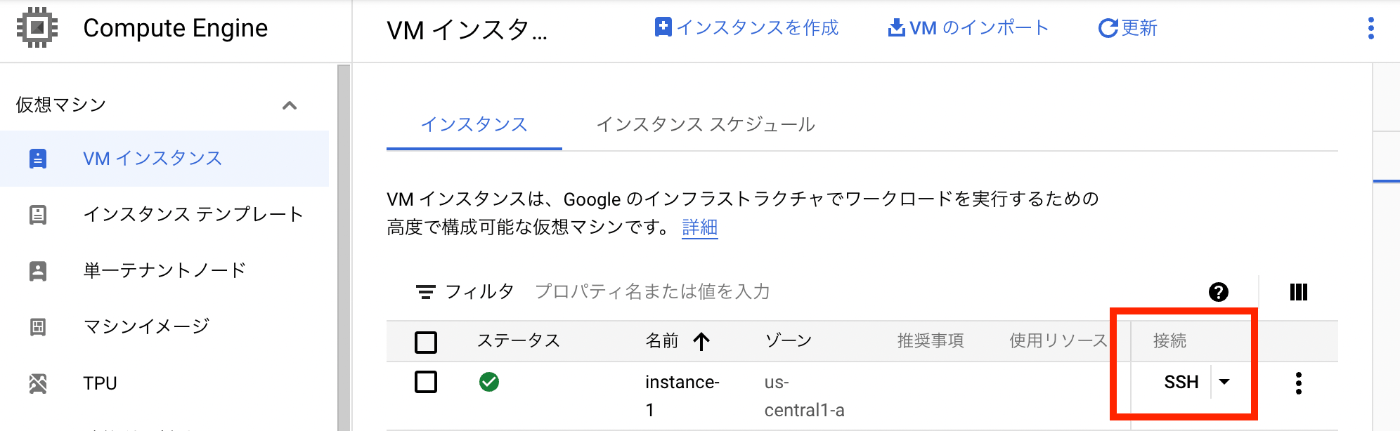
After a while, the VM instance will start up as shown below. Click the “SSH” button to connect to the VM instance.
Operations Inside the VM Instance
Installing the Nvidia Driver
After connecting via SSH, the following screen is displayed. Press “y” to install the Nvidia driver.
======================================
Welcome to the Google Deep Learning VM
======================================
Version: common-cu113.m91
Based on: Debian GNU/Linux 10 (buster) (GNU/Linux 4.19.0-19-cloud-amd64 x86_64\n
)
Resources:
 * Google Deep Learning Platform StackOverflow: https://stackoverflow.com/questi
ons/tagged/google-dl-platform
 * Google Cloud Documentation: https://cloud.google.com/deep-learning-vm
 * Google Group: https://groups.google.com/forum/#!forum/google-dl-platform
To reinstall Nvidia driver (if needed) run:
sudo /opt/deeplearning/install-driver.sh
Linux instance-1 4.19.0-19-cloud-amd64 #1 SMP Debian 4.19.232-1 (2022-03-07) x86
_64
The programs included with the Debian GNU/Linux system are free software;
the exact distribution terms for each program are described in the
individual files in /usr/share/doc/*/copyright.
Debian GNU/Linux comes with ABSOLUTELY NO WARRANTY, to the extent
permitted by applicable law.
This VM requires Nvidia drivers to function correctly.   Installation takes ~1 minute.
Would you like to install the Nvidia driver? [y/n]
However, running this immediately after startup resulted in the following error.
Would you like to install the Nvidia driver? [y/n] y
Installing Nvidia driver.
wait apt locks released
install linux headers: linux-headers-4.19.0-19-cloud-amd64
E: Could not get lock /var/lib/dpkg/lock-frontend - open (11: Resource temporarily unavailable)
E: Unable to acquire the dpkg frontend lock (/var/lib/dpkg/lock-frontend), is another process using it?
Nvidia driver installed.
Running the following ps command showed that other processes were running.
ps aux | grep apt
Therefore, exit once, wait a moment, and then reconnect via SSH. You will be asked the same question, and pressing “y” again completed the installation as follows.
Would you like to install the Nvidia driver? [y/n] y
Installing Nvidia driver.
wait apt locks released
install linux headers: linux-headers-4.19.0-19-cloud-amd64
Reading package lists... Done
Building dependency tree
Reading state information... Done
linux-headers-4.19.0-19-cloud-amd64 is already the newest version (4.19.232-1).
0 upgraded, 0 newly installed, 0 to remove and 1 not upgraded.
DRIVER_VERSION: 470.57.02
Downloading driver from GCS location and install: gs://nvidia-drivers-us-public/tesla/470.57.02/NVIDIA-Linux-x86_64
-470.57.02.run
Verifying archive integrity... OK
Uncompressing NVIDIA Accelerated Graphics Driver for Linux-x86_64 470.57.02........................................
...................................................................................................................
...................................................................................................................
...................................................................................................................
...................................................................................................................
...................................................................................
WARNING: The nvidia-drm module will not be installed. As a result, DRM-KMS will not function with this
         installation of the NVIDIA driver.
WARNING: nvidia-installer was forced to guess the X library path '/usr/lib64' and X module path
         '/usr/lib64/xorg/modules'; these paths were not queryable from the system.  If X fails to find the NVIDIA
         X driver module, please install the `pkg-config` utility and the X.Org SDK/development package for your
         distribution and reinstall the driver.

Nvidia driver installed.
I did not understand the meaning of the above WARNINGs, so I ignored them…
Starting the Docker Container
From here on, I could proceed following the GitHub README.md.
Since docker and git were already installed, I ran the following. Note that running dockerbuild.sh takes some time.
git clone --recursive https://github.com/ndl-lab/ndlocr_cli
cd ndlocr_cli
sh ./docker/dockerbuild.sh
sh ./docker/run_docker.sh
Running Inference
This could also be done following the README.md.
This time, I ran inference on page 4 of “Koui Genji Monogatari, Volume 1”.
https://dl.ndl.go.jp/info:ndljp/pid/3437686/4
# Log in to the container
docker exec -i -t --user root ocr_cli_runner bash
Try running inference inside the container.
# Download an image to sample_data/img
wget https://www.dl.ndl.go.jp/api/iiif/3437686/R0000004/full/full/0/default.jpg -P sample_data/img/
# Run inference (with -x option to also output recognition result xml files)
python main.py infer sample_data output_dir -x
The inference runs as follows.
root@fd35b62fef61:~/ocr_cli# python main.py infer sample_data output_dir -x
start inference !
input_root : sample_data
output_root : output_dir
config_file : config.yml
Using TensorFlow backend.
load from config=src/ndl_layout/models/ndl_layout_config.py, checkpoint=src/ndl_layout/models/epoch_140_all_eql_bt.pth
set up EQL (version NDL), 9 classes included.
load checkpoint from local path: src/ndl_layout/models/epoch_140_all_eql_bt.pth
No Transformation module specified
No SequenceModeling module specified
model input parameters 32 1200 20 1 512 256 7085 100 None ResNet None CTC
loading pretrained model from src/text_recognition/models/ndlenfixed64-mj0-synth1.pth
[{'input_dir': '/root/ocr_cli/sample_data', 'img_list': ['/root/ocr_cli/sample_data/img/default.jpg'], 'output_dir': '/root/ocr_cli/output_dir/sample_data'}]
{'input_dir': '/root/ocr_cli/sample_data', 'img_list': ['/root/ocr_cli/sample_data/img/default.jpg'], 'output_dir': '/root/ocr_cli/output_dir/sample_data'}
######## START PAGE INFERENCE PROCESS ########
### Page Separation ###
1/1 [==============================] - 1s 1s/step
img 0 top conf: 0.8656622171401978
### Page Deskew Process ###
### Page Deskew Process ###
### Layout Extraction Process ###
/usr/local/lib/python3.7/dist-packages/mmdet/datasets/utils.py:68: UserWarning: "ImageToTensor" pipeline is replaced by "DefaultFormatBundle" for batch inference. It is recommended to manually replace it in the test data pipeline in your config f
ile.
  'data pipeline in your config file.', UserWarning)
### Layout Extraction Process ###
### Line OCR Process ###
### Line OCR Process ###
This BLOCK elemetn will be skipped.
{'TYPE': '図版', 'X': '881', 'Y': '378', 'WIDTH': '439', 'HEIGHT': '428', 'CONF': '0.999'}
This BLOCK elemetn will be skipped.
{'TYPE': '図版', 'X': '881', 'Y': '378', 'WIDTH': '439', 'HEIGHT': '428', 'CONF': '0.999'}
No predicted STRING for this xml_line
{'TYPE': '図版', 'X': '881', 'Y': '378', 'WIDTH': '439', 'HEIGHT': '428', 'CONF': '0.999'}
########  END PAGE INFERENCE PROCESS  ########
### save xml : /root/ocr_cli/output_dir/sample_data/xml/sample_data.xml###
================== PROCESSING TIME ==================
Average processing time : 6.026494741439819 sec / image file
As a result, the OCR processing results could be confirmed as follows.
root@fd35b62fef61:~/ocr_cli# cat output_dir/sample_data/xml/sample_data.xml
<?xml version='1.0' encoding='utf-8'?>
<OCRDATASET><PAGE HEIGHT="3426" IMAGENAME="default_L.jpg" WIDTH="2485">
<LINE CONF="1.000" HEIGHT="440" STRING="に決定いたしました。" TYPE="本文" WIDTH="45" X="1147" Y="522" />
<LINE CONF="1.000" HEIGHT="2319" STRING="ず、講壇から博士を失ふことを惜しまないものはありませんでした。それで博士記念のために國文學研究の一" TYPE="本文" WIDTH="56" X="1614" Y="517" />
<LINE CONF="1.000" HEIGHT="2336" STRING="事業を起さうといふ議が、やがて博士の知人門下生の間に起り、十二年三月本會が出來て、資金の募集に著手" TYPE="本文" WIDTH="58" X="1519" Y="517" />
<LINE CONF="1.000" HEIGHT="2334" STRING="ありません。大正十一年三月病のために願に依つて本官を免ぜられましたが、博士を知ると知らざるとを問は" TYPE="本文" WIDTH="55" X="1709" Y="519" />
<LINE CONF="1.000" HEIGHT="2337" STRING="られ、又わが國文學界に於ける新研究の開拓者として學界に貢獻された功績の顯著なことは、今更申すまでも" TYPE="本文" WIDTH="55" X="1804" Y="519" />
<LINE CONF="1.000" HEIGHT="876" STRING="原典研究に從事されることになりました。" TYPE="本文" WIDTH="48" X="765" Y="516" />
<LINE CONF="1.000" HEIGHT="2311" STRING="爾來君は主力を原典の搜索、蒐集に注ぎ、廣くこれを全國に探り、得るに隨つて或は摸寫し、或は撮影して、" TYPE="本文" WIDTH="52" X="668" Y="566" />
<LINE CONF="1.000" HEIGHT="2330" STRING="したのであります。中途大震火災の變に遭遇しましたが、幸に資を得ること金五千餘圓に達しました。そこで" TYPE="本文" WIDTH="53" X="1426" Y="523" />
<LINE CONF="1.000" HEIGHT="2309" STRING="ば、諸註研究の完備は期し難いことを痛感され、實行委員も亦これを容認したので、君は第一次事業として、" TYPE="本文" WIDTH="50" X="858" Y="517" />
<LINE CONF="1.000" HEIGHT="2291" STRING="東京帝國大學名譽教授故芳賀矢一博士が、久しく東大の國語國文學講座を擔當して、多數學生の指導に任ぜ" TYPE="本文" WIDTH="59" X="1897" Y="564" />
<LINE CONF="1.000" HEIGHT="2329" STRING="が漸次進むに隨つて、君は古註引くところの原文の異同に疑を抱き、先づ原典研究の基礎を固めるのでなけれ" TYPE="本文" WIDTH="51" X="952" Y="519" />
<LINE CONF="1.000" HEIGHT="2286" STRING="池田文學士は囑を受けてより日夜勵精、資料の蒐集及びその研究に從事することになりました。かくて研究" TYPE="本文" WIDTH="52" X="1045" Y="566" />
<LINE CONF="1.000" HEIGHT="2332" STRING="研究を新進有爲の學者に委囑することとし、芳賀博士の贊成を得て、これを文學士池田龜鑑君に囑託すること" TYPE="本文" WIDTH="53" X="1236" Y="522" />
<LINE CONF="1.000" HEIGHT="2337" STRING="實行委員は直ちに本資金及びその利子を以て源氏物語の諸註集成を作成せんことを企圖し、これを目標とした" TYPE="本文" WIDTH="52" X="1331" Y="518" />
<LINE CONF="0.999" HEIGHT="80" STRING="序" TYPE="本文" WIDTH="77" X="2129" Y="640" />
<LINE CONF="0.823" HEIGHT="88" STRING="3%θ" TYPE="本文" WIDTH="396" X="1632" Y="184" />
<BLOCK CONF="0.593" HEIGHT="46" STRING="一" TYPE="ノンブル" WIDTH="48" X="583" Y="2546" />
</PAGE><PAGE HEIGHT="3463" IMAGENAME="default_R.jpg" WIDTH="2595">
<LINE CONF="0.610" HEIGHT="151" STRING="中央" TYPE="本文" WIDTH="729" X="573" Y="2788" />
<LINE CONF="0.491" HEIGHT="117" STRING="" TYPE="キャプション" WIDTH="92" X="1683" Y="2778" />
<BLOCK CONF="0.999" HEIGHT="428" TYPE="図版" WIDTH="439" X="881" Y="378" />
Summary
I was able to successfully run the NDLOCR application. Please remember to stop the instance after running it.
I deeply appreciate the NDL staff who published this application.
Addendum
2022.04.28
I wrote an article about running it using Google Colab. I hope this is also useful.