Overview
When editing TEI/XML files, changing the RNG file used for validation allows you to limit the tags and attributes available. This offers benefits such as preventing workers from being confused by tag choices and reducing inconsistencies in the created TEI/XML.
As a method for editing RNG files, using Roma is common, as introduced in the following article.
This is a top-down approach to limiting available tags and attributes, but this time we try creating an RNG file bottom-up from existing TEI/XML using generative AI.
Target Data
We target the following XML file published in the Koui Genji Monogatari Text DB.
https://kouigenjimonogatari.github.io/tei/01.xml
This file uses the following tei_all.rng.
http://www.tei-c.org/release/xml/tei/custom/schema/relaxng/tei_all.rng
As a result, many insertable tags are suggested, as shown below.

Creating an RNG File with Generative AI
Using a prompt like the following, an RNG file is created based on the tag usage in the target XML file.
# Custom RNG Schema Creation Request for XML File

## Purpose
- Create an RNG schema limited to used elements/attributes for improved work efficiency
- Build an environment where workers can edit with a consistent structure without confusion in tag selection

## Provided File
- File name: 01.xml

## Requirements
1. **Analyze the current XML file** and identify actually used elements and attributes
2. **Create an RNG schema with a minimal yet sufficient set of elements**
3. **Design for effective auto-completion and validation**
4. **Include comments** specifying the purpose of each element

## Constraints/Policy
- Exclude unnecessary elements (e.g., XX, YY are not used)
- Clearly define required attributes

## Expected Deliverables
1. Custom RNG file (.rng)
2. Brief usage guide
As a result, the following RNG file was created.
<?xml version="1.0" encoding="UTF-8"?>
<!--
  Custom RNG Schema: For Koui Genji Monogatari TEI Files
  Created: 2024

  [Purpose]
  - Limited to only actually used elements/attributes for improved work efficiency
  - Enable effective auto-completion and validation
  - Clear structure so workers don't struggle with tag selection
-->
<grammar xmlns="http://relaxng.org/ns/structure/1.0"
         xmlns:a="http://relaxng.org/ns/compatibility/annotations/1.0"
         datatypeLibrary="http://www.w3.org/2001/XMLSchema-datatypes"
         ns="http://www.tei-c.org/ns/1.0">

  <start>
    <ref name="TEI"/>
  </start>

  <!-- ====================
       Root Element
       ==================== -->
  <define name="TEI">
    <element name="TEI">
      <a:documentation>Root element of the TEI document</a:documentation>
      <ref name="teiHeader"/>
      <ref name="facsimile"/>
      <ref name="text"/>
    </element>
  </define>

  <!-- ====================
       Header Section (Not Subject to Editing)
       ==================== -->
  <define name="teiHeader">
    <element name="teiHeader">
      <a:documentation>
        Metadata area (not modified during editing work)
        - fileDesc: Bibliographic information
        - encodingDesc: Encoding information
      </a:documentation>
      <ref name="fileDesc"/>
      <ref name="encodingDesc"/>
    </element>
  </define>

  <!-- Bibliographic Information -->
  <define name="fileDesc">
    <element name="fileDesc">
      <ref name="titleStmt"/>
      <ref name="publicationStmt"/>
      <ref name="sourceDesc"/>
    </element>
  </define>

  <!-- Title Information -->
  <define name="titleStmt">
    <element name="titleStmt">
      <element name="title">
        <text/>
      </element>
      <element name="author">
        <text/>
      </element>
      <oneOrMore>
        <ref name="respStmt"/>
      </oneOrMore>
    </element>
  </define>

  <!-- Responsibility Statement -->
  <define name="respStmt">
    <element name="respStmt">
      <element name="resp">
        <attribute name="when">
          <a:documentation>Work date (YYYY-MM-DD format)</a:documentation>
          <data type="date"/>
        </attribute>
        <text/>
      </element>
      <element name="name">
        <text/>
      </element>
    </element>
  </define>

  <!-- Publication Information -->
  <define name="publicationStmt">
    <element name="publicationStmt">
      <element name="distributor">
        <text/>
      </element>
      <element name="date">
        <attribute name="when">
          <data type="date"/>
        </attribute>
        <text/>
      </element>
      <element name="availability">
        <element name="p">
          <element name="ref">
            <attribute name="target">
              <data type="anyURI"/>
            </attribute>
            <text/>
          </element>
        </element>
      </element>
    </element>
  </define>

  <!-- Source Description -->
  <define name="sourceDesc">
    <element name="sourceDesc">
      <element name="bibl">
        <element name="author">
          <text/>
        </element>
        <element name="title">
          <text/>
        </element>
        <element name="publisher">
          <text/>
        </element>
      </element>
    </element>
  </define>

  <!-- Encoding Description -->
  <define name="encodingDesc">
    <element name="encodingDesc">
      <element name="p">
        <mixed>
          <optional>
            <element name="ref">
              <attribute name="target">
                <data type="anyURI"/>
              </attribute>
              <text/>
            </element>
          </optional>
        </mixed>
      </element>
    </element>
  </define>

  <!-- ====================
       Image Reference Section
       ==================== -->
  <define name="facsimile">
    <element name="facsimile">
      <a:documentation>
        Area for managing image information
        - Defines IIIF-compatible image URLs and zone coordinates
      </a:documentation>
      <ref name="surfaceGrp"/>
    </element>
  </define>

  <!-- Image Group -->
  <define name="surfaceGrp">
    <element name="surfaceGrp">
      <attribute name="facs">
        <a:documentation>IIIF Manifest URL (required)</a:documentation>
        <data type="anyURI">
          <param name="pattern">https://.*\.json</param>
        </data>
      </attribute>
      <oneOrMore>
        <ref name="surface"/>
      </oneOrMore>
    </element>
  </define>

  <!-- Individual Image Information -->
  <define name="surface">
    <element name="surface">
      <a:documentation>Represents one image surface</a:documentation>
      <ref name="graphic"/>
      <oneOrMore>
        <ref name="zone"/>
      </oneOrMore>
    </element>
  </define>

  <!-- Image Link -->
  <define name="graphic">
    <element name="graphic">
      <attribute name="n">
        <a:documentation>IIIF Canvas URL</a:documentation>
        <data type="anyURI"/>
      </attribute>
      <attribute name="url">
        <a:documentation>Direct image URL</a:documentation>
        <data type="anyURI"/>
      </attribute>
      <empty/>
    </element>
  </define>

  <!-- Region Definition on Image -->
  <define name="zone">
    <element name="zone">
      <a:documentation>
        Defines a rectangular region on an image
        - Specifies the range of pages or columns
      </a:documentation>
      <attribute name="xml:id">
        <a:documentation>Zone ID (zone_XXXX format)</a:documentation>
        <data type="ID">
          <param name="pattern">zone_\d{4}</param>
        </data>
      </attribute>
      <attribute name="lrx">
        <a:documentation>Lower-right X coordinate</a:documentation>
        <data type="nonNegativeInteger"/>
      </attribute>
      <attribute name="lry">
        <a:documentation>Lower-right Y coordinate</a:documentation>
        <data type="nonNegativeInteger"/>
      </attribute>
      <attribute name="ulx">
        <a:documentation>Upper-left X coordinate</a:documentation>
        <data type="nonNegativeInteger"/>
      </attribute>
      <attribute name="uly">
        <a:documentation>Upper-left Y coordinate</a:documentation>
        <data type="nonNegativeInteger"/>
      </attribute>
      <empty/>
    </element>
  </define>

  <!-- ====================
       Text Body (Main Editing Area)
       ==================== -->
  <define name="text">
    <element name="text">
      <a:documentation>Container for the text body</a:documentation>
      <ref name="body"/>
    </element>
  </define>

  <!-- Body -->
  <define name="body">
    <element name="body">
      <a:documentation>Body area</a:documentation>
      <oneOrMore>
        <ref name="p"/>
      </oneOrMore>
    </element>
  </define>

  <!-- Paragraph -->
  <define name="p">
    <element name="p">
      <a:documentation>
        Paragraph element
        - Typically uses one p element for the entire document
      </a:documentation>
      <ref name="textContent"/>
    </element>
  </define>

  <!-- ====================
       Text Content Model
       ==================== -->
  <define name="textContent">
    <a:documentation>
      Elements available within the body text
    </a:documentation>
    <zeroOrMore>
      <choice>
        <text/>
        <ref name="lb"/>
        <ref name="pb"/>
        <ref name="seg"/>
      </choice>
    </zeroOrMore>
  </define>

  <!-- Line Break -->
  <define name="lb">
    <element name="lb">
      <a:documentation>
        Line break marker
        - Indicates the line break position in the original
        - Used as an empty element
      </a:documentation>
      <empty/>
    </element>
  </define>

  <!-- Page Boundary -->
  <define name="pb">
    <element name="pb">
      <a:documentation>
        Page boundary marker
        - Indicates the start of a new page
        - Must reference a corresponding zone element
      </a:documentation>
      <attribute name="n">
        <a:documentation>Page number (numeric)</a:documentation>
        <data type="positiveInteger"/>
      </attribute>
      <attribute name="facs">
        <a:documentation>Reference to corresponding zone (#zone_XXXX format)</a:documentation>
        <data type="string">
          <param name="pattern">#zone_\d{4}</param>
        </data>
      </attribute>
      <empty/>
    </element>
  </define>

  <!-- Text Segment (Most Important Element) -->
  <define name="seg">
    <element name="seg">
      <a:documentation>
        Text segment
        [IMPORTANT] Primary editing target element
        - Divided by line or semantic unit
        - Each segment corresponds to an external resource with a unique ID
        - Linked to external database via corresp attribute
      </a:documentation>
      <attribute name="corresp">
        <a:documentation>
          Link to external resource (required)
          Format: https://w3id.org/kouigenjimonogatari/api/items/XXXX-XX.json
        </a:documentation>
        <data type="anyURI">
          <param name="pattern">https://w3id\.org/kouigenjimonogatari/api/items/\d{4}-\d{2}\.json</param>
        </data>
      </attribute>
      <text/>
    </element>
  </define>

</grammar>
Applying to XML
Apply the created RNG file as follows.
<?xml version="1.0" encoding="UTF-8"?>
<?xml-model href="01_custom.rng" type="application/xml" schematypens="http://relaxng.org/ns/structure/1.0"?>
<?xml-model href="01_custom.rng" type="application/xml"
   schematypens="http://purl.oclc.org/dsdl/schematron"?>
<TEI xmlns="http://www.tei-c.org/ns/1.0">
   <teiHeader>
      <fileDesc>
         <titleStmt>
            <title>校異源氏物語・きりつぼ</title>
...
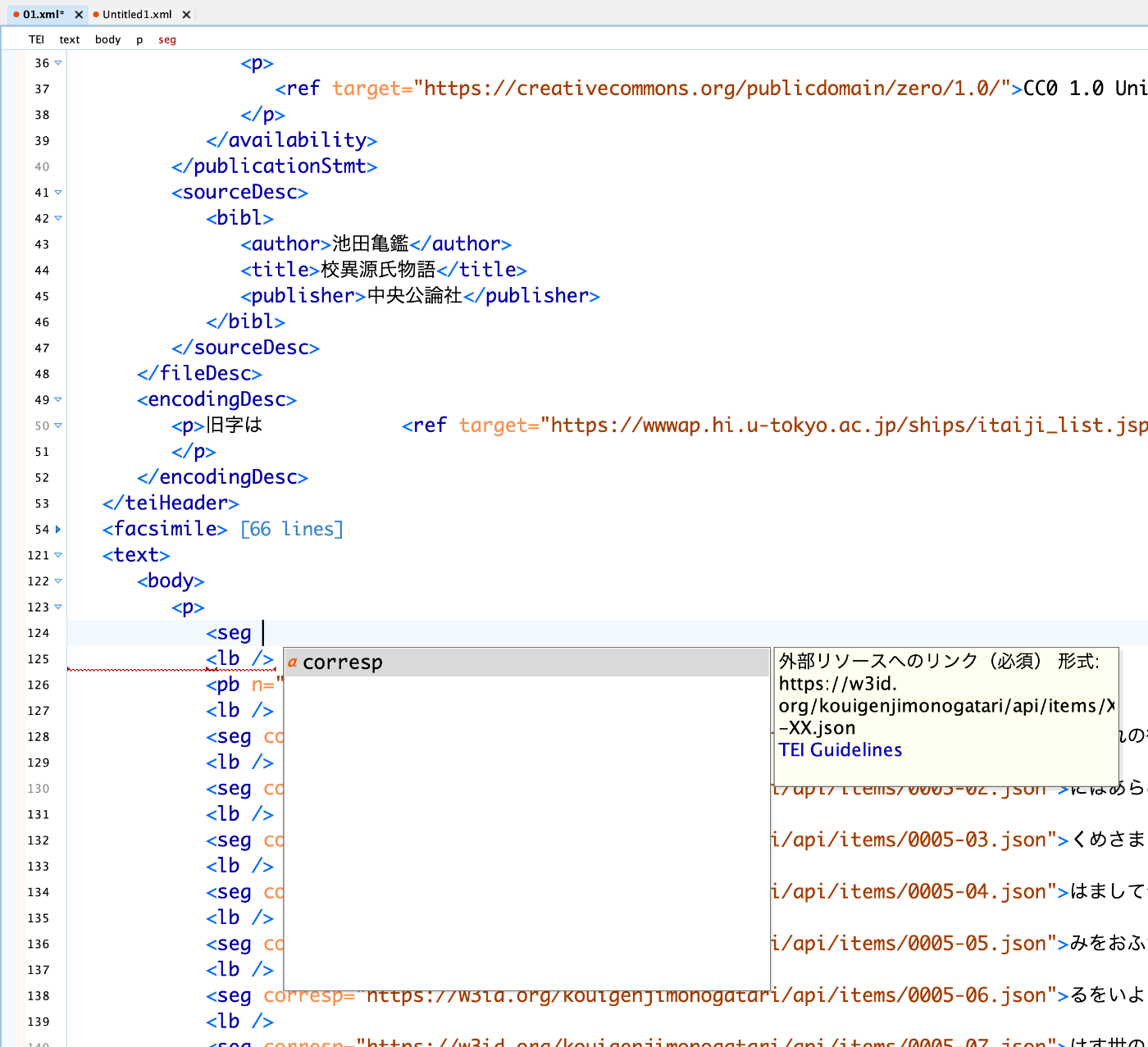
As a result, the available tags are displayed in a limited manner, as shown below.

The available attributes are also limited.
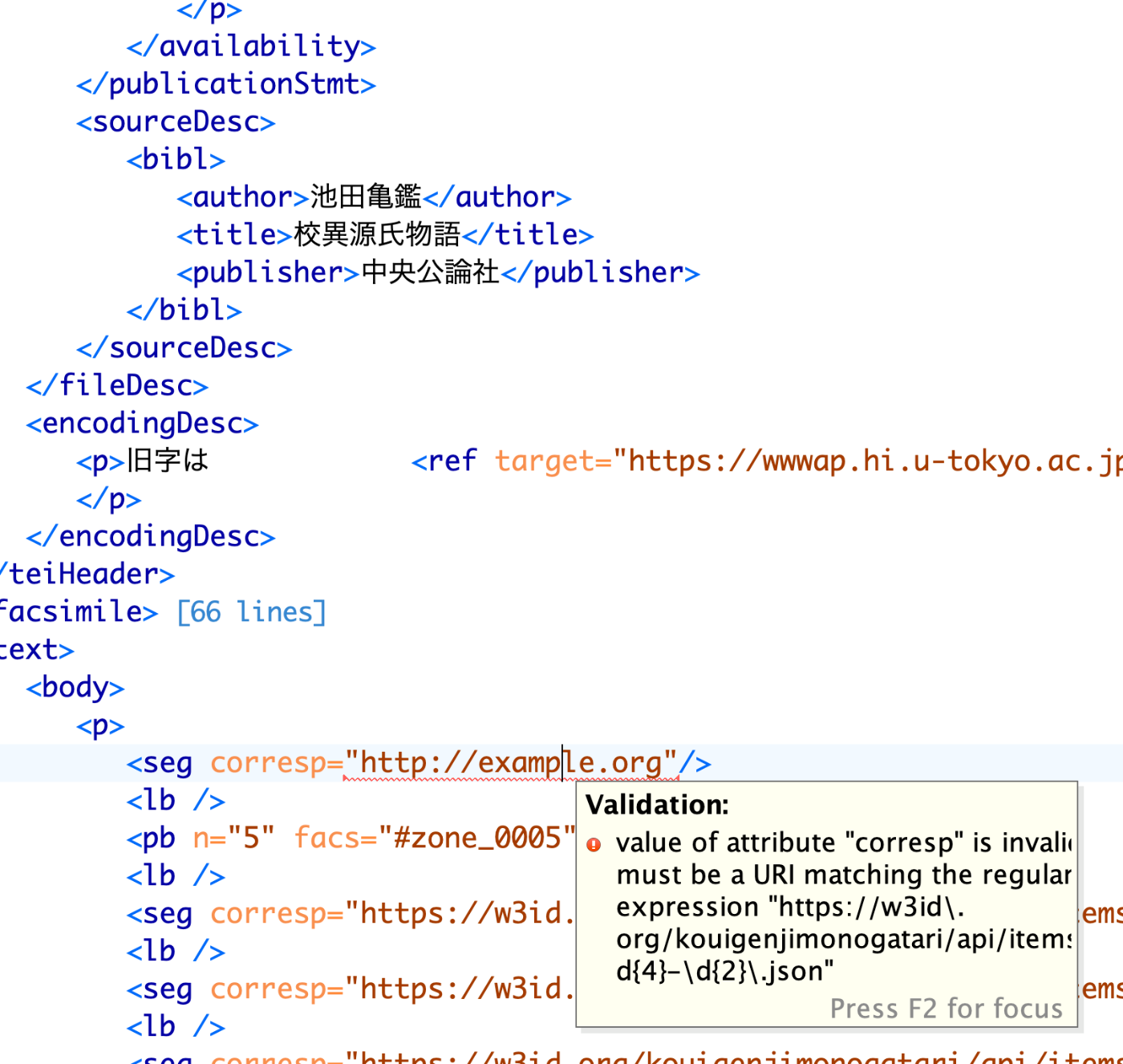
Furthermore, the attribute values are also constrained by format restrictions.
The same restrictions apply in Scholarly XML for VSCode.

https://marketplace.visualstudio.com/items?itemName=raffazizzi.sxml
Building such a working environment is expected to reduce inconsistencies in deliverables across different workers.
Summary
I hope this serves as a useful reference as an example of creating RNG files bottom-up.