Overview
This is a memo about hosting TEI/XML files on S3-compatible object storage. Specifically, we target the mdx I object storage.
https://mdx.jp/mdx1/p/about/system
Background
We are building a web application (Next.js) that loads TEI/XML files and visualizes their content. When the number and size of files were small, they were stored in the public folder, but as these grew larger, we considered hosting them elsewhere.
There are many options for storage locations, but this time we target mdx I’s S3-compatible object storage.
Uploading Files to Object Storage via GUI
There are many ways to upload TEI/XML files to object storage via GUI. Among them, I have previously introduced methods using Cyberduck and GakuNin RDM.
In this case, however, content other than TEI/XML was managed in Drupal. Therefore, we connected Drupal to the object storage so that users could complete everything through Drupal operations.
Connecting Drupal to Object Storage
The following module is used.
https://www.drupal.org/project/s3fs
After installation, select S3 File System from the configuration page /admin/config.
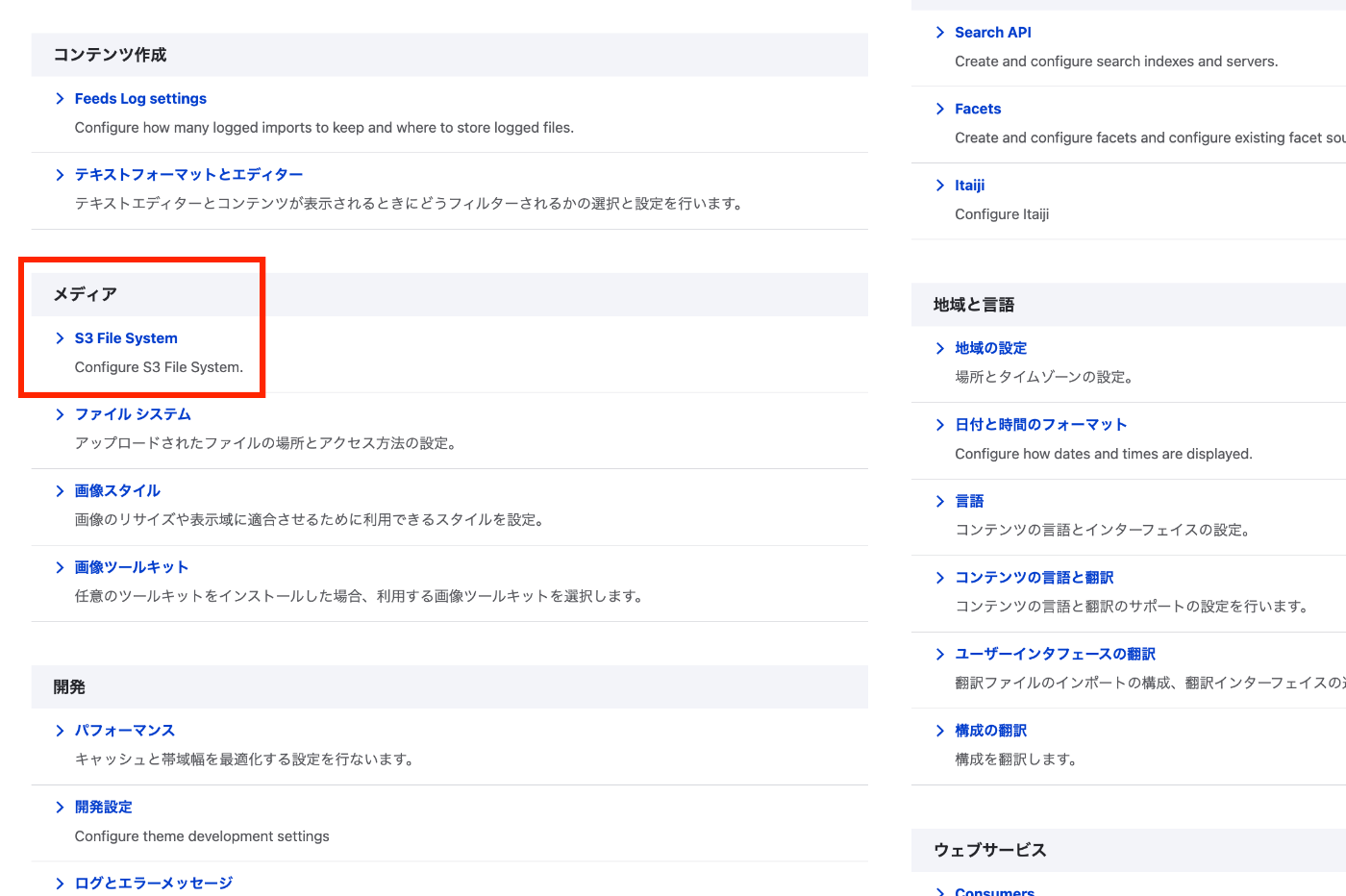
Then register the access key and secret key, along with the S3 bucket name.

Also, in Advanced Configuration Options under Custom Host Settings, enter https://s3ds.mdx.jp.

This completes the connection settings to the object storage.
After that, in the feed settings for each content type, select “S3 File System” as the upload destination.

Also, since TEI/XML files are the upload target in this case, enter xml as the “Allowed extensions.”

As a result, TEI/XML files uploaded through Drupal’s GUI are now stored in mdx I’s object storage.
(Reference) Bulk File Upload Using Drupal’s JSON:API
For the initial registration of TEI/XML files, bulk registration was performed using Python. The following article was helpful for bulk file upload methods using JSON:API.
https://www.drupal.org/node/3024331
As an example, it was achieved with a script like the following.
import requests
import json
import os
from dotenv import load_dotenv
from glob import glob
from tqdm import tqdm

class ApiClient:
    def __init__(self):
        load_dotenv(override=True)

        # Drupal site URL (example)
        self.DRUPAL_BASE_URL = os.getenv("DRUPAL_BASE_URL")

        # Endpoint (JSON:API)
        # self.JSONAPI_ENDPOINT = f"{self.DRUPAL_BASE_URL}/jsonapi/node/article"

        # Authentication credentials (Basic auth)
        self.USERNAME = os.getenv("DRUPAL_USERNAME")
        self.PASSWORD = os.getenv("DRUPAL_PASSWORD")

    def login(self):
        # Login request
        login_url = f"{self.DRUPAL_BASE_URL}/user/login?_format=json"

        login_response = requests.post(
            login_url,
            json={"name": self.USERNAME, "pass": self.PASSWORD},
            headers={"Content-Type": "application/json"}
        )

        if login_response.status_code == 200:
            self.session_cookies = login_response.cookies

    def get_csrf_token(self):
        # Get CSRF token
        csrf_token_response = requests.get(
            f"{self.DRUPAL_BASE_URL}/session/token",
            cookies=self.session_cookies  # Pass login session here
        )

        if csrf_token_response.status_code == 200:
            self.headers = {
                "Content-Type": "application/vnd.api+json",
                "Accept": "application/vnd.api+json",
                "X-CSRF-Token": csrf_token_response.text,
            }
        else:
            self.csrf_token = None

    def upload_file(self, type, uuid, field, file_path, verbose=False):
        url = f"{self.DRUPAL_BASE_URL}/jsonapi/node/{type}/{uuid}/{field}"

        # Get filename
        filename = os.path.basename(file_path)

        # Read file in binary mode
        with open(file_path, 'rb') as f:
            file_data = f.read()

        headers = self.headers.copy()
        headers['Content-Type'] = 'application/octet-stream'
        headers['Content-Disposition'] = f'attachment; filename="{filename}"'

        # Upload file
        response = requests.post(url, headers=headers, cookies=self.session_cookies, data=file_data)

        if response.status_code == 200:
            if verbose:
                print(f"File upload successful: {filename}")
        else:
            print(f"File upload failed: {response.status_code} {response.text}")
This can be used to upload files to a field such as field_file on content that has already been created.
There may be more appropriate methods, but it can be used as follows.
client = ApiClient()
client.login()
client.get_csrf_token()

uuid = "cefa8076-4ddf-4c05-a03d-fcdebbf0c209"
file = "<file path>"
content_type = "<content type>"
field = "field_file"

client.upload_file(content_type, uuid, field, file)
The following environment variables are required.
DRUPAL_BASE_URL=
DRUPAL_USERNAME=
DRUPAL_PASSWORD=
Using from Next.js
TEI/XML files uploaded to the object storage are loaded from applications such as Next.js.
The following library was used successfully.
https://www.npmjs.com/package/@aws-sdk/client-s3
Specifically, it was used as follows.
import { S3Client, GetObjectCommand } from '@aws-sdk/client-s3';
import { DOMParser, Document as XMLDocument } from '@xmldom/xmldom';

export const convertToXml = (xmlText: string): XMLDocument => {
  const parser = new DOMParser();
  const xml = parser.parseFromString(xmlText, 'text/xml');
  return xml;
};

export const getXml = async (id: string): Promise<XMLDocument | null> => {
  const client = new S3Client({
    region: 'us-east-1', // May or may not need to be set depending on the service
    endpoint: process.env.S3_ENDPOINT || '',
    credentials: {
      accessKeyId: process.env.S3_ACCESS_KEY_ID || '',
      secretAccessKey: process.env.S3_SECRET_ACCESS_KEY || '',
    },
  });

  const command = new GetObjectCommand({
    Bucket: process.env.S3_BUCKET || '',
    Key: `xml/${id}.xml`,
  });

  const response = await client.send(command);

  const content = await response.Body?.transformToString();

  if (!content) {
    return null;
  }

  return convertToXml(content);
};
It is used with the following environment variables.
S3_ACCESS_KEY_ID=
S3_SECRET_ACCESS_KEY=
S3_ENDPOINT=https://s3ds.mdx.jp
S3_BUCKET=
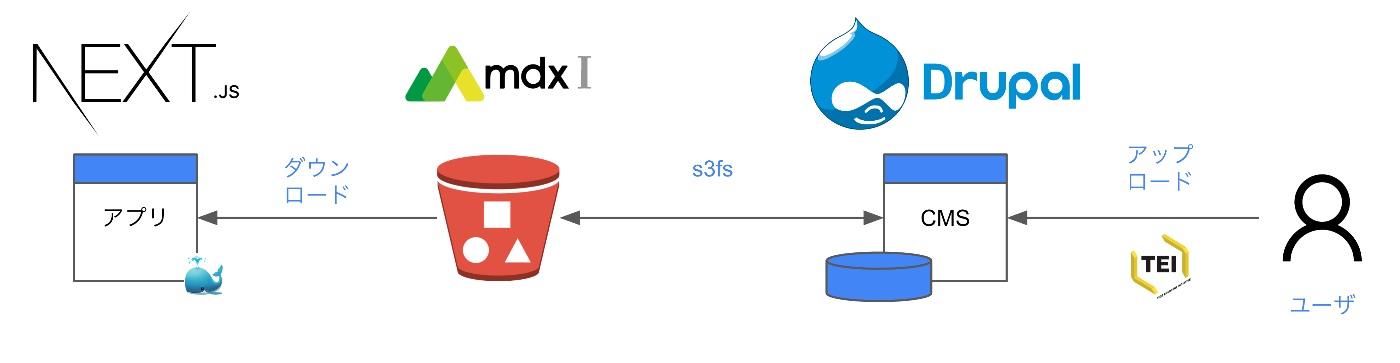
As a result, the following architecture can be achieved.
Future Outlook: Connecting with LEAF-Writer
While we have not prepared an editing environment for TEI/XML files uploaded to Drupal (or rather, mdx I’s object storage) in this case, using the following LEAF-Writer Drupal module could potentially allow TEI/XML file editing and management to be completed within the CMS.
https://gitlab.com/calincs/cwrc/leaf-writer/leaf_writer
Also, the following prototype connecting GakuNin RDM and LEAF-Writer may be a useful reference.
Summary
This article introduced an example of hosting TEI/XML files on S3-compatible object storage. Since there are both advantages and disadvantages to this approach, I hope this article serves as a useful reference when considering architectures suited to your use case.