When trying to display large-scale point cloud data (LiDAR/LAZ) in a web browser, the browser may crash due to insufficient memory. This article introduces how to display millions of points without stress using Potree’s LOD (Level of Detail) technology.
https://3dtiles-viewer.vercel.app/potree-lod-viewer.html
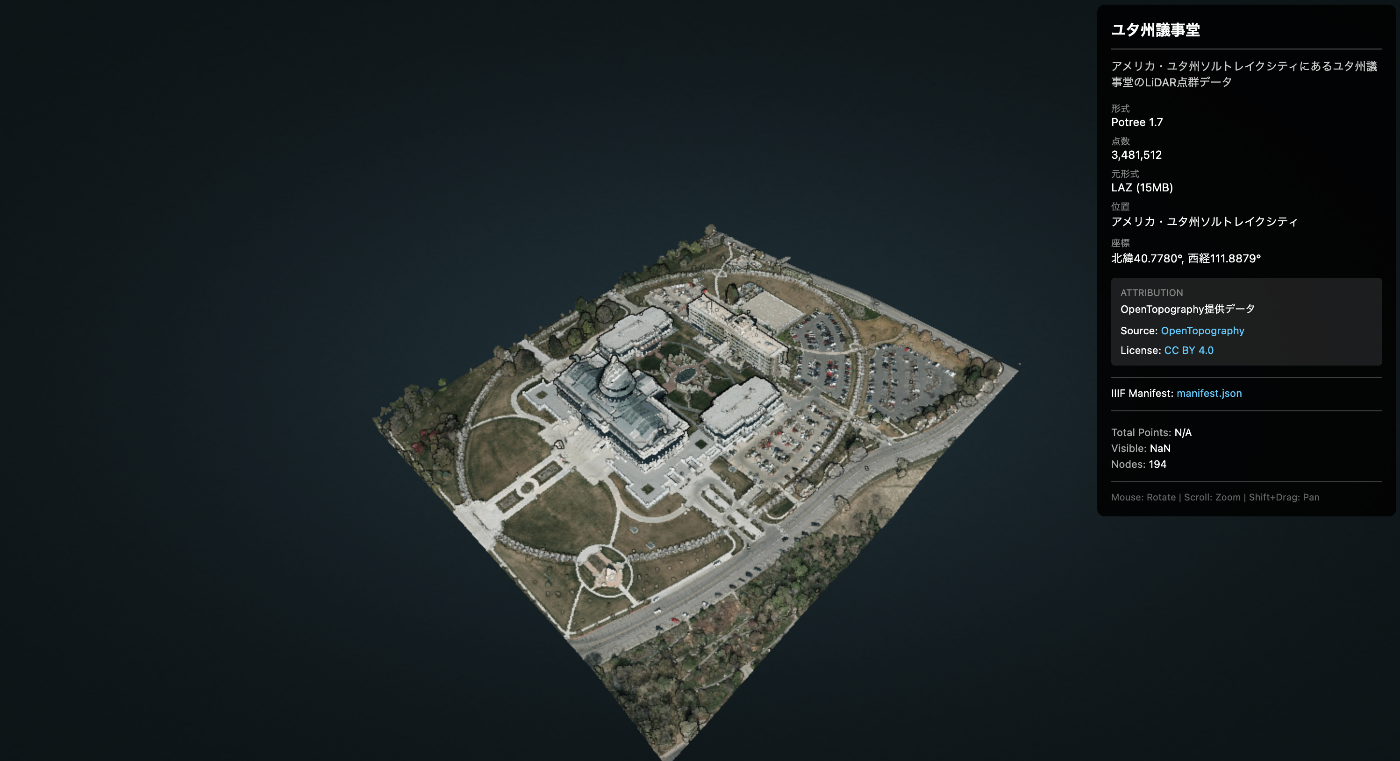
Data Used
- Data Name: Utah State Capitol
- Source: OpenTopography
- Download URL: https://object.cloud.sdsc.edu/v1/AUTH_opentopography/www/education/MatlabTopo/Utah_state_capitol.laz
- File Size: 15MB (LAZ compressed)
- Point Count: 3,481,512 points
- Location: Salt Lake City, Utah, USA
Challenge
Trying to load this data directly with Three.js or similar libraries may cause the browser to freeze.
Solution: Potree
Potree is a WebGL-based viewer for large-scale point cloud data. Through LOD (Level of Detail), it displays areas near the camera in detail and distant areas coarsely, enabling smooth operation even with billions of points.
How It Works
- Spatially divide the point cloud using an octree structure
- Store data at different levels of detail in each node
- Dynamically load only the necessary nodes based on the viewpoint
Procedure
1. Download the LAZ File
curl -L -o utah_capitol.laz \
  "https://object.cloud.sdsc.edu/v1/AUTH_opentopography/www/education/MatlabTopo/Utah_state_capitol.laz"
2. Convert LAZ to Potree Format
Run PotreeConverter using Docker.
# Dockerイメージの取得
docker pull synth3d/potreeconverter

# 変換実行
docker run --rm \
  -v $(pwd):/data \
  -v $(pwd)/output:/output \
  synth3d/potreeconverter \
  PotreeConverter /data/utah_capitol.laz -o /output/utah_capitol
Output:
AABB:
min: [424889, 4.51427e+06, 1350.42]
max: [425270, 4.51471e+06, 1458.57]

spacing calculated from diagonal: 3.78973
conversion finished
3481512 points were processed and 3481512 points (100%) were written to the output.
duration: 1.819s
Converted Size: 54MB
Generated file structure:
utah_capitol/
├── cloud.js          # メタデータ
├── sources.json
└── data/
    └── r/
        ├── r.bin     # ルートノード
        ├── r.hrc     # 階層情報
        └── ...       # 多数のノード
3. Prepare the Potree Library
Download and place Potree 1.8.
# ダウンロード
curl -L -o potree-1.8.zip \
  https://github.com/potree/potree/releases/download/1.8/Potree_1.8.zip

# 解凍して配置
unzip potree-1.8.zip
mv Potree_1.8 js/libs/

# 不要なフォルダを削除(サイズ削減: 121MB → 64MB)
rm -rf js/libs/Potree_1.8/pointclouds
rm -rf js/libs/Potree_1.8/examples
rm -rf js/libs/Potree_1.8/docs
4. Create the Viewer HTML
<!DOCTYPE html>
<html lang="ja">
<head>
  <meta charset="UTF-8">
  <title>Point Cloud Viewer (Potree)</title>

  <!-- Potree dependencies -->
  <script src="js/libs/Potree_1.8/libs/jquery/jquery-3.1.1.min.js"></script>
  <script src="js/libs/Potree_1.8/libs/spectrum/spectrum.js"></script>
  <script src="js/libs/Potree_1.8/libs/jquery-ui/jquery-ui.min.js"></script>
  <script src="js/libs/Potree_1.8/libs/three.js/build/three.min.js"></script>
  <script src="js/libs/Potree_1.8/libs/other/BinaryHeap.js"></script>
  <script src="js/libs/Potree_1.8/libs/tween/tween.min.js"></script>
  <script src="js/libs/Potree_1.8/libs/d3/d3.js"></script>
  <script src="js/libs/Potree_1.8/libs/proj4/proj4.js"></script>
  <script src="js/libs/Potree_1.8/libs/i18next/i18next.js"></script>
  <script src="js/libs/Potree_1.8/libs/jstree/jstree.js"></script>
  <script src="js/libs/Potree_1.8/build/potree/potree.js"></script>

  <!-- Potree CSS -->
  <link rel="stylesheet" href="js/libs/Potree_1.8/libs/spectrum/spectrum.css">
  <link rel="stylesheet" href="js/libs/Potree_1.8/libs/jquery-ui/jquery-ui.min.css">
  <link rel="stylesheet" href="js/libs/Potree_1.8/libs/jstree/themes/mixed/style.css">
  <link rel="stylesheet" href="js/libs/Potree_1.8/build/potree/potree.css">

  <style>
    html, body { width: 100%; height: 100%; margin: 0; overflow: hidden; }
    #potree_container { position: absolute; width: 100%; height: 100%; }
  </style>
</head>
<body>
  <div id="potree_container"></div>

  <script>
    // ビューア初期化
    const viewer = new Potree.Viewer(document.getElementById("potree_container"));
    viewer.setEDLEnabled(true);           // Eye-Dome Lighting
    viewer.setFOV(60);
    viewer.setPointBudget(3_000_000);     // 一度に表示する最大点数
    viewer.setBackground("gradient");

    // URLパラメータからデータパスを取得
    const params = new URLSearchParams(window.location.search);
    const dataPath = params.get('data') || 'files/utah_capitol/cloud.js';

    // 点群を読み込み
    Potree.loadPointCloud(dataPath, "pointcloud", function(e) {
      const pointcloud = e.pointcloud;

      // マテリアル設定
      pointcloud.material.size = 1;
      pointcloud.material.pointSizeType = Potree.PointSizeType.ADAPTIVE;
      pointcloud.material.shape = Potree.PointShape.CIRCLE;

      viewer.scene.addPointCloud(pointcloud);
      viewer.fitToScreen();
    });
  </script>
</body>
</html>
5. Deploy
Push to GitHub and publish on Vercel/GitHub Pages.
git add docs/potree-lod-viewer.html docs/js/libs/Potree_1.8 docs/files/utah_capitol
git commit -m "Add Potree LOD point cloud viewer with Utah Capitol data"
git push origin main
Results
Demo URL: https://3dtiles-viewer.vercel.app/potree-lod-viewer.html?data=files/utah_capitol/cloud.js
| Item | Value |
|---|---|
| Data Source | OpenTopography |
| LAZ Size | 15MB |
| Converted Size | 54MB |
| Total Points | 3,481,512 |
| Point Budget | 3,000,000 |
| Performance | Smooth |
When zooming the camera, detailed nodes are automatically loaded.
Performance Tips
- Point Budget: Limit the number of points drawn at once with
viewer.setPointBudget(3_000_000) - Adaptive Point Size: Automatically adjust point size based on distance
- EDL (Eye-Dome Lighting): Enhance depth perception for improved visibility
Integration with IIIF Presentation API 3.0
To attach metadata (title, source, license, etc.) to point cloud data, we leverage IIIF Presentation API 3.0.
Creating the IIIF Manifest
{
  "@context": [
    "http://iiif.io/api/presentation/3/context.json",
    {
      "potree": "https://potree.github.io/ns#",
      "cloudUrl": "potree:cloudUrl",
      "pointCount": "potree:pointCount"
    }
  ],
  "id": "https://example.com/iiif/utah_capitol/manifest.json",
  "type": "Manifest",
  "label": {
    "en": ["Utah State Capitol"],
    "ja": ["ユタ州議事堂"]
  },
  "summary": {
    "en": ["LiDAR point cloud of the Utah State Capitol building"],
    "ja": ["ユタ州議事堂のLiDAR点群データ"]
  },
  "metadata": [
    {
      "label": { "en": ["Format"] },
      "value": { "en": ["Potree 1.7"] }
    },
    {
      "label": { "en": ["Point Count"] },
      "value": { "en": ["3,481,512"] }
    },
    {
      "label": { "en": ["Location"] },
      "value": { "en": ["Salt Lake City, Utah, USA"] }
    }
  ],
  "rights": "https://creativecommons.org/licenses/by/4.0/",
  "requiredStatement": {
    "label": { "en": ["Attribution"] },
    "value": { "en": ["Data provided by OpenTopography"] }
  },
  "provider": [
    {
      "id": "https://opentopography.org/",
      "type": "Agent",
      "label": { "en": ["OpenTopography"] },
      "homepage": [
        {
          "id": "https://opentopography.org/",
          "type": "Text",
          "format": "text/html"
        }
      ]
    }
  ],
  "items": [
    {
      "id": "https://example.com/iiif/utah_capitol/manifest.json/scene/1",
      "type": "Scene",
      "items": [
        {
          "id": "https://example.com/iiif/utah_capitol/manifest.json/annotation-page/1",
          "type": "AnnotationPage",
          "items": [
            {
              "id": "https://example.com/iiif/utah_capitol/manifest.json/annotation/1",
              "type": "Annotation",
              "motivation": "painting",
              "body": {
                "id": "https://example.com/files/utah_capitol/cloud.js",
                "type": "Model",
                "format": "application/json",
                "cloudUrl": "https://example.com/files/utah_capitol/cloud.js",
                "pointCount": 3481512
              },
              "target": "https://example.com/iiif/utah_capitol/manifest.json/scene/1"
            }
          ]
        }
      ]
    }
  ]
}
Key Manifest Properties
| Property | Description |
|---|---|
label | Title (multilingual support) |
summary | Description text |
metadata | Metadata such as format, point count, location |
rights | License URL |
requiredStatement | Required attribution statement |
provider | Data provider information |
items[].body.cloudUrl | URL to Potree cloud.js |
Loading the Manifest in the Viewer
// マニフェストURLからメタデータを取得
const manifestUrl = 'iiif/utah_capitol/manifest.json';

fetch(manifestUrl)
  .then(res => res.json())
  .then(manifest => {
    // タイトル表示
    const title = manifest.label?.ja?.[0] || manifest.label?.en?.[0];
    document.getElementById('title').textContent = title;

    // ライセンス表示
    if (manifest.rights) {
      const licenseName = manifest.rights.includes('by/4.0') ? 'CC BY 4.0' : 'License';
      document.getElementById('license').innerHTML =
        `<a href="${manifest.rights}">${licenseName}</a>`;
    }

    // 点群データのURL取得
    const cloudUrl = manifest.items[0].items[0].items[0].body.cloudUrl;
    loadPointCloud(cloudUrl);
  });
Usage
# マニフェストから読み込み(メタデータ表示あり)
potree-lod-viewer.html?manifest=iiif/utah_capitol/manifest.json

# 直接データを指定(メタデータなし)
potree-lod-viewer.html?data=files/utah_capitol/cloud.js
Benefits of Using IIIF
- Standardized metadata format - Compatibility with other IIIF-compatible tools
- Multilingual support - Support for multiple languages in
labelandsummary - License and attribution clarity - Legal information provided through
rightsandrequiredStatement - Data provider information - Clear data provenance through
provider - Extensibility - Custom contexts allow adding Potree-specific properties
Summary
- LOD is essential for displaying large-scale point clouds
- PotreeConverter (Docker) makes conversion easy
- Potree 1.8 smoothly displays millions of points or more
- IIIF Presentation API 3.0 standardizes metadata
- Additional data can be loaded via
?manifest=path/to/manifest.json
Reference Links
- Potree GitHub
- PotreeConverter Docker (synth3d)
- OpenTopography - Point cloud data source
- IIIF Presentation API 3.0 - Metadata specification
- Demo - Actual viewer